Build something new event ticketing software
Sell tickets and check people in, even offline
We build event ticketing software that sells tickets on your own website, sends them to attendees' phones and checks people in by QR code at the door, even when the venue Wi-Fi gives up.
- We rehearse doors opening before your first event
- Your attendee list stays yours
- English, Hindi, Gujarati and more
Sound familiar?
What we hear before we start
- Every ticket you sell pays a fee to a platform that keeps your attendee list.
- Early bird, group, student and sponsor passes don't fit the ticketing site's options.
- The queue at the door grows the moment the venue Wi-Fi slows down.
- Companies ask for proper GST or VAT invoices, and someone makes them by hand.
- A forwarded screenshot of one ticket gets two people through the gate.
- Your team answers the same questions about timings, parking and passes for weeks.
What changes
-
Today: Tickets sell on someone else's site, under their name and their fees.
After: Tickets sell on your own website, with your prices, your rules and your design.
-
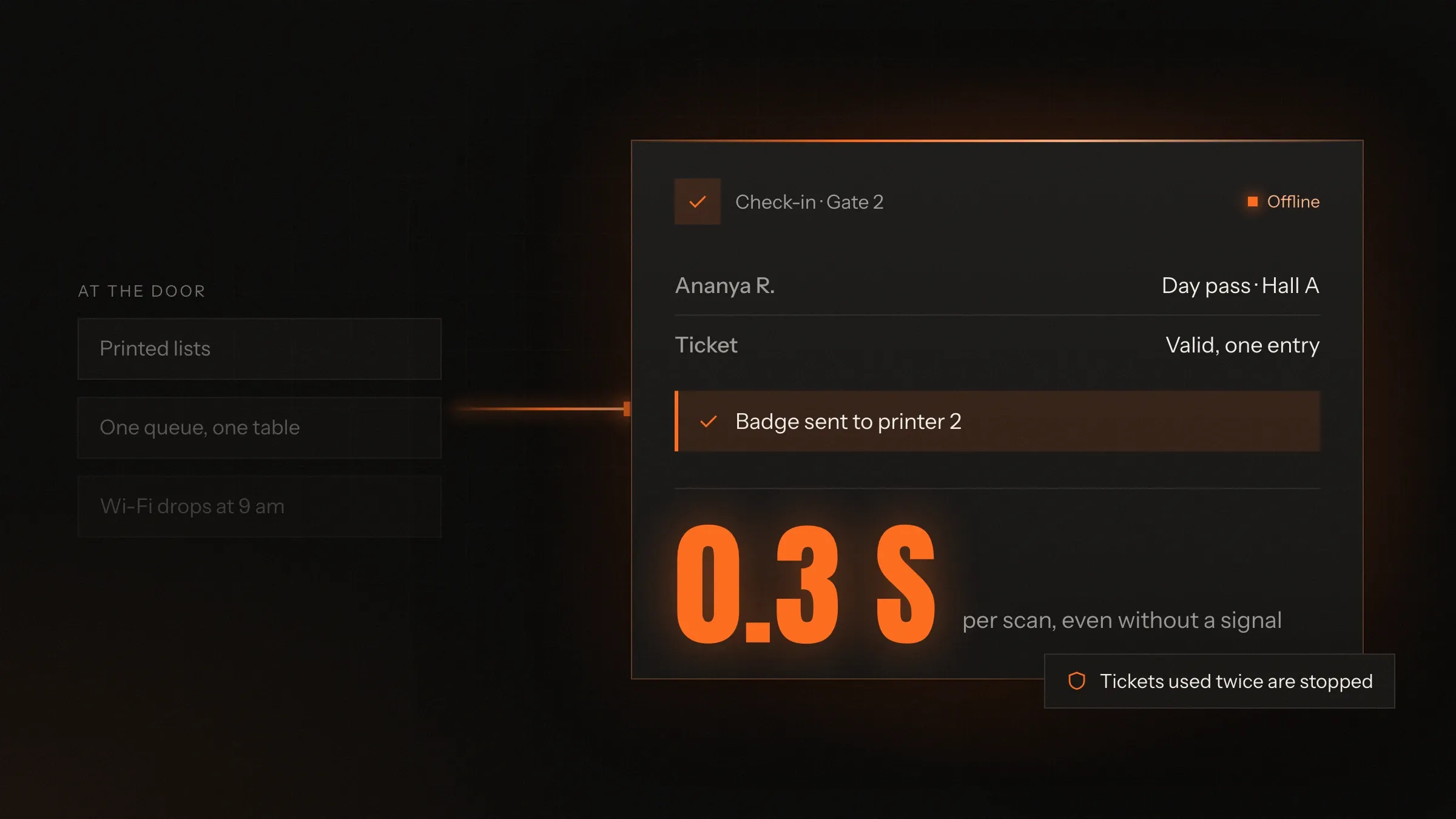
Today: Check-in stops when the network does.
After: Staff phones hold the guest list, keep scanning offline and sync when the signal returns.
-
Today: A copied ticket gets a second person in.
After: Every code is signed and accepted once, and a second scan is flagged on the spot.
-
Today: Badges are printed days ahead, and many are never collected.
After: Badges print as each person checks in, including people who registered that morning.
-
Today: Sales, check-ins and refunds live in three spreadsheets.
After: One live screen shows sales by ticket type and arrivals by gate.
What it does for you
-
Sell the tickets you design
Early bird, group, student, VIP, day passes, workshops and hidden tickets behind a code, each with its own price, limit and dates.
For exampleEarly bird closes at midnight on the 15th or after the first 300 tickets, whichever comes first.
-
Take payment the way people pay
UPI, cards, net banking and wallets in India; cards, Apple Pay, Google Pay and local methods such as iDEAL in Europe; bank transfer for companies.
For exampleA company in Pune books twelve passes, enters its GSTIN and gets one GST invoice for all of them.
-
Send tickets to the phone
Tickets arrive by email and WhatsApp and save to Apple Wallet or Google Wallet, each with its own signed QR code.
For exampleOn the morning of the event, an attendee opens her ticket straight from the lock screen.
-
Check people in without Wi-Fi
The staff app downloads the guest list before doors open, scans offline and shares scans between phones whenever there is a signal.
For exampleThe basement hall has no signal. Gate 2 keeps scanning, and the counts catch up when a phone reconnects.
-
Stop fake and shared tickets
Codes are signed so they can't be made up, each ticket is accepted once, and for high-demand events the code can refresh so a screenshot is useless.
For exampleA ticket already scanned at Gate 1 is flagged at Gate 3, with the time it was first used.
-
Print badges at the door
Badges print on arrival with the name, the company and a colour for the pass type, so only people who come get one.
For exampleA speaker checks in and her badge prints in the speaker colour, with her session time.
-
Answer attendee questions
An assistant answers questions about timings, the venue, parking and passes from your own event information, and passes the rest to your team.
For exampleSomeone asks at 11 pm whether children need a ticket. The assistant answers from your policy.
-
Run every event from one screen
Sales by ticket type, refunds, transfers, arrivals by gate and no-shows, with exports for sponsors and accounts.
For exampleAt 9:40 the screen shows Gate 2 backing up, so you send two more staff with phones.
How it works
-
You set up the event
Dates, venue, ticket types, prices, limits and rules, in your own dashboard.
-
Attendees buy
On your website in a few taps, paying the way they prefer. Each ticket is held while they pay.
-
Tickets arrive
By email and WhatsApp, as a wallet pass with a signed QR code.
-
Doors open
Staff phones scan tickets, online or offline, and accept each one only once.
-
Badges and zones
Badges print on arrival, and workshops, days and VIP areas are checked at their own doors.
-
You see it live
Sales, arrivals and no-shows on one screen, during the event and after it.
Where we've built it
3 from our portfolio
-
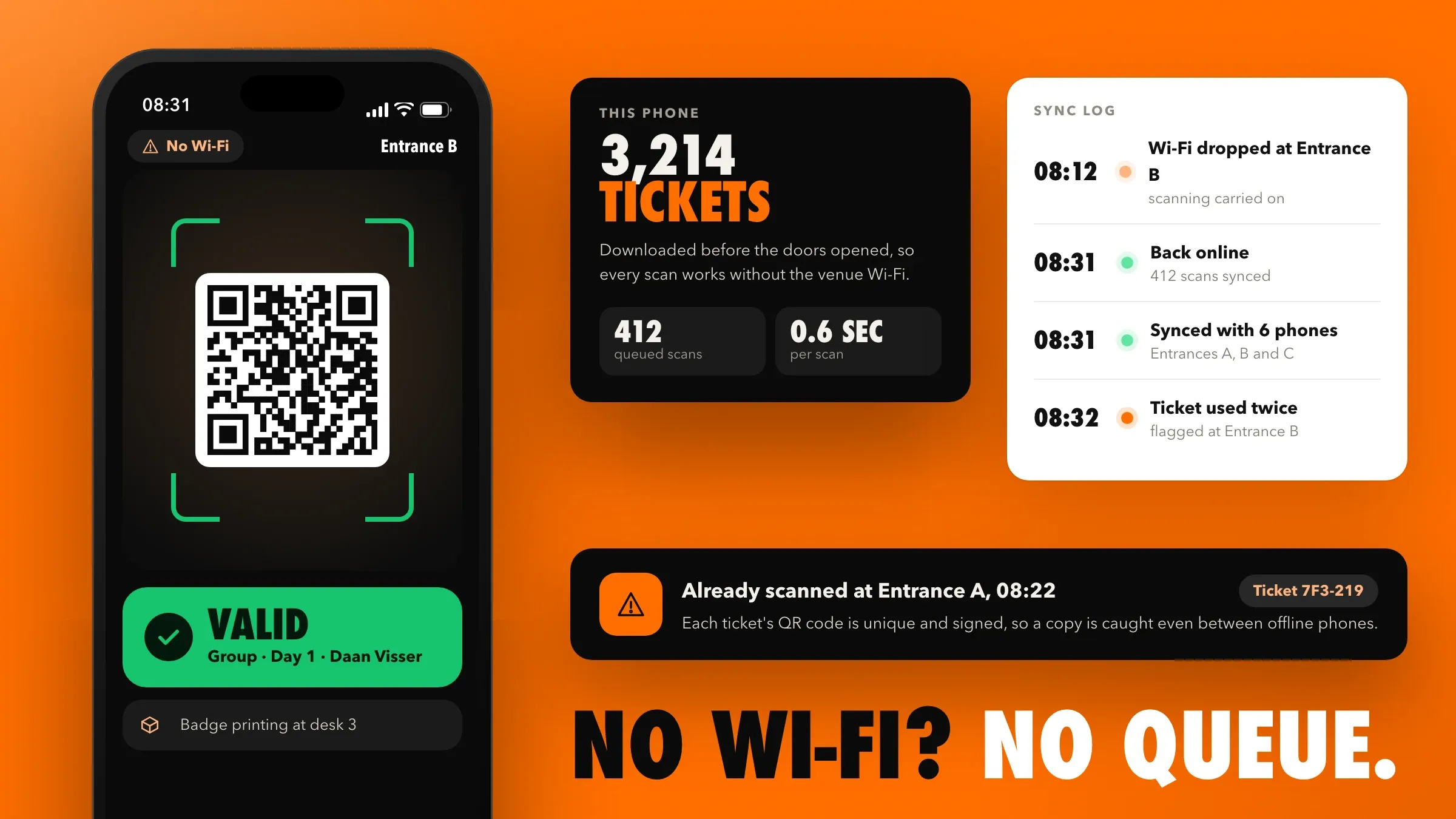 Ticketing with check-in that works without Wi-Fi For a conference and trade show organiser in Utrecht, we built ticket sales on its own website, VAT invoices for companies, wallet tickets, offline QR check-in and badges printed on arrival. Read the case study
 -
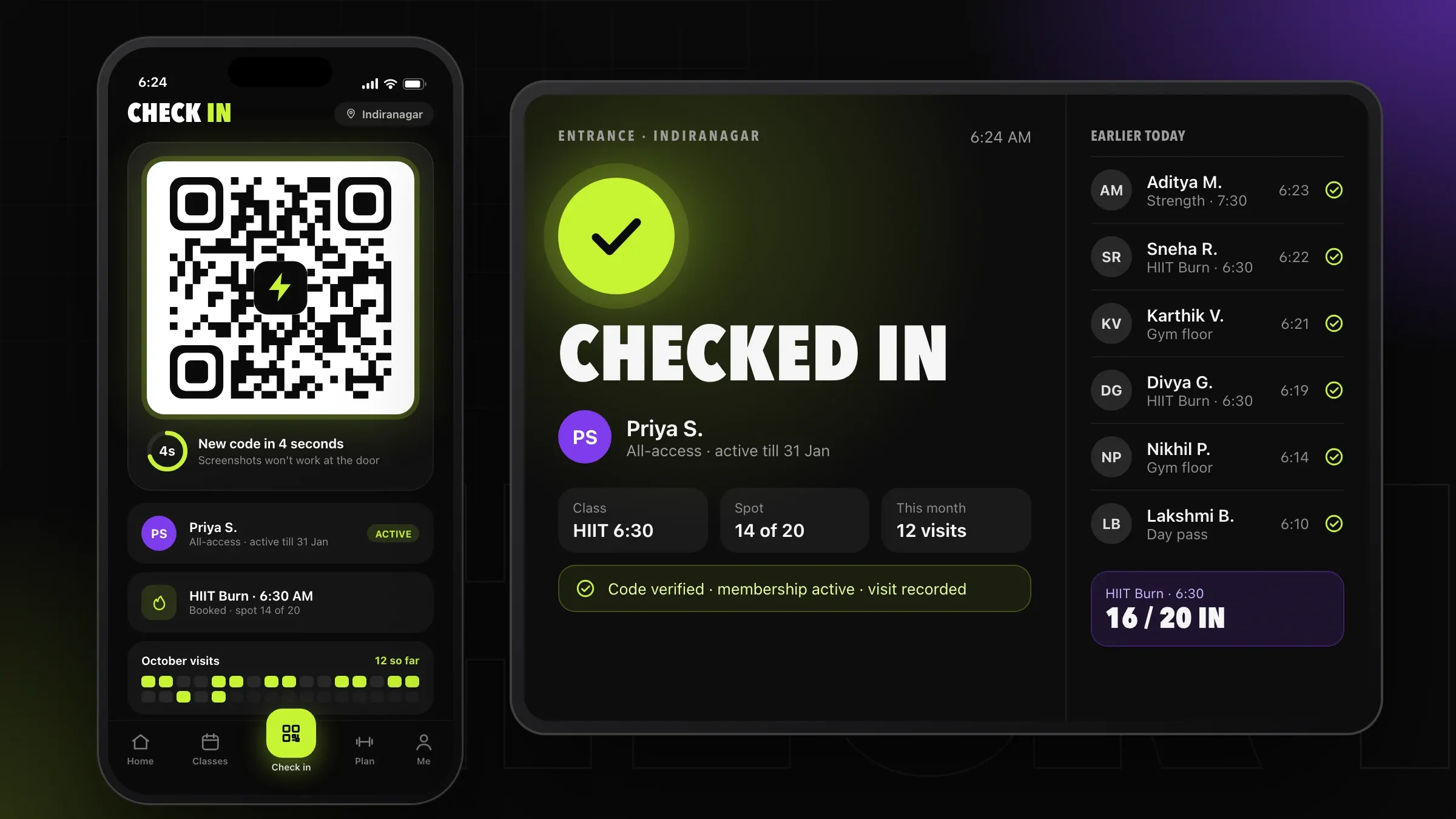 A QR code a screenshot can't share For a chain of fitness studios in Bengaluru, members check in with a QR code that refreshes every few seconds, and each check-in confirms the membership and records the visit. Read the case study
 -
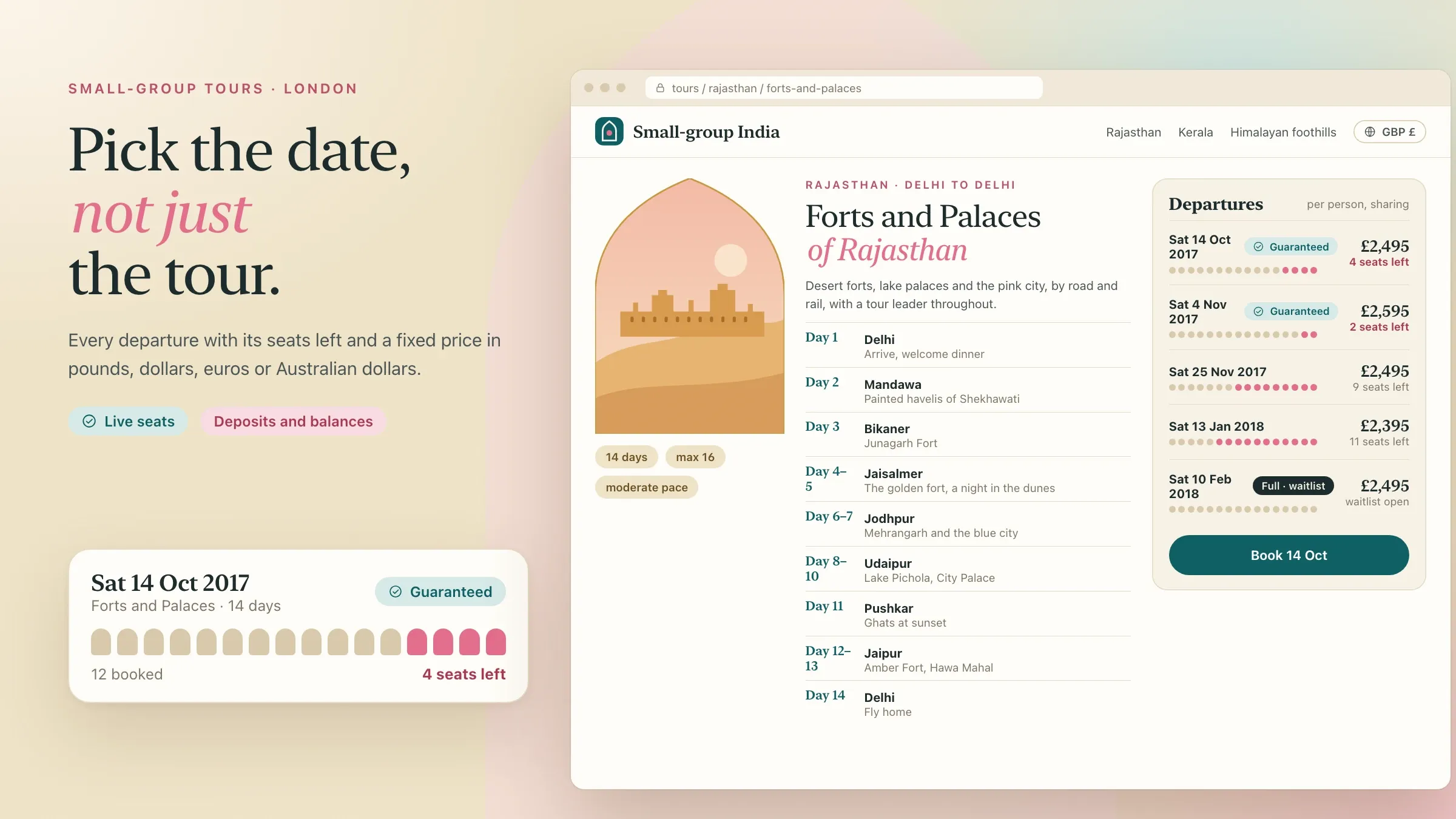 Limited places that can't be sold twice For a tour operator in London, seats on every departure update the moment a traveller or agent books, and full departures offer a waitlist. Read the case study
What event ticketing software does
Event ticketing software sells tickets for your events, delivers them to attendees and checks them in at the door. Built for you, it runs on your own website under your own name: you set the ticket types and prices, take the payments into your own account and keep the attendee list.
Behind the ticket shop sit the parts people rarely notice until they fail: the rules that decide who can buy what and when, the invoices companies need, the scanning app at the gate, the badge printer and the screen that tells you how many people are inside. We build them as one system, so a ticket sold at midnight is on the right phone at the right gate the next morning.
It suits conferences, trade shows, concerts, college fests, Navratri garba nights, workshops, marathons and festivals: any event where people pay to come in and someone has to check them at the door.
Why organisers move to their own ticketing
Organisers usually move when their events outgrow the platform. The fee on every ticket adds up, the platform’s options stop fitting the passes you want to sell, and your attendee list sits in someone else’s system, where you can’t easily reach the people who came last year.
Your own ticketing changes those three things. The payment provider’s charge still applies, but there is no platform fee on top. Ticket rules follow your events instead of a form’s options. And the people who bought from you are your customers, with their consent on record, ready to hear about your next event.
It is not the right move for everyone. If you run a few small events a year, a platform is usually cheaper. Your own system pays off when you sell many tickets, run events again and again, or need rules, invoices or check-in that a platform can’t give you. We will tell you honestly which side of that line you are on.
Ticket types, prices and the rules behind them
A ticket type is a price with rules attached. Early bird tickets end on a date or after a set number are sold. Group tickets lower the price per person. Student tickets ask for proof. Sponsor, speaker, press and exhibitor passes are free but need approval. Partner codes unlock a discount, or a ticket nobody else can see.
Events with more than one day or space need more: day passes and full passes, workshops with their own capacity, seated halls with a seat map, standing zones, and passes that open the VIP lounge but not backstage. Each rule is checked when the ticket is sold and again at the door.
You set all of this in your own dashboard. Opening a new event, adding a ticket type or closing early bird doesn’t need a developer. Transfers to a colleague and refunds follow the policy you set, up to the deadline you choose.
Payments, GST and VAT invoices
Attendees pay the way they already pay. In India that means UPI, cards, net banking and wallets through a provider such as Razorpay. In Europe it means cards, Apple Pay and Google Pay, and local methods such as iDEAL in the Netherlands or Bancontact in Belgium, through a provider such as Stripe. The money goes into your own merchant account.
Companies often buy the most tickets, and they need invoices their accounts teams accept first time. In India, a company enters its GSTIN and receives a GST invoice in its own name, and where your turnover requires e-invoicing, the invoice carries its IRN. In Europe, VAT numbers are checked and businesses in other EU countries are invoiced under the reverse-charge rules. Companies can choose to pay by bank transfer, and their tickets are issued as soon as the payment arrives.
Refunds, part refunds and cancelled events go back through the same provider, with a credit note where one is needed.
Check-in that keeps going offline
Check-in has to work without a connection, because the door is where ticketing is judged. Most people arrive in the same short window, and the venue Wi-Fi is at its worst exactly then, when every phone in the building joins at once.
Before doors open, the staff app on each phone downloads the guest list. Every ticket’s QR code is signed, so the phone can tell a genuine ticket from a made-up one without asking a server. Scans are saved on the phone and shared with the other phones over Wi-Fi or mobile data whenever there is a signal. If a gate is cut off completely, it keeps scanning, and any ticket used twice is flagged as soon as the phones catch up, with the time and gate of first entry.
Staff can use their own phones or a few shared ones, so there is no special scanner to hire. People whose phone has died are found by name or booking number in seconds.
Stopping fake and shared tickets
Fake tickets fail because the code is signed: a code your system didn’t issue won’t scan. Shared tickets are the harder problem, because a real ticket can be photographed and forwarded.
Each ticket is accepted once, so the second person through the door is stopped, and the scan shows when and where the ticket was first used. For high-demand events, the ticket can live in an app whose code refreshes every few seconds, so a screenshot is useless. Names on tickets, limits per buyer and a phone number confirmed by OTP make bulk buying for resale harder, and transfers can go only through your own site, so a ticket that changes hands does so on the record.
The on-sale rush
The minute tickets go on sale is the other moment that tests the system. A popular concert or a garba pass can bring a crowd to the shop all at once.
We prepare for it in three ways. Pages are built ahead of time and served from a content delivery network close to each buyer, so the shop stays quick under load. A ticket is held for the buyer for a few minutes while they pay, so it can never be sold twice. And for the biggest on-sales, a fair queue lets people in in order, instead of letting the site slow down for everyone. Before your first big on-sale, we test the shop with far more traffic than you expect.
Badges, zones and exhibitors
For conferences and trade shows, badges print on arrival rather than weeks ahead. Each badge carries the name, the company and a colour for the pass type, and only people who actually come get one, including those who registered that morning.
Zones and sessions are checked at their own doors: the workshop room scans for workshop tickets, the VIP lounge for VIP passes. Exhibitors can scan visitors’ badges on their stands, with the visitor’s agreement, add a note and download their leads after the event, and visitors can see who they shared their details with.
What we need from you
We start with your last event. Your ticket types and prices, an export of past sales from your current platform, the venue plan with its gates and how many staff stand at each, and the questions attendees asked most tell us more than a long requirements document.
You will also need a merchant account with a payment provider in your business’s name, your GSTIN or VAT number for invoices, and your brand and website, because the shop should feel like part of them. Most of all we need one person on your side who decides: someone who knows how your events run and can say yes to a rule.
After the doors close
Ticketing doesn’t end when the event does. Your dashboard shows who came and who didn’t, which ticket types sold, how fast each gate moved and which exhibitors collected leads, with exports for your accounts team and your partners.
Attendee data is kept only as long as you need it and deleted on the schedule you set, under the GDPR or India’s data protection law as your events require. Between events we read your team’s notes, fix whatever slowed anyone down and add what the next event needs, so each one runs a little more smoothly than the last.
How we work with you
From the first call to running it
- Start
Walk through your last event
We go through your last event with your team, from the first ticket sold to the last person through the door, and list what slowed everyone down.
- Design
Design the shop and the door
The ticket shop, the tickets, the check-in app and your dashboard, designed for the busiest moment: doors opening.
- Build
Build and connect
Ticket rules, payments, invoices, wallet passes and offline check-in, connected to your website, CRM or accounts.
- Rehearsal
Rehearse doors opening
Staff, phones and badge printers on a full run with test tickets and the Wi-Fi switched off, before any real attendee arrives.
- First event
Go on sale and open the doors
Tickets go on sale, and we are on call through the event day.
- Every event
Improve between events
We read your team's notes, fix what slowed anyone down and add what the next event needs.
Safe and in your control
Signed tickets
Each QR code is signed by your system, so a made-up code fails at the door, and each ticket is accepted once.
Card and UPI details never touch your servers
Payments are handled by providers such as Razorpay or Stripe, and the money goes straight into your own merchant account.
Your attendee list stays yours
Attendee data sits in your own database, not a platform's, and you decide who on your team can see or export it.
Consent on record
Marketing messages and sharing details with sponsors or exhibitors need a clear yes, and every choice is recorded, under the GDPR or India's data protection law as your events need.
Ready for the on-sale minute
Tickets are held while people pay, so nothing is sold twice, and we load-test the shop before your first big on-sale.
Staff see only their job
Gate staff can scan and look up a name. Sales, refunds and exports stay with the people you choose.
Time and cost
The cost depends on how your events work, not on how many tickets you sell. A conference with one entrance is a smaller build than a festival with zones, wristbands and several venues. After the first call we send a written plan and a quote.
Ticket rules
General admission is the quickest start. Seat maps, zones, multi-day passes and passes that need approval each add work.
Payments and invoices
Each payment provider, currency and invoice type, such as GST, VAT or company invoices paid by transfer, is set up and tested.
Check-in at the venue
Offline scanning on staff phones is the core. Badge printing, zones and exhibitor lead scanning add testing on site.
Apps
A web shop and a staff app cover most events. An attendee app with the agenda, maps and alerts is an extra build.
Other systems
Connecting your CRM, accounting software, email tool or website adds work for each one.
Volume
Running costs follow the tickets sold, the messages sent and how hard the on-sale rush hits.
Built with
Chosen for each project, never by habit
Questions and answers
13 answered
What is event ticketing software?
Event ticketing software sells tickets for your events online, sends them to attendees and checks them in at the door. Built for you, it runs on your own website, takes payment into your own account and keeps your attendee list in your hands.
Why build our own ticketing instead of using a ticketing platform?
Own ticketing pays off when you sell many tickets or run events often: there is no platform fee on each ticket, the rules fit your events and the attendee data stays with you. For a few small events a year, a platform is usually cheaper, and we will tell you so.
How does QR check-in work without internet?
The staff app downloads the guest list before doors open, and every QR code is signed, so a phone can tell a genuine ticket without a connection. Scans are shared between phones whenever there is a signal, and a ticket used twice is flagged with the time and gate of first entry.
How do you stop fake tickets and screenshots?
Codes are signed, so a made-up ticket fails, and each ticket is accepted only once. For high-demand events, tickets can carry a code that refreshes every few seconds, so a screenshot won't scan, with limits per buyer and transfers only through your own site.
Can tickets go into Apple Wallet and Google Wallet?
Yes. Tickets arrive by email or WhatsApp and save to Apple Wallet or Google Wallet in one tap. On the day they can show on the lock screen, and if the time or venue changes, the pass updates on the attendee's phone.
Which payment methods can attendees use?
In India, UPI, cards, net banking and wallets, through a provider such as Razorpay. In Europe and elsewhere, cards, Apple Pay, Google Pay and local methods such as iDEAL, through a provider such as Stripe. Companies can also pay by bank transfer.
Can companies get GST or VAT invoices for tickets?
Yes. Companies enter their GSTIN or VAT number at checkout and receive an invoice in their own name. In India, invoices can carry an e-invoice IRN where your turnover requires it; in the EU, business buyers in other countries are invoiced under the reverse-charge rules.
Will the site cope when tickets go on sale?
Yes, because it is built for that minute. Pages are served from a content delivery network, each ticket is held while the buyer pays so nothing sells twice, and the biggest on-sales can use a fair queue. We load-test before your first major on-sale.
How much does event ticketing software cost?
It depends on your ticket rules, the payments and invoices you need, how check-in works at your venues and which systems it connects to. A conference with one entrance costs less to build than a festival with zones and several venues. After the first call we send a written plan and a quote.
How long does it take to build an event ticketing system?
It depends on how much it has to do. A ticket shop with QR check-in for one kind of event is a matter of weeks; badges, zones, exhibitor leads and an attendee app take longer. We plan back from your next on-sale date and leave time to rehearse.
Can the ticket shop work in Hindi and Gujarati?
Yes. The shop, tickets, emails and WhatsApp messages can be in English, Hindi, Gujarati or other languages, and attendees choose. The staff app can use a different language from the shop, so gate staff read their own.
Do you build ticketing software for organisers outside India?
Yes. FIRELIFE Ventures works with organisers worldwide from Rajkot, India, and has built event ticketing with offline check-in, wallet tickets and VAT invoices for a conference and trade show organiser in the Netherlands.
What happens after the first event?
We stay with you. We go through your team's notes, fix what slowed anyone down, keep the system updated and add what the next events need, such as new ticket types, a second venue or lead scanning for exhibitors.
Tell us what you want to build
Write a few lines about the idea and who it is for. We reply with our questions, a first plan and how we would start.
Write to us