Build something new booking system development
Take bookings while you sleep
We build booking systems that let customers book, pay and reschedule at any hour, keep one calendar for every person, room and branch, and send reminders and waitlist offers so the slots you open are the slots that get used.
- We start at your front desk
- Bookings on your website, app and WhatsApp
- English, Hindi, Gujarati and more
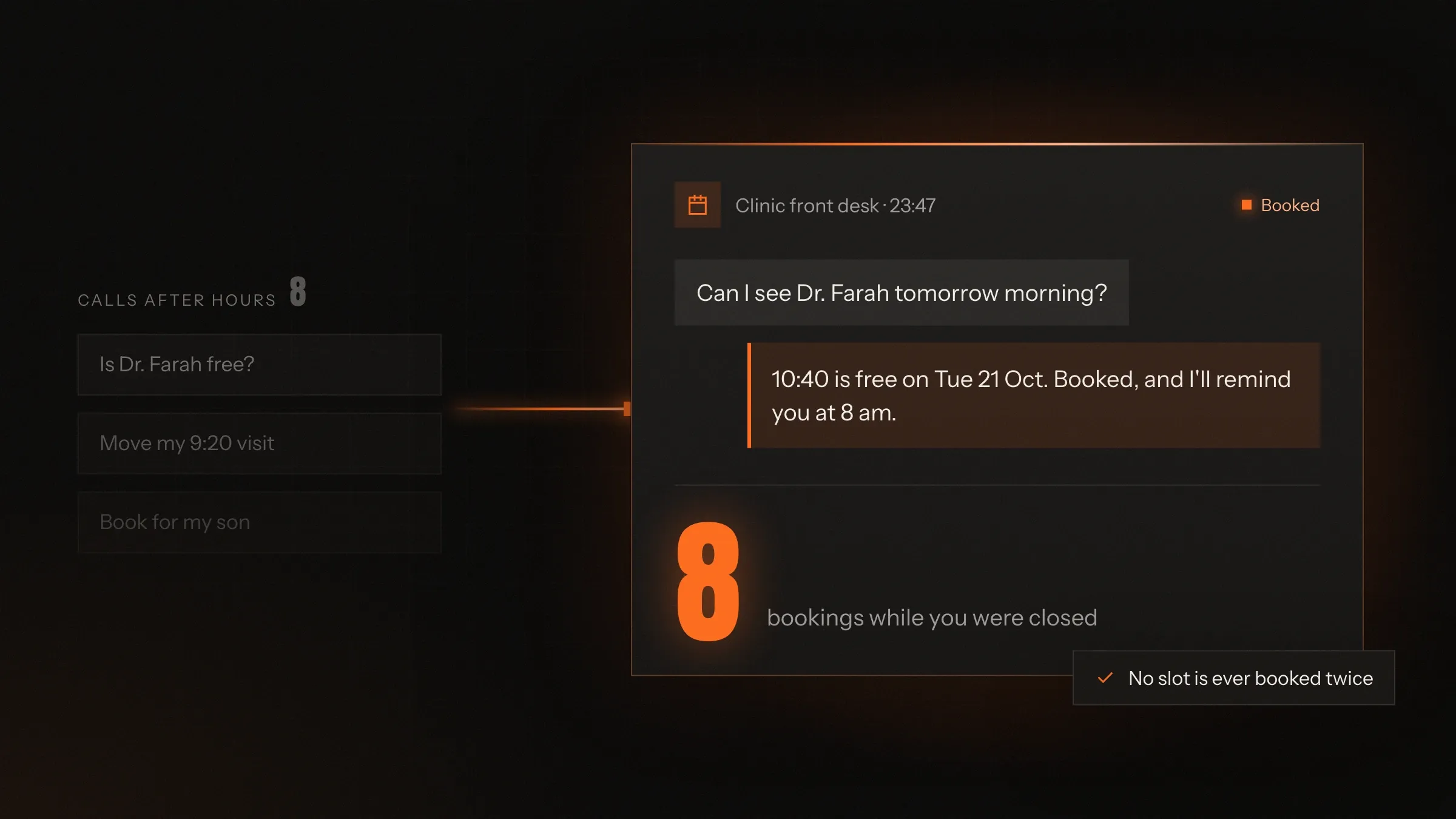
Sound familiar?
What we hear before we start
- Bookings only happen when someone is free to answer the phone.
- Messages that arrive at midnight get a reply the next afternoon, and the customer has booked elsewhere.
- The same slot gets promised twice, because the diary lives in two places.
- No-shows leave gaps that nobody can fill in time.
- Deposits and balances are chased one message at a time.
What changes
-
Today: Customers can book only when the phone is answered.
After: Customers book online, on WhatsApp or in your app, at any hour.
-
Today: Each branch, chair or room keeps its own diary.
After: One calendar holds every person, room and branch, so a slot can't be sold twice.
-
Today: No-shows are discovered when the slot is already lost.
After: Reminders ask customers to confirm, move or cancel, and freed slots go to the waitlist.
-
Today: Deposits arrive by bank transfer, and balances are chased by email.
After: Deposits are taken when booking, and balances are collected before the date.
-
Today: The front desk spends the morning on the phone.
After: The front desk looks after the customers standing in front of it.
What it does for you
-
Book online at any hour
From your website, your app, a link on Google or Instagram, or WhatsApp, choosing the service, the person and the time.
For exampleA client books a haircut at 11 pm from a link on Instagram, with the stylist she always sees.
-
Keep one calendar for everything
Every person, room, chair and branch in one calendar, with each service's real length and the gaps it needs.
For exampleA doctor who works at two branches can never be booked at both at the same time.
-
Take deposits and payments
UPI, cards and wallets, deposits and balances, prepaid packs and memberships, in the currencies your customers use.
For exampleA traveller in Sydney pays a deposit in Australian dollars, and the balance is collected online before departure.
-
Remind, confirm and rebook
Reminders on SMS, WhatsApp or email, each with a link to confirm, move or cancel.
For exampleA patient taps to move her visit from the morning reminder, and the slot is offered to someone waiting for an earlier one.
-
Fill gaps from a waitlist
Full classes, departures and days keep a waitlist, and a cancelled place goes to the next person automatically.
For exampleA member cancels the 7 am spin class, and the next member on the waitlist gets the spot with a notification.
-
Answer and book on WhatsApp
An AI receptionist answers questions about services and prices, and books, moves or cancels within your rules.
For exampleA client asks at midnight whether Saturday is free. The receptionist books the slot and sends a reminder on Friday.
-
See the whole day at the desk
A front-desk view of every booking, walk-in and payment, with reports on no-shows, busy hours and revenue.
For exampleReception books a walk-in into the same calendar the website uses, and that slot disappears online.
How it works
-
The customer picks a slot
Service, person, place and time, from only what is genuinely free.
-
They pay or hold it
A deposit, full payment, a pack or pay later, by your rules for that service.
-
The calendar updates everywhere
Website, app, front desk and staff phones all show the same booking at once.
-
Reminders go out
Before the booking, with a link to confirm, move or cancel.
-
Freed slots are refilled
Cancelled places go to the waitlist or to customers who asked for an earlier time.
-
They arrive and check in
By QR code or at the desk, with a live queue where waiting matters.
Where we've built it
5 from our portfolio
-
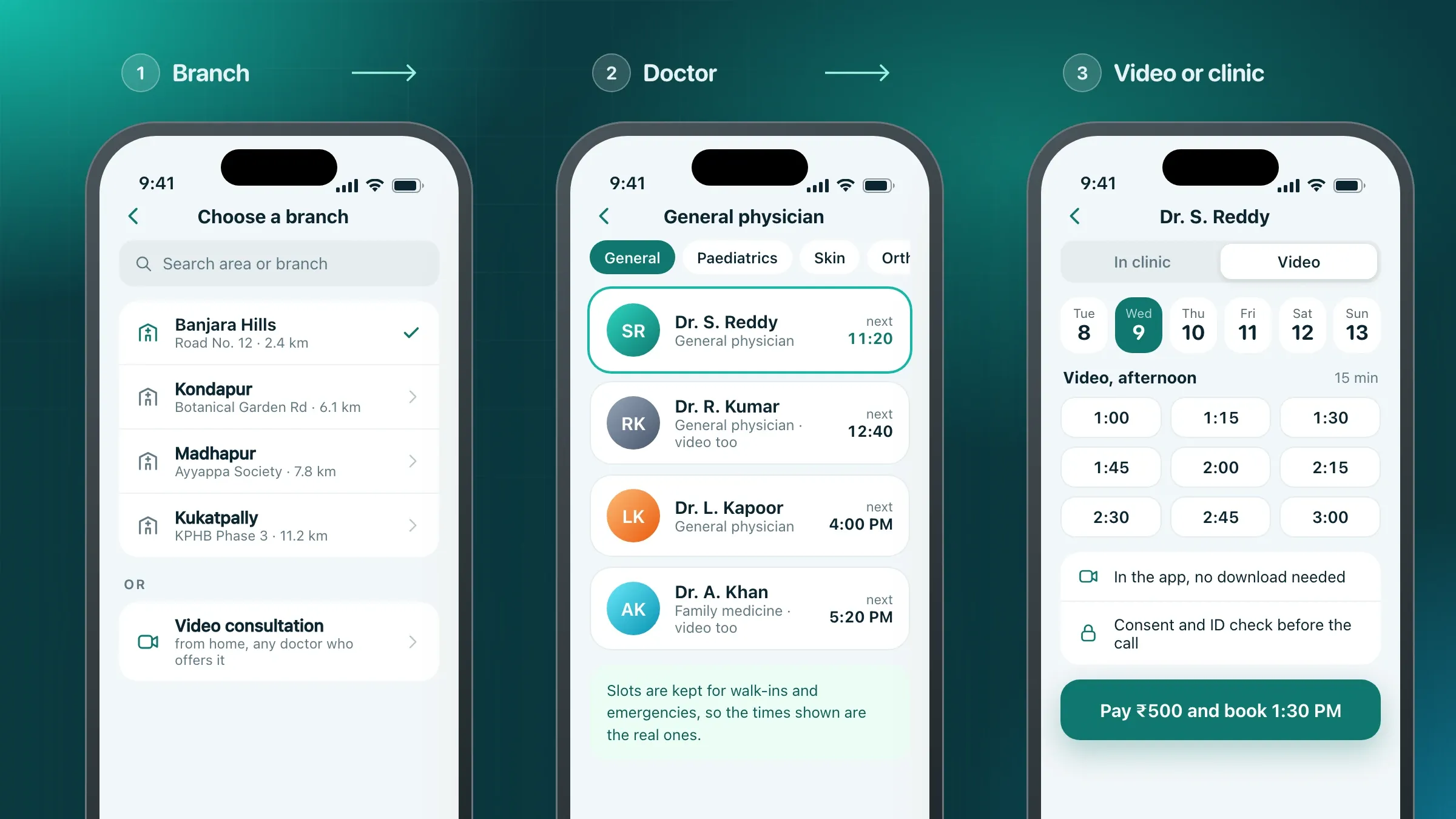 Every branch, one calendar For a multi-speciality clinic group in Hyderabad, patients book in-clinic or video slots at any branch, follow a live queue on their phones and get reminders on SMS and WhatsApp. Read the case study
 -
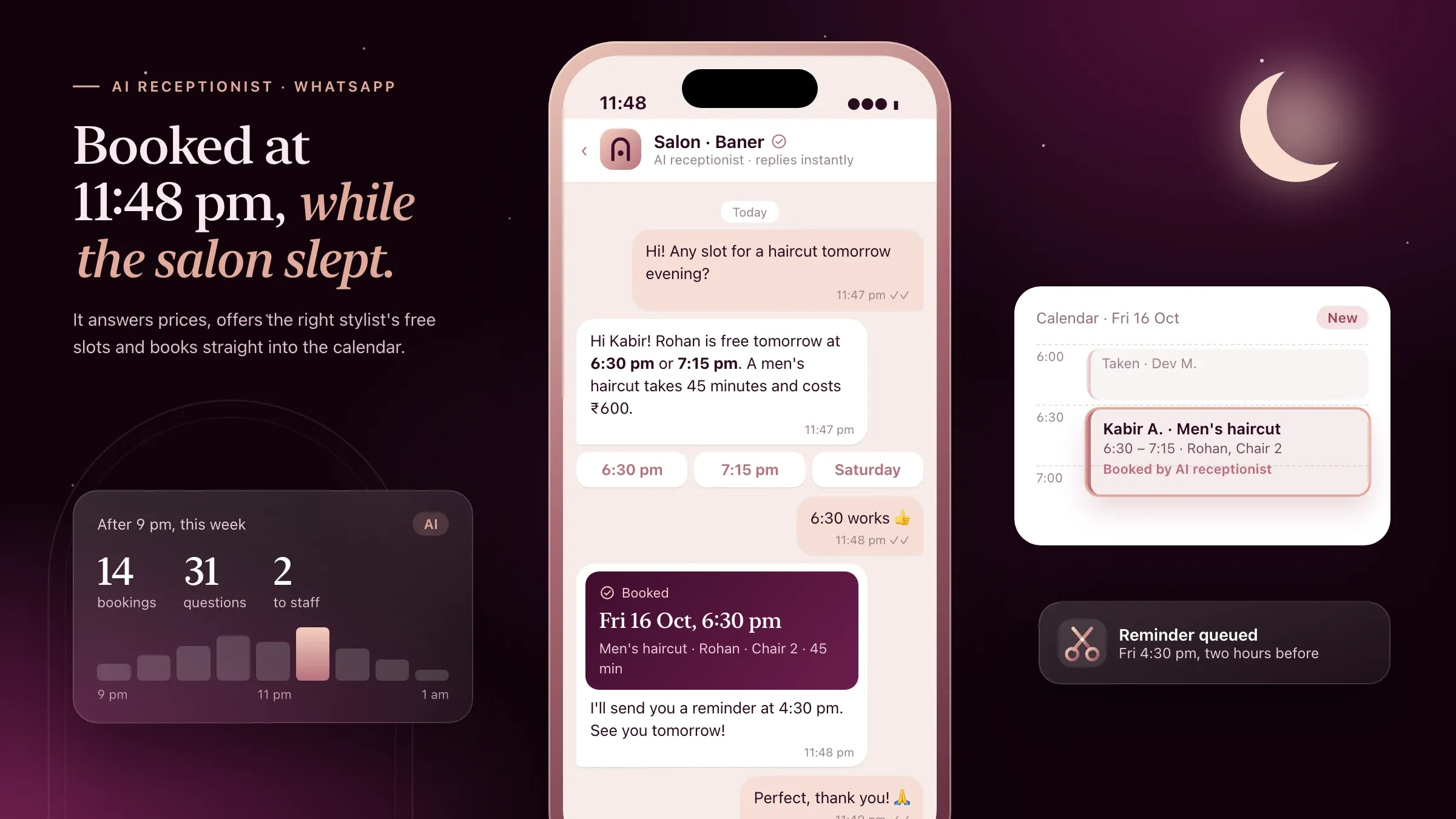 Bookings on WhatsApp at midnight For a salon software startup we back in Pune, we built the AI receptionist that answers clients on WhatsApp and books, moves or cancels appointments at any hour. Meet the startup
 -
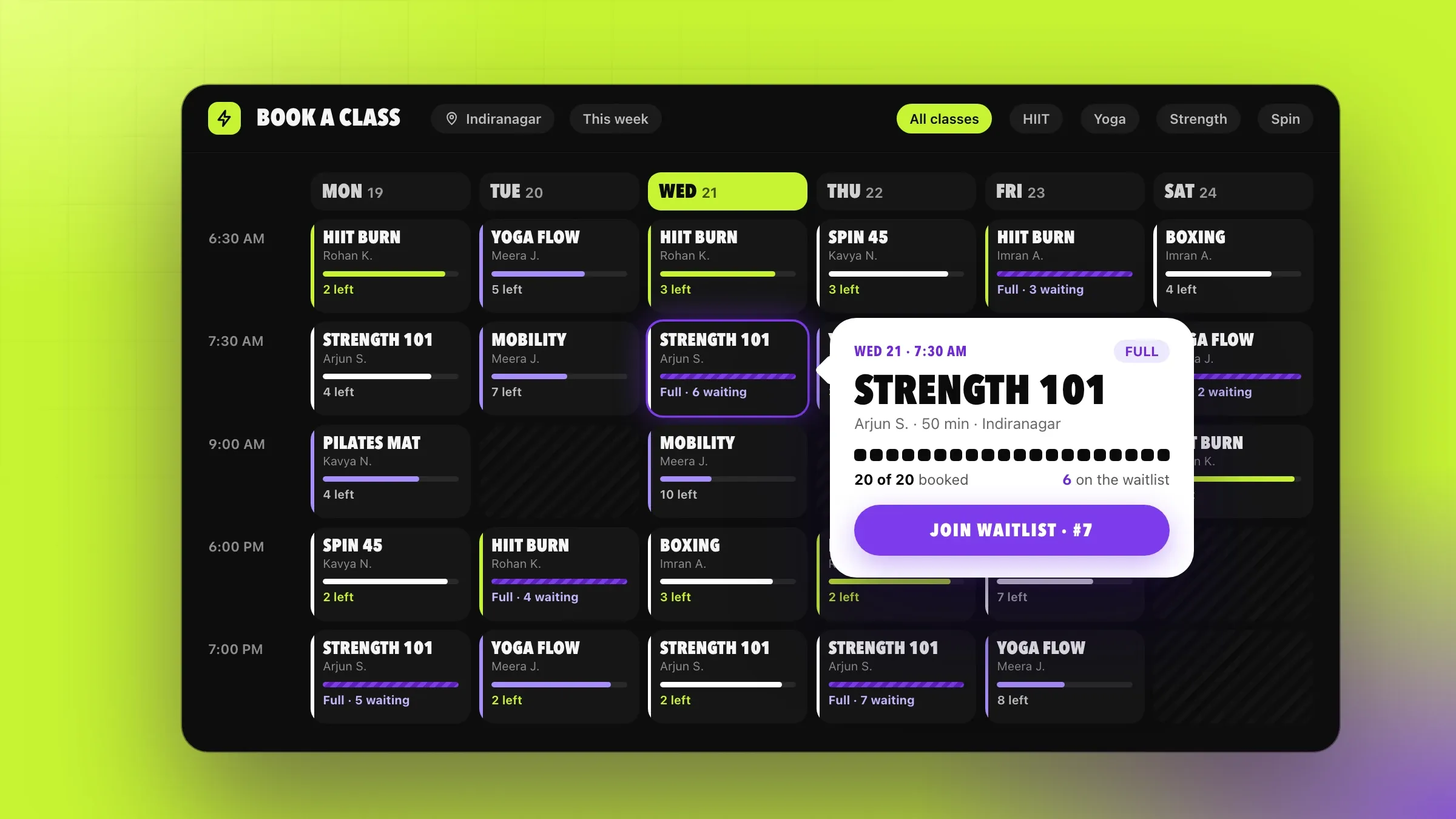 Classes that fill fairly For a chain of fitness studios in Bengaluru, members book classes in the app, join a waitlist when a class is full, and get the spot automatically when someone cancels. Read the case study
 -
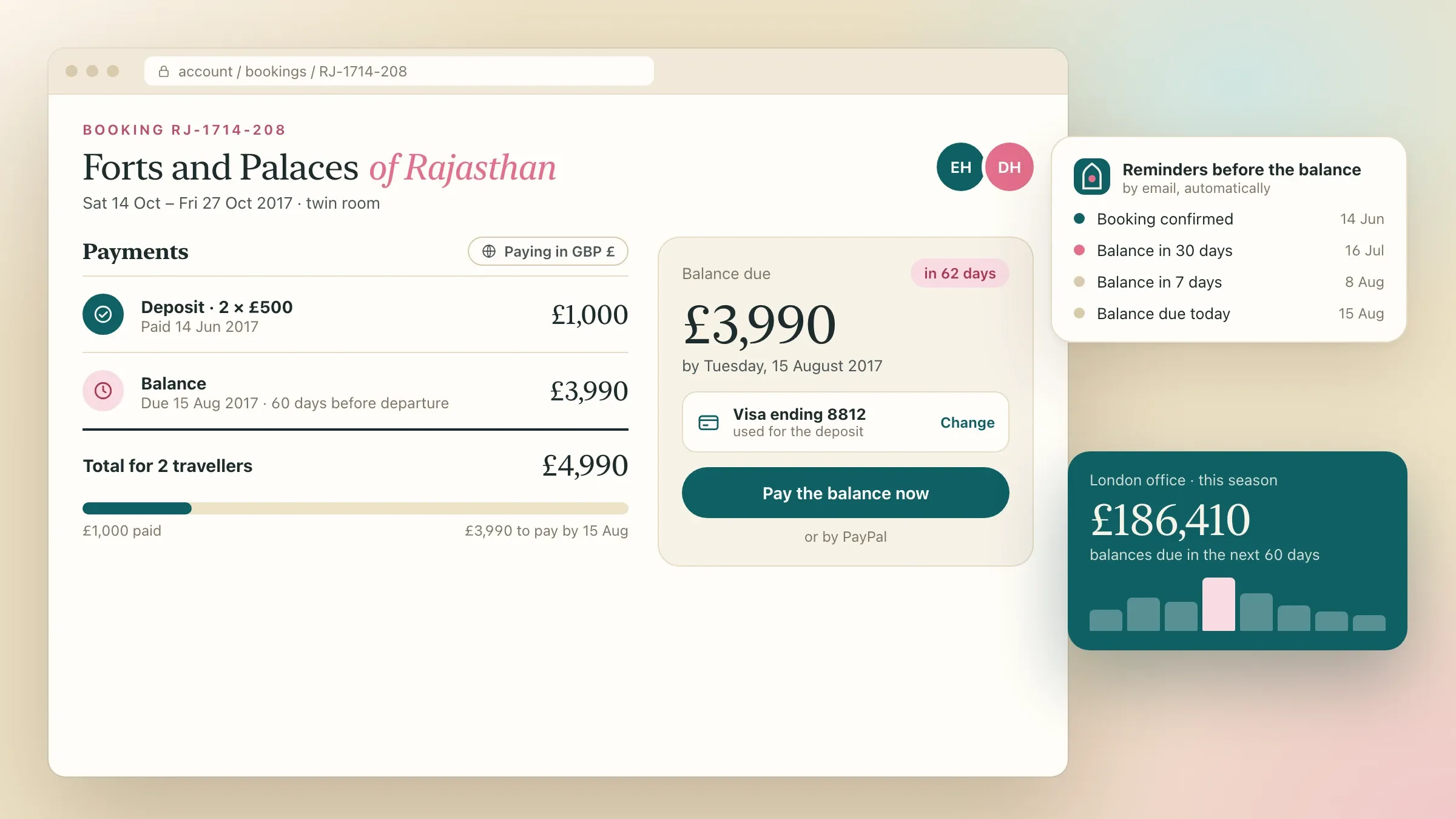 Deposits now, balances later For a tour operator in London, travellers book live seats on each departure, pay a deposit in their own currency and settle the balance online before the tour. Read the case study
 -
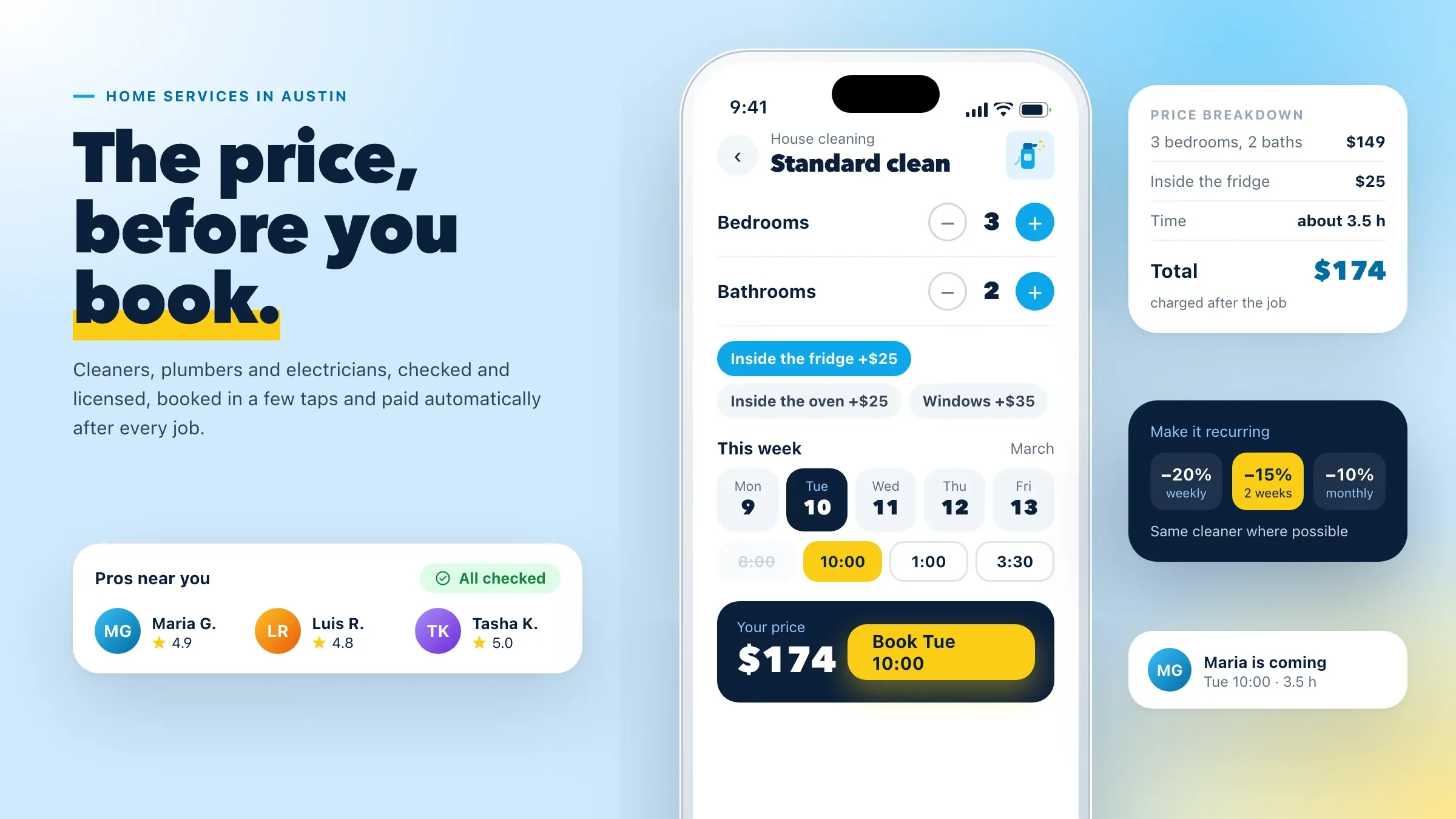 Upfront prices and time slots For a home services company in Austin, homeowners see the price before they book, pick a time slot and can make cleanings recurring. Read the case study
What a booking system does
A booking system lets customers see what is free and book it themselves, at any hour, without waiting for someone to answer the phone. It keeps one calendar for your people, rooms and branches, takes payment or a deposit, sends reminders, and shows your front desk the whole day.
The customer sees a few simple screens: choose a service, a person and a time, pay if needed, done. Behind them sit the rules that make a business work: how long each service really takes, who can do what, which slots are kept for walk-ins, what happens when someone cancels late. Getting those rules right is most of the job.
A good booking system pays for itself in two ways. It takes bookings you were missing, at night, at weekends and while the phone was busy, and it keeps the slots you already sold from going empty.
Where it pays off first
It pays off first wherever time is what you sell: clinics and diagnostic centres, salons and spas, gyms and studios, tour operators, home services, coaching and tuition, consultants, rentals and venues.
The signs are familiar. Bookings stop when the front desk is busy or closed. Messages sent at midnight are answered the next afternoon. Staff who work at more than one branch get booked twice. No-shows leave gaps, and deposits are chased by hand.
For a multi-speciality clinic group in Hyderabad, every branch booked appointments by phone and only during opening hours. We built one booking system for the whole group: a booking website, a patient app and one shared calendar for every doctor at every branch. Patients now book, move and cancel at any hour without calling.
The calendar is the heart of it
Everything depends on a calendar that knows how your business really runs. Each person has their hours at each location, each room or chair has its own availability, and each service has its real length, including setup and clean-up time.
In Hyderabad, new consultations, follow-ups and procedures each have their own length, some slots are kept for walk-ins and emergencies, and a doctor’s leave or late start updates every affected booking at once. For salons, the calendar works by stylist and chair; for studios, by class and room; for tour operators, by departure and seat.
One calendar behind every channel is what stops double bookings. The website, the app, WhatsApp and the front desk all book from it, and a slot is held while the customer pays. Customers booking from another country see times in their own time zone, while your team’s calendar stays in yours.
Booking on your website, app and WhatsApp
Customers should be able to book wherever they already are. A booking page on your website, a link on Google or Instagram, your own app, or a WhatsApp chat all lead to the same calendar. Booking pages are kept short, because the fewer steps between choosing a time and confirming it, the more bookings finish, especially on a phone.
WhatsApp matters most in India, where many customers message rather than call. For a salon software startup we back in Pune, we built an AI receptionist on WhatsApp that answers questions about services and prices, books, moves or cancels appointments with the right stylist, and sends reminders. Anything unusual goes to the staff with the conversation attached. It also brings clients back, with a friendly message when a regular is due for their next visit.
Family accounts help too. In the Hyderabad patient app, one account books for the whole family, and each member keeps their own history.
Deposits, payments and packages
Payment rules belong in the booking, not in a separate conversation. Customers can pay in full, pay a deposit, use a prepaid pack or membership, or pay at the visit, depending on the service.
For a tour operator in London, travellers pay a deposit by card or PayPal in pounds, US dollars, euros or Australian dollars, and the balance is collected online before departure, with reminders as the date approaches. For a chain of fitness studios in Bengaluru, monthly memberships run on UPI AutoPay or a card mandate, with a notice before every charge as RBI rules require, and every payment produces a GST invoice.
Packs and memberships are drawn down visit by visit, so the customer and the front desk always see what is left.
Reminders, no-shows and waitlists
A slot that goes empty is revenue you cannot get back. Reminders go out by SMS, WhatsApp or email before each booking, each with a link to confirm, move or cancel, so plans change in time rather than on the day.
In Hyderabad, reminders go out the day before and on the morning of each appointment. When a patient cancels or moves, the slot returns to the calendar straight away and can be offered to patients waiting for an earlier one, and reception calls only the few who haven’t replied.
Waitlists do the same for anything with limited places. In the Bengaluru studios, a member who cancels frees the spot for the next member on the waitlist automatically, and each studio sets its own late-cancellation and no-show rules so popular classes stay fair. Full tour departures in London offer a waitlist that tells travellers when a seat opens.
On the day: check-in and queues
The booking does not end when the customer arrives. Check-in can be a QR code from the app, scanned at the entrance; in the Bengaluru studios the code refreshes every few seconds, so a screenshot can’t be shared.
Where waiting matters, a live queue helps. In Hyderabad, every patient gets a token, sees their place and expected waiting time on their phone, and is told at once if the doctor is running late, so they arrive when the doctor is ready instead of filling the waiting room.
The front desk and the owner’s view
Reception needs one screen for the day: every booking across branches, walk-ins booked into the same calendar, check-ins, payments and who has not confirmed. The owner needs a different view: bookings by channel and hour, no-show rates, busy and quiet times, and revenue by service, person and branch.
Both views come from the same records, so nobody compiles a spreadsheet at month end. If you run a clinic, Pulse Clinic, the clinic management software we are building, combines online appointments, a live queue and reminders with patient records, prescriptions and billing.
What we need from you, and how we measure it
We need your services and rules, your staff and their hours, and an owner on your side. Services means each one’s length, price and who can provide it. Rules means deposits, cancellations, walk-in slots and anything the front desk handles “by experience”. Recent bookings show your busy hours and no-show patterns. The owner is usually the person who runs the front desk or operations. If you already use booking software, we move your existing bookings, customers and packs across, so nobody loses a booking on the day you switch.
Before we build, we agree the measures: the share of bookings made online, bookings made outside opening hours, the no-show rate, time the front desk spends on the phone and how full the calendar is. We watch them through the pilot and report them every month after.
Launching one branch at a time
A booking system is best launched where you can watch it closely. In Hyderabad, one branch went first, with reception running the new system alongside the phones while we fixed what they found; each branch then switched in turn, with posters at the desk inviting patients to book online next time.
In London, existing bookings for the coming season were moved across first, so travellers and agents found their bookings waiting when they signed in. After launch we run the system with you, tune the rules and reminders, and add services, branches and channels as you grow.
How we work with you
From the first call to running it
- Start
A morning at your front desk
We watch how bookings arrive today, list every service, rule and exception, and agree what the first version must handle.
- Build
Calendar, booking and payments
The shared calendar, online booking, payments and reminders come first, connected to the tools you already use.
- Pilot
One branch first
One branch or team takes bookings on the new system while the old way runs alongside, and we fix what the front desk finds.
- Launch
Every branch, every channel
Existing bookings are moved across, each branch switches in turn, and customers are invited to book online next time.
- Every month
Run and improve
We review bookings, no-shows and busy hours with you, tune the rules and add services, channels and features as you grow.
Safe and in your control
No double bookings
Every channel books from one calendar, and a slot is held while the customer pays, so it can't be sold twice.
Payments through regulated gateways
Cards, UPI and wallets run through payment providers such as Razorpay or Stripe, so card details never touch your servers.
Customers' details protected
Personal and health details are encrypted, each staff role sees only what it needs, and access to sensitive records is logged.
Consent for every message
Customers' agreement to reminders and offers is recorded, they can opt out at any time, and their data can be exported or deleted on request.
Your rules, applied the same way
Cancellation, late-cancellation and no-show rules are written down once and applied to everyone.
A person for the unusual
Anything outside the AI receptionist's rules goes to your staff, with the conversation attached.
Time and cost
The cost depends on what is being booked and how payment works, not on a package. A single service with one calendar is the quickest start; several branches, classes, deposits and an AI receptionist on WhatsApp take longer. After the first call we send a written plan and a quote for the first stage.
What is being booked
One person's appointments, many staff and rooms, classes with limited places or multi-day departures each need different calendar rules.
How customers pay
Deposits, balances, packs, memberships on autopay and several currencies each add rules and testing.
Channels
A website, an app and WhatsApp booking with an AI receptionist are each built and tested on their own.
Connections
Billing, accounts, a CRM, Google Calendar or software you already run each add an integration.
Running costs
SMS and WhatsApp reminders, payment fees and hosting grow with the number of bookings each month.
Built with
Chosen for each project, never by habit
Questions and answers
14 answered
What is a booking system?
A booking system lets customers see what is free and book it themselves, online or on WhatsApp, at any hour. It keeps one calendar for your staff, rooms and branches, takes payments or deposits, sends reminders and shows your front desk the whole day.
Do we need a custom booking system or a ready-made tool?
A ready-made tool suits simple appointments. A custom system makes sense when your rules don't fit one: staff across branches, classes with waitlists, deposits and balances, memberships, several currencies, or bookings that must flow into your own software.
Can customers book on WhatsApp?
Yes. An AI receptionist on WhatsApp can answer questions about services and prices and book, move or cancel appointments within your rules, at any hour. We built one for a salon software startup we back in Pune.
Can the booking system take deposits and payments online?
Yes. Customers can pay in full, pay a deposit with the balance collected later, or use a prepaid pack or membership, by UPI, card or wallet. Memberships can run on UPI AutoPay or a card mandate, and prices can be set in several currencies.
How does a booking system reduce no-shows?
Reminders go out before each booking with a link to confirm, move or cancel, so plans change in time. A freed slot returns to the calendar at once and can go to a waitlist, and late-cancellation rules are applied the same way to everyone.
Can it handle several staff, rooms or branches?
Yes. One calendar holds every person, room, chair and branch, with each service's length and the gaps it needs, so a person who works at two branches is never booked at both at once.
Can it work for classes, tours or events with limited places?
Yes. Classes, departures and sessions can each have a set number of places, with live counts, waitlists and automatic offers when someone cancels. Our portfolio includes class booking for fitness studios in Bengaluru and tour departures for an operator in London.
Can it connect to Google Calendar or our existing software?
Yes. Bookings can appear in staff members' Google or Outlook calendars, and flow into your billing, accounts or CRM, so nothing is typed twice.
Is there a ready-made booking option for clinics?
Pulse Clinic, the clinic management software we are building, covers online appointments, a live queue and reminders alongside patient records, prescriptions and billing. Clinic groups with their own rules can also have a booking system built for them.
Can the booking pages work in Hindi or Gujarati?
Yes. Booking pages, reminders and the WhatsApp receptionist can run in English, Hindi, Gujarati and other languages, and each language is tested with real customers before launch.
How much does a booking system cost?
It depends on what is being booked, how customers pay, which channels you need and which systems it connects to. Running costs follow your bookings and messages. After the first call we send a written plan and a quote for the first stage.
How long does it take to build a booking system?
Online booking, one calendar and reminders for a single location is the quickest start; several branches, payments, memberships and WhatsApp booking take longer. We launch in stages, often one branch first, so real bookings run while the rest is built.
Do you build booking systems for businesses outside India?
Yes. FIRELIFE Ventures works with small and mid-size businesses worldwide, from Rajkot, India, on India time. Our portfolio includes booking systems for clients in the United Kingdom, the United States and India.
What happens after the booking system goes live?
We run it with you: we watch bookings, no-shows and busy hours, tune the rules and reminders, and add services, branches, channels and features as your business grows.
Tell us what you want to build
Write a few lines about the idea and who it is for. We reply with our questions, a first plan and how we would start.
Write to us