Build something new clinic management software
Run your clinic without paperwork
We build clinic management software that runs your whole day in one place: bookings and the live queue, patient records, e-prescriptions, billing and follow-up reminders, set up the way your doctors and front desk already work.
- We start with a morning at your front desk
- Doctors approve every note and prescription
- English, Hindi, Gujarati and more
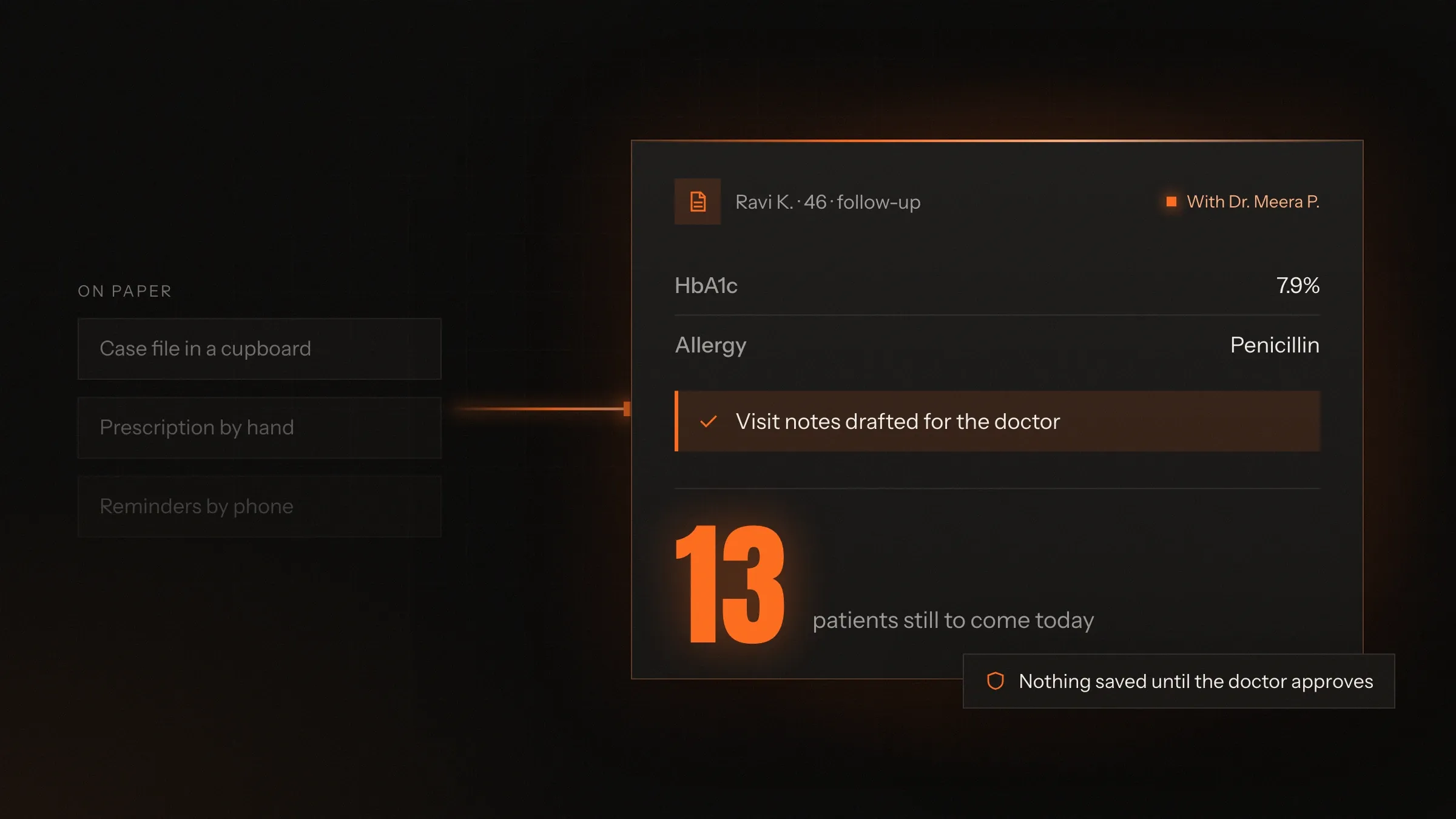
Sound familiar?
What we hear before we start
- The phone rings all morning, and the patients at the desk wait while reception answers it.
- Nobody in the waiting room knows how long they'll wait, so they keep asking.
- Files go missing, and every visit starts with "Did you bring your old reports?"
- Prescriptions are handwritten, and the chemist calls to check what they say.
- Follow-ups are forgotten until the patient turns up at another clinic.
- At closing time, nobody is sure the cash, card and UPI slips add up.
What changes
-
Today: Bookings arrive by phone, walk-in and WhatsApp, and live in a diary.
After: Every booking lands in one calendar, and patients book online at any hour.
-
Today: The waiting room fills up, and the questions at the desk never stop.
After: Patients see their place in the queue on their phone and arrive when the doctor is ready.
-
Today: The doctor flips through a paper file to find last month's report.
After: History, allergies, medicines and reports are on screen before the patient sits down.
-
Today: Prescriptions and notes are written by hand, patient after patient.
After: Prescriptions come from the doctor's own templates, and notes are drafted from the doctor's voice.
-
Today: Follow-ups depend on someone remembering to call.
After: Reminders go out on WhatsApp and SMS by themselves, and the desk sees who hasn't replied.
What it does for you
-
Bookings and the live queue
Online, phone and walk-in bookings in one calendar per doctor, with slot rules for new visits, follow-ups and procedures, and a queue patients can follow.
For exampleA patient books a 6 pm slot from the clinic's WhatsApp link, and at 5:40 sees two patients ahead.
-
Patient records
Visits, diagnoses, allergies, current medicines, lab reports and scans in one record per patient, shared across doctors and branches.
For exampleBefore the patient sits down, the doctor sees last month's HbA1c report and a penicillin allergy.
-
E-prescriptions
Each doctor's own templates, with dosage and instructions, the doctor's registration number on every prescription, printed or sent to the patient's phone.
For exampleThe doctor picks the usual fever template, adjusts it for the child and sends it to the parent's phone.
-
AI visit notes
With the patient's consent, the doctor speaks and AI drafts structured notes. Nothing is saved until the doctor has checked it.
For exampleAfter the consultation, complaints, findings, diagnosis and advice are waiting in the record for one approval.
-
Billing, packages and payments
Consultation, procedure and package bills, paid by UPI, card or cash, with receipts on WhatsApp and balances that update by themselves.
For exampleA physiotherapy patient pays for ten sessions by UPI, and each visit is drawn from the package.
-
Reminders that bring patients back
Appointment, follow-up, vaccination and repeat-test reminders on WhatsApp and SMS, with a link to confirm or move.
For exampleA patient due for a review in two weeks gets a reminder, taps Confirm, and the slot is held.
-
Speciality templates
Tooth charts, skin photo records with consent, physiotherapy session plans, antenatal visits and growth charts, set up for the way each speciality records its work.
For exampleA dentist plans a root canal across three visits and bills each stage as it is done.
-
The owner's view
Collections by doctor and payment method, package balances, no-shows and follow-ups, across one clinic or many.
For exampleBefore closing, the owner sees the day's UPI, card and cash totals, by doctor.
How it works
-
The patient books
Online, on WhatsApp, by phone or at the desk, all into the same calendar.
-
Reminded and checked in
A reminder goes out the day before. At the clinic, the desk checks them in or they scan a QR code with their ABHA app.
-
Waiting, without the crowd
The live queue shows each patient their place and wait, and tells them when a doctor is running late.
-
The consultation
The doctor sees the full history, speaks or types the notes, and builds the prescription from a template.
-
Billed and sent home
The bill is ready at the desk, paid by UPI, card or cash, and the prescription reaches the patient's phone.
-
Brought back
Follow-up and repeat-test reminders go out on their own, and the next visit starts with everything on record.
Where we've built it
3 from our portfolio
-
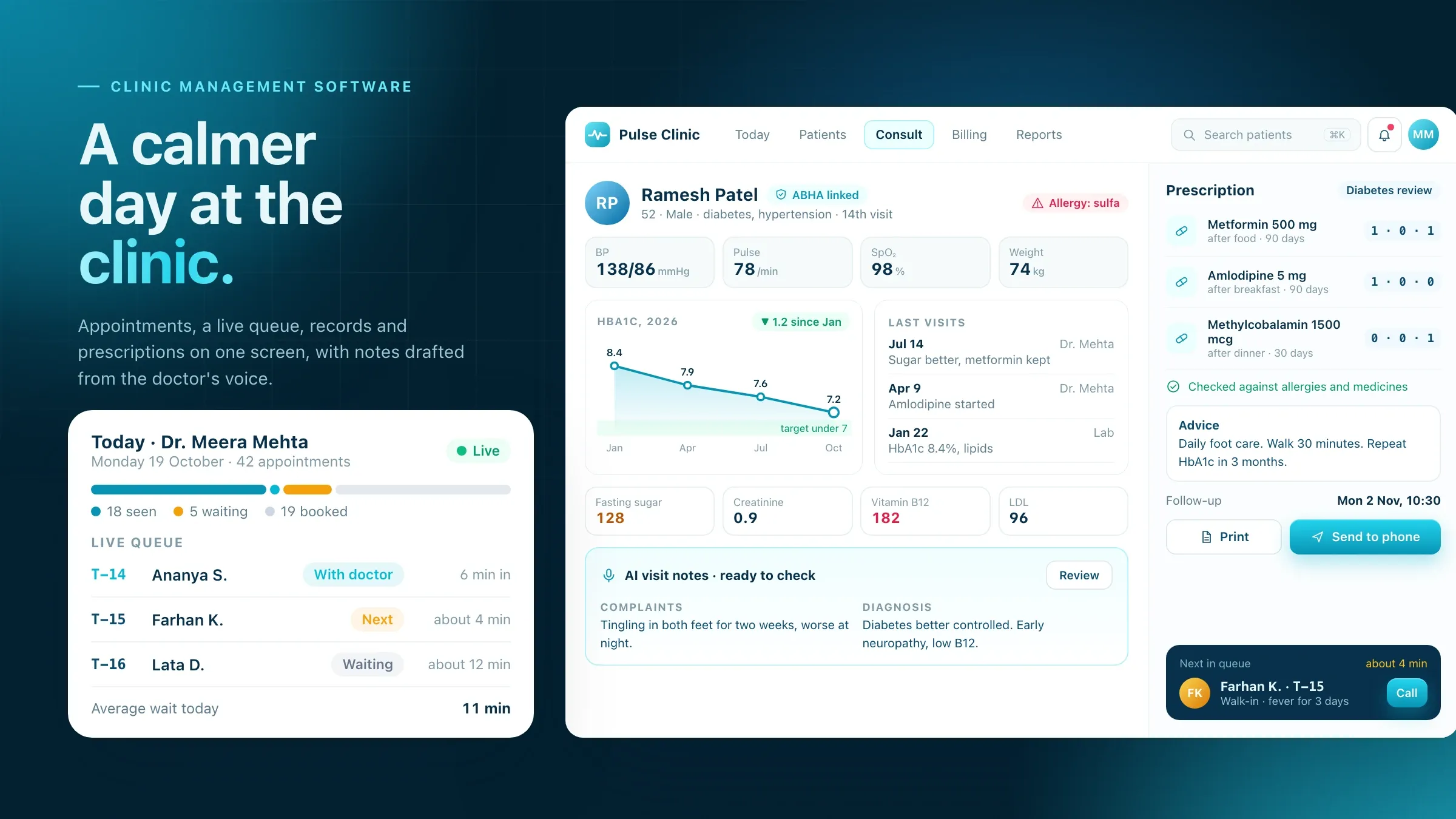 Pulse Clinic, our own clinic software Our clinic management software for online appointments, patient records, e-prescriptions and billing, with AI visit notes and automatic reminders. It is in development. See the product
 -
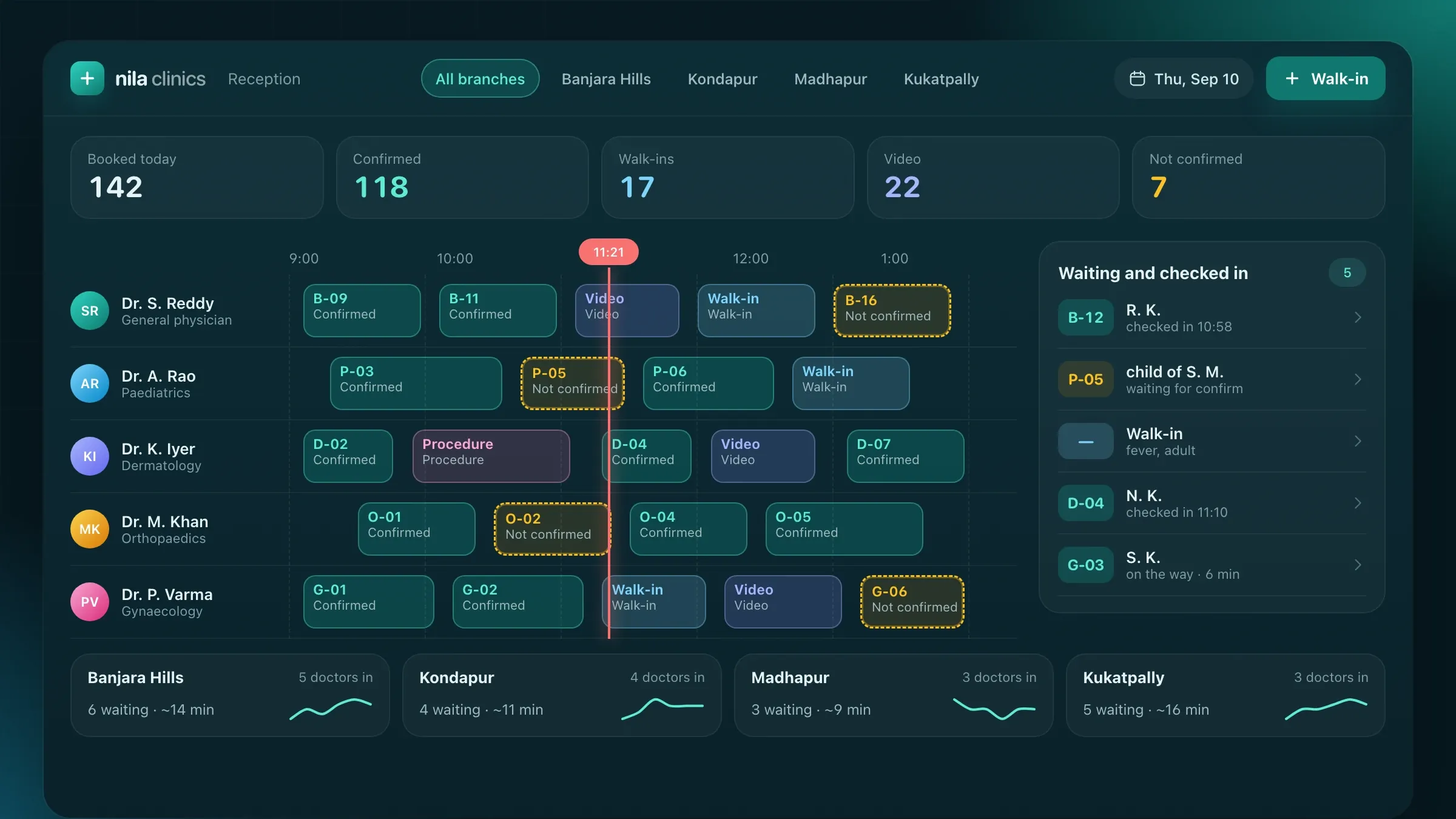 One calendar for every branch For a multi-speciality clinic group in Hyderabad, we built online booking for every branch, a live queue, video consultations and reminders on SMS and WhatsApp. Read the case study
 -
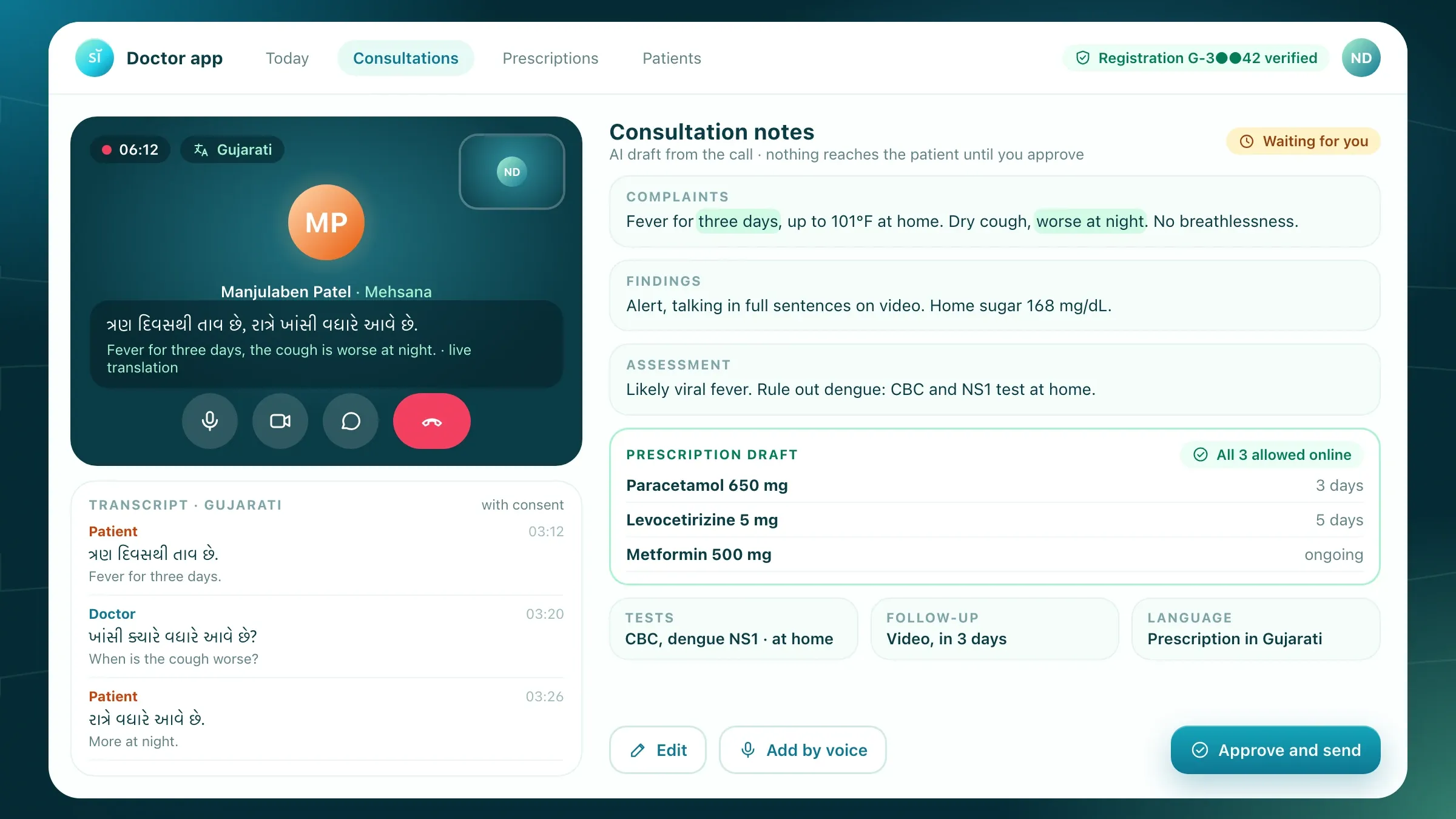 Notes drafted, the doctor approves For a HealthTech startup we back in Ahmedabad, we build the doctor app with e-prescriptions, an AI scribe that drafts notes for approval, and ABHA linking. Meet the startup
What clinic management software does
Clinic management software runs a clinic’s day in one system: bookings, the waiting room, patient records, prescriptions, billing and follow-ups. It replaces the appointment diary, the paper files, the prescription pad and the separate billing tool, and lets everyone in the clinic see the same day.
For the front desk, that means one calendar for phone, walk-in and online bookings, and a queue patients can follow on their phone. For doctors, it means the patient’s history on screen before they sit down, and prescriptions written from templates instead of by hand. For the owner, it means knowing what was collected, by whom and how, without adding up slips at closing time.
Good clinic software stays out of the way. A consultation should get the same attention as before, with less writing. If a screen slows a doctor down, it is the wrong screen, and we change it.
Ready-made, or built for your clinic
There are two ways to get clinic software from us: our own product, or a system built for you. Pulse Clinic is our clinic management software for online appointments, patient records, e-prescriptions and billing, with AI visit notes and automatic reminders. It is in development, and clinics that want early access can ask through the form on this page.
A ready-made product suits a single clinic or a small practice whose day looks like most clinics’ days. A custom build fits better when your work doesn’t: a group with several branches and shared doctors, a speciality with its own records such as IVF, dialysis or eye care, a hospital or lab system the clinic must work with, a patient app under your own name, or a clinic outside India with different rules.
We will tell you which one fits after the first conversation. If Pulse Clinic covers what you need, we will say so rather than build it again.
Where it pays off first
The front desk is usually where clinic software earns its keep first. Phone bookings, walk-ins, check-ins and payments all land on the same counter, often with one person behind it. Online booking and automatic reminders take many of the calls away, and a live queue ends the “how much longer?” questions.
Next come the doctor’s minutes. Templates for common prescriptions, the history on one screen and notes drafted from the doctor’s voice give back time that went into writing. Over a busy outpatient session, those minutes become more time with each patient, or an earlier end to the day.
Then come follow-ups. Clinics lose many patients not to another doctor but to forgetting. A reminder for a review, a vaccination or a repeat test brings them back, and the front desk sees who has not replied.
What we need from your clinic
We start with a morning at your front desk and time with your doctors. A real session, with walk-ins, a doctor running late and the phone ringing, tells us more than any list of features.
We also ask for what your clinic already uses: the registration form, the prescription pad, the fee list, package prices, the reports you print and the spreadsheets someone keeps on the side. Each one becomes a screen or a report in the new system, so nothing your team relies on is lost.
Finally, we need one person on your side who owns the project, usually the owner or the practice manager, and an hour with each doctor to agree their templates. Doctors who shape their own templates use the system from the first day.
The decisions that shape your system
A few early choices set the size of the build. One clinic or several branches: branches need shared doctors, shared patients and one view for the owner. Which specialities: each records different things, from tooth charts to growth charts to physiotherapy session plans. A patient app, or booking through WhatsApp and a web link: an app suits groups with loyal patients, while WhatsApp reaches everyone without an install.
Others are about how the clinic works. Do doctors type, tap or speak their notes? Are fees paid per visit, in packages or through insurance? Should records link to ABHA? Where must the data be kept? We write each decision down with its reason, so the plan and the quote match what you chose.
Records, prescriptions and AI notes
The patient record is the heart of the system. Visits, diagnoses, allergies, current medicines, lab reports and prescriptions sit together, and the doctor reads them at a glance before the patient sits down.
Prescriptions are built from each doctor’s own templates and carry the doctor’s name, qualifications and registration number. Allergies and current medicines are shown while the prescription is written, and it prints clearly or goes straight to the patient’s phone.
AI visit notes are optional. With the patient’s consent, the doctor speaks during or after the consultation and AI drafts structured notes: complaints, findings, diagnosis and advice. The doctor reads the draft, corrects it and saves it. Nothing reaches the record without the doctor’s approval.
ABHA, labs and the tools you already use
Clinic software in India can connect to the Ayushman Bharat Digital Mission (ABDM). Patients can register at the desk by scanning a QR code with their ABHA app, which fills in their details without typing, and their records can be linked to their ABHA health ID so they can share them with another doctor when they choose. ABDM has its own sandbox and approval steps before these features go live, and we plan the work around them.
Beyond ABHA, we connect what the clinic already runs: the lab that sends reports, the pharmacy that fills prescriptions, accounting software such as Tally, a payment gateway for UPI and cards, and WhatsApp and SMS for reminders. Older systems without an API can be connected through a small bridge or a regular file exchange.
Privacy and consent
Health records are among the most personal data a business holds, so privacy is designed in from the first screen. Each role sees only what its work needs, and every time someone opens a record, it is logged.
Consent is recorded with the patient: for AI notes, for clinical photos, for ABHA linking and for messages. For clinics in India, we design for the Digital Personal Data Protection Act, keep data in India and encrypt it in transit and at rest. For clinics elsewhere, we design for the rules that apply there, such as HIPAA in the United States or the GDPR in the UK and Europe, and agree with your adviser what they ask of the software.
Compliance stays with the clinic, as it always has. Our job is to give you the controls it needs, and the records to show they work.
Moving from paper and old software
Switching systems should not close the clinic for a day. Patient lists and histories can be imported from spreadsheets or exported from your old software, and paper files for your regular patients can be scanned into their records.
We pilot with one doctor or one branch first, with the old way still running beside it. The front desk is trained before the switch on the screens they will use most, and we stay close through the first busy sessions, fixing what they find.
Measuring it, and improving after launch
Before we build, we agree what should change and how we will count it: calls to the front desk, no-shows, the wait in the waiting room, time spent on notes and prescriptions, and follow-ups that come back. The system records most of these itself.
After launch we review those numbers with you every month, fix what gets in the way and add what your doctors and front desk ask for: a new speciality template, a report, another branch. Clinic software that is looked after keeps getting easier to use; software that is left alone slowly gets worked around.
How we work with you
From the first call to running it
- Start
A morning at your front desk
We watch a real session, sit with your doctors, collect your forms, pads and fee lists, and agree what should change first.
- Design
Screens your team tries first
The calendar, the queue, the record and the prescription are drawn up and tried by your front desk and doctors before we build them.
- Build
Build and connect
We build the system, set up each doctor's templates, connect payments, WhatsApp and ABHA where you need it, and import your patient list.
- Pilot
One doctor or one branch first
The new system runs beside the old way while we fix what your team finds, then the front desk is trained before the switch.
- Every month
Run and improve
We look after the system, review the numbers with you and add templates, reports or branches as the clinic grows.
Safe and in your control
Each role sees its part
Reception sees appointments and bills, doctors see their patients' records, and the owner sees the whole clinic.
Every look at a record is logged
Who opened which record, when and what they changed is kept, so any question can be answered later.
Consent on record
Consent for AI notes, clinical photos, ABHA linking and messages is recorded with the patient, and can be withdrawn.
The doctor decides
AI drafts notes, but only the doctor can save a note or issue a prescription, under their own name and registration number.
Stored in India, encrypted
For clinics in India, data is kept in India and encrypted in transit and at rest, with regular backups. Elsewhere, it stays in the region you need.
Your data, yours to take
Patient records can be exported at any time in standard formats, so you are never locked in.
Time and cost
The cost of clinic software depends on how your clinic works, not on a package. Many clinics start with booking, records and prescriptions, then add the rest. After the first call we send a written plan and a quote for the first stage.
Doctors, branches and specialities
One clinic with general practice is the simplest. Several branches, shared doctors and speciality records add screens and rules.
Apps or links
Booking through WhatsApp and a web link costs less than a patient app for Android and iPhone under your name.
What it connects to
ABHA, labs, pharmacies, accounting software and payment gateways each add work, more so for older systems without an API.
Records to move
A clean spreadsheet imports quickly. Years of records in old software or on paper take longer to bring across.
AI notes and languages
Voice-drafted notes and screens in Hindi, Gujarati or other languages are tested with your own doctors and patients.
Built with
Chosen for each project, never by habit
Questions and answers
13 answered
What is clinic management software?
Clinic management software runs a clinic's day in one system: appointments and the queue, patient records, prescriptions, billing and reminders. It replaces the appointment diary, paper files, the prescription pad and separate billing tools, so the front desk, doctors and owner all see the same day.
Should we use Pulse Clinic or have software built for our clinic?
It depends on how your clinic works. Pulse Clinic, our own clinic management software, suits clinics whose day looks like most clinics' days; it is in development and clinics can ask for early access. A custom build fits better for clinic groups, unusual specialities, your own patient app, or systems the clinic must connect to.
How much does clinic management software cost?
It depends on the number of doctors and branches, the specialities, whether you need a patient app, what it connects to and how many records need moving. We send a written plan and a quote after the first call, and many clinics start with booking, records and prescriptions.
How long does it take to build clinic software?
It depends on the scope. Booking, records and prescriptions for one clinic is a matter of weeks; a clinic group with a patient app, ABHA and lab connections takes longer. The written plan sets out each stage, and a pilot comes before the full switch.
Can patients book appointments on WhatsApp?
Yes. Patients can book, confirm, move or cancel from WhatsApp or a web link, and those bookings land in the same calendar as phone and walk-in bookings. Reminders go out on WhatsApp and SMS by themselves.
Does it work with ABHA and the Ayushman Bharat Digital Mission?
It can. Patients can register at the desk by scanning a QR code with their ABHA app, and records can be linked to their ABHA health ID so they can share them with other doctors. ABDM has its own sandbox and approval steps, which we plan into the timeline.
How do you keep patient records private?
Each role sees only what its work needs, every look at a record is logged, consent is recorded with the patient, and data is encrypted and kept in India for Indian clinics. We design for India's data protection law, and for the rules that apply where your clinic practises.
Can doctors write prescriptions on a tablet or phone?
Yes. Doctors build prescriptions from their own templates on a computer, tablet or phone, with allergies and current medicines shown as they write. Every prescription carries the doctor's name, qualifications and registration number.
Can one system run several branches and doctors?
Yes. Each doctor has one calendar with their hours at each branch, patients share one record across branches, and the owner sees every branch on one screen, so double bookings across branches can't happen.
Can we move our existing patient records?
Yes. Patient lists and histories can be imported from spreadsheets or exported from your old software, and paper files for regular patients can be scanned into their records, so the first visit in the new system starts with what you already know.
Can the software work in Hindi and Gujarati?
Yes. Patient messages, booking pages and printed prescriptions can be in English, Hindi, Gujarati and other languages, while staff screens stay in the language your team prefers.
Do you build clinic software for clinics outside India?
Yes. FIRELIFE Ventures works with small and mid-size businesses worldwide, from Rajkot, India, on India time. Our clinic work so far is in India, so for a clinic elsewhere we start by agreeing which privacy rules apply, such as HIPAA or the GDPR, and what they ask of the software.
What happens after the clinic software goes live?
We look after it with you: fixes, updates and backups, a monthly review of no-shows, waiting times and follow-ups, and new templates, reports or branches when you need them.
Tell us what you want to build
Write a few lines about the idea and who it is for. We reply with our questions, a first plan and how we would start.
Write to us