Make it work better AI document processing
Read invoices and documents automatically
We build AI document processing that reads the invoices, purchase orders, bank statements, KYC papers and forms your team types in today, checks every figure against your records and enters the data where it belongs, sending anything unclear to a person.
- Tested on your own documents first
- Anything unsure goes to a person
- Every value linked to its page
Sound familiar?
What we hear before we start
- Someone in accounts spends the day typing supplier invoices into Tally.
- Invoices are paid before anyone checks them against the purchase order.
- Bank statements and salary slips are read line by line, by hand, for every application.
- The same invoice gets entered twice, and nobody notices until the supplier's ledger doesn't match.
- Month end closes late because the paperwork arrives in a pile.
- Scans, phone photos and PDFs from a hundred suppliers all look different.
What changes
-
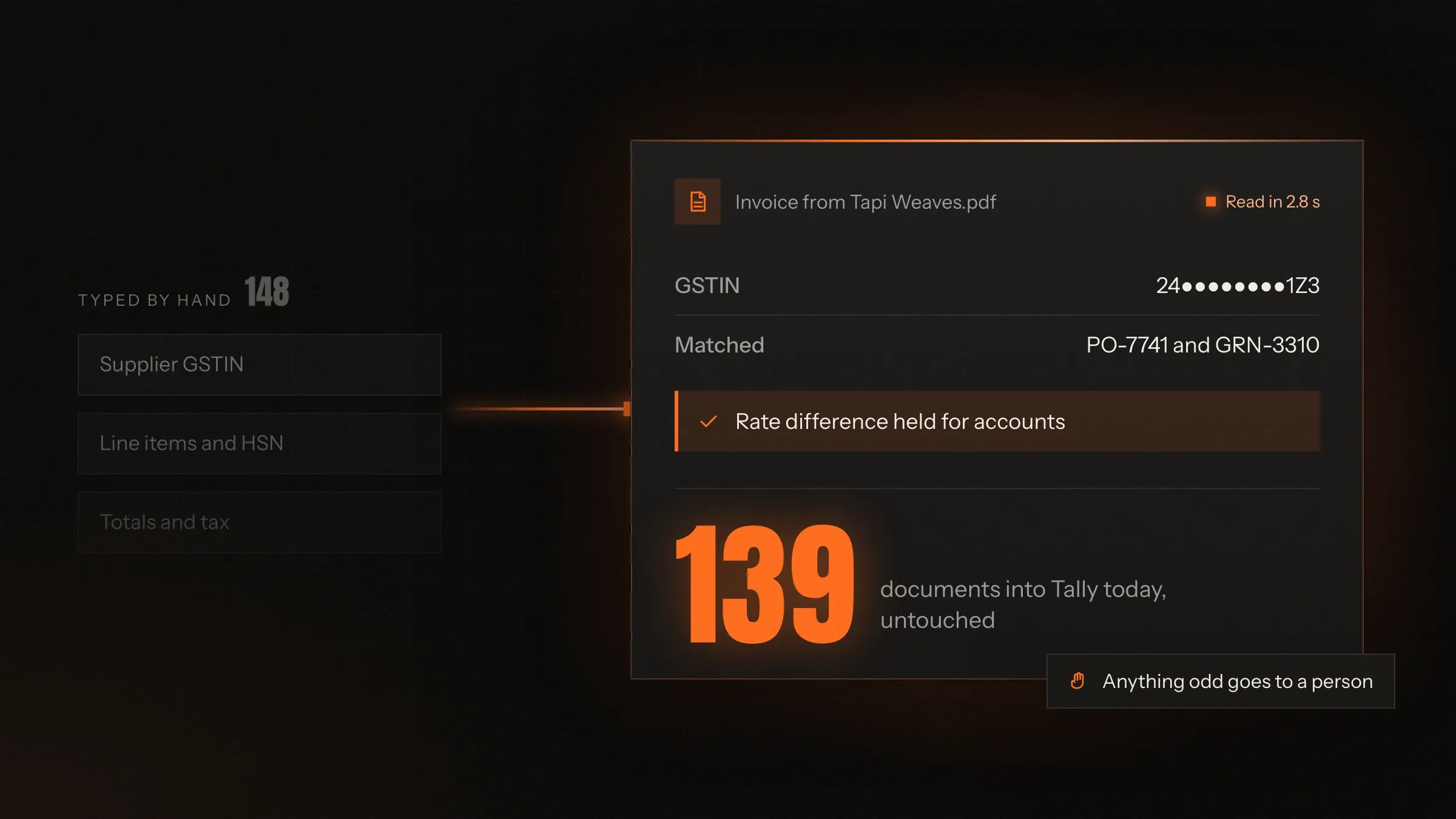
Today: Every invoice is typed in by hand.
After: It is read, checked and entered by itself, with the PDF attached.
-
Today: Mismatches are found after payment.
After: Rates, quantities and GSTINs are checked against the order before anything is posted.
-
Today: Underwriters copy figures out of statements.
After: The figures arrive extracted, with anything unusual flagged for a second look.
-
Today: Duplicates slip through.
After: A document seen before is recognised, whatever its file name.
-
Today: Paperwork piles up for month end.
After: Documents are processed as they arrive, every day.
What it does for you
-
Read any layout
Invoices, purchase orders, delivery challans, bank statements, KYC papers and forms, as PDFs, scans or phone photos.
For exampleA supplier's invoice photographed on a phone is read as cleanly as a PDF from their billing software.
-
Pull out the fields you need
Supplier, GSTIN, invoice number, dates, line items, HSN codes, tax and totals, in the structure your software expects.
For exampleEach line of a 40-line invoice becomes a row with its quantity, rate and HSN code.
-
Check against your records
Purchase orders, goods receipts, price lists, vendor masters and earlier documents, compared field by field.
For exampleAn invoice rate ₹4 above the purchase order is held and shown to accounts beside the order.
-
Catch duplicates and errors
The same invoice sent twice, totals that don't add up, an inactive GSTIN or a missing page.
For exampleAn invoice sent again under a new file name is recognised and not paid twice.
-
Enter the data where it belongs
Posted to Tally, your ERP, CRM or loan system, with the original document attached to the record.
For exampleA matched purchase invoice appears in Tally as a voucher, with its PDF linked.
-
Sort what arrives
Emails and uploads sorted by document type and sent to the right queue.
For exampleOne inbox receiving invoices, statements and credit notes sends each to its own workflow.
-
Summarise long documents
Contracts, leases and reports summarised, with key terms and dates pulled out and linked to their clause.
For exampleA 30-page lease is summed up with its rent, increases and notice period, each linked to the page.
How it works
-
Documents arrive
By email, upload, scanner, WhatsApp or a shared folder.
-
AI reads them
It works out the document type and reads every field, including tables that run across pages.
-
Every value is checked
Against your records, the document's own arithmetic and the documents seen before.
-
Clear cases go through
Documents that pass every check are entered in your system with the original attached.
-
Unclear cases go to a person
Anything uncertain or mismatched waits on a review screen, with the page and the reason beside it.
-
Corrections are kept
Every correction is recorded and used to read the next similar document better.
Where we've built it
2 from our portfolio
-
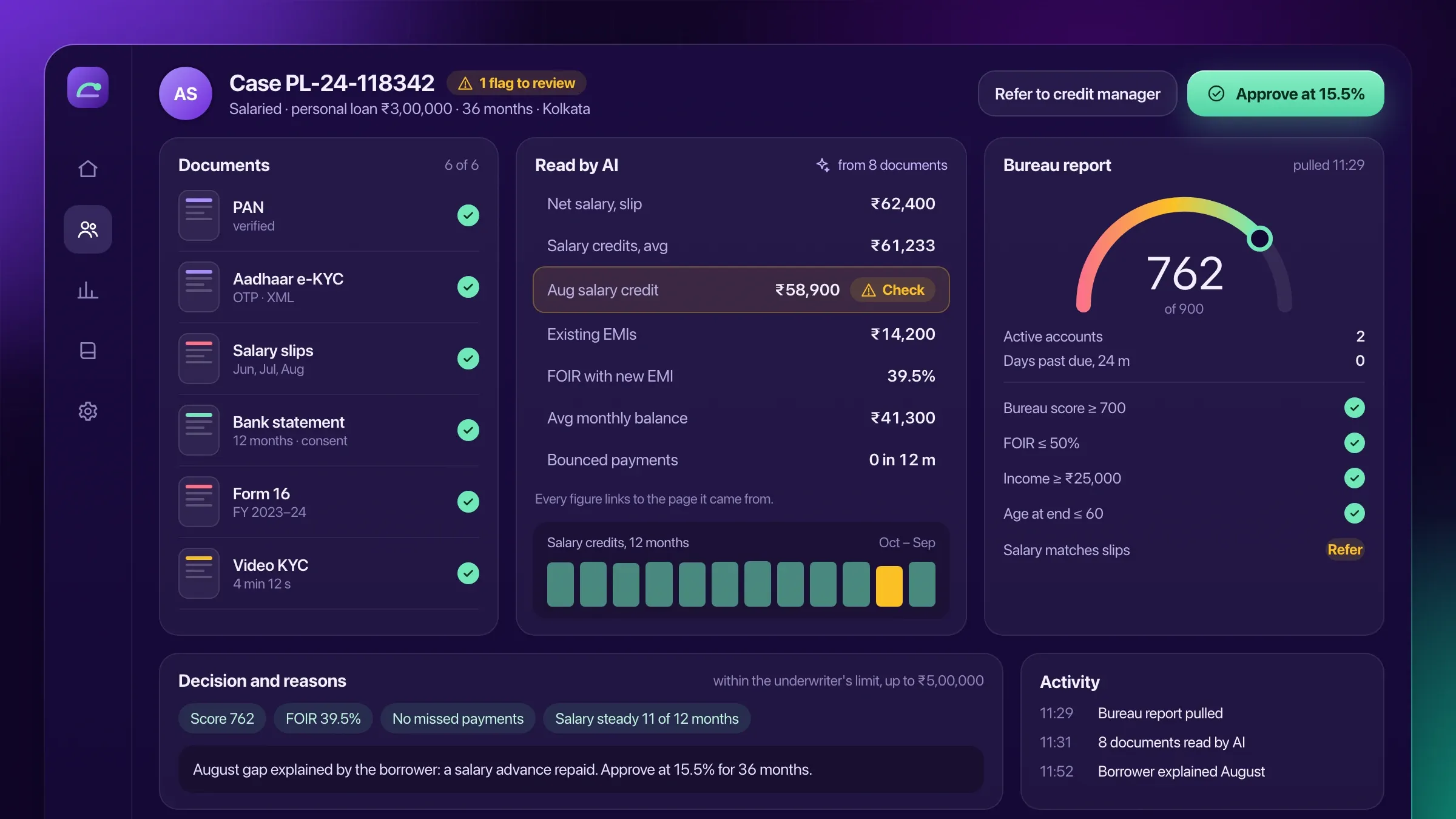 Statements and tax returns, read by AI For an NBFC in Kolkata, AI reads bank statements, salary slips and tax and GST returns, pulls out the figures underwriters need and flags anything that doesn't match. Read the case study
 -
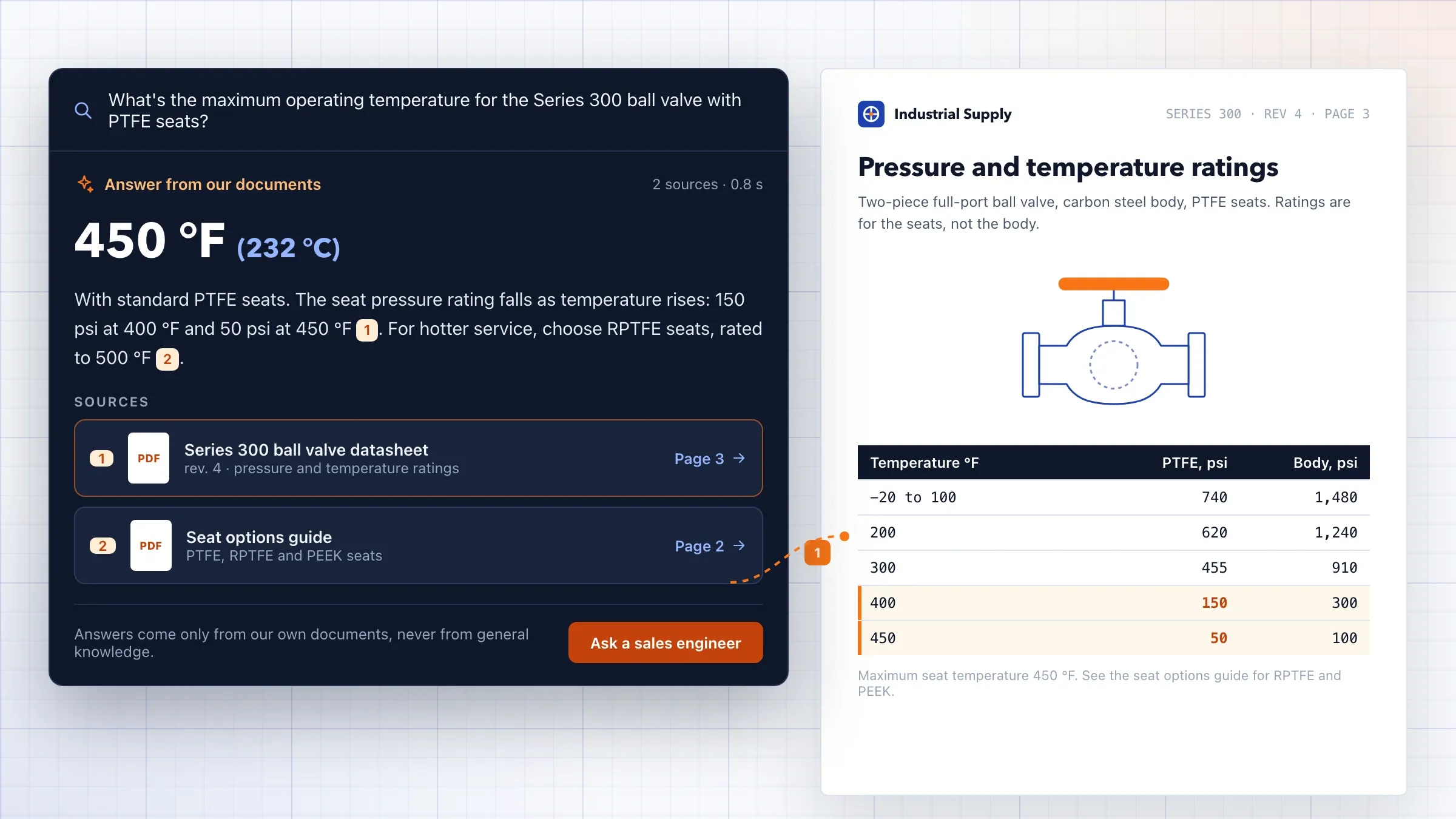 Datasheets and manuals that answer back For an industrial equipment distributor in Ohio, AI search reads every datasheet, manual and brochure and answers customers with a link to the exact page. Read the case study
What AI document processing does
AI document processing turns documents into data your systems can use. It reads a supplier invoice, a bank statement or an application form, finds the information you need, checks it and enters it where it belongs, so your team stops typing it by hand.
Older tools worked from templates: draw a box where the invoice number sits and hope the supplier never changes their layout. AI reads a document the way a person does, by understanding what each number means, so a new supplier’s invoice or a phone photo of a delivery challan can be read without building a template first.
Reading is only half the job. What makes the result safe to use is what happens next: every value is checked against your records, and anything uncertain goes to a person.
In practice, every document passes through three steps. It is classified, so the system knows it is an invoice rather than a credit note or a delivery challan. Its fields are extracted, with tables read row by row. Then the values are validated, and the document either goes through or waits for review.
Where to start: the documents that cost you most
Start with the documents that arrive most often and are still typed in by hand. For most businesses that means supplier invoices. For lenders it means bank statements, salary slips and tax returns; for transport companies, delivery challans, lorry receipts and proofs of delivery; for clinics and insurers, claim forms and reports.
We count how many of each type arrive in a month, how long each takes to enter and what goes wrong today. A type that arrives hundreds of times a month and feeds an important decision, such as a payment or a loan, is usually the right first job.
Rare, very long or legally sensitive documents can still benefit through summaries and extracted key terms, but they are rarely the place to begin.
What we need from you
We need real documents, not perfect ones. A few hundred examples of each type, including the faded scans, the pages photographed at an angle, the invoices with handwritten corrections and the suppliers whose layouts annoy your team the most.
We also need the rules your team applies without thinking: which purchase order an invoice should match, how much difference in rate is acceptable, which suppliers are on hold and which fields your accounting software insists on. These become the checks.
Finally, we need one person who owns the process: someone in accounts, operations or credit who reviews the pilot results and decides when a document type is ready to go through on its own.
Reading layouts, tables, scans and languages
Documents rarely arrive as clean PDFs. AI document processing has to read scans, phone photos, statements that run to many pages and invoices whose line items continue onto a second sheet.
We combine a document-reading service, such as Amazon Textract, which finds text, tables and where they sit on the page, with an AI model that understands what each part means: which date is the invoice date and which is the due date, which code is the GSTIN, which table holds the line items. Printed Hindi, Gujarati and other Indian languages, and documents that mix them with English, are read the same way.
Every value keeps its position on the page, so the review screen can show exactly where it came from.
Checking: matching, arithmetic and duplicates
Checks turn reading into something you can trust. Each document is checked in three ways.
First, against itself: do the line items add up to the taxable value, and does the tax match the rate for each HSN code? Then against your records: is the supplier in your vendor list, is their GSTIN active, does the invoice match the purchase order and the goods actually received? Finally, against history: has this invoice, or one with the same number and amount, been seen before?
Indian documents bring checks of their own. An e-invoice carries a signed QR code with its IRN, the seller’s GSTIN, the invoice number, date and value, so the printed figures can be compared with what was reported to the GST system. E-way bill numbers can be checked against the consignment they travel with, and PAN and GSTIN formats are validated before anything is looked up.
A document that passes every check can go through by itself. One that fails any check waits for a person, with the reason written in plain words.
Review: where people stay in charge
The review screen is where your team spends its time now, instead of typing. It shows the original document on one side and the extracted fields on the other, with every uncertain or failed field highlighted and linked to its place on the page.
A reviewer confirms or corrects the fields, adds a note if needed and approves. Corrections are recorded, so the same mistake on the next document from that supplier becomes less likely.
How much goes to review is your decision. Most businesses start with a person checking everything, then let clear documents from known suppliers through once the pilot shows they are read correctly.
Getting the data into your systems
Processed documents only help once the data is where your team works. We connect the output to Tally, your ERP, your accounting software, your loan system or even a shared spreadsheet, through their APIs or a bridge we build.
A purchase invoice becomes a voucher or a bill, linked to the original PDF. A bank statement becomes a set of figures in the underwriter’s case. A delivery challan closes the matching consignment. Nothing is posted until it has passed its checks or been approved by a person.
Long documents: contracts, reports and manuals
Not every document is a form. Contracts, leases, insurance policies, tender documents and technical manuals are long, and what people need from them is a handful of facts and a way to ask questions.
For these, AI document processing produces a summary with the key terms pulled out, such as the parties, dates, amounts, notice periods, renewal terms and penalties, each linked to the clause it came from, so a reviewer can check it against the original in seconds.
The same documents can be made searchable. Your team, or your customers, ask a question in plain words and get an answer drawn from the documents, with a link to the exact page. A summary never replaces reading a contract before signing it; it shows you where to look first.
Privacy and sensitive documents
Documents carry some of the most sensitive data a business holds: bank details, ID numbers, salaries and medical information. We handle them that way.
Files are encrypted in storage and in transit, processed on cloud services in the region you need, and visible only to the roles that need them. Numbers such as Aadhaar can be masked once checked, and documents are deleted on the schedule you set. AI providers’ business services are used, so your documents are not used to train their models.
Every view, correction and approval is logged with the person’s name, and personal data is handled in line with India’s data protection law, or the GDPR where the people in your documents are in Europe.
Measuring accuracy and improving it
Accuracy is measured, not assumed. Before launch we run the system on a set of documents your team has already entered and compare every field. The result shows which fields can go through on their own and which still need a person.
After launch, a monthly report shows the documents processed, the share that went through without review, corrections by field and by supplier, and how long reviews took. New suppliers’ layouts, new document types and changes in tax rules are added as they come.
The share of documents that go through without anyone touching them is the number most teams watch. It should rise as corrections accumulate and known suppliers are trusted, while the documents that still need a person are the genuinely unusual ones.
How we work with you
From the first call to running it
- Start
Gather your real documents
We collect a few hundred of your real documents, including the messy ones, and agree the fields, the checks and where the data should go.
- Build
Set up reading and checks
We set up the reading for each document type, write the checks against your records and connect the system the data goes into.
- Pilot
Read beside your team
The system reads live documents while your team still enters them by hand, and we compare every field.
- Launch
Let clear cases through
Documents that pass every check are posted by themselves; everything else waits for review.
- Every month
Review and add types
We go through the corrections with you, improve accuracy and add new suppliers and document types.
Safe and in your control
A person for anything unsure
Fields the AI isn't confident about, and every failed check, go to review, never straight into your books.
Every value traced to its page
Each field links back to the place it was read from, so anyone can check it in seconds.
Originals kept with the record
The source file is stored with the entry it created, ready for audits and disputes.
Sensitive papers protected
KYC documents and statements are encrypted, masked where possible and visible only to the roles that need them.
Processed in your region
Documents are handled on cloud services in the region you need, through AI providers' business services that don't train on them.
Measured on your documents
Accuracy is measured field by field on documents your team has already entered, and measured again whenever anything changes.
Time and cost
The cost depends on your documents, not on a package: how many types there are, how varied they look, which checks they need and where the data goes. Most businesses start with one type, usually supplier invoices, and add more. After the first call we send a written plan and a quote.
Document types and variety
One type from a few senders is the quickest start. Many layouts, languages or handwriting take more examples and testing.
Checks and matching
Reading fields is the start. Matching against orders, receipts and master data adds rules and connections.
Where the data goes
Posting to software with an API is quicker than to older software that needs a bridge.
The review screen
A simple review queue costs less than one with approvals, comments and several teams.
Volume
Running costs follow the pages processed each month: reading and AI services, storage and hosting.
Built with
Chosen for each project, never by habit
Questions and answers
13 answered
What is AI document processing?
AI document processing is software that reads documents such as invoices, purchase orders, bank statements and forms, pulls out the information you need, checks it and enters it into your systems. Unlike older template-based tools, it copes with new layouts, scans and phone photos.
How is AI document processing different from OCR?
OCR turns an image of text into text. AI document processing goes further: it understands which number is the invoice total and which is the GSTIN, reads tables line by line, checks the figures and decides what needs a person.
Which documents can it read?
Supplier invoices, purchase orders, delivery challans, e-way bills, bank statements, salary slips, tax and GST returns, KYC documents, application forms, contracts and receipts. We test each type on your own examples before it goes live.
How accurate is AI document processing?
It depends on your documents, so we measure it rather than promise it. Before launch, every field is compared with what your team entered on a set of your own documents, and any field below the agreed confidence, or any failed check, goes to a person instead of into your books.
Can it read scans, photos and handwriting?
Clear scans and phone photos read well. Handwriting varies: neat handwritten forms can often be read, but we test on your examples and send anything uncertain to a person.
Can it post invoices into Tally or our ERP?
Yes. Checked documents can be posted to Tally, your ERP or your accounting software as vouchers or bills, with the original file attached, through the software's API or a bridge we build.
Can it check GSTINs and match invoices to purchase orders?
Yes. It can confirm that a supplier's GSTIN is active, check that the tax and totals add up, and match each invoice line to the purchase order and the goods received. Differences in rate or quantity are held for your team.
Can it read documents in Hindi, Gujarati or other languages?
Yes, for printed documents in Hindi, Gujarati and many other languages, including documents that mix them with English. We test each language on your own documents before launch.
Is it safe to process KYC documents and bank statements with AI?
They are encrypted, processed in the region you need, visible only to the roles that need them, and masked where full numbers aren't required. We use AI providers' business services, which don't use your documents to train their models.
How much does AI document processing cost?
It depends on the number of document types, how varied they are, the checks they need, where the data goes and how many pages you process each month. There is a one-time cost to set it up and a running cost that follows volume. We send a written quote after the first call.
How long does it take to set up AI document processing?
One document type going into one system is a matter of weeks, most of it spent testing on your real documents. More types, more checks or older destination software take longer. The plan after the first call sets out the timeline.
Do you work with businesses outside India?
Yes. FIRELIFE Ventures works with small and mid-size businesses worldwide from Rajkot, India, on India time. Our portfolio includes AI that reads documents for clients in India and the United States, and we adapt to each country's document formats and tax rules.
What happens after launch?
We review corrections with you every month, improve accuracy, add new suppliers' layouts and new document types, and update the checks when tax rules or your processes change.
Tell us what should work better
Write a few lines about what slows you down today. We reply with our questions, a first plan and how we would start.
Write to us