Make it work better API integration
Make your tools talk to each other
We connect the software you already use, from your store and CRM to Tally, payment gateways, couriers and WhatsApp, so orders, stock, customers and invoices move between them on their own, with every sync logged, checked and retried.
- We start with the job your team retypes most
- Every sync logged, retried and alerted
- Your tools stay; the retyping goes
Sound familiar?
What we hear before we start
- Orders from the website are typed into Tally by hand, one by one.
- Stock sold on a marketplace is sold again on your own store.
- Customers ask where their parcel is, and someone checks the courier's website.
- Payments arrive in the gateway, and someone matches them to invoices by hand.
- A quick automation someone set up broke last month, and nobody noticed for a week.
- Every new tool you add makes the copying worse.
What changes
-
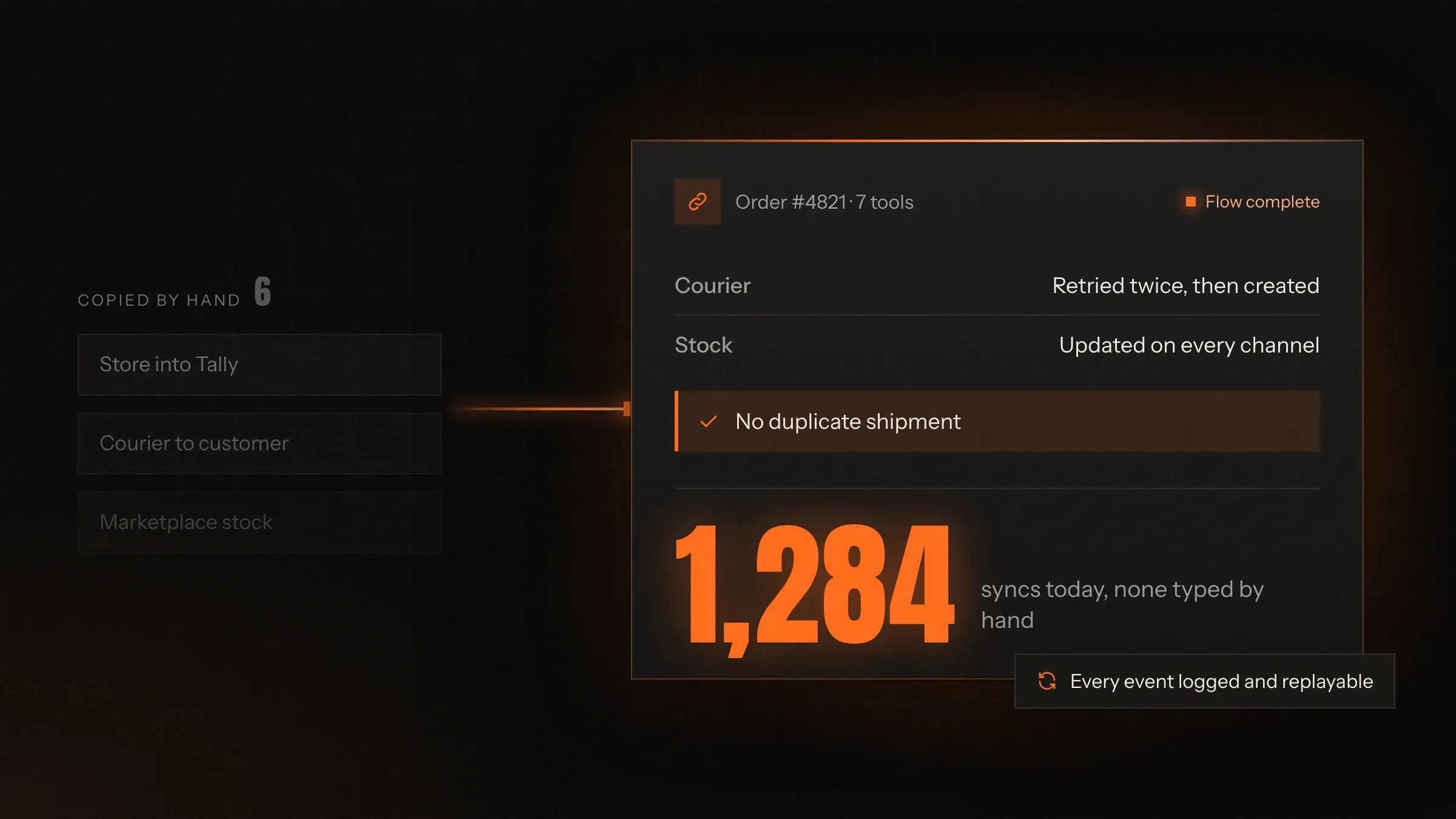
Today: Data is copied between tools by hand.
After: Records move between tools on their own, as things happen.
-
Today: Each tool has its own version of a customer or an order.
After: One record is matched across tools, with one ID to follow it.
-
Today: Stock goes out of step between channels.
After: Every sale updates stock everywhere the item is listed.
-
Today: A failed sync is found weeks later.
After: Failures retry on their own, and a person is told if they don't recover.
-
Today: Adding a tool means more manual work.
After: A new tool plugs into the same connections.
What it does for you
-
Orders into your accounts
Orders, invoices, receipts and refunds from your store or billing system posted to Tally, Zoho Books or QuickBooks.
For exampleAn online order becomes a sales voucher in Tally with the right ledger, GST and customer.
-
Stock in step everywhere
Stock synced between your store, marketplaces, point of sale and warehouse, so the same item is never sold twice.
For exampleThe last piece sells on Amazon, and your own store stops offering it.
-
Payments matched
Card, UPI and wallet payments from Razorpay, Stripe or PayPal matched to orders and invoices, with refunds and settlements reconciled.
For exampleA UPI payment arrives, and the invoice is marked paid without anyone opening the gateway.
-
Shipping and tracking
Courier booking, labels, tracking and failed-delivery reports from couriers or shipping aggregators, back into your orders.
For exampleA courier reports a failed delivery, and the customer gets a WhatsApp message to fix the address.
-
Leads into your CRM
Website forms, ads, IndiaMART and WhatsApp enquiries sent straight to HubSpot, Zoho or your own CRM, with the source attached.
For exampleA quote request reaches the right salesperson with the product and quantity attached.
-
Messages when things happen
Order confirmations, reminders and updates sent through the WhatsApp Business API, email or SMS, triggered by events in your systems.
For exampleA cash-on-delivery order is confirmed on WhatsApp before it ships.
-
GST and other official APIs
GST e-invoices and e-way bills through authorised providers, and identity or bank checks through regulated services.
For exampleAt dispatch, the e-invoice and e-way bill are made from the order without retyping.
-
An API for your own software
A clean, documented API for your own system, so partners, apps and future tools can connect safely.
For exampleA dealer's app reads live prices and stock from your system, with its own key and limits.
How it works
-
Something happens
An order, a payment, a scan or a new lead in one of your tools.
-
The hub hears it
Through a webhook, an API call or a scheduled check.
-
It's checked and translated
Fields are validated and mapped to what the other tool expects.
-
It's delivered
The other tool is updated, with one ID linking the two records.
-
Failures retry
If a tool is down or says no, the sync retries, then alerts a person.
-
Everything is logged
Each sync is recorded, so you can see what moved, when and why.
Where we've built it
5 from our portfolio
-
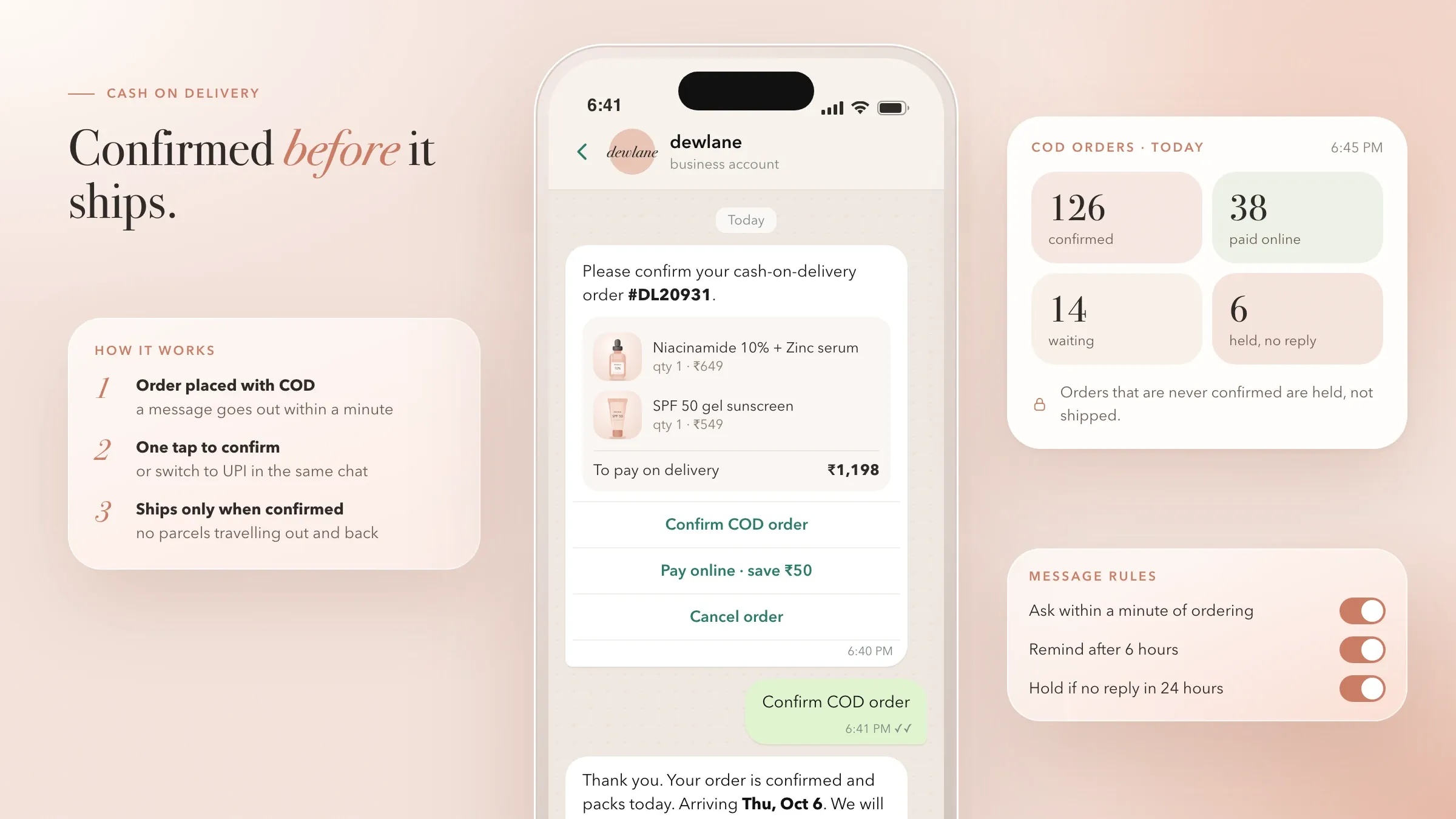 Store, payments, couriers and WhatsApp in step For a skincare brand in Mumbai, Shopify webhooks keep the store's own database in step, Razorpay takes payments and UPI AutoPay, and WhatsApp carries delivery updates. Read the case study
 -
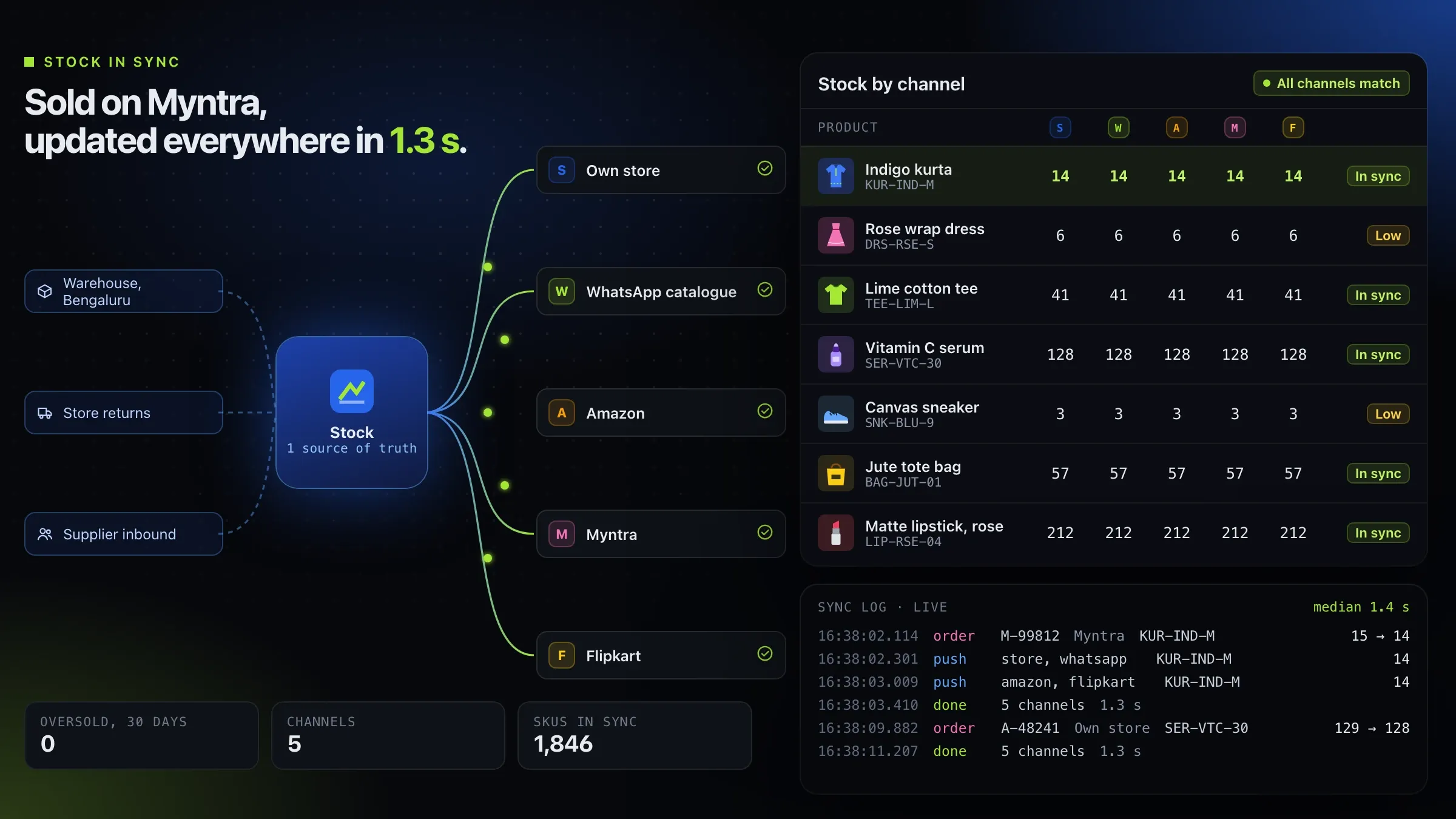 Stock in sync across channels For a Bengaluru commerce platform for D2C brands that we back, we built the order and stock engine that keeps the brand's store and marketplaces in step. Meet the startup
 -
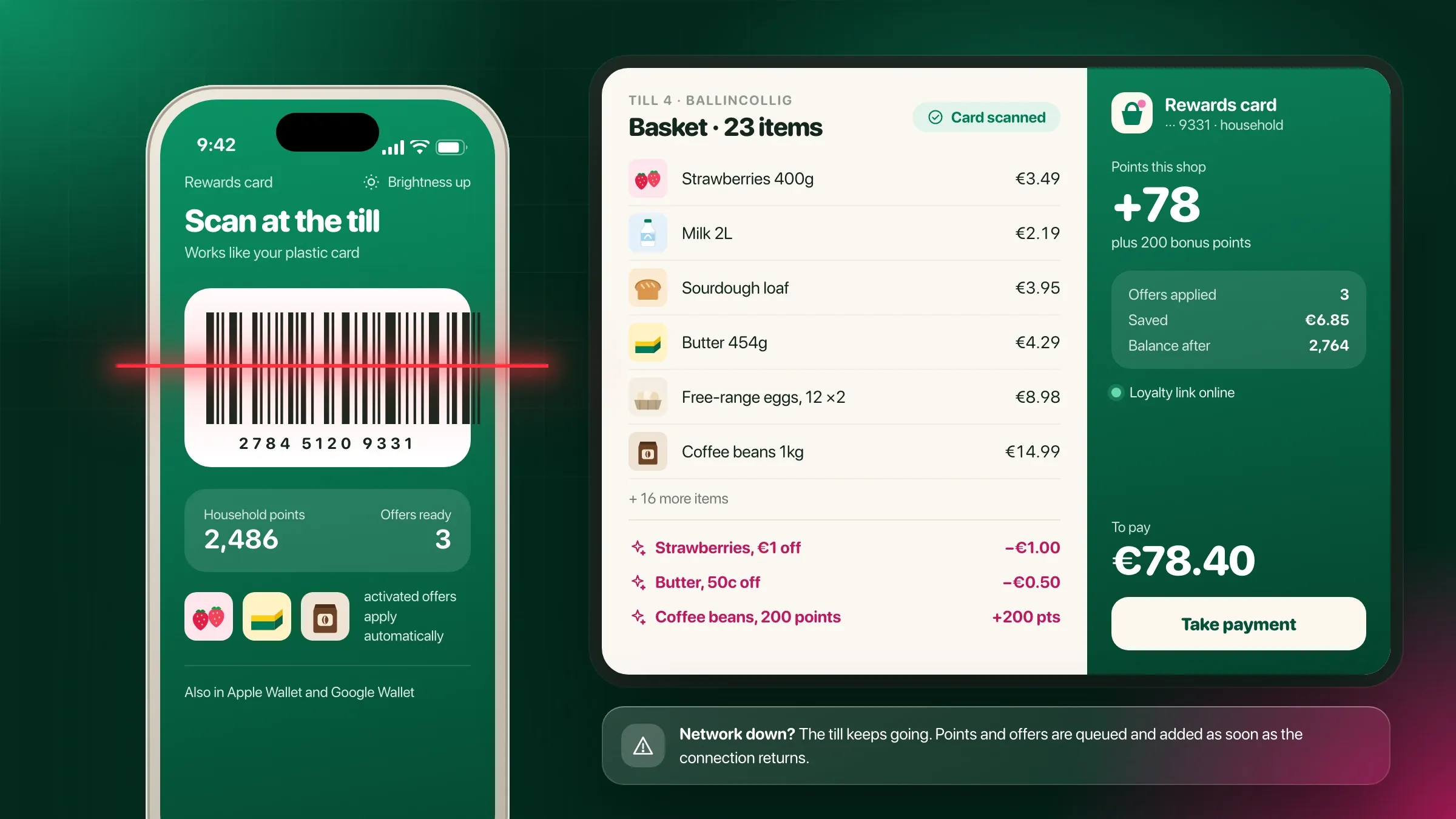 A loyalty app wired to existing tills For a supermarket chain in Cork, Ireland, a till integration layer connects the loyalty system to the point-of-sale system already in every store. Read the case study
 -
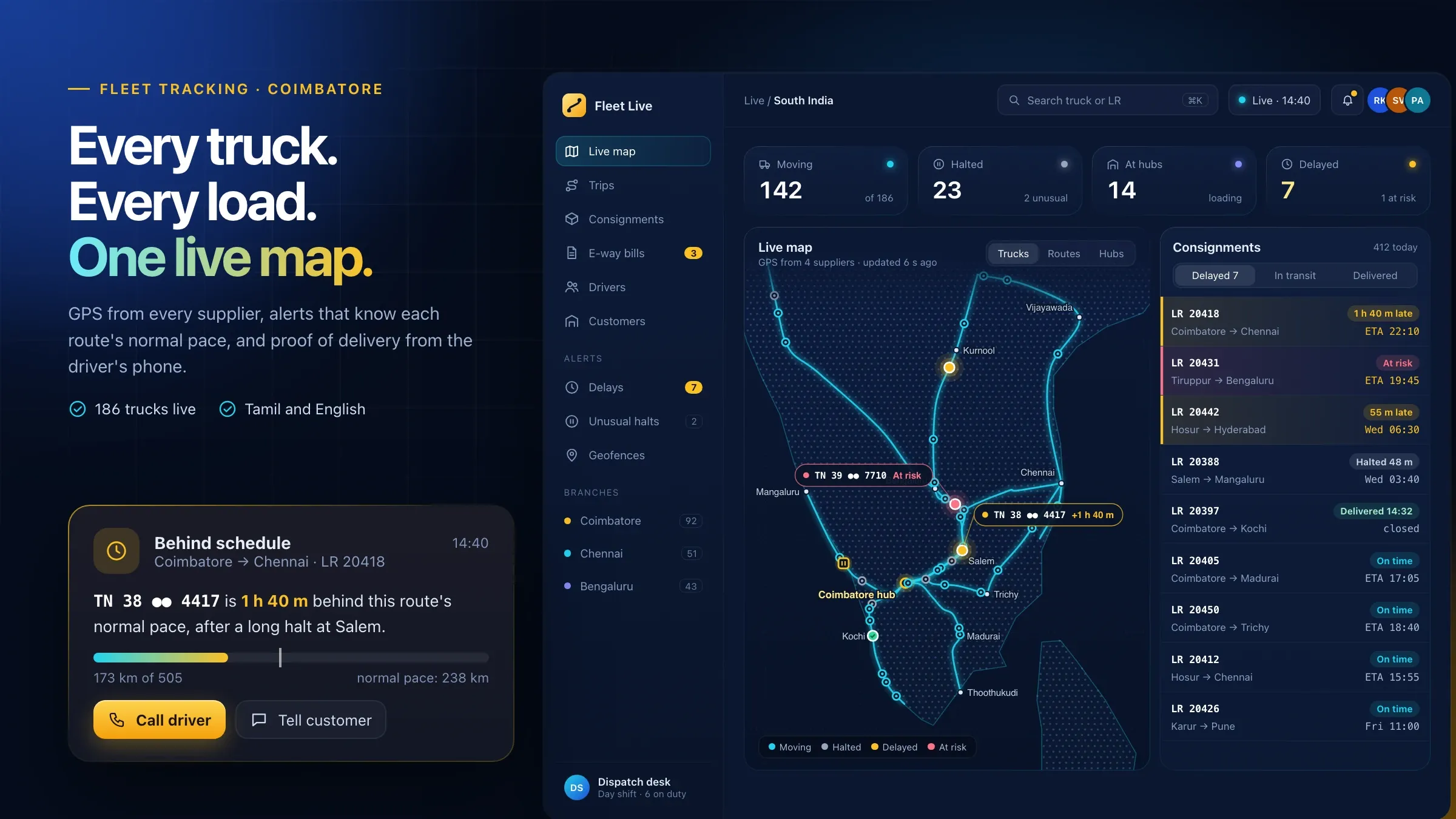 Every GPS supplier on one map For a transport company in Coimbatore, a device gateway reads the data formats of different GPS suppliers and puts every truck on one live map. Read the case study
 -
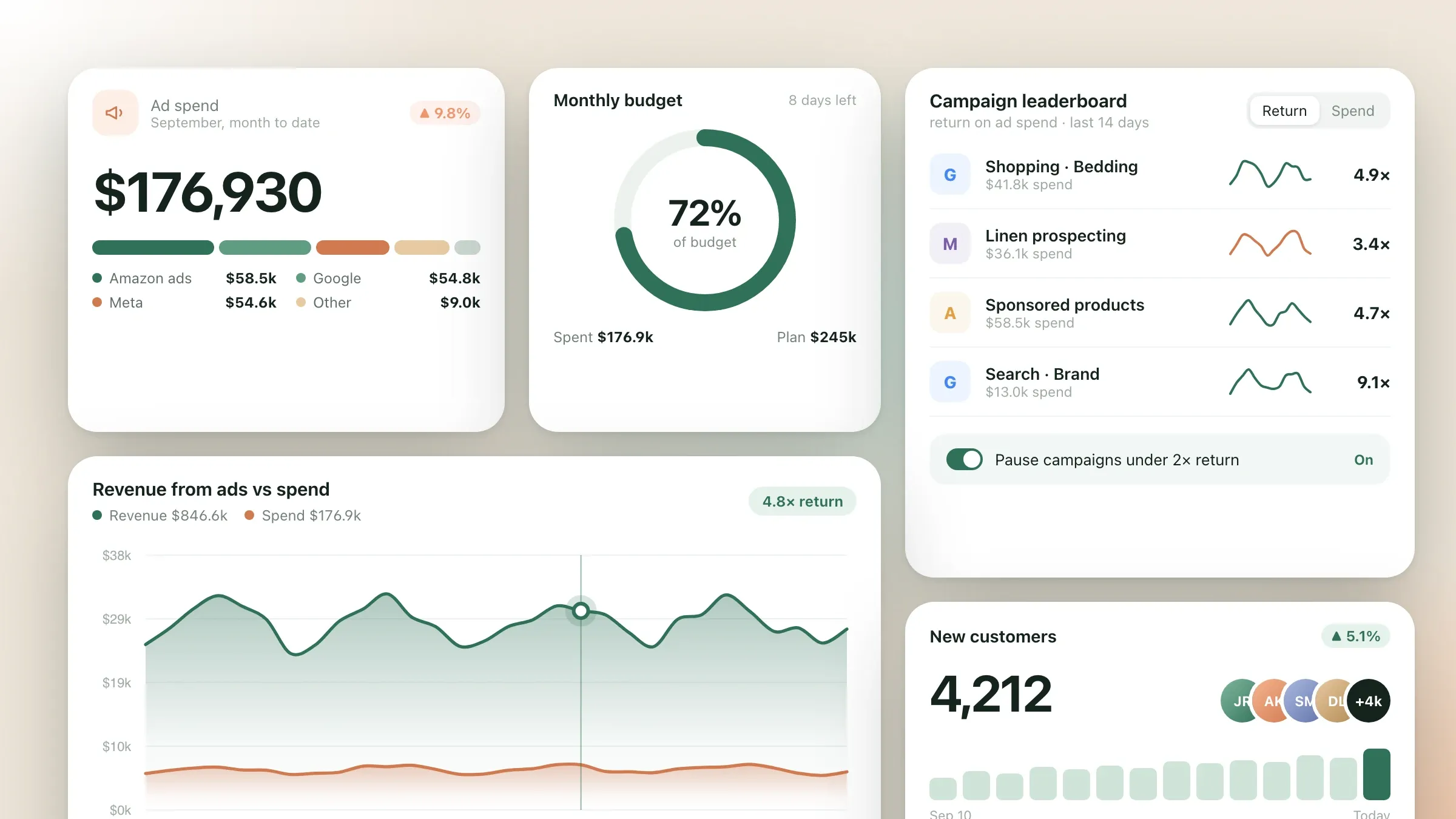 Eight tools, synced automatically For a home goods brand in Denver, the store, Amazon, Google and Meta ads, email, analytics, the warehouse system and accounting sync into one warehouse. Read the case study
What API integration means
API integration connects your software tools so data moves between them on its own. An API is the door a tool offers to other software: a way to read an order, create an invoice or update stock without a person typing it in.
Most growing businesses run on a handful of good tools that don’t talk to each other: an online store, a marketplace or two, a payment gateway, Tally, a courier, WhatsApp and a CRM. Each works well alone. The gaps between them are filled by people copying, checking and chasing, and that is where errors, delays and late nights come from.
Integration closes those gaps. Your tools stay; the retyping goes.
Ready-made connectors or a custom integration
Use a ready-made connector when one exists and fits; build when it doesn’t. Many tools offer their own plug-ins, and platforms such as Zapier or Make join popular apps without code. For simple, low-volume flows they are a good choice, and we will say so.
A custom integration pays off when volumes are high, when the rules are particular to your business, when a failure must never pass unnoticed, or when the tools are Indian or in-house software those platforms don’t cover. It also pays off when several flows share the same records: one hub with one set of IDs, logs and alerts is easier to trust than a dozen separate automations nobody owns.
Often the answer is a mix: ready-made connectors where they are solid, and custom work for the flows that matter most.
Where it pays off first
The best first flow is the one your team copies most often, with the most mistakes. Usually it is one of these:
- orders into accounts: every order from the store or billing system becomes an invoice in Tally or your accounting software;
- stock across channels: every sale updates stock wherever the item is listed;
- payments to invoices: gateway payments, refunds and settlements matched to the right orders;
- shipping: courier booking, labels and tracking updates flowing back into orders and out to customers;
- leads into the CRM: enquiries from forms, ads, IndiaMART and WhatsApp landing with their source.
A Mumbai skincare brand we built for shows several at once: Shopify webhooks keep the store’s own database in step with orders and subscriptions, Razorpay handles payments and UPI AutoPay mandates, a shipping aggregator allocates couriers, and the WhatsApp Business API carries confirmations and delivery updates.
A supermarket chain we built for in Cork shows another kind. A till integration layer connects its loyalty system to the point-of-sale system already in every store, so points and offers apply at the till, and if a store’s network drops, the shops are queued and added when it returns.
What we need from you
We need to see the copying, access to the tools, and one person who decides which tool is right when two disagree.
Seeing the copying means sitting with the people who do it: which screens they move between, what they check, and what goes wrong. Access means an admin or developer login for each tool, so we can create a dedicated key for the integration, plus a test or sandbox account where the tool offers one. The person who decides settles questions such as whether the store or Tally holds the true customer name.
We also need to know your busy moments: sale days, month end, the first of the month when invoices go out. The connections are tested at the volume they will really meet.
Mapping the data before writing code
Most integration problems are data problems, so we map before we build. For each flow we agree which tool is the source of truth for each field, how records are matched across tools, and what happens to edge cases: a part refund, a cancelled order after dispatch, a customer with two phone numbers, a product sold in packs on one channel and singly on another.
Every record gets one ID that follows it across tools, so an order in the store, its invoice in Tally, its payment in the gateway and its shipment with the courier can always be found from one another. Units, tax codes, ledgers and currencies are mapped once and tested on your real records.
Connections that don’t fail quietly
An integration that works on a quiet Tuesday is easy. The test is sale day, month end and the night a tool goes down. So every connection we build has the same safeguards.
Events arrive through webhooks where tools offer them, and through scheduled checks where they don’t, so nothing is missed if a webhook is lost. They pass through a queue that absorbs bursts. Each sync is checked before it is sent, retried with growing gaps if the other tool is busy or down, and stopped with an alert to a person if it still can’t get through. Each record carries its own ID, so a retry never creates a second order, invoice or payment.
Every attempt is logged with what moved and what came back. When a record is fixed, it can be replayed with one action instead of being typed in again.
Indian systems: Tally, GST, UPI and couriers
Many integrations in India meet the same systems, and each has its habits. Tally usually runs on a computer in the office, so we connect directly or through a small connector there. GST e-invoices and e-way bills are generated through authorised GST API providers, with the IRN and QR code returned onto the invoice. A brass components manufacturer we built for in Jamnagar generates both at dispatch and sends the invoice to Tally without retyping.
UPI and card payments arrive through gateways such as Razorpay, with settlements and refunds to reconcile. Couriers and shipping aggregators each report tracking and failed deliveries in their own way, and marketplaces and IndiaMART have their own order and lead formats. Our portfolio already includes Tally, GST e-invoicing, Razorpay, shipping aggregators and WhatsApp, which shortens the work.
When a tool has no API
Some software has no API, or one that doesn’t do what you need. That doesn’t always rule it out.
Older or in-house systems can often be reached through their database with read access, scheduled file exports, or the emails they send. Hardware can need a gateway: a transport company we built for in Coimbatore had GPS devices from different suppliers, each with its own data format, and a device gateway now reads them all onto one live map. We tell you which route is reliable enough before we build, and what it means for speed and upkeep.
Security and access
Every connection gets its own key with the narrowest permissions that do the job, never a person’s login, so it can be limited, watched and switched off on its own. Keys live in a secrets store, not in code or spreadsheets. Access is reviewed when people or partners change, and any key can be withdrawn without touching the others.
Only the fields a tool needs are sent, data is encrypted in transit, and sensitive fields such as phone numbers, bank details and ID numbers are masked in the logs.
Measuring it and keeping it running
Before we build, we agree what success looks like: how many records the flow moves without a person, how fast they arrive, how many need attention, and how many hours of copying stop.
After launch, a short report shows those numbers each month, along with every failure and what caused it. Alerts go to a named person for each flow, by email, Slack or WhatsApp, with the record and the error attached, so every fix starts from the facts. Tools change their APIs, retire old versions and add new limits, so we watch for those changes and update connections before they break. When one flow is settled, the next is usually quicker, because it plugs into the same hub, IDs and logs.
How we work with you
From the first call to running it
- Start
Map the copying
We list every place your team moves data by hand, how often and what it costs, and pick the flow that saves the most.
- Build
Build the connection
We map fields between the tools, build the sync with checks, retries and logs, and test it on copies of your real records.
- Pilot
Run it beside your team
The sync runs while your team still checks its output, until the records match every time.
- Launch
Stop the retyping
Manual entry stops for that flow, and alerts go to the person who should know when something fails.
- Every month
Watch and extend
We watch the logs, update connections when a tool changes its API, and add the next flow.
Safe and in your control
Only the access it needs
Each connection gets its own key with the narrowest permissions that do the job, never a person's login.
Keys kept out of sight
API keys and tokens live in a secrets store, never in code or spreadsheets, and can be changed at any time.
No silent failures
Every failed sync retries, and anything that can't recover alerts a person with the record attached.
No duplicates on retry
Each record carries its own ID, so a retry never creates a second order, invoice or payment.
Every sync on record
What moved, when, from where and what changed is logged and can be searched.
Personal data kept to the minimum
Only the fields a tool needs are sent, data is encrypted in transit, and sensitive fields are masked in logs.
Time and cost
The cost of an integration depends on the tools involved and how much has to happen between them, not on a package. Most businesses start with the one flow their team retypes most, then add the next. After the first call we send a written plan and a quote.
Which tools
Tools with a modern, documented API connect quickly. Older or in-house software may need a small bridge, a database link or a file exchange.
How many flows
Orders to accounts is one flow; stock, payments and returns are others. Each is built and tested on its own.
Which way data moves
One-way syncs are simpler. Two-way syncs need rules for which tool wins when both change.
How fast it must be
Updates as they happen cost more to build and run than an hourly or nightly batch.
Volume and spikes
Sale days and month ends need queues that absorb bursts without losing anything.
Running costs
Hosting and some tools' own API charges follow how much data moves.
Built with
Chosen for each project, never by habit
Questions and answers
12 answered
What is API integration?
API integration connects software tools through their APIs, the doors each tool offers to other software, so data moves between them automatically. An order in your store becomes an invoice in Tally, a payment marks that invoice paid, and the courier's updates reach the customer, without anyone retyping.
Which tools can you connect?
Most business software: online stores such as Shopify and WooCommerce, marketplaces, Tally, Zoho Books and QuickBooks, payment gateways such as Razorpay, Stripe and PayPal, couriers and shipping aggregators, WhatsApp, CRMs such as HubSpot, ERPs, GST e-invoicing through authorised providers, and your own software.
Can you integrate with Tally?
Yes. Tally can receive sales, purchases, receipts and payments from your store, billing software or ERP, and send ledgers and balances back where needed. Depending on how Tally is set up, we connect directly or through a small connector on the computer that runs it.
What if a tool has no API?
It can often still be connected: through its database with read access, scheduled file exports, or emails it sends. We tell you which way is reliable enough before we build, and what it means for speed and upkeep.
Why not use Zapier or Make?
Use them when they fit: for a few simple flows between popular apps, they are quick and cheap, and we will tell you when that is all you need. Build custom when volumes are high, your rules are particular, a failure must never go unnoticed, or the software is Indian or in-house and those platforms don't support it.
What happens when a sync fails?
It retries on its own. If it still can't get through, it stops, alerts the right person with the record attached and waits, so nothing is lost or sent twice. Every attempt is logged, and fixed records can be replayed with one action.
Is our data safe when it moves between tools?
Each connection has its own key with only the access it needs, keys are kept in a secrets store, data is encrypted in transit and sensitive fields are masked in the logs. Only the fields a tool needs are sent.
How much does API integration cost?
It depends on the tools, how many flows you need, whether data moves one way or both, how fast it must arrive and how much moves. Starting with the one flow your team retypes most keeps the first stage small. After the first call we send a written plan and a quote.
How long does an integration take?
One flow between two modern tools with good APIs is a matter of weeks. Several flows, two-way syncs or older software take longer. The written plan after the first call sets out the timeline.
Can you build an API for our own software?
Yes. We design and document an API for your system, with a key and limits for each partner or app, versions so changes don't break anyone, and logs of every call.
Do you integrate software for businesses outside India?
Yes. FIRELIFE Ventures works with small and mid-size businesses worldwide, from Rajkot, India, on India time. Our portfolio includes integration work for clients in the United States, Ireland and India.
What happens after the integration goes live?
We watch it with you: we review failures and alerts, update connections when a tool changes its API, and add new flows and tools as you need them.
Tell us what should work better
Write a few lines about what slows you down today. We reply with our questions, a first plan and how we would start.
Write to us