Build something new ERP development
One system for your whole operation
We build ERP software around the way your business runs: sales, purchase, stock, production, dispatch and accounts in one system, so every department works from the same live numbers and nothing is typed twice.
- We start with the department that hurts most
- Your accounts can stay in Tally
- English, Hindi, Gujarati and more
Sound familiar?
What we hear before we start
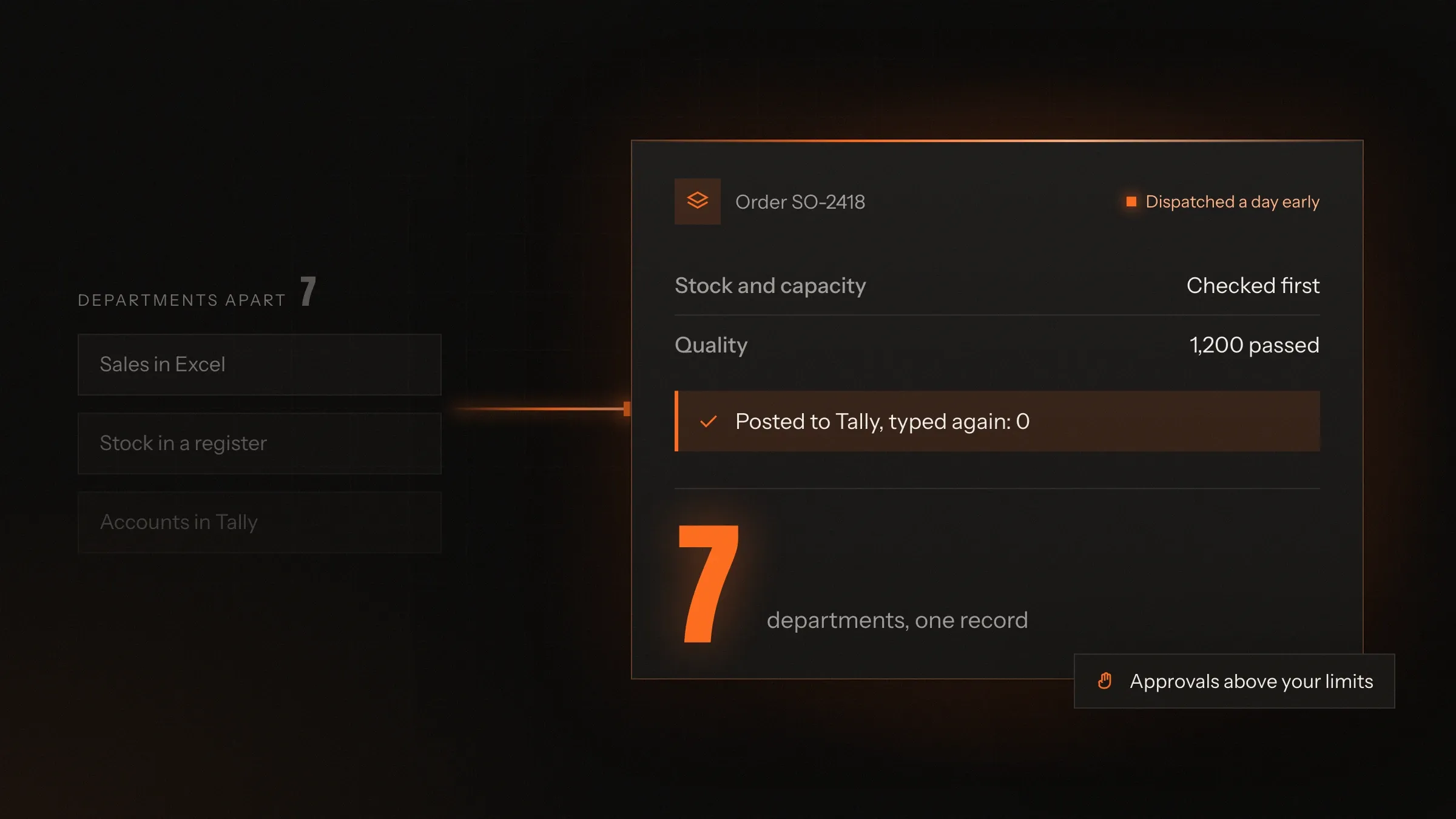
- Sales promises a date, and only then asks the factory or the warehouse.
- Stock in the system and stock on the shelf never match.
- Every order is typed three times: in the order book, the dispatch register and Tally.
- Each department has its own spreadsheet, and only the owner sees all of them.
- Month end is a hunt for missing bills, challans and receipts.
- The big ERP packages wanted your team to change how it works to fit them.
What changes
-
Today: Each department keeps its own sheet.
After: Sales, purchase, stores, production and accounts work in one system.
-
Today: Orders are typed again at every step.
After: An order entered once flows to production, dispatch and the invoice.
-
Today: Stock is counted when someone has time.
After: Every receipt, issue, sale and transfer updates stock as it happens.
-
Today: Invoices, e-way bills and challans are made by hand.
After: GST e-invoices, e-way bills and job work challans come from the records.
-
Today: The owner phones around for the day's position.
After: Orders, stock, dues and cash sit on one screen, live.
What it does for you
-
Sales orders and quotes
Quotations, orders and delivery dates from one record, with price lists, discounts, credit limits and GST.
For exampleAn order over a dealer's credit limit waits for the owner's approval instead of being refused.
-
Purchase and suppliers
Purchase requests, orders, goods received against the order and supplier bills matched to what actually arrived.
For exampleA supplier bills for 500 kg but 480 kg arrived, and the gap is flagged before payment.
-
Stock you can trust
Stock by item, batch, location and warehouse, with transfers, reorder levels and counts shelf by shelf.
For exampleReorder suggestions come from how fast each item really moves, not from a fixed number.
-
Production and job work
Bills of materials, routings, job cards and material issued against each batch, including work sent out to job workers.
For exampleParts sent out for plating travel with a job work challan and are tracked out and back by weight.
-
Dispatch and GST paperwork
Packing lists, GST e-invoices and e-way bills generated from the records, with dispatch details sent to the customer.
For exampleAt dispatch, the e-invoice and e-way bill are made in one step and the invoice reaches the books.
-
Accounts that match
Sales, purchases, receipts and payments posted to Tally or your accounting software, or kept in the ERP itself.
For exampleMonth end starts from entries already in the books, not from a pile of bills.
-
Approvals and roles
Who may change a price, approve a purchase or release a dispatch, set by role, with every change logged.
For exampleA purchase over the limit goes to the owner's phone for a one-tap approval.
-
The owner's view
Orders, stock, production, dues and cash on one screen, with a report for each department.
For exampleEach morning the owner sees late orders, low stock and payments due this week.
How it works
-
An order comes in
Entered once, from a quotation, a purchase order or a dealer's app.
-
Stock and capacity are checked
The ERP checks material and free capacity before a date is promised.
-
Work is planned and bought
Production is scheduled, and missing material becomes a purchase request.
-
The floor records progress
Material issued, output and quality checks are recorded where the work happens.
-
Goods go out
The packing list, e-invoice and e-way bill come from the records.
-
The books are updated
Invoices, receipts and payments reach your accounts without retyping.
Where we've built it
4 from our portfolio
-
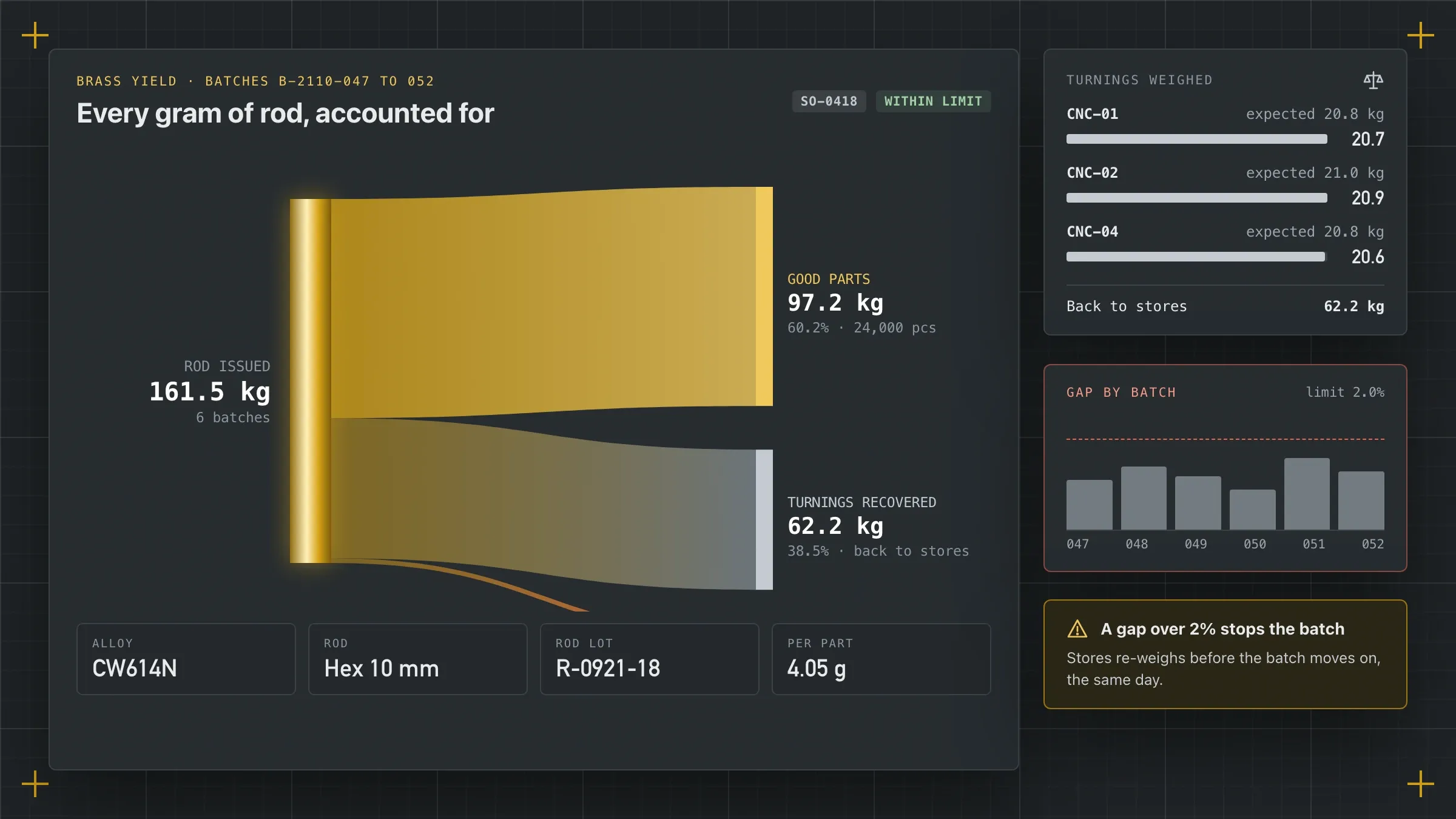 From purchase order to truck For a brass components manufacturer in Jamnagar, one system runs orders, planning, job cards, quality and dispatch, and accounts for every gram of brass. Read the case study
 -
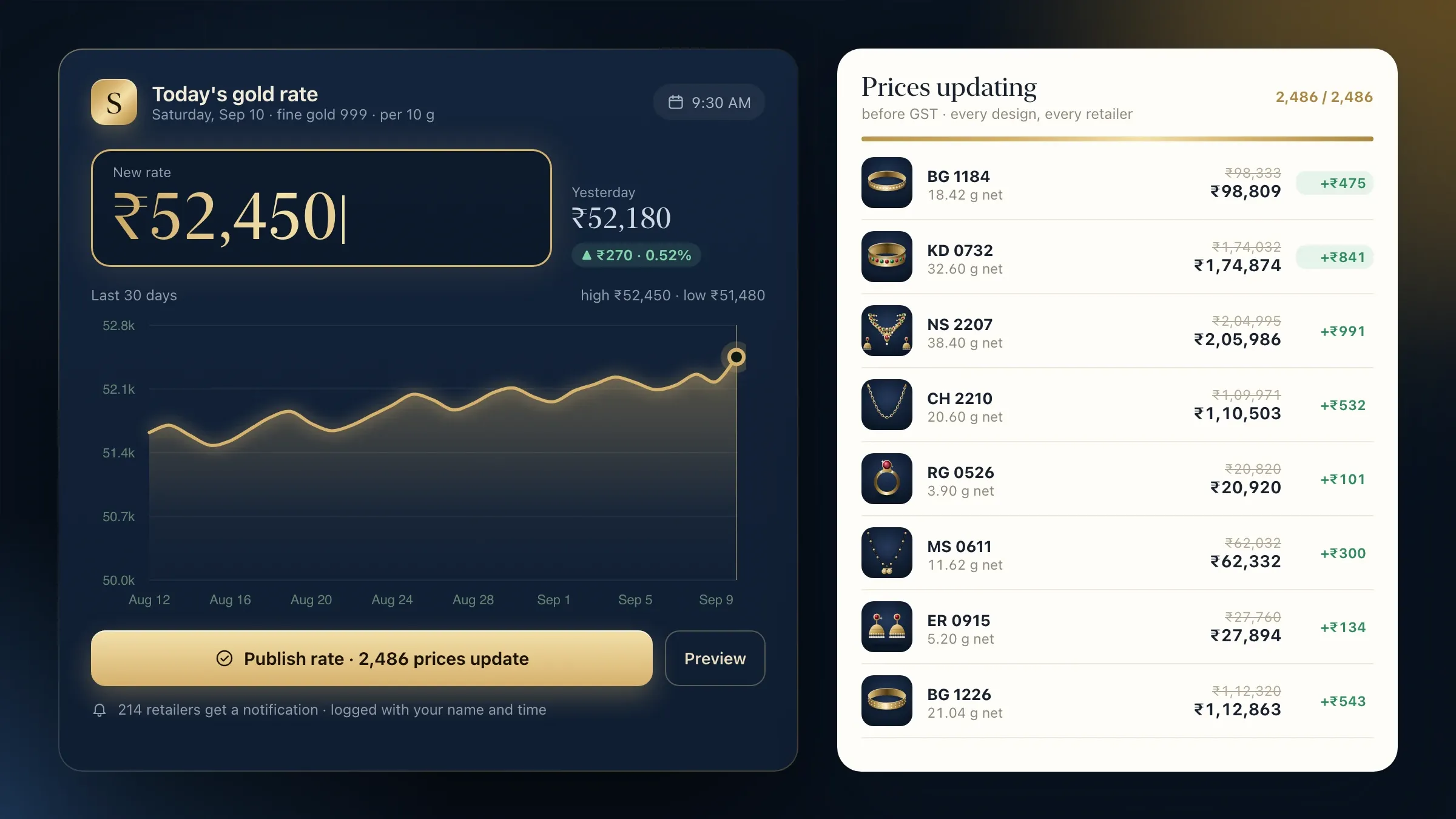 Prices, ledgers and production together For a gold jewellery manufacturer and wholesaler in Rajkot, prices, metal and cash ledgers and production run from one system that matches the books. Read the case study
 -
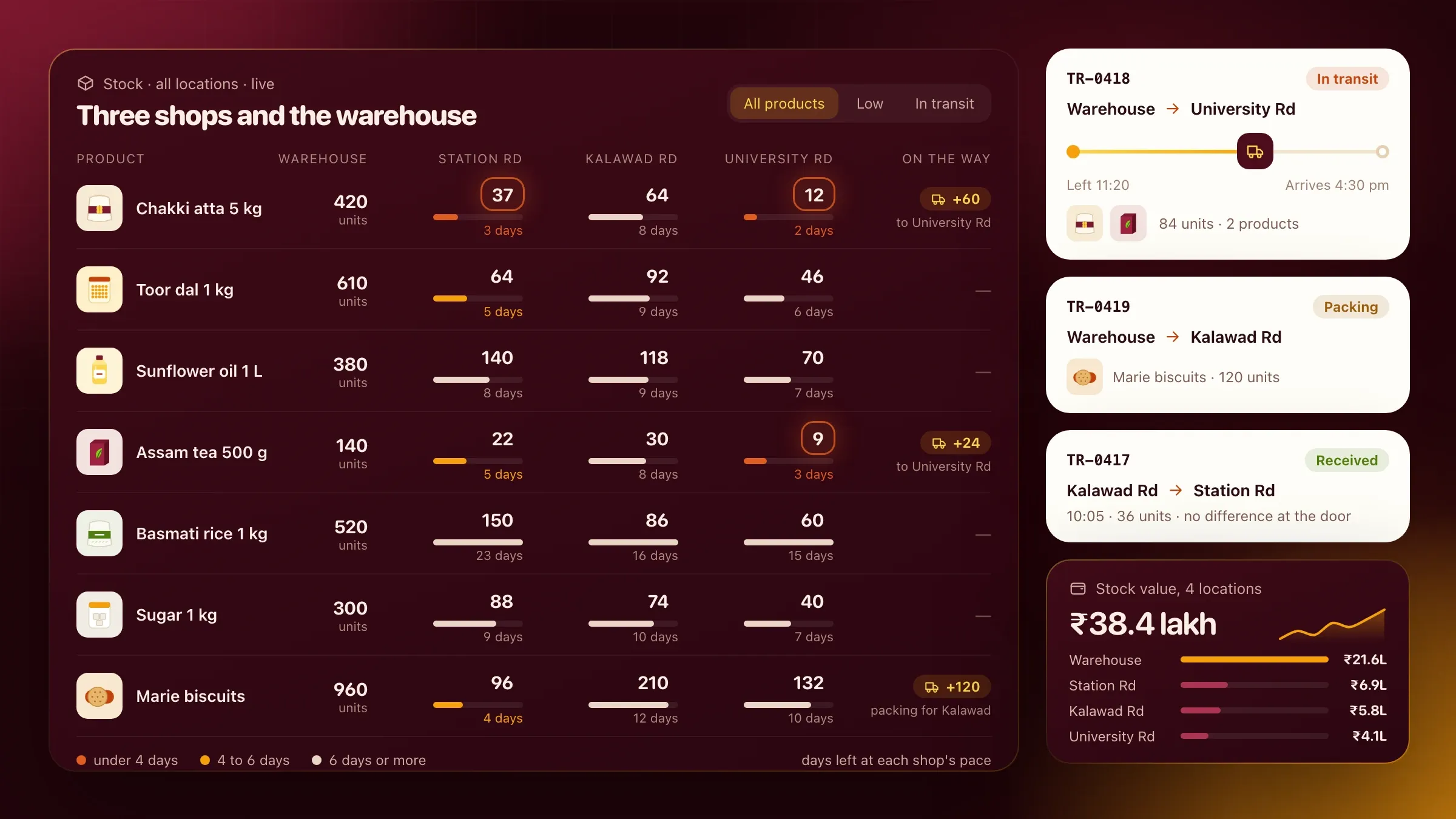 Ember POS, our own inventory software Our inventory and POS billing software, in development: sales, stock and purchases kept in step across shops and warehouses, with GST invoices. See the product
 -
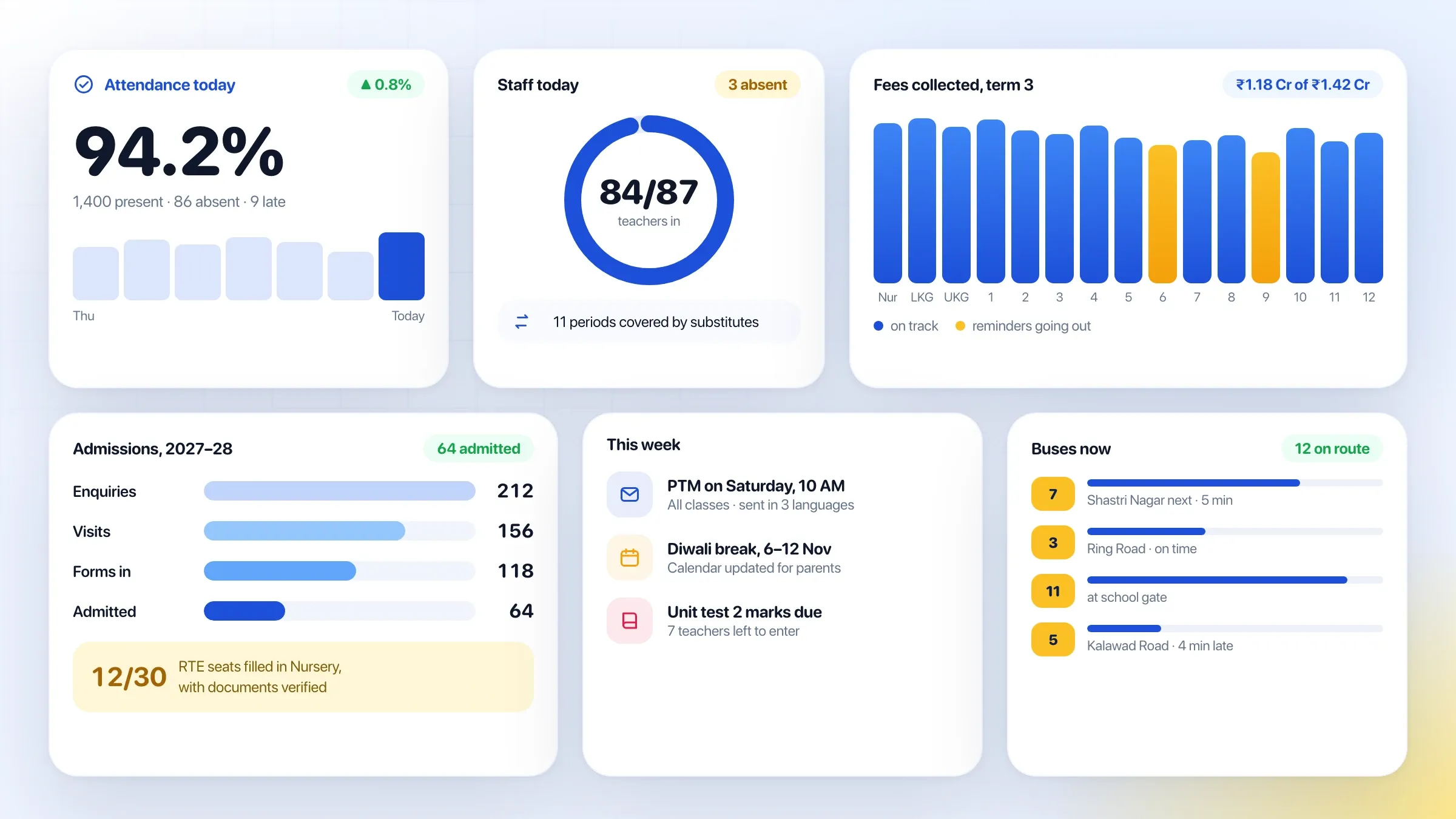 Beacon School ERP, our own school ERP Our school ERP, in development: admissions, attendance, fees, exams and parent updates in one school management system, with a parent app. See the product
What an ERP is, in plain words
An ERP is one system that every department works in, so an order, a stock movement or a payment is recorded once and seen by everyone who needs it. Sales, purchase, stores, production, dispatch and accounts stop keeping their own versions of the truth.
Most growing businesses don’t decide to buy an ERP. They arrive at the need. The order book is in one spreadsheet, stock in another, production on a whiteboard and accounts in Tally. Each works on its own, but the gaps between them cost money: dates promised without checking capacity, stock that exists only on paper, invoices typed again from dispatch notes, and an owner who is the only person who sees the whole picture.
ERP development closes those gaps with software built around your own work, rather than a package your team has to bend around.
Build, buy or build in stages
Buy a packaged ERP if it fits your processes with little change. Build one when your work is particular enough that a package would force people to work around it. We tell you which at the first call.
A custom ERP pays off when the way you make, price or move goods is specific to your trade: job work sent out and back, metal or batch tracking, dealer and distributor pricing, rates that change daily, or production routed across particular machines. It also pays off when you want only what you use, in the language your floor reads, without paying for modules nobody opens.
The safest way to build one is in stages. We start with the department that hurts most, put it live and let it prove itself, then add the next. Each stage is useful on its own, so you are never waiting for a big-bang launch.
If your main need is billing and stock across shops and warehouses, our own inventory and POS billing software, Ember POS, may be enough. It is in development, and businesses that want early access can ask.
Where an ERP pays off first
The first gains usually come from three places: promising dates the operation can keep, knowing what stock you really hold, and never typing the same order twice.
A brass components manufacturer we built for in Jamnagar shows all three. Orders arrived by email and phone, production was planned on a whiteboard and invoices were typed again into the accounting software. Now each order is entered once from the buyer’s purchase order, the system checks rod stock and machine capacity before suggesting a dispatch date, and the invoice reaches Tally straight from dispatch.
For traders and distributors, the first win is usually stock and pricing. A gold jewellery wholesaler we built for in Rajkot runs prices, metal and cash ledgers and production from one system that matches its books exactly.
What we need from you
We need time with the people who do the work, your real documents, and one person who can decide.
The people who take orders, buy material, run the stores, plan production and post the accounts show us how work really moves, including the shortcuts nobody wrote down. Real documents, such as purchase orders, job cards, challans, invoices and the spreadsheets everyone relies on, let us design screens that match your work rather than a template.
One person on your side, usually the owner or a director, settles disagreements between departments and decides the order in which they move over. We also need access to your Tally data or accounting exports, your GST setup and any machines, scanners or printers the system should use.
Getting the masters right
An ERP is only as good as its master data: the item list, units, bills of materials, routings, customers, suppliers, price lists and tax codes. Get these right and everything built on them works; get them wrong and every report is wrong too.
So before go-live we clean and import them with your team. Duplicate items are merged, units are made consistent (kilograms, pieces, boxes and how they convert), HSN codes and GST rates are checked, and each bill of materials is tested on a real order. Opening stock is counted and loaded on a fixed day, and open orders and balances move across with it.
Codes matter too. Items get codes your team can read and your printers can label, and batches or lots get numbers that follow the material from receipt to dispatch, so any finished part can be traced back to what it was made from.
This step is unglamorous, and it is the one most worth doing slowly. We give it the time it needs.
Designed for each desk, counter and machine
People use an ERP only if it makes their own job easier, so each role gets screens built for its work.
Sales sees customers, prices, credit and promised dates. Stores sees receipts, issues and transfers, with barcode or QR scanning. Supervisors on the floor use tablets with large buttons: scan a batch, see its job card, record output and rejections. Accounts sees bills to match, receipts to post and dues to chase. The owner sees all of it on one screen.
Approvals follow the same thinking. A discount beyond a salesperson’s limit, a purchase over a set value or a dispatch to a customer past their credit limit waits for the right person, who approves it from a notification on their phone. Nothing waits for a signature on paper.
Screens can be in English, Hindi or Gujarati, and devices on the floor or in the warehouse keep working through short network drops and send their records when the connection returns.
GST, Tally and the paperwork
In India, much of an ERP’s value is in the paperwork it produces correctly. GST e-invoices and e-way bills are generated from the dispatch records through an authorised GST API provider, with the IRN and QR code on the invoice. Material sent to job workers travels with a job work challan, and the figures for the ITC-04 return are ready when it is due.
Many businesses want their accounts to stay in Tally, where their accountant works. The ERP sends sales, purchases, receipts and payments to Tally, so the books match operations without retyping. If you would rather keep accounts in the ERP, that works too.
Rolling it out one department at a time
An ERP is rolled out, not switched on. Each department moves over in turn, starting with the one agreed at the start.
That department works in the ERP beside its old sheets until both show the same figures and the team trusts the new screens. People are trained at their own desks and machines, team leaders first, so they can help the rest. Only then are the old sheets retired and the next department begins. Training is short and practical: each person learns the few screens they use, on their own orders.
Before we start, we agree how success will be measured: how often promised dates are met, how far system stock differs from a physical count, how many documents are typed twice, and how long month end takes. Those measures are reported as each department goes live.
After launch: running and extending
An ERP keeps changing because your business does. New products, customers, plants and rules arrive, and GST and e-invoicing requirements change. We run the ERP with you, keep it current and fix what slows people down.
When the core is settled, we add what comes next: a dealer ordering app, dashboards for the owner, HR and payroll linked to production, or a link to your online store. Each addition builds on the same records, so each is quicker than the last.
Reports grow with use as well. Once the records are trusted, questions such as margin by customer, material yield by batch or on-time delivery by product are answered from the ERP instead of a separate spreadsheet.
How we work with you
From the first call to running it
- Start
Map the operation
We follow real orders through every department, from enquiry to payment, and agree which department moves first and how we will measure it.
- Build
Build the first module
We build the part that hurts most, often orders and stock or production, connect it to Tally and import your items, customers, suppliers and opening stock.
- Pilot
Run it beside the old way
That department works in the ERP alongside its old sheets until the figures agree and the team trusts it.
- Launch
Department by department
Each next department moves over in turn, with people trained at their own desks, counters and machines.
- Every month
Run and extend
We review what is used, fix what slows people down, and add the next department or report.
Safe and in your control
Roles for every desk
Sales, stores, production and accounts each see and change only what their work needs.
Every change on record
Prices, stock adjustments, approvals and deletions record who made them and when.
Approvals where money moves
Discounts, purchases and credit beyond set limits wait for the right person's approval.
Works through network drops
Shop-floor and warehouse devices keep working offline and send their records when the connection returns.
Checked before the old way goes
Each department runs in parallel until its figures match, and only then are the old sheets retired.
Backed up and yours
Data is encrypted, backed up and kept in the region you need, and can be exported whenever you want.
Time and cost
The cost of an ERP depends on how many departments it covers and how particular your processes are, not on a package. Most businesses start with one or two modules, see them work, then add the next. After the first call we send a written plan and a quote for the first stage.
How many departments
Orders and stock alone is a smaller build than everything from sales to dispatch to accounts.
How you make or move things
Trading is simpler. Production with routings, batches, job work and quality checks adds rules and screens.
Your masters and old data
Clean item, customer and supplier lists import quickly; years of duplicates take time to clean.
Links to other systems
Tally, GST e-invoicing, e-way bills, your website or marketplaces each add a connection to build and test.
Devices on the floor
Tablets, barcode or QR scanners and label printers in the warehouse or factory add setup and training.
How many locations
Each extra branch, warehouse or plant adds its own stock, rules and people to train.
Built with
Chosen for each project, never by habit
Questions and answers
13 answered
What is ERP development?
ERP development is building enterprise resource planning software around the way your business runs: one system where sales, purchase, stock, production, dispatch and accounts share the same records. Instead of bending your work to fit a packaged ERP, the system follows your processes.
Should we build a custom ERP or buy one?
Buy one if a packaged ERP fits your processes with little change. Build one when your work is particular, such as production with job work, batch or metal tracking, dealer pricing or trade rules, or when a package would force your team to work around it. Building one department at a time also spreads the cost.
How much does ERP development cost?
It depends on how many departments it covers, how you make or move goods, how clean your data is, which systems it connects to and how many locations you run. Starting with one module keeps the first stage focused. After the first call we send a written plan and a quote for the first stage.
How long does it take to build an ERP?
A focused first module, such as orders and stock, is a matter of weeks. A full ERP across every department is built and rolled out in stages over a longer period, and each stage goes live and proves itself before the next one starts.
Can the ERP work with Tally?
Yes. Many businesses keep their accounts in Tally and let the ERP send it sales, purchases, receipts and payments, so the books match operations without retyping. If you prefer, the accounts can live in the ERP itself.
Does it generate GST e-invoices and e-way bills?
Yes. E-invoices and e-way bills are generated from the dispatch records through an authorised GST API provider, with the IRN and QR code printed on the invoice and the e-way bill attached to the shipment.
Can we start with one department?
Yes, and we recommend it. We start where the pain is greatest, usually orders and stock or production planning, run it beside the old way until the figures match, then add the next department.
Can our existing data move into the new ERP?
Yes. Items, customers, suppliers, price lists, opening stock, open orders and balances are imported and checked, with duplicates merged on the way in.
Will it work on the shop floor and in the warehouse?
Yes. Supervisors and storekeepers use tablets or phones with QR or barcode scanning, with large buttons and few fields, and the devices keep working through short network drops.
Can the ERP work in Hindi and Gujarati?
Yes. Screens for the shop floor, the warehouse and the office can be in English, Hindi and Gujarati, so each person works in the language they read best.
Is an ERP only for manufacturers?
No. Traders, distributors, wholesalers, service companies and multi-branch retailers use ERPs too. The modules differ: a distributor needs pricing, stock and dispatch, while a manufacturer adds production and quality.
Do you build ERP software for businesses outside India?
Yes. FIRELIFE Ventures works with small and mid-size businesses worldwide, from Rajkot, India, on India time. Outside India we build invoicing and tax to your local rules and connect the ERP to the accounting software you already use.
What happens after the ERP goes live?
We run it with you: we fix what slows people down, keep it current with GST and other rule changes, and add the next department, location or report when you are ready.
Tell us what you want to build
Write a few lines about the idea and who it is for. We reply with our questions, a first plan and how we would start.
Write to us