Build something new POS and inventory software
Bill faster, never run out of stock
We build POS and inventory software for shops and distributors: fast GST billing at the counter that keeps going when the internet drops, stock that matches the shelf in every shop and warehouse, and reorder alerts before you run out.
- We start at your counter, on a busy day
- Built around how your trade sells
- Ready-made where it fits, custom where it counts
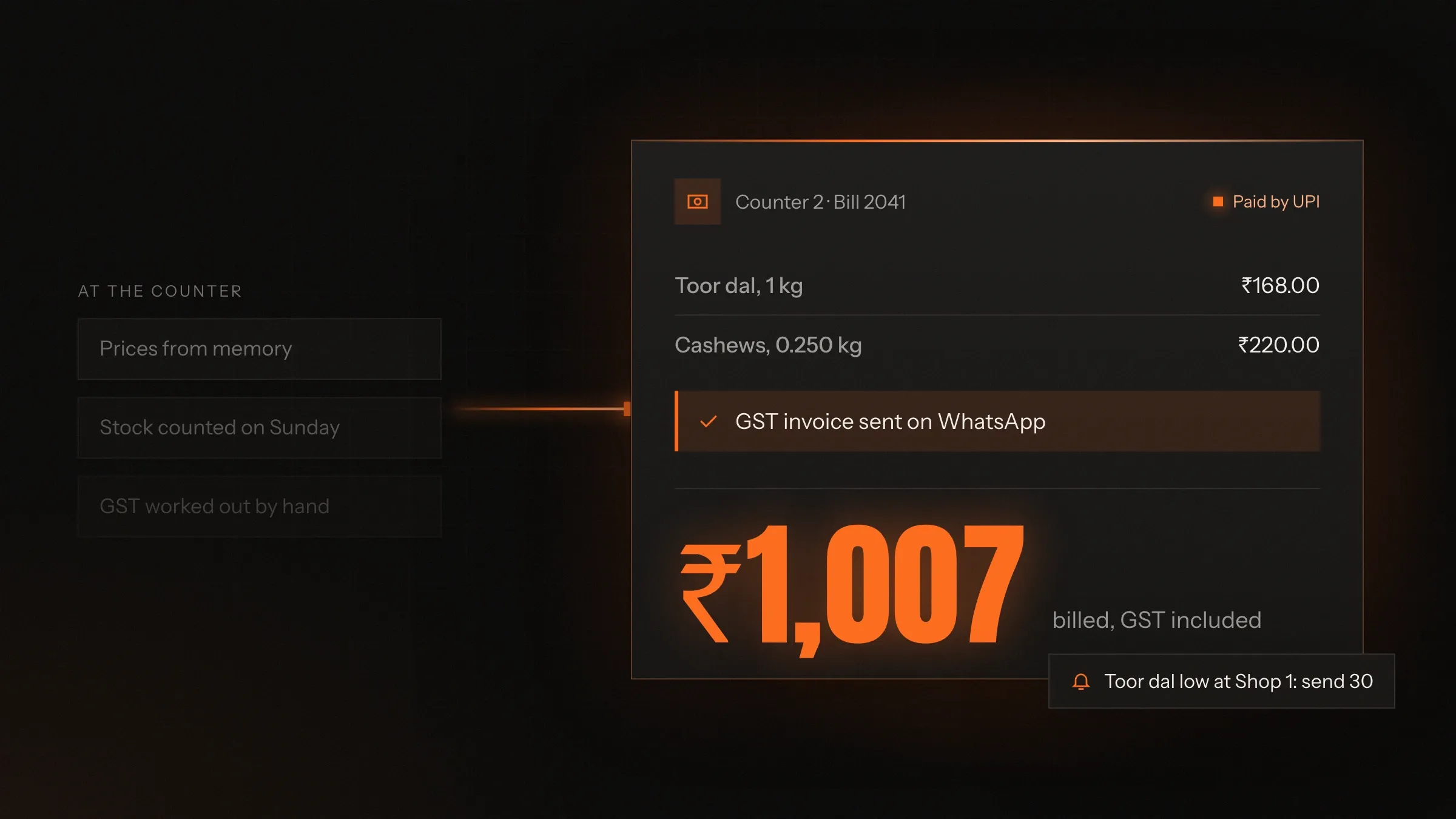
Sound familiar?
What we hear before we start
- The queue grows while the cashier types item codes and works out GST by hand.
- Your billing and your stock register never agree by the end of the week.
- Fast sellers run out without warning, and slow ones fill the back room.
- Each shop phones the others to ask what stock they have.
- Credit customers' dues live in a notebook, and reminders depend on memory.
- The internet drops, and the counter stops billing.
What changes
-
Today: Item codes are typed and GST is worked out by hand.
After: Scan, weigh, take UPI and print the GST invoice in seconds.
-
Today: Stock is counted once a month and wrong by the next morning.
After: Every sale, return and transfer updates stock the moment it happens.
-
Today: You find out something ran out when a customer asks for it.
After: Reorder alerts arrive while there is still time to restock.
-
Today: Supplier bills are checked against deliveries from memory.
After: Each supplier bill is matched to what actually arrived.
-
Today: Credit dues are chased by phone, when someone remembers.
After: Each credit customer has a ledger and a WhatsApp reminder with a UPI link.
What it does for you
-
Billing at the counter
Scan barcodes, weigh loose items, apply offers and take UPI, card, cash or a mix, with the GST invoice printed or sent on WhatsApp.
For exampleA shopper scans the UPI QR on the customer display, and the bill closes itself once the payment is confirmed.
-
Stock across shops and warehouses
Stock for every location in real time, with transfers sent and received in the system, so nothing goes missing in transit.
For exampleA shop out of size 9 sees two pairs at the branch across town and requests a transfer.
-
Batches, expiry, sizes and serials
Batch and expiry dates for pharmacies and groceries, sizes and colours for apparel, serial and IMEI numbers for electronics.
For exampleA pharmacy sells the strip that expires first and sees next month's expiries today.
-
Purchases and reorders
Purchase orders, goods received against them, supplier bills matched, and reorder suggestions from how fast each item really sells.
For exampleOn Monday the system suggests a bigger order of a fast-moving biscuit and none of one that has slowed.
-
Credit customers and khata
A ledger and credit limit for each customer, with every bill and payment, and WhatsApp reminders that carry a UPI link.
For exampleA contractor gets a reminder for last month's dues and pays from the link that evening.
-
Billing that works offline
The counter keeps billing when the internet drops, and syncs every bill and stock change when the connection returns.
For exampleThe line drops in the evening rush; billing carries on and catches up when it is back.
-
Reports and the books
Sales by shop, product and staff, margins by category, and sales and purchases ready for your accountant or Tally.
For exampleThe owner checks yesterday's sales for every shop on a phone before opening.
-
The counter and the website in step
One stock count for your counters, your online store and the marketplaces you sell on.
For exampleThe last jacket sells in the shop and shows as sold out on the website straight away.
How it works
-
Products go in
Your catalogue is imported with prices, GST rates, HSN codes, variants and barcodes, and labels are printed for anything without one.
-
The counter bills
Scan, weigh, apply offers and take payment by UPI, card or cash.
-
Stock moves
Each sale, return and transfer updates the shop's stock and the totals at once.
-
Goods arrive
Deliveries are received against the purchase order, and the supplier's bill is matched to what came.
-
The system warns you
Low stock, expiring batches and overdue credit show up before they cost you.
-
The books close
Sales, purchases and payments go to your accountant or Tally without retyping.
Where we've built it
4 from our portfolio
-
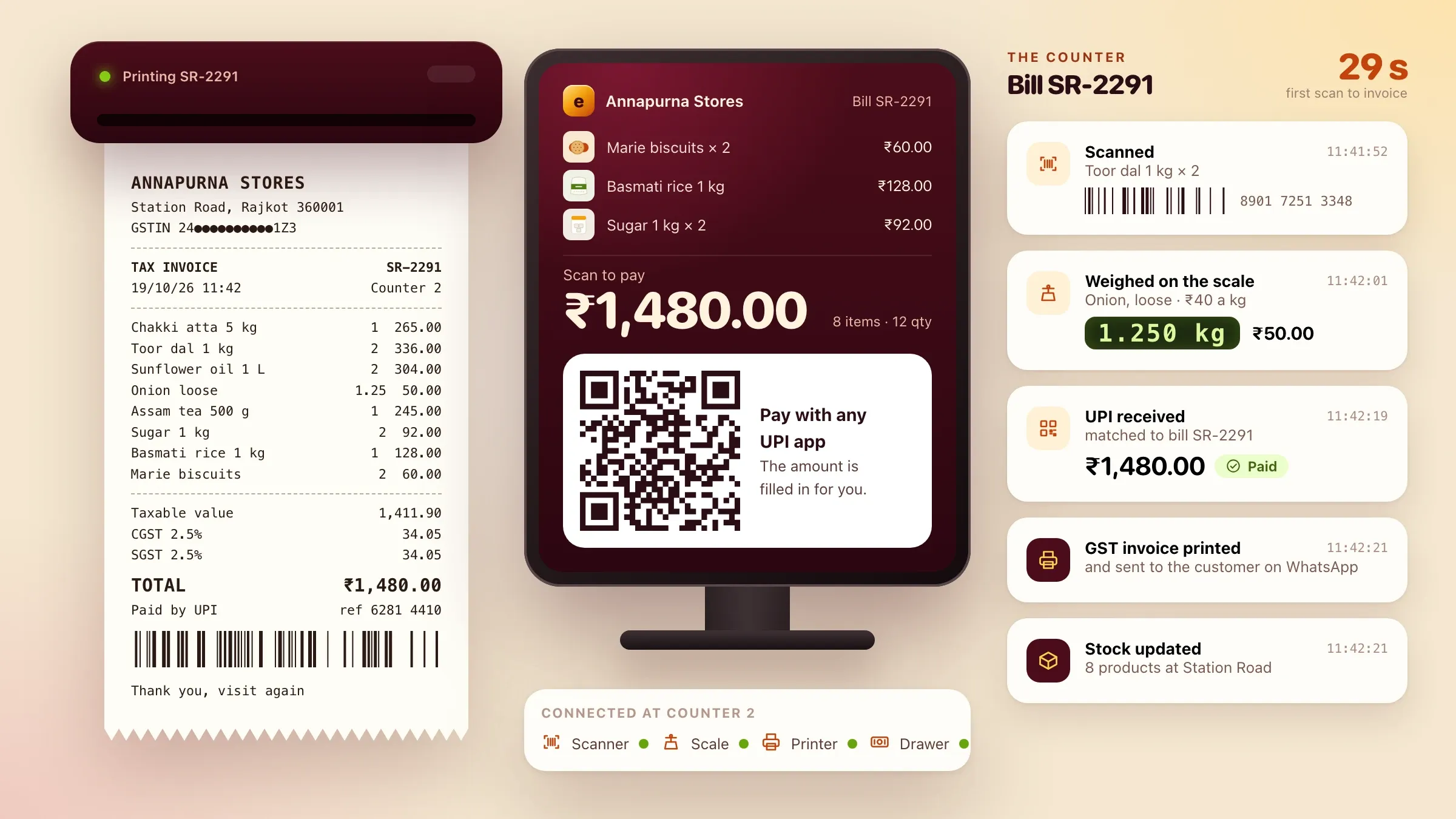 Ember POS, our own billing and stock software Our own inventory and POS billing software, in development: fast GST billing that works offline, stock in step across shops and warehouses, credit customers, batches and expiry. See the product
 -
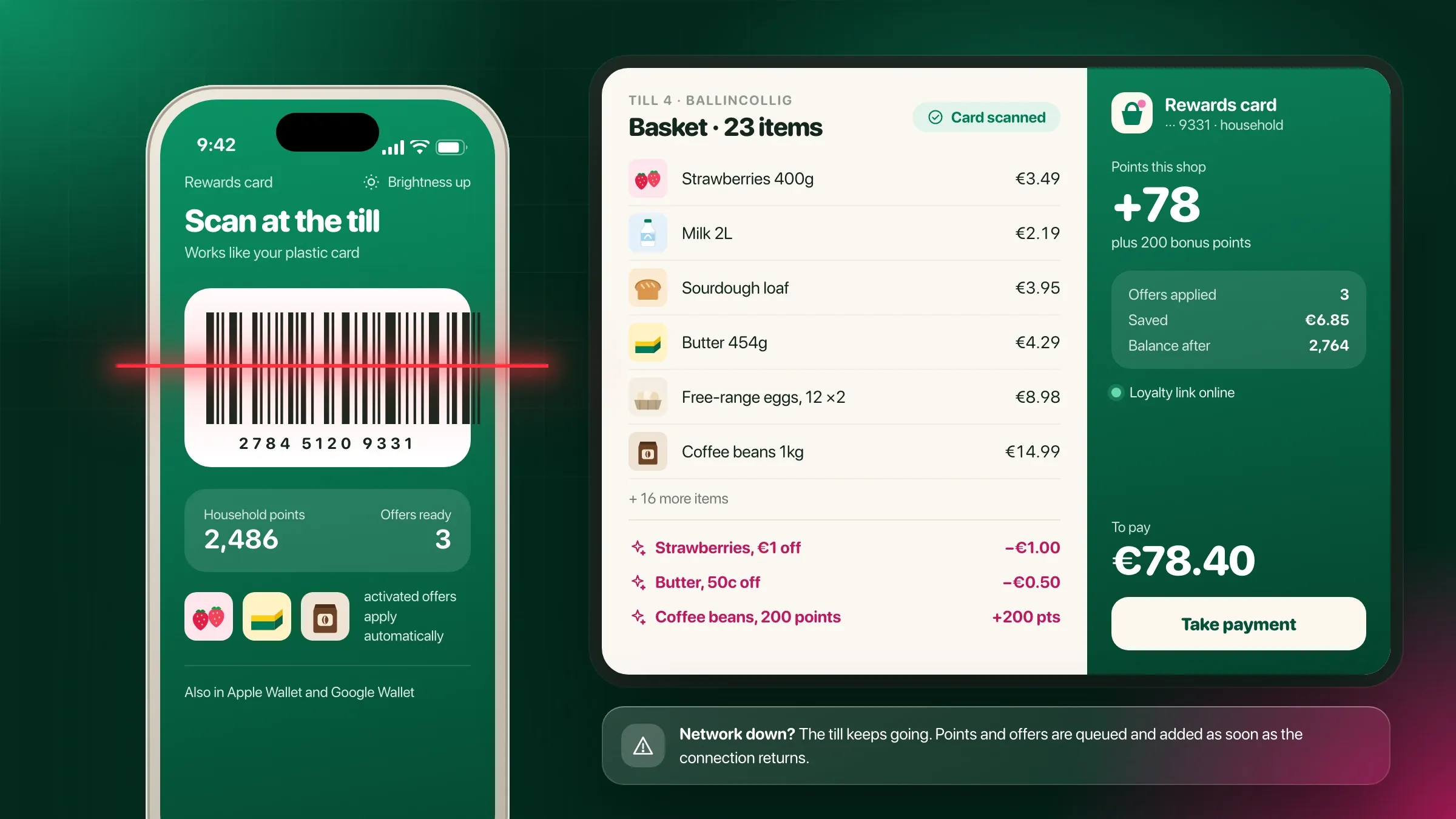 Connected to the tills already in store For a supermarket chain in Cork, a loyalty system linked to the existing tills, which keep working and queue the points when the network drops. Read the case study
 -
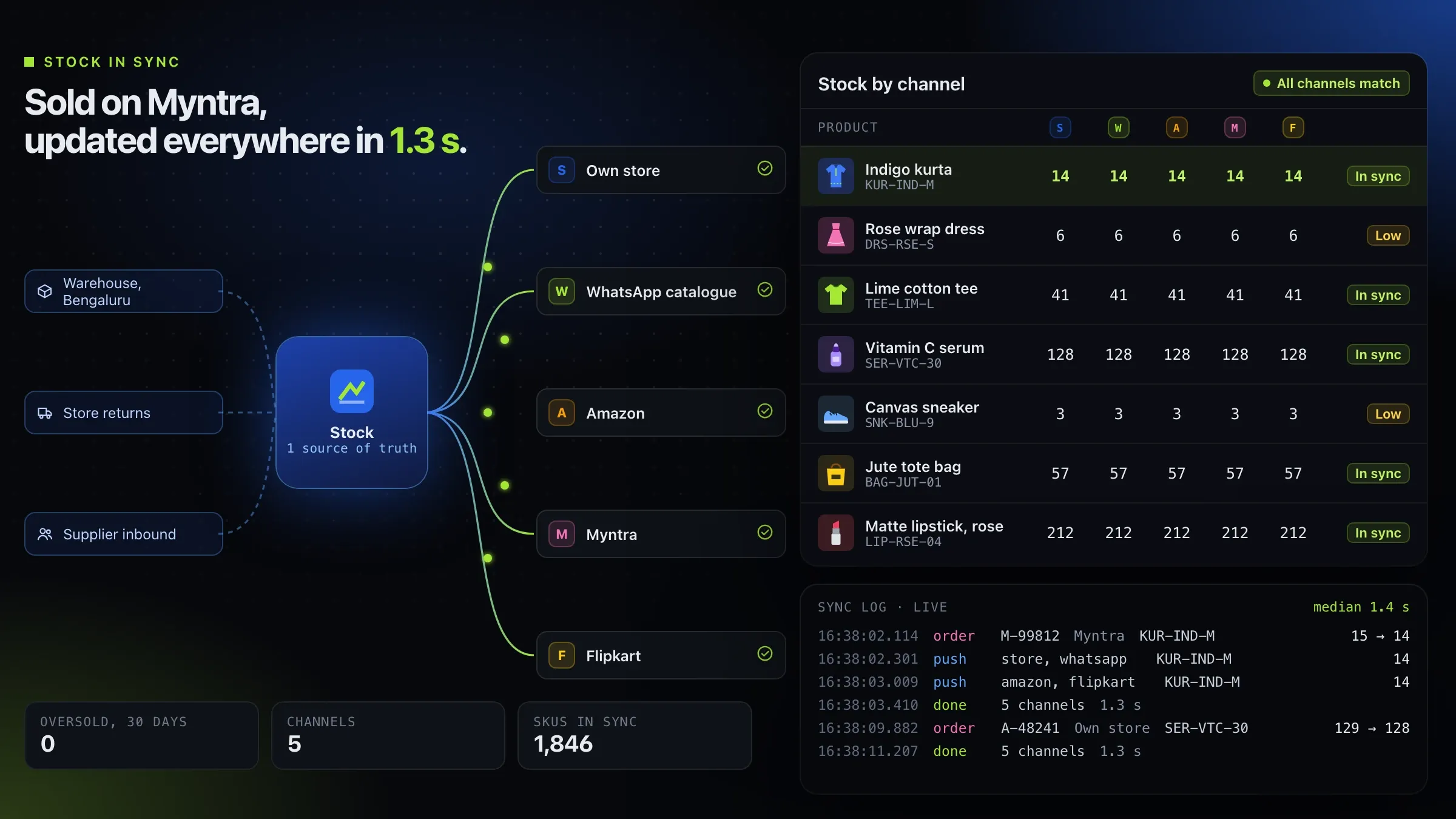 One stock count for every channel For a Bengaluru startup we back, we built the order and stock engine that keeps a brand's own store and its marketplaces in step. Meet the startup
 -
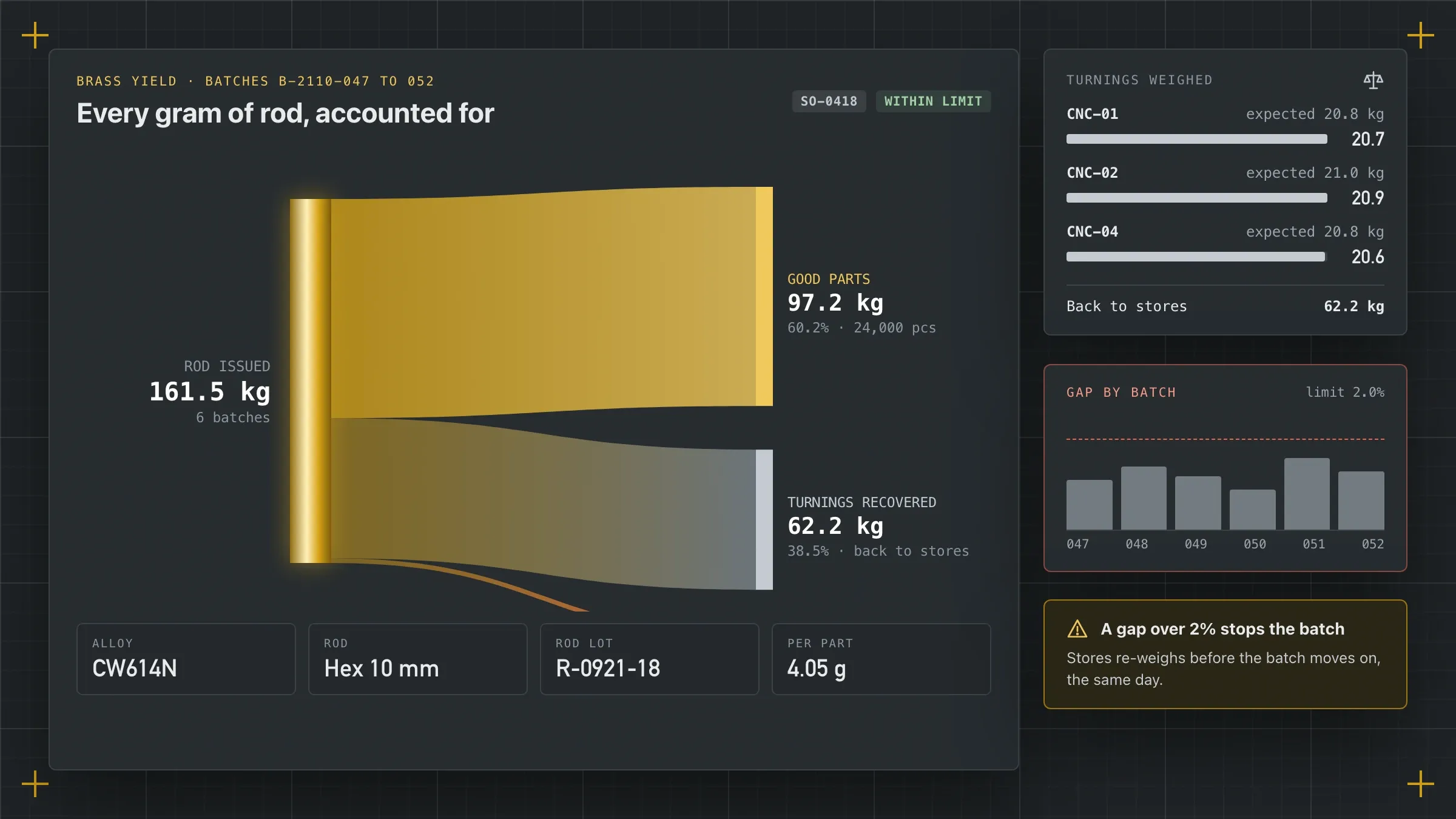 Stock checked before a date is promised For a brass components manufacturer in Jamnagar, rod stock checked by alloy and size as each order is entered, and brass tracked to the gram. Read the case study
Why billing and stock belong in one system
Billing and stock belong together because every sale is a stock movement. When the counter bills in one tool and stock is counted in another, or by hand, the numbers drift apart within days. By the weekend nobody trusts the stock figure, fast sellers run out without warning, and slow ones pile up in the back room.
POS and inventory software closes that gap. The counter is where stock leaves, and the receiving desk is where it arrives, so both are recorded in one place as they happen. Returns, transfers between shops and stock counts update the same figures.
The result is a stock number you can act on: what to reorder, what to move to another shop, what to discount before it expires, and what has simply gone missing.
Where it pays off first
It pays off first at the counter on your busiest hour. A cashier who scans, weighs and takes UPI without typing codes or working out GST serves more people, makes fewer mistakes and closes the till with cash that matches the bills.
The second payoff is the stockroom. When reorder suggestions come from how fast each item really sells and how long each supplier takes to deliver, fast movers stay on the shelf and money stops sitting in slow ones.
The third is credit. Many shops in India sell on khata to trusted customers. A ledger for each of them, with a credit limit and polite WhatsApp reminders carrying a UPI link, brings in dues that a notebook lets slip.
Ready-made, Ember POS or built for you
The first decision is whether you need custom software at all. Many shops bill and stock the way most shops do, and a ready-made system, set up properly with your products, prices and hardware, serves them well.
Ember POS is our own inventory and POS billing software, in development, for retailers and distributors with one shop or many. It covers fast GST billing that works offline, stock across shops and warehouses, credit customers, batches and expiry, purchases and reorder suggestions. Businesses that want early access can ask through the form.
A custom build earns its cost when your trade has rules that ready-made tools handle badly: prices that follow a daily rate, products sold by weight, length and piece at once, distributor schemes, job work, or a link to your own ordering or factory software. Then we build around how you actually sell, and reuse what we have already built where it fits.
Built for how your trade sells
Every trade tracks different things, so the system has to as well. A grocery or supermarket needs weighing scales at the counter, loose items, offers such as buy-two-get-one, and batch and expiry on packaged goods. A pharmacy needs batch and expiry on every strip, with the earliest-expiring stock sold first.
Apparel and footwear need sizes and colours as variants of one product, with stock by size, so a shop knows it has the shirt but not in medium. Electronics and mobile shops record serial and IMEI numbers for every unit sold, for warranty and returns. Hardware stores sell the same item by piece and by box.
Distributors work differently again: separate retail and wholesale price lists, schemes and free goods, bulk billing for trade customers, credit limits and dues by customer, and e-way bills for consignments that need them. We start by watching your counter, so the system fits your trade rather than the other way round.
GST, e-invoices and the books
Every bill is a GST invoice: the right tax rate for each item, its HSN code, the split between CGST and SGST or IGST, and your GSTIN on the printout. B2B invoices carry the buyer’s GSTIN and can be issued as e-invoices where your business is required to.
Returns produce credit notes against the original bill, not a fresh sale with a minus sign. Purchases record the input tax on each supplier bill. At the end of the month your accountant gets sales by tax rate and HSN code, purchases and payments, ready to file and to send to Tally, so nothing is typed twice.
Outside India the same structure carries VAT or sales tax instead, with the invoice format your country expects.
Stock you can trust
A stock figure is only useful if people trust it. Every sale, return, purchase and transfer changes stock at the moment it happens, in the right shop. Transfers are sent from one location and received at the other, so stock in transit is visible rather than lost.
Counts happen shelf by shelf on an Android phone, a section at a time, without closing the shop. Any difference between the count and the system is recorded with a reason: damage, expiry, a billing mistake or a missing item. Over a few months those reasons show where stock really goes.
Reorder suggestions use each item’s actual rate of sale in each shop and each supplier’s delivery time, so the order you place on Monday matches what you will sell before the next delivery.
What we need from you
We need your product list, your prices and a day at your counter. The product list can start as a spreadsheet: names, prices, GST rates, HSN codes, sizes or variants, and barcodes where they exist. We help clean it up and print labels for anything without a barcode.
We also need your rules: who may give discounts and how much, how credit works, which offers you run, and how stock moves between your shops. And we need an opening stock count before go-live, which your team does with our counting app.
Finally, someone on your side who owns the system: usually the owner or the store manager, who approves the rules and tells us what the reports should answer.
Connecting the counter to everything else
The counter sits at the centre of your business, so the system connects outward. Dynamic UPI QR codes come from your payment gateway, with the exact amount and the payment matched to the bill. Card machines can pass the amount from the bill so nobody types it twice.
Stock can feed your online store and the marketplaces you sell on, so a sale at the counter and a sale online come out of one count. Sales, purchases and payments go to Tally or your accounting software. Customer bills and credit reminders go out on WhatsApp. A loyalty programme can read the bill and add points at the till, as we did for a supermarket chain in Ireland.
How we measure whether it works
Before switching on, we agree a few measures with you. Usually they are the time to bill a typical basket, how far the system’s stock is from the shelf at each count, how often fast movers run out, how much money sits in slow stock, and how much credit is overdue.
We take a first reading during the pilot, beside your old method, and again each month after launch. The reports show you where the system helps and where it doesn’t yet: a section that still counts badly, a supplier who is always late, an item that never sells.
Switching over and running it
Switching over is planned so the counter never stops. One shop runs the system on real days first, beside the old method, until the stock and the cash agree. Then the other shops follow one by one, each with its opening stock counted and its staff trained at their own counter.
After launch we run it with you. GST rates, invoice rules and payment providers change, and the system changes with them. New shops, new product lines and new reports are added as you grow, and we are a message away on WhatsApp or email when a printer or scanner misbehaves.
How we work with you
From the first call to running it
- Start
Stand at your counter
We spend time at your counter and in your stockroom on a busy day, and write down how your trade bills, stocks and buys.
- Choose
Ready-made or built for you
We compare what you need with what Ember POS, our own software in development, is built to do, and recommend building only what your trade needs.
- Build
Build and connect the counter
Billing, stock, purchases and reports, with your scanners, printers, scales and payment QR connected and tested.
- Pilot
One shop first
One shop runs the system on real days, beside your old method, until the stock and the cash agree.
- Launch
Every shop, then the warehouse
Shops switch over one by one, with opening stock counted and staff trained at their own counters.
- Every month
Run and improve
Updates when GST rules change, new reports, and new shops or product lines added.
Safe and in your control
No sale is ever lost
Every bill is saved on the counter first and then synced, so an outage never loses a sale.
Staff see only what they need
Roles for cashiers, managers, buyers and owners. Discounts, voids and price changes above a limit need a manager's approval.
Every change on record
Price edits, stock adjustments, voids and returns are logged with who made them and when.
Stock differences explained
Counts are recorded shelf by shelf, and every difference is saved with a reason.
Payments matched, not assumed
A UPI payment closes the bill only when the payment provider confirms it, so a screenshot is never taken as proof.
Your data off the premises
Data is kept in the cloud with backups, so a broken counter computer is a hardware problem, not a lost business.
Time and cost
The cost depends on how many shops and counters you run and how particular your trade is, not on a package. A ready-made system set up well costs least; a custom build makes sense when your pricing, billing or stock rules don't fit one. After the first call we send a written plan and a quote.
Ready-made or custom
Setting up existing software costs least. Adding your own features, or building from scratch, costs more.
Shops, counters and warehouses
Each location adds setup, an opening stock count and staff training.
Your trade's rules
Batches and expiry, sizes and colours, serial numbers, weighed items, wholesale price lists and schemes.
Hardware
Scanners, printers, scales, customer displays and cash drawers you already have, or new ones to buy.
Systems to connect
Tally, e-invoicing, your online store, marketplaces or your ERP.
Moving your data
Products, opening stock, customer dues and supplier balances from your old software or spreadsheets.
Built with
Chosen for each project, never by habit
Questions and answers
14 answered
What is POS and inventory software?
POS and inventory software combines billing at the counter with stock management. Every sale updates stock automatically, so a business always knows what it has, where it is and what to reorder, without a separate register.
What is Ember POS?
Ember POS is inventory management and POS billing software built by FIRELIFE Ventures for retailers and distributors. It bills at the counter with GST invoices, keeps stock in step across every shop and warehouse, handles credit customers, batches and expiry, and suggests reorders. It is in development; ask through the form for early access.
Should we use ready-made POS software or build our own?
Use ready-made software when your shop bills and stocks the way most shops do. Build, or extend, when your trade has rules that ready-made tools handle badly, such as prices that change daily, unusual units, schemes for distributors or a link to your own systems. We recommend one after seeing your counter.
How much does POS and inventory software cost?
It depends on whether you start from ready-made software or a custom build, how many shops, counters and warehouses you run, your trade's rules, the hardware and the systems it connects to. We send a written quote after the first call.
How long does it take to set up POS and inventory software?
One shop on ready-made software is a matter of weeks, most of it spent on the product list and the opening stock count. Several shops, a warehouse or custom features take longer. The written plan after the first call sets out the timeline.
Does it create GST invoices and e-invoices?
Yes. Every bill is a GST invoice with the right rates and HSN codes, printed or sent on WhatsApp. B2B invoices can be generated as e-invoices where your business is required to issue them.
What happens if the internet goes down?
The counter keeps billing. Every bill and stock change is saved on the device and synced as soon as the connection returns, so the queue never waits for the internet.
Which hardware does it work with?
Standard barcode scanners, thermal receipt printers, label printers, cash drawers, customer displays and weighing scales, on Windows computers or Android devices at the counter. We check your existing hardware before buying anything new.
Can it manage stock across several shops and a warehouse?
Yes. Stock is tracked per shop and per warehouse in real time, and transfers are sent and received in the system, so each shop sees what it has, what the others have and what is on the way.
Can it handle batches, expiry dates and serial numbers?
Yes. Pharmacies and groceries track batches and expiry and sell the earliest-expiring stock first; apparel tracks sizes and colours; electronics records serial or IMEI numbers for every unit sold.
Can it send data to Tally?
Yes. Sales, purchases and payments can be exported for your accountant or sent to Tally, so the books match the counter without retyping.
Can the counter work in Hindi or Gujarati?
Yes. We can build the counter screens and printed bills in English, Hindi or Gujarati, so staff work in the language they read fastest and customers read their bill.
Do you build POS software for shops outside India?
Yes. FIRELIFE Ventures works with small and mid-size businesses worldwide from Rajkot, India, on India time. Outside India we set up local tax such as VAT and local payment methods in place of GST and UPI, and our till work includes a supermarket chain in Ireland.
What happens after the system goes live?
We keep it running with you: updates when GST rules or payment providers change, help when a counter or printer misbehaves, new reports as you ask questions, and new shops added when you open them.
Tell us what you want to build
Write a few lines about the idea and who it is for. We reply with our questions, a first plan and how we would start.
Write to us