Build something new manufacturing software
Ship on the date you promised
We build manufacturing software that keeps your promises: delivery dates checked against real capacity and material, production planned by machine and shift, job cards and quality checks on the shop floor, and dispatch with its GST paperwork.
- We learn your floor before we design
- Rolled out one machine group at a time
- English, Hindi, Gujarati and more
Sound familiar?
What we hear before we start
- Sales promises a date without knowing whether the machines are free.
- Planning lives on a whiteboard that only one person understands.
- Supervisors walk the floor to find out where an order has reached.
- The bottleneck moves every week, and you find out on Friday.
- Material losses show up at the stock count, too late to know where they happened.
- Quality reports are on paper, and tracing a rejected part takes a day.
What changes
-
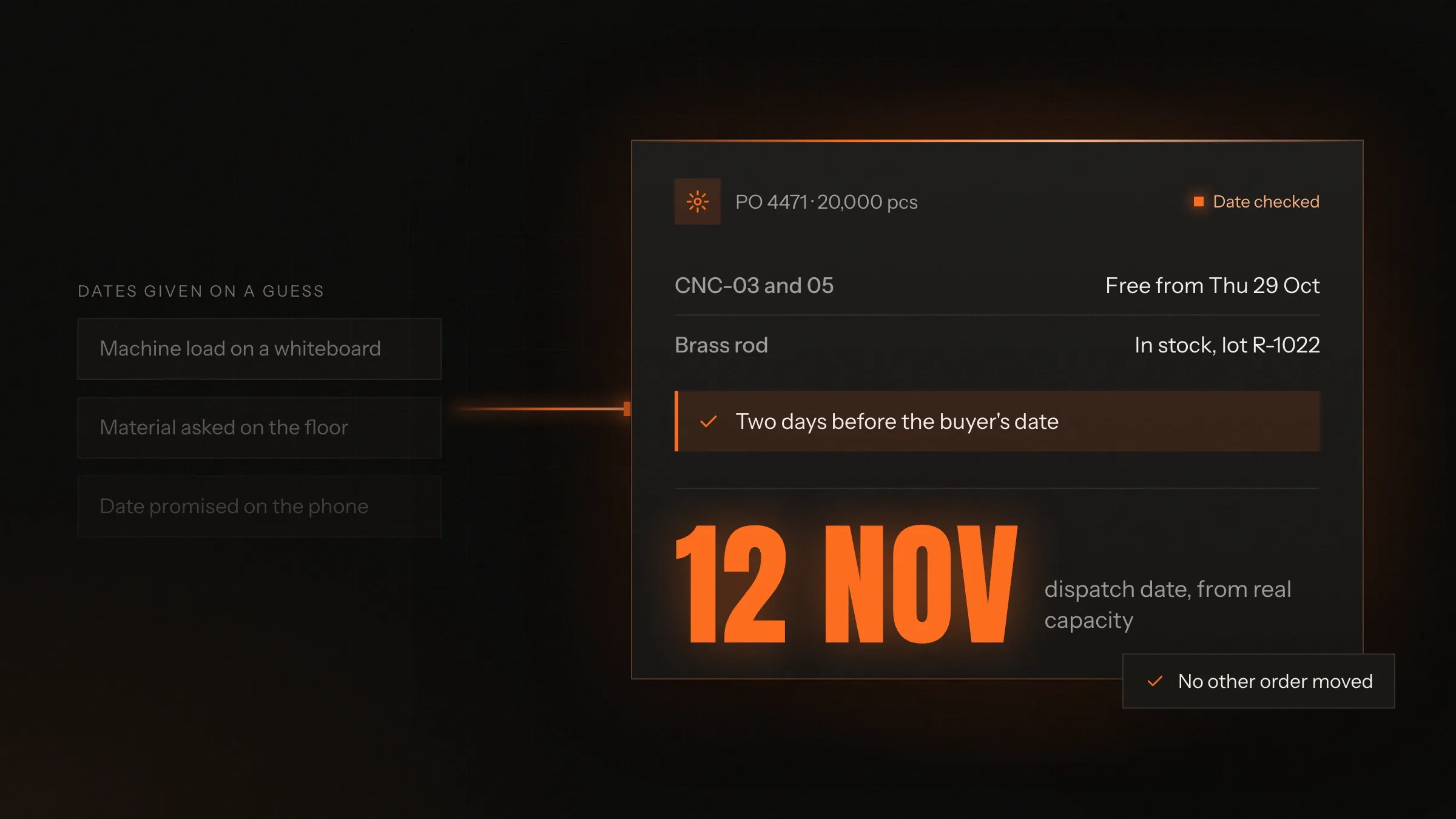
Today: Dates are promised from memory.
After: Dates are suggested from free capacity and the material in stock.
-
Today: The plan is on a whiteboard.
After: A live production board shows every machine's load by shift.
-
Today: Progress is found by walking the floor.
After: Supervisors scan a batch on a tablet and record output where it happens.
-
Today: A breakdown means re-planning by phone.
After: Jobs move on the board, and every affected date updates.
-
Today: Material is counted by the tonne at stock-taking.
After: Material issued, good output and scrap are recorded for every batch.
What it does for you
-
Dates you can keep
Each new order is checked against material in stock and free capacity on every machine it needs, before a date is promised.
For exampleA buyer asks to pull an order forward, and the planner sees exactly what would move to make room.
-
Planning by machine and shift
One board with every machine's load, changeovers grouped and orders at risk of missing their date flagged early.
For exampleOn Monday the planner sees that plating will be the bottleneck by Thursday.
-
Job cards on the shop floor
Scan a batch's QR code to open its job card: the drawing, the machine, the checks, and the output to record.
For exampleA supervisor records good parts and rejections with their reasons without leaving the machine.
-
Quality at every stage
First-piece, in-process and final inspection with measurements and photos, and a batch can't move on until it passes.
For exampleA failed dimension holds the batch and alerts quality before the next operation starts.
-
Material and yield
Raw material issued to each batch, good parts, scrap and returns, with the gap shown the day it happens.
For exampleA batch uses more material than its drawing allows, and stores knows the same afternoon.
-
Job work and outside processes
Parts sent out for plating, heat treatment or painting travel with a GST job work challan and are tracked out and back.
For exampleThe plater returns fewer pieces than were sent, and the shortfall is on record before anyone asks.
-
Dispatch and paperwork
Packing lists from passed batches, with GST e-invoices, e-way bills and test certificates made from the records.
For exampleThe buyer receives dispatch details and the test certificate on the day the truck leaves.
-
Trace any part
Every part traced to its material lot, machine, shift and inspections.
For exampleA customer complaint is traced to one batch, one material lot and one shift from a single search.
How it works
-
Order and date
The order is entered once, and a dispatch date is suggested from capacity and material.
-
Plan
Work is scheduled by machine and shift on the production board.
-
Issue material
Material is issued to each batch, and the batch gets its own QR tag.
-
Make and check
Each operation is recorded on the job card, with inspections before the batch moves on.
-
Pack and dispatch
Passed batches are packed, and the e-invoice and e-way bill are generated.
-
Learn
Actual times and yields feed the next plan and the next quote.
Where we've built it
3 from our portfolio
-
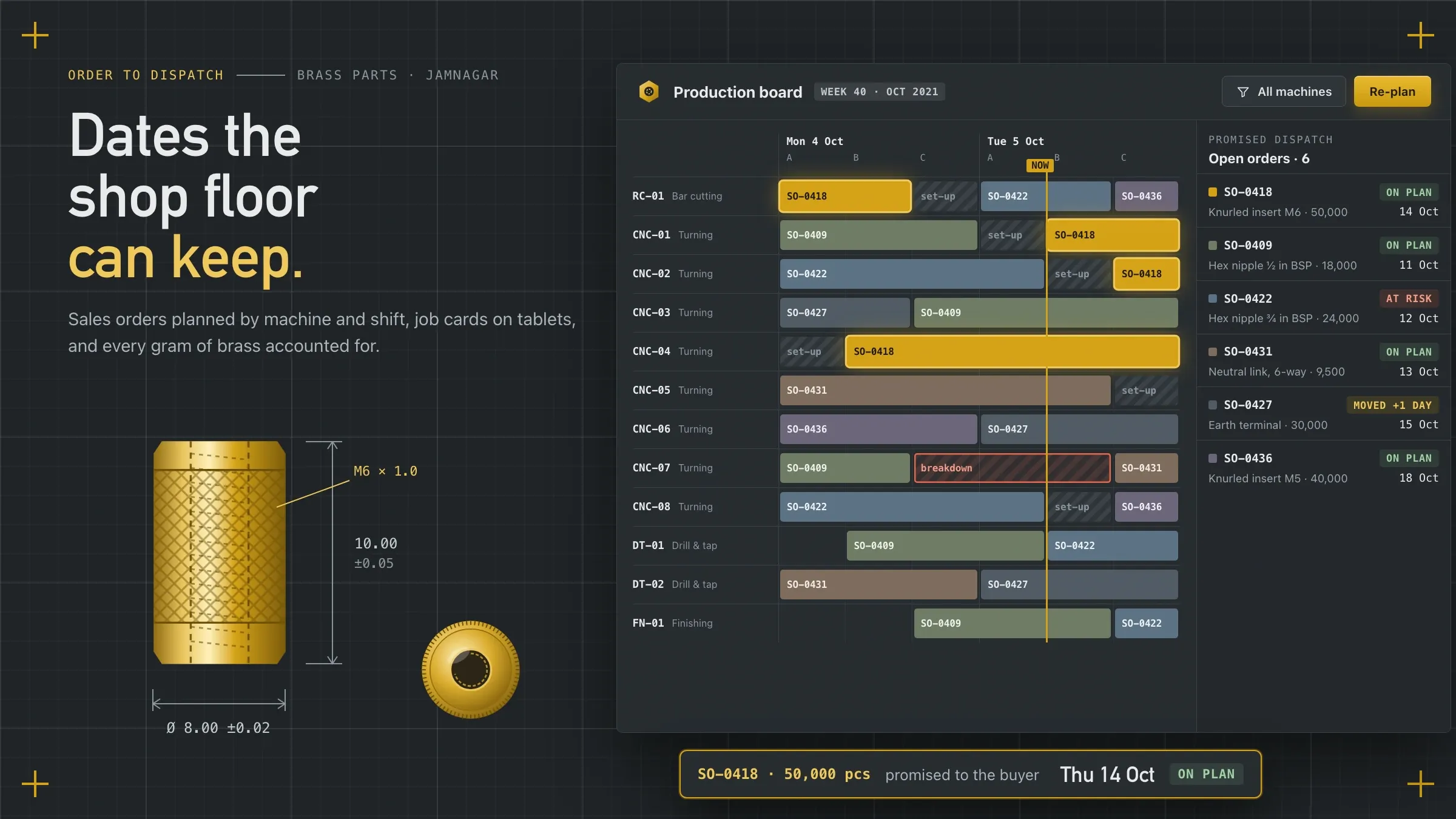 Dates the shop floor can keep For a brass precision components manufacturer in Jamnagar, dispatch dates come from real machine capacity, and job cards and inspections run on shop-floor tablets. Read the case study
 -
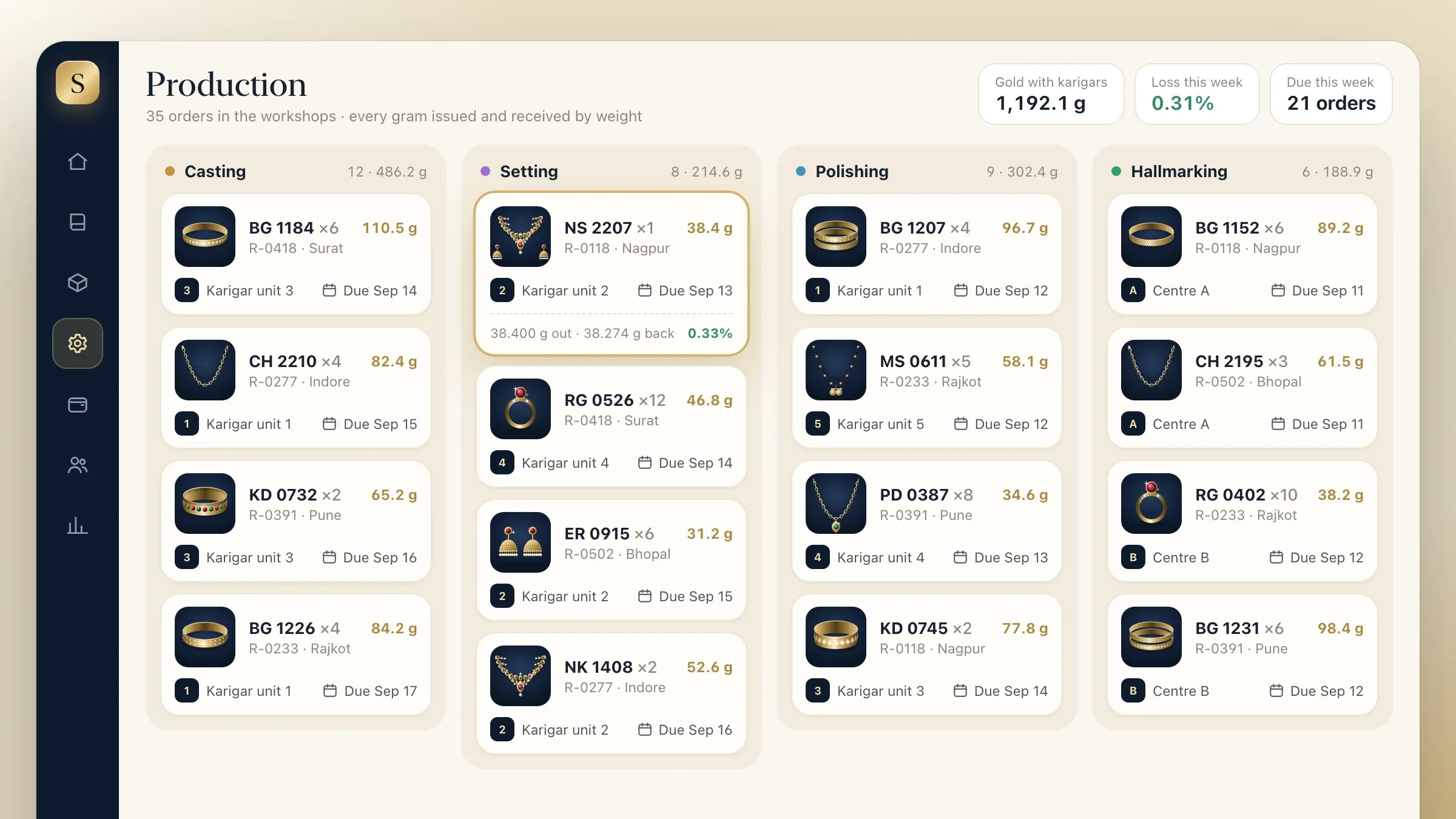 Orders through the karigar workshops For a gold jewellery manufacturer and wholesaler in Rajkot, each order moves through casting, setting, polishing and hallmarking, with gold tracked by weight. Read the case study
 -
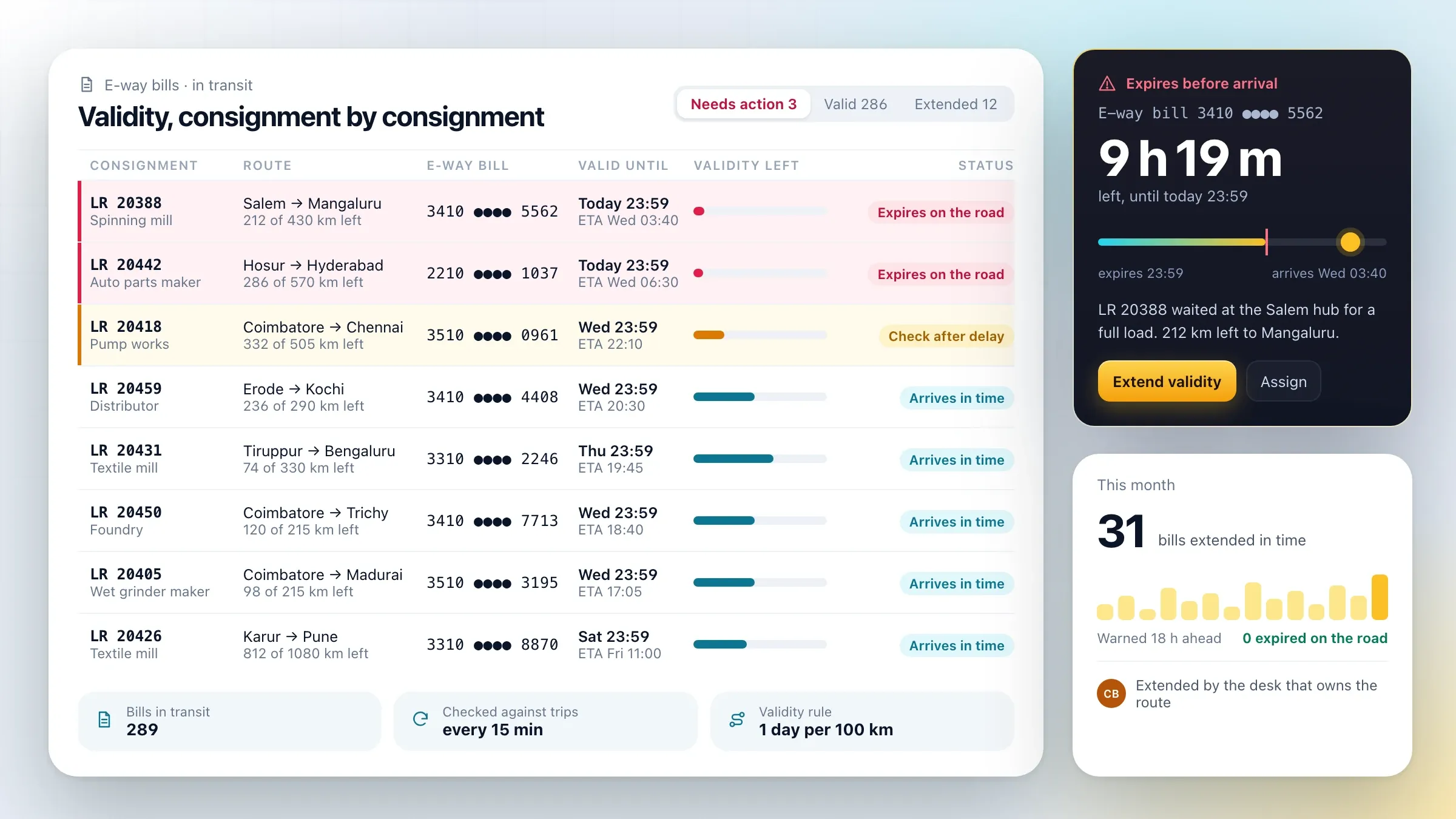 After the gate: every consignment tracked For a transport company in Coimbatore that carries goods for manufacturers and distributors, every truck, consignment and e-way bill is tracked live. Read the case study
What manufacturing software does
Manufacturing software runs your plant’s work from order to truck, so the date sales promises is a date the floor can keep. It replaces the whiteboard, the walk around the floor and the paper job card with one live view that everyone shares.
It does four jobs. It checks capacity and material before a date is promised. It plans work by machine and shift and re-plans when something breaks. It records what actually happens on the floor: output, rejections, inspections and material. And it turns finished, passed work into a dispatch with the right paperwork.
People sometimes call this MES, production planning or shop-floor software. The name matters less than the result: fewer missed dates, less material lost, and a plant the owner can see without walking it.
Build, buy or connect to your ERP
Buy a package if it fits your routings and your floor; build when your process is specific. We give you that answer at the first call.
Custom manufacturing software pays off when your work doesn’t fit a template: parts routed across particular machines, material tracked by weight or lot, job work sent out and back, inspection plans set by each customer, or supervisors who need simple screens in Gujarati or Hindi. It also pays off when you already have accounts and purchase in Tally or an ERP and need the floor to talk to it, rather than a second system that duplicates it.
If you need the whole business in one system, including purchase and accounts, that is an ERP, and we build those too. Many plants start on the floor, where the pain is, and grow outward.
Where it pays off first: the delivery date
The first gain is almost always the delivery date. When sales can’t see machine loads, promises and capacity rarely match, and every late order costs goodwill, overtime or a lost buyer.
A brass precision components manufacturer we built for in Jamnagar shows how this changes. Orders arrived by email and phone, and production was planned on a whiteboard. Now each order carries its routing, the list of operations and machines each part needs. As the order is entered, the system checks rod stock and the free capacity on every machine the part needs, and suggests a dispatch date. When a buyer asks to pull an order forward, the planner sees exactly what moves to make room.
The second gain is visibility. Supervisors stop walking the floor to find out where an order has reached, because every batch reports its own progress from the machine it is on.
What we learn on your floor
We need to see your floor before we design anything, and we need one person who can decide.
We follow real orders from purchase order to truck, through sales, planning, stores, the machines, quality and dispatch. We sit with planners and supervisors, because they hold the rules nobody wrote down: which machine really runs which part, how long a changeover takes, which customer always pulls orders forward.
We also need your part list and routings (or the knowledge to build them), drawings, inspection plans, a few months of orders, and access to Tally or your ERP. One person on your side, usually the plant head or the owner, agrees the priorities when sales and production disagree.
Planning by machine and shift
Planners schedule work on one production board, with every machine’s load for the coming days and shifts. Similar parts are grouped to save changeovers, and the board warns when an order is at risk of missing its date, while there is still time to act.
When a machine breaks down or an urgent order arrives, the planner moves jobs on the board and every affected date updates. Sales sees the change at once and can warn the buyer. The bottleneck of the week, whether a set of machines, plating or inspection, is visible on Monday instead of Friday.
Over time, the board learns from what actually happened: real cycle times, real changeovers, real yields. Plans and quotes get more accurate each month.
The board also watches material. If rod, castings or bought-out parts for a job haven’t arrived, the job is flagged before it reaches the machine, and the shortage becomes a purchase request.
Job cards, quality and traceability
Supervisors work from tablets. Every batch carries a QR tag from the moment material is issued, and scanning it opens the job card for the next operation, with the drawing, the machine and the checks for that step. Supervisors record good output, rejections with their reasons and time.
Inspectors record first-piece, in-process and final inspection with measurements and photos, and a batch can’t move on until it passes. Because every step is recorded against the batch, any part can be traced to its material lot, machine, shift and inspections. When a customer raises a complaint, you find the cause from one search instead of a day in the store room.
Material, yield and job work
Material is usually a plant’s biggest cost, so we track it batch by batch: material issued, good parts produced, scrap and returns, and the gap between them, shown the day it happens rather than at the next stock count.
Parts that go out for plating, heat treatment, painting or other outside work travel with a GST job work challan generated by the system. Quantities and weights are tracked out to the job worker and back, and the details for the ITC-04 job work return are ready when it is due.
Dispatch, GST paperwork and your accounts
At dispatch, the system prepares the packing list from batches that passed final inspection, with each box labelled by part, quantity and batch. It generates the GST e-invoice and the e-way bill through an authorised GST API provider and sends the invoice to Tally or your accounting software, so nothing is typed twice.
Buyers receive dispatch details, with test certificates where they need them, the same day. Once the truck leaves the gate, a link to your transport partner’s tracking or your own fleet software can carry the story on to the buyer’s door.
Rolling out without stopping production
A plant can’t stop for a software launch, so we roll out in steps. Orders and planning run beside the whiteboard until planners trust the board. The floor follows one machine group at a time, with supervisors trained on tablets beside their own machines. Dispatch and accounts switch last, once the first e-invoices have been checked line by line.
Before we start, we agree how success will be measured: the share of orders dispatched on the promised date, how long a date takes to promise, material yield by batch, and how long it takes to trace a part. Those measures go into a monthly review, so we can see where the plan, the screens or the floor needs to improve next.
After launch: running and improving
Manufacturing software earns its keep only if it keeps up with the plant. New parts, machines, customers and inspection plans arrive every month, GST rules change, and the bottleneck moves.
We run the software with you. Each month we look at the measures agreed at the start, review where dates slipped and why, and tune the planning rules: cycle times, changeover groups and the buffer before plating or inspection. We add machines and parts as they arrive and keep the e-invoice and e-way bill links current.
When the floor is settled, the next steps are usually close by: a portal where buyers see their order status, dashboards for the owner, HR and payroll linked to shifts and output, or machines that report their own counts.
How we work with you
From the first call to running it
- Start
Follow real orders
We spend time on your floor, following real orders from purchase order to truck through sales, planning, stores, machines, quality and dispatch.
- Build
Build around your floor
We build planning, job cards and dispatch around your routings and machines, and set up tablets and QR tags for each machine group.
- Pilot
One machine group first
Planning runs beside the whiteboard and one machine group moves to tablets, until planners and supervisors trust the board.
- Launch
Group by group
The rest of the floor follows one machine group at a time, then dispatch and accounts switch once the first e-invoices are checked line by line.
- Every month
Plan better each month
We review on-time delivery, yield and bottlenecks with you, and improve the plan and the screens.
Safe and in your control
Nothing moves without its check
A batch can't move on until its inspection passes, and any override is recorded with a reason.
Every change logged
Date changes, plan moves, stock adjustments and overrides record who made them and when.
Each role sees its own work
Sales, planners, supervisors, quality and stores each see and change only what their job needs.
Works through network drops
Shop-floor tablets keep working offline and send their records when the connection returns.
Drawings kept to those who need them
Customer drawings and specifications are shown only to the people making the part, and downloads are logged.
Checked before the old way goes
Planning and the floor run beside the old method until the figures agree, and only then is it retired.
Time and cost
The cost of manufacturing software depends on how your plant works and how much of it the system covers, not on a package. Many plants start with orders, planning and the production board, then add job cards, quality, material and dispatch. After the first call we send a written plan and a quote.
Routings and machines
A few products on a few machines is simpler than hundreds of parts routed across many machines and processes.
How work is recorded
Tablets and QR tags at each machine group add devices, setup and training.
Quality and traceability
Inspection plans, measurements, photos and lot tracing add screens and rules.
Job work and outside processes
Plating, heat treatment and other outside work add challans and tracking.
Links to other systems
Tally, GST e-invoicing, e-way bills and your ERP or CRM each add a connection to build and test.
Your old data
Parts, routings, drawings and open orders need cleaning before they can be loaded.
Built with
Chosen for each project, never by habit
Questions and answers
13 answered
What is manufacturing software?
Manufacturing software runs a plant's work from order to dispatch. It checks capacity and material before a date is promised, plans production by machine and shift, records progress and quality on the shop floor, tracks material, and produces the dispatch paperwork, so everyone from sales to the owner sees the same live view of the floor.
Is manufacturing software the same as an ERP?
Not quite. An ERP covers the whole business, including purchase and accounts. Manufacturing software, sometimes called MES or production planning software, goes deep on the shop floor: machines, shifts, job cards, inspections and yield. Many plants need both, and we build either or connect one to the other.
Should we build manufacturing software or buy a package?
Buy if a standard package fits your routings and your floor. Build when your process is specific: particular machines and operations, job work, material tracked by weight or lot, or a floor where supervisors need simple screens in their own language.
How does the software suggest a delivery date?
It looks at the work behind the order, meaning the operations and machines each part needs, checks material in stock and free capacity on each machine, and suggests the earliest realistic dispatch date. The planner accepts or adjusts it and sees what else would move.
Can supervisors use it on the shop floor?
Yes. Supervisors and inspectors use tablets with large buttons: scan a batch's QR code, see its job card, record output, rejections and checks. The tablets keep working through short network drops.
Can it handle job work and GST challans?
Yes. Parts sent out for plating, heat treatment or other processes travel with a GST job work challan made by the system, quantities and weights are tracked out and back, and the figures for the ITC-04 return are ready when it is due.
Does it generate GST e-invoices and e-way bills?
Yes. At dispatch, e-invoices and e-way bills are generated from the records through an authorised GST API provider, and the invoice can be sent to Tally or your accounting software without retyping.
Can it connect to our machines?
Where machines can share counts or status, we can read them; where they can't, supervisors record output on tablets. Most plants start with tablets and connect machines later, where it pays.
How much does manufacturing software cost?
It depends on your routings and machines, how work is recorded on the floor, how much quality and traceability you need, job work, and which systems it connects to. Starting with orders, planning and the production board keeps the first stage focused. After the first call we send a written plan and a quote.
How long does it take to build manufacturing software?
Orders, planning and the production board for one plant are a matter of weeks. Job cards, quality, material and dispatch across the whole floor take longer, and are rolled out one machine group at a time so production never stops.
Can the shop-floor screens work in Hindi and Gujarati?
Yes. Tablet screens, job cards and alerts can be in English, Hindi and Gujarati, so supervisors and operators work in the language they read best.
Do you build manufacturing software for plants outside India?
Yes. FIRELIFE Ventures works with small and mid-size businesses worldwide, from Rajkot, India, on India time. Outside India we build invoicing and dispatch paperwork to your local rules and connect to the systems you already use.
What happens after the software goes live?
We run it with you: we review on-time delivery, yield and bottlenecks, improve the plan and the screens, keep GST paperwork current, and add new machines, plants or processes as you grow.
Tell us what you want to build
Write a few lines about the idea and who it is for. We reply with our questions, a first plan and how we would start.
Write to us