Build something new HRMS and payroll software
Pay your team right, every month
We build HR and payroll software around your shifts, policies and salary rules: attendance from biometric devices or the phone, leave in two taps, payroll with PF, ESI, professional tax and TDS, and payslips on every phone on payday.
- Your first payroll runs beside the old one
- Built around your shifts and policies
- English, Hindi, Gujarati and more
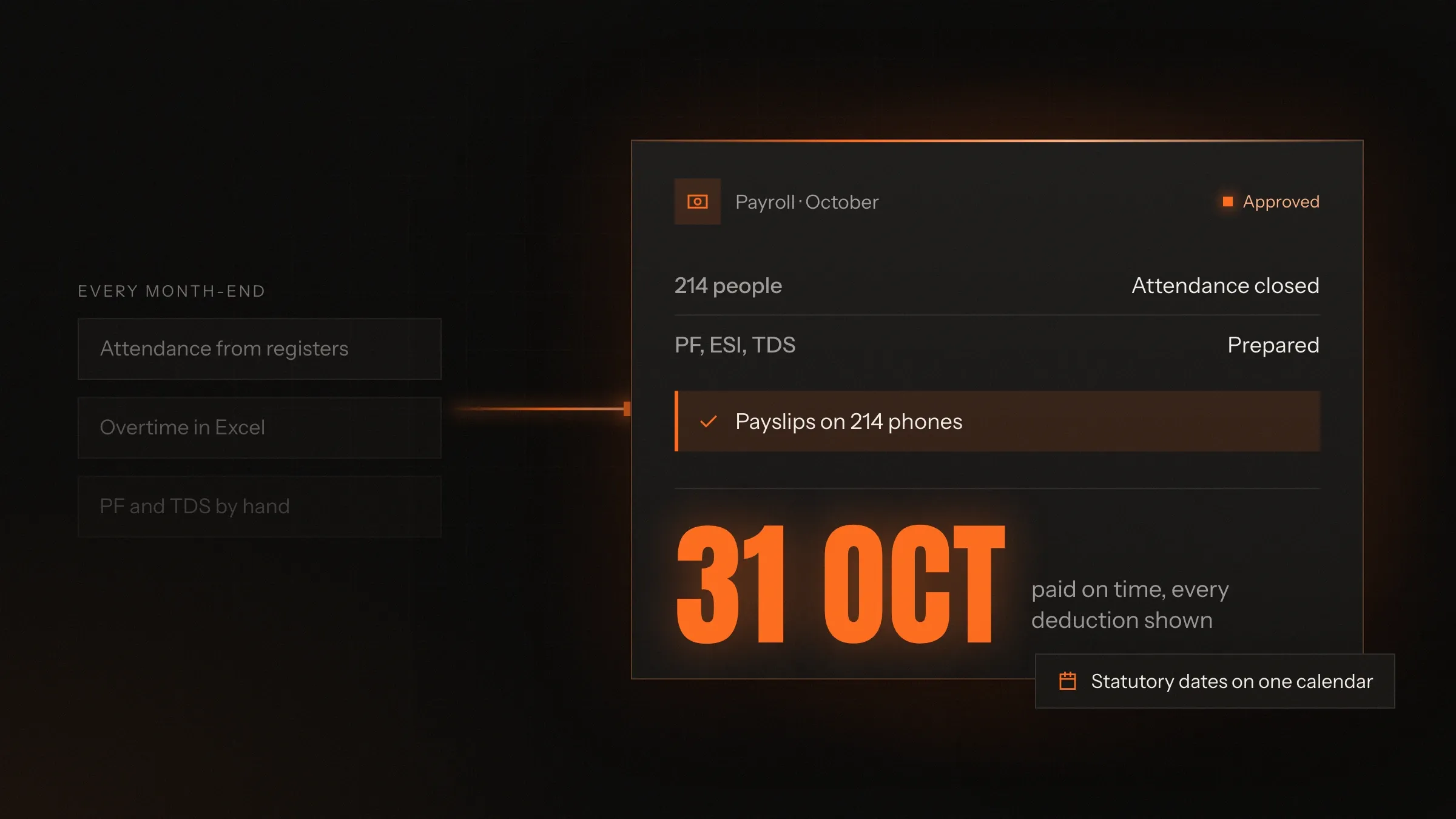
Sound familiar?
What we hear before we start
- The first week of every month goes on attendance sheets, late marks and overtime.
- Biometric punches, leave forms and salary sheets live in three places that never agree.
- Night shifts that cross midnight show up as two half days.
- Staff queue at the HR desk for leave balances, payslip copies and tax questions.
- PF, ESI and TDS due dates are remembered only when they are nearly missed.
- Every leaver's full and final settlement is worked out by hand, then checked twice.
What changes
-
Today: Attendance is pasted into spreadsheets at month end.
After: Attendance flows in every day and is matched to each person's shift.
-
Today: Missed punches and late marks are found during payroll.
After: Exceptions go to the employee and manager to fix as they happen.
-
Today: Payroll takes a week of formulas and checking.
After: Payroll runs from attendance that is already complete, with last month's changes to review.
-
Today: Payslips are printed or emailed one by one.
After: Payslips reach every phone on payday, and the bank file is ready to upload.
-
Today: Statutory due dates live in someone's memory.
After: PF, ESI, professional tax and TDS dates sit in one calendar, with the reports prepared.
What it does for you
-
Attendance for every shift
From biometric devices, phones with location limits or the door, matched to general, rotating and night shifts with your own grace, late-mark and overtime rules.
For exampleA shift from 10 pm to 7 am counts as one working day, with the night allowance added.
-
Leave without paper
Employees apply in two taps, managers approve from a notification, and balances follow your own leave policy.
For exampleA supervisor approves a sick leave from the shop floor, and the balance updates before payroll.
-
Payroll that adds up
Salary structures, allowances, overtime and deductions from attendance, with PF, ESI, professional tax, labour welfare fund and TDS in every run.
For exampleStaff in Pune pay professional tax on Maharashtra's slabs, and staff in Ahmedabad on Gujarat's.
-
Payday on the phone
Payslips on every phone, the bank transfer file ready to upload, and statutory reports from the same run.
For exampleOn payday HR uploads one bank file, and each employee finds their payslip in the app.
-
A compliance calendar
PF, ESI, TDS and professional tax due dates in one calendar, with the challans and returns prepared before each falls due.
For exampleHR sees the ESI payment is due next week, with the figures already prepared.
-
Self-service for staff
Attendance, leave balances, tax declarations with proofs, Form 16 and company policies on every employee's phone.
For exampleAn employee uploads rent receipts for her tax declaration instead of emailing HR.
-
Joiners and leavers
Offer letters, joining documents and assets for joiners; full and final settlements worked out for leavers.
For exampleA resignation is accepted, and the settlement with leave encashment and notice recovery is ready to check.
-
Answers from your own policies
An AI assistant explains payslips and leave rules from your policies and the employee's own records, and passes the rest to HR.
For exampleAn employee asks why this month's salary is lower and sees the two days of unpaid leave.
How it works
-
People check in
On biometric devices, the phone or at the door, matched to their shift.
-
Exceptions are fixed early
Missed punches, late marks and leave go to the employee and manager during the month.
-
The month closes
Attendance and leave are already complete and checked.
-
Payroll runs
Earnings, overtime and statutory deductions are worked out, with changes from last month flagged.
-
HR reviews and approves
One person checks the flagged lines and approves the run.
-
Everyone is paid
Payslips reach phones, the bank file is uploaded and statutory reports are ready.
Where we've built it
3 from our portfolio
-
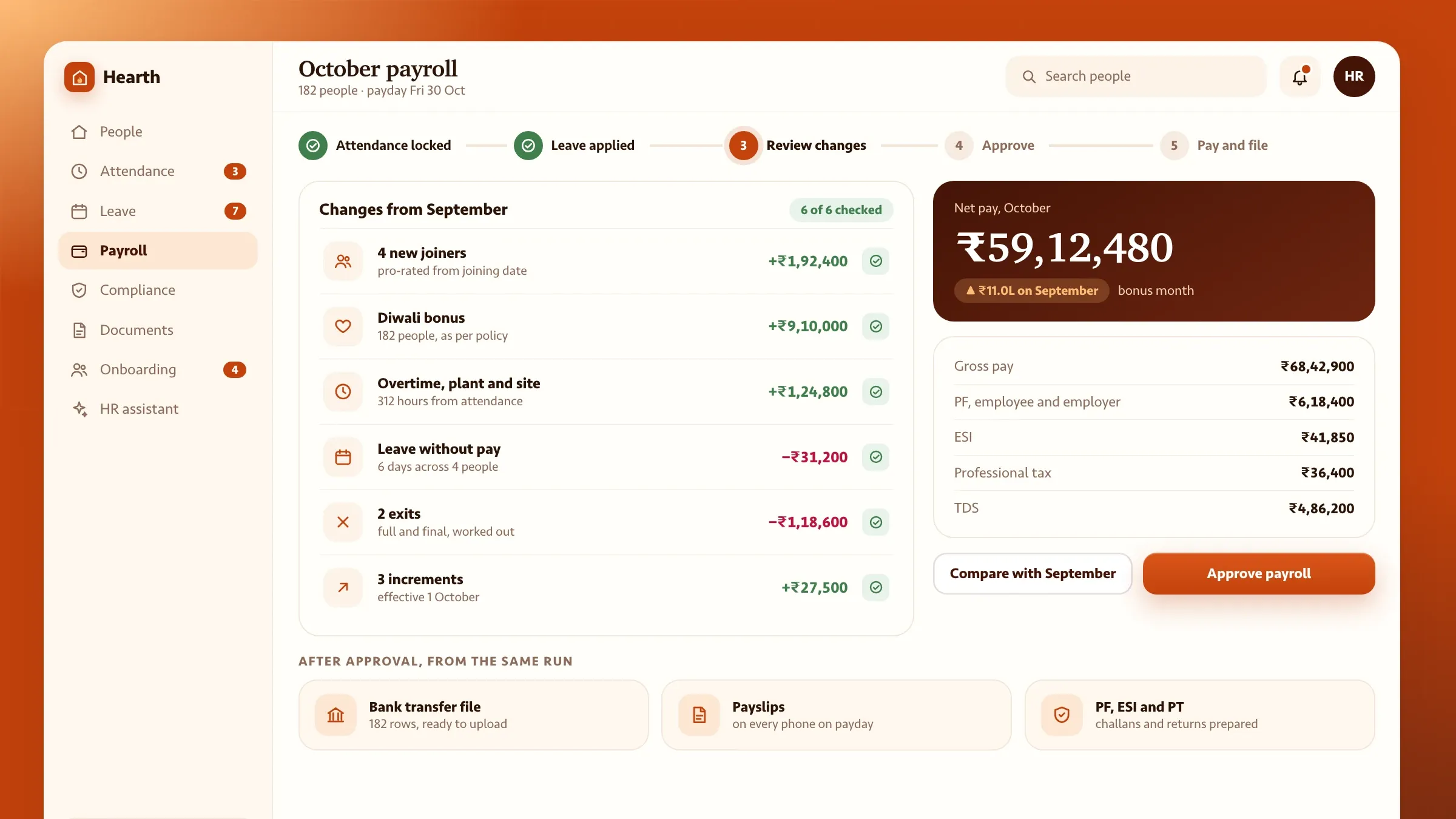 Hearth HRMS, our own HR and payroll software Our HRMS for growing companies, in development: employee records, attendance from the phone, leave, payroll with Indian statutory compliance and a self-service app. See the product
 -
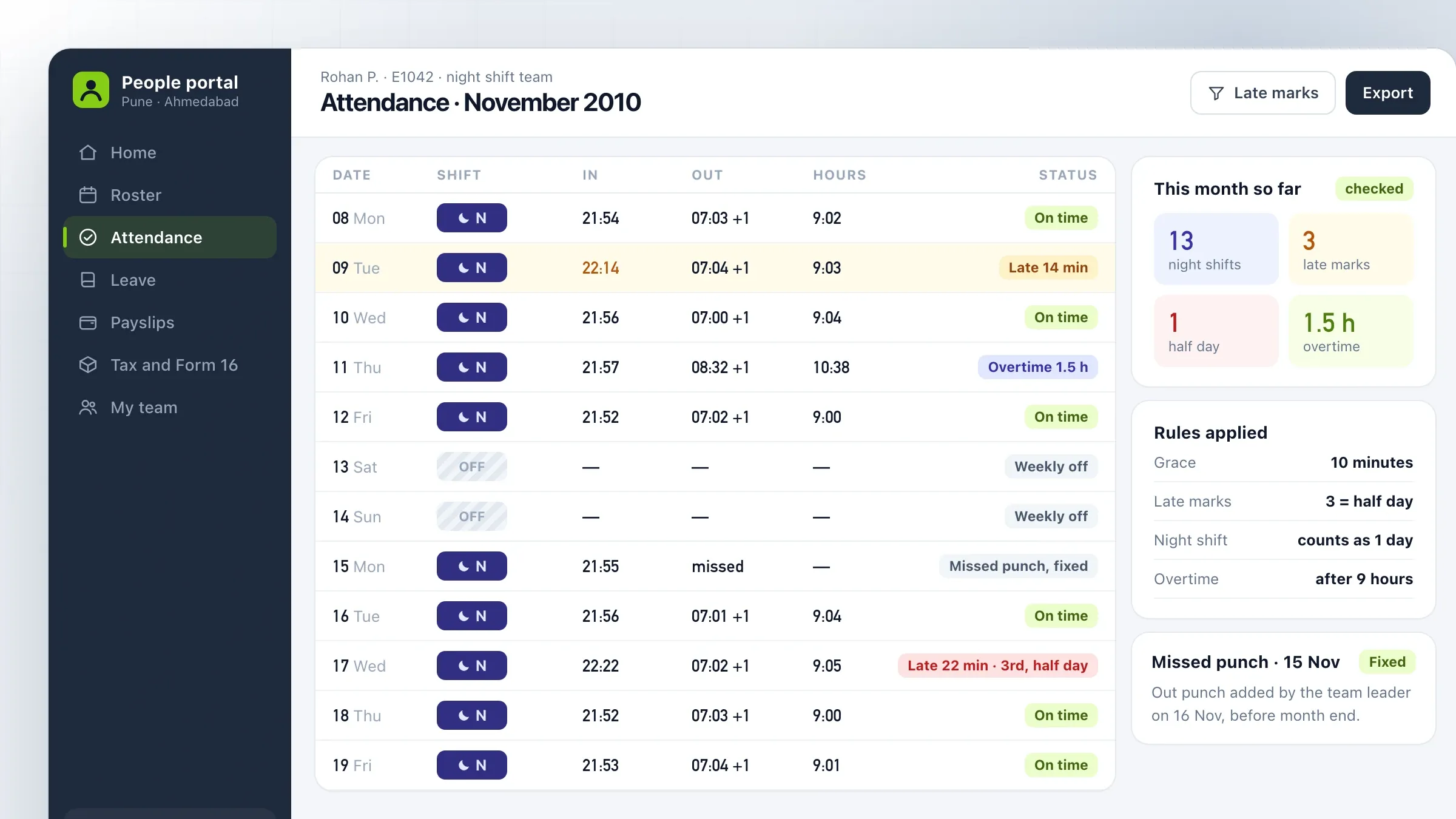 Payroll for round-the-clock shifts For a customer support company in Pune and Ahmedabad, biometric attendance is matched to rotating and night shifts, and payroll follows each state's rules. Read the case study
 -
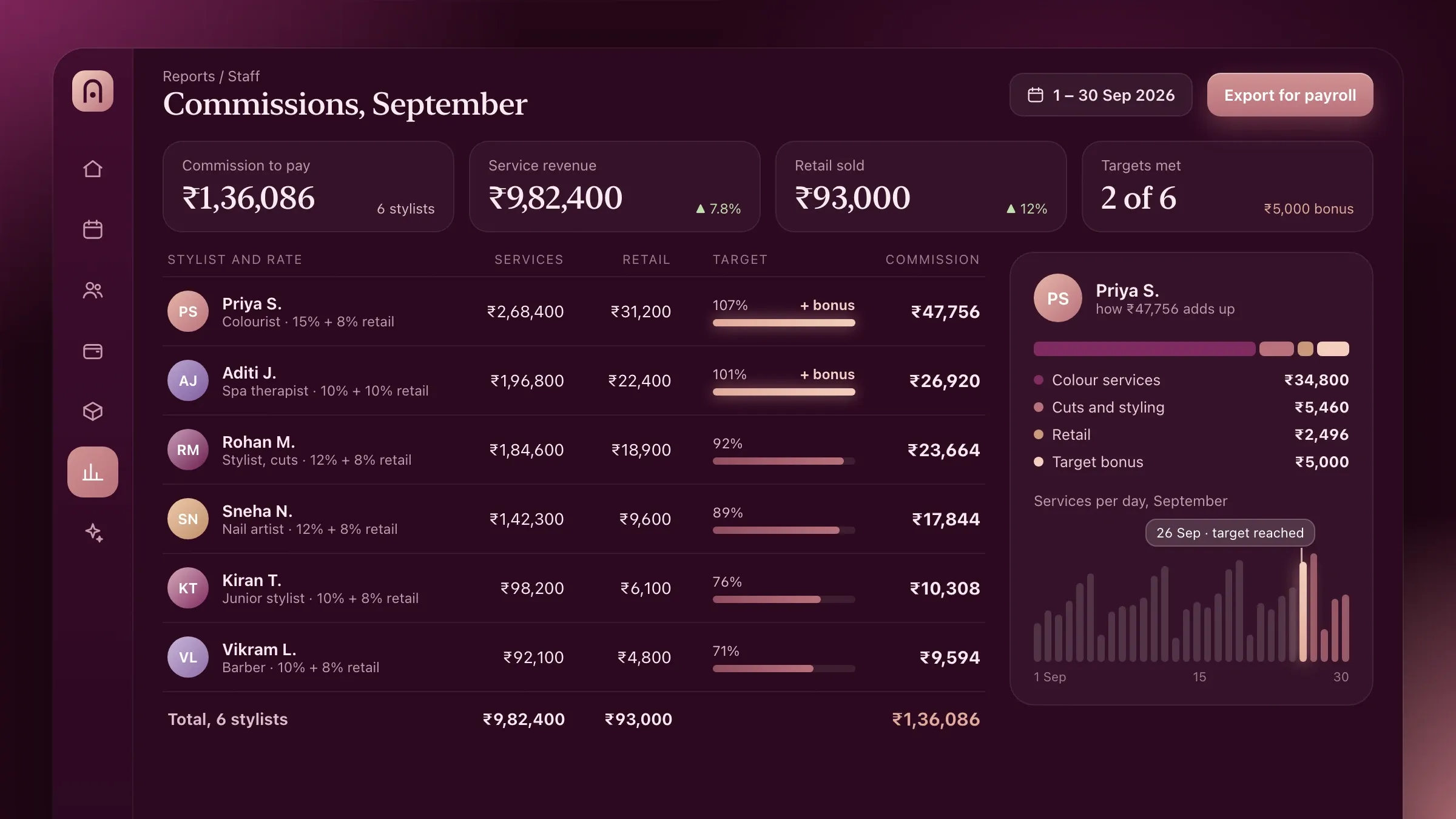 Commissions worked out from every bill In the salon and spa software of a Pune startup we back, each bill records who did the work, so stylists' commissions are worked out automatically. Meet the startup
What HRMS and payroll software does
HRMS and payroll software keeps every employee’s record, attendance and leave in one place and turns them into an accurate payroll each month. It replaces the attendance sheet, the leave register, the salary spreadsheet and the queue at the HR desk.
It does three jobs. It records who worked, when and on which shift, as it happens. It applies your rules and the law to that record to work out what each person is owed and what must be deducted. And it gets the result to the people who need it: payslips to employees, the bank file to finance, and the statutory figures to whoever files them.
When those three jobs live in one system, month end stops being a week of checking and becomes an afternoon of review.
Build, buy or start from Hearth
Buy a standard HRMS if it fits your shifts, salary structures and policies. Build one when it doesn’t. We give that answer at the first call.
A custom system pays off when the way your people work is unusual: rotating and night shifts, site and field teams, piece rates or production incentives, offices in several states, or contract staff alongside your own. It also pays off when payroll has to read from your ERP, production records or sales figures, such as commissions worked out from every bill.
We are also building our own HR and payroll software, Hearth HRMS, for growing companies with 20 to 500 people. It covers employee records, attendance from the phone, leave and payroll with Indian statutory compliance, with a self-service app and an AI assistant. It is in development, and if it fits, you can ask for early access.
Where it pays off first
The biggest gains come where attendance is hardest to count. Companies with shifts, night work, several sites or field teams spend the most time on month end, and gain the most when attendance arrives complete and matched to shifts.
A customer support company we built for in Pune and Ahmedabad shows the pattern. Its offices run round the clock, and payroll took the HR team the first week of every month. Night shifts that crossed midnight looked like two half days to the biometric machines. Once attendance was matched to each person’s rostered shift every night, payroll started from figures that were already complete.
Manufacturers, hospitals, security and facility companies, retail chains and support centres share the same problem in different forms.
What we need from you
We need your rules, your data and one person who can decide. Rules means your salary structures, leave policy, shift patterns, overtime and allowance rates, and the exceptions HR applies from memory. Data means a few months of attendance and payroll, so we can test our figures against yours.
One person on your side, usually the HR head or the finance head, agrees how each rule should work when two people remember it differently. We also need access to your biometric devices or their software, your bank’s salary file format and your accountant’s view on how payroll entries should reach the books.
Attendance that matches how people work
Attendance is where payroll goes right or wrong, so we start there. Office teams check in on biometric devices, at the door or on their phone. Field and site teams check in on their phone at an allowed location. Punches from different device makers are collected on a schedule and sent to one system.
Each punch is matched to the person’s shift: general, rotating or night, with weekly offs on different days. Your own rules then apply the same way to everyone: grace minutes, late marks, half days after repeated late marks, overtime beyond the shift and allowances for night shifts. A missed punch goes to the employee and their manager to fix during the month, not after it.
Leave follows the same logic. Casual, sick and earned leave accrue by your policy, carry forward or lapse at year end, and holidays follow each office’s own calendar. A manager approving leave from a notification can see who else in the team is off that day.
Payroll with Indian compliance built in
Payroll runs from attendance that is already complete. Each salary structure covers basic pay, allowances, reimbursements and deductions, with overtime and leave flowing in from attendance. Statutory deductions are worked out in every run:
- provident fund and ESI, within their wage limits;
- professional tax on each state’s slabs, for teams in more than one state;
- labour welfare fund, in the states where it applies;
- TDS under the old or new tax regime each employee chooses, with investment declarations and proofs.
Payslips, the bank transfer file and the statutory reports come out of the same run, and Form 16 is ready at year end. Every due date sits in one compliance calendar, so no deadline depends on someone’s memory.
Variable pay follows the same path. Production incentives, sales commissions and piece rates are worked out from the records they depend on, such as output from the shop floor or bills from the counter, so nobody re-keys them at month end.
Self-service and answers without the HR desk
Most visits to the HR desk are simple questions: a leave balance, a payslip copy, a tax declaration. Employees answer these themselves in the app: they check attendance, apply for leave, download payslips and Form 16, and submit declarations with their proofs.
An AI assistant can go further. Employees ask in plain words why this month’s salary is different or whether Saturday is a holiday, and it answers from your own policies and their own records. It never shows one person another’s data, and it passes anything it can’t answer to HR with the conversation attached.
Joiners, leavers and full and final
New joiners get their offer letter, sign joining documents and upload their papers before day one, and their salary structure, shift and assets are set up once.
When someone leaves, the system works out the full and final settlement: salary for days worked, leave encashment, notice period recovery, gratuity where it is due, and any loans or advances to recover. HR checks it, pays it and issues the relieving letter, without a separate spreadsheet for each leaver.
Contract and temporary staff can sit in the same system with their own attendance rules, so a site manager sees everyone who works there, whoever pays them.
Checking every figure before you switch
Payroll is not something to switch over and hope. Before launch, one full month runs in the new system beside your old sheets, and every payslip is compared line by line until they match. Any difference is traced to a rule, and the rule is fixed or written down.
We agree in advance how success will be measured: how many days month end takes, how many attendance exceptions are still open at close, how many payroll corrections follow payday, and how many questions still reach the HR desk. Those measures go into a short report after each payroll, so you can see the system earn its keep.
Running it, year after year
Payroll rules change. Budgets change tax slabs, wage ceilings move and states revise their professional tax. We update the system for each change, test it on your own data and tell you what changed before the next run.
Payroll also connects to the rest of the business. Salary entries can post to Tally or your accounting software, costs can be split by department or site, and headcount and overtime can feed your ERP or dashboards, so finance and operations see labour cost without asking HR for a spreadsheet.
As the company grows, we add new offices, shifts and policies, connect payroll to accounting or your ERP, and widen self-service. We run and support it with you on India time, so every payday is uneventful.
How we work with you
From the first call to running it
- Start
Write down every rule
We sit with HR, payroll and shift managers, collect your salary structures, leave policy and shift patterns, and write down the rules people apply from memory.
- Build
Build and connect
We build attendance, leave and payroll around those rules, connect your biometric devices and bank format, and import employees and balances.
- Pilot
Run payroll twice
One full month runs in the new system beside your old sheets, and we compare every payslip line by line until they match.
- Launch
Switch over
The new system goes live, often one office or site at a time, with team leaders trained first so they can help their teams.
- Every month
Keep it current
We update it for budget and statutory changes, add new shifts, sites and policies, and fix anything a payroll run flags.
Safe and in your control
Salaries seen only by those who must
Access is set by role: employees see their own records, managers see their team, and HR and finance see what they need.
Every change logged
A salary revision, a leave adjustment or an attendance correction records who made it and when.
Checked before it's paid
Each run shows what changed from last month, and nothing is paid until HR approves it.
A parallel run before you switch
The first payroll runs beside your old one until every payslip matches.
Personal data protected
Bank details, ID numbers and documents are encrypted, and ID numbers are masked on screen.
Kept where you need it
Data stays in the cloud region you choose, with backups, and can be exported whenever you want.
Time and cost
The cost of HR and payroll software depends on how your people work and how many rules payroll has to follow, not on a package. Many companies start with attendance, leave and payroll, then add self-service, onboarding and the AI assistant. After the first call we send a written plan and a quote.
Shifts and working patterns
One general shift is simple. Rotating shifts, night shifts across midnight and site teams add rules and tests.
Salary structures and states
Each salary structure, allowance and state's professional tax and welfare fund rules is set up and checked.
How attendance is captured
Phone check-in is the quickest. Biometric devices from different makers can need a small bridge at each site.
Your old records
Employees, salary history, leave balances and loans move across; messier records take longer.
Other systems
Bank files are standard. Links to accounting, an ERP or production records add time.
Built with
Chosen for each project, never by habit
Questions and answers
13 answered
What is HRMS and payroll software?
HRMS and payroll software keeps every employee's record, attendance and leave in one system and turns them into payroll each month: salaries, overtime, statutory deductions, payslips and the bank file. Employees help themselves on a phone app, and HR stops rebuilding the same spreadsheet.
Should we build HR and payroll software or buy one?
Buy one if a standard HRMS fits your shifts, salary structures and policies. Build one when it doesn't: rotating and night shifts, site teams, incentives or piece rates, offices in several states, or payroll that must work with your own ERP or production records.
Do you have a ready-made HRMS?
We are building our own, Hearth HRMS, for growing companies with 20 to 500 people: employee records, attendance from the phone, leave and payroll with Indian statutory compliance, a self-service app and an AI assistant that answers from your own policies. It is in development, and companies that want early access can ask.
Which statutory deductions can the payroll handle?
Provident fund, ESI, professional tax on each state's slabs, labour welfare fund where it applies, and TDS under the old or new tax regime each employee chooses, with Form 16 at year end. We build to the rules in force and update them when they change.
Can it connect to our biometric attendance machines?
Yes. Most biometric devices can share their punches, either directly or through a small service on your office network that sends them on a schedule. The punches are then matched to each person's shift and your rules.
Can field and site staff mark attendance on their phone?
Yes. Field and site staff check in on their phone at an allowed location, such as a site, a client's office or a route, so attendance is marked only where it should be.
How much does HRMS and payroll software cost?
It depends on your shift patterns, salary structures, how many states you pay in, how attendance is captured and which systems it connects to. Starting with attendance, leave and payroll keeps the first version focused. After the first call we send a written plan and a quote.
How long does it take to build HR and payroll software?
A focused system for attendance, leave and payroll on simple shifts is a matter of weeks. Several states, biometric sites, self-service and onboarding take longer. Every plan includes one full payroll run beside your old one before you switch.
Can we move from spreadsheets or our current payroll software?
Yes. Employees, documents, salary structures, leave balances and loans are imported, and the first payroll runs alongside your old one so every figure is checked before you switch.
Can the employee app work in Hindi and Gujarati?
Yes. The employee app, payslips and notifications can be in English, Hindi and Gujarati, which helps on shop floors and sites where not everyone reads English.
Is our employees' salary data safe?
Access is set by role, so employees see their own records, managers see their team and HR sees what HR needs. Data is encrypted, ID numbers are masked on screen, and every change is logged.
Do you build HR software for companies outside India?
Yes. FIRELIFE Ventures works with small and mid-size businesses worldwide, from Rajkot, India, on India time. Payroll rules differ by country, so outside India we build to the local rules you and your accountant confirm, or connect attendance and leave to the payroll provider you already use.
What happens after the system goes live?
We run it with you: we update it for budget and statutory changes, add new shifts, sites and policies, and fix anything a payroll run flags.
Tell us what you want to build
Write a few lines about the idea and who it is for. We reply with our questions, a first plan and how we would start.
Write to us