Build something new WhatsApp Business API
Sell and support on WhatsApp
We set up the WhatsApp Business API on your number and connect it to your systems, so customers can browse, order, pay, get updates and ask for help in the app they already use, while your team and an AI assistant answer from one shared inbox.
- Set up on your own business number
- Connected to your store, CRM or ERP
- Templates written for Meta's rules
Sound familiar?
What we hear before we start
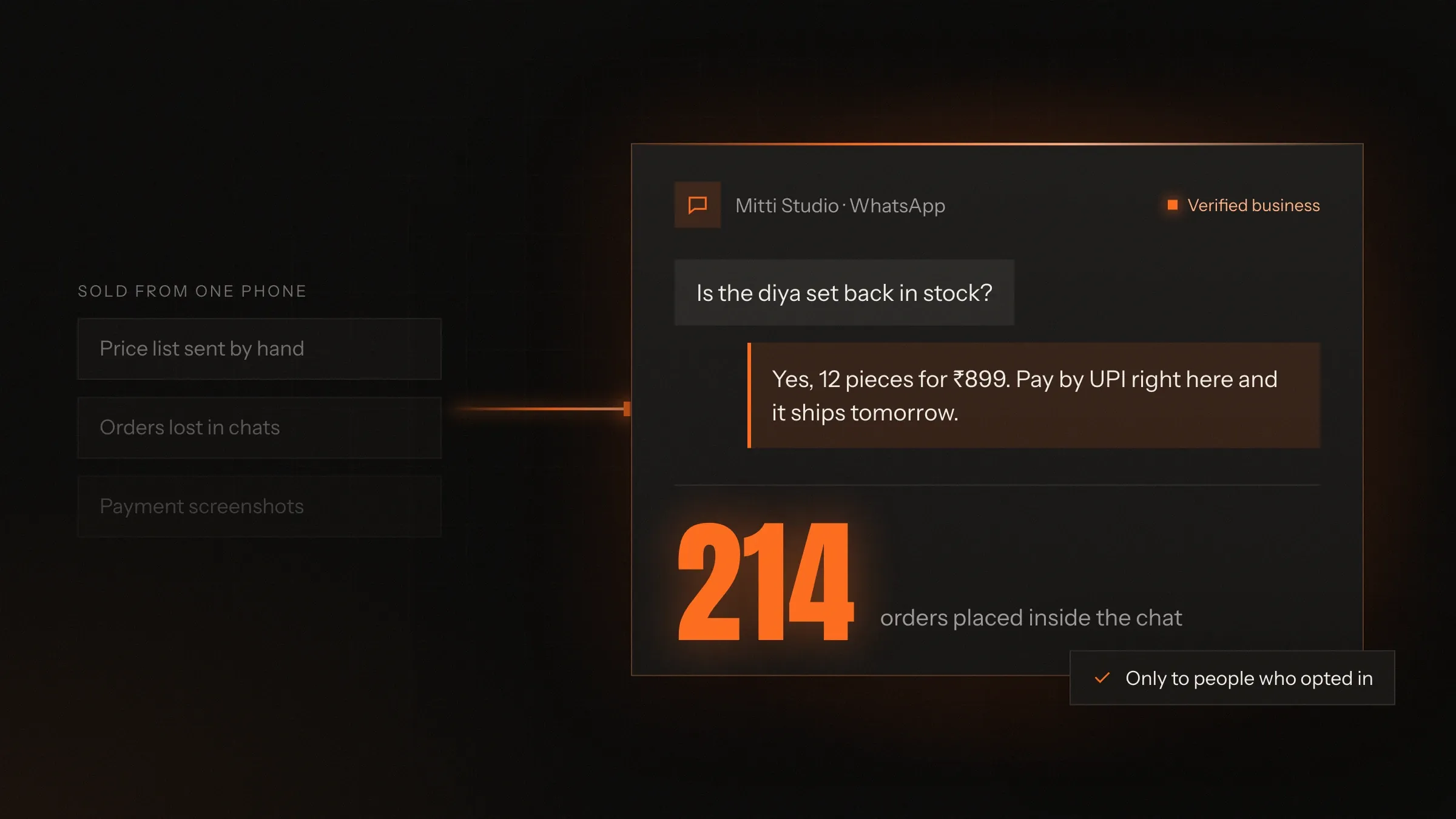
- Customers message your shop's WhatsApp, and the replies come from one phone in someone's pocket.
- Order updates go by SMS and email, and customers call to ask anyway.
- Your team copies orders from WhatsApp chats into your billing software by hand.
- Broadcast lists hit their limit, and you can't tell who read the message.
- Cash-on-delivery orders are refused at the door because nobody confirmed them.
- When the person with the phone leaves, the customer history leaves with them.
What changes
-
Today: One phone, one person, one inbox.
After: Your whole team and an AI assistant answer from one number, in a shared inbox.
-
Today: Orders are typed from chats into your software.
After: Orders placed on WhatsApp land in your store or ERP by themselves.
-
Today: Updates go by SMS and email that customers skip.
After: Confirmations, payment links and delivery updates arrive on WhatsApp.
-
Today: Broadcasts go out with no idea what happened next.
After: Campaigns reach opted-in customers, with delivery, read and reply counts.
-
Today: Cash-on-delivery orders ship without a check.
After: Each one is confirmed on WhatsApp first, with the option to pay online.
What it does for you
-
Send updates customers see
Order confirmations, payment links, delivery updates, appointment reminders and one-time passwords, from approved templates.
For exampleA parcel goes out for delivery, and the buyer gets the tracking link on WhatsApp.
-
Sell from a catalogue
Products, prices and stock from your store, browsed and added to a cart inside the chat.
For exampleA customer taps a product, adds two to the cart and sends the order without leaving WhatsApp.
-
Take payments in the chat
UPI and card payment links, cash-on-delivery confirmation and payment reminders, matched to the order.
For exampleA buyer confirms a cash-on-delivery order, or switches to UPI with one tap.
-
Answer with an AI assistant
Questions about orders, products and policies answered at any hour, with a person taking over when needed.
For exampleAt 11 pm a customer asks if a size is back in stock and gets the answer straight away.
-
Share one inbox
Every chat on one number, assigned to the right person, with the customer's orders beside it.
For exampleA bulk enquiry goes to sales, while a return question goes to support.
-
Run campaigns that respect opt-in
Offers and launches sent only to customers who agreed, with opt-outs honoured at once.
For exampleA restock alert goes to customers who asked to hear about it, and anyone who replies STOP is removed.
-
Build flows inside the chat
Step-by-step forms for bookings, lead capture, addresses and feedback, without sending anyone to a website.
For exampleA patient picks a doctor, a date and a time slot in a WhatsApp flow.
How it works
-
Your number is connected
We set up your WhatsApp Business Account, verify the business and connect your number to the API.
-
Templates are approved
Messages you start, such as updates and offers, are written as templates and approved by Meta.
-
Your systems are linked
Your store, CRM, ERP or booking system sends events to WhatsApp and receives replies and orders back.
-
Customers chat, order and pay
Inside WhatsApp, with catalogues, buttons, flows and payment links.
-
The AI and your team answer
In one shared inbox, with a clean hand-over from the AI to a person.
-
You see what works
Delivery, read and reply counts for every template and campaign, tied to your orders.
Where we've built it
5 from our portfolio
-
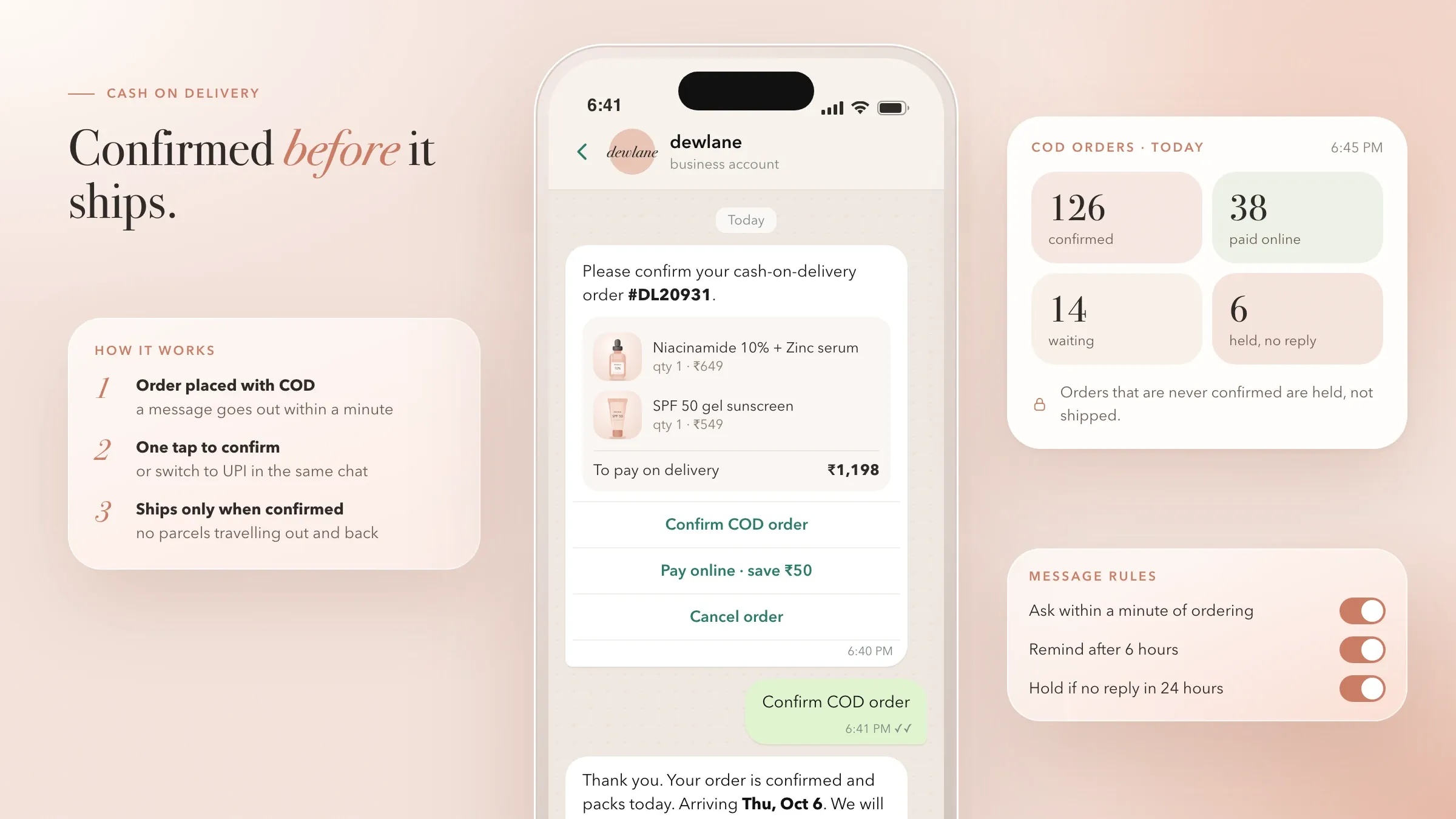 Cash on delivery, confirmed first For a skincare brand in Mumbai, every cash-on-delivery order is confirmed on WhatsApp before it ships, and buyers can switch to paying online in the same chat. Read the case study
 -
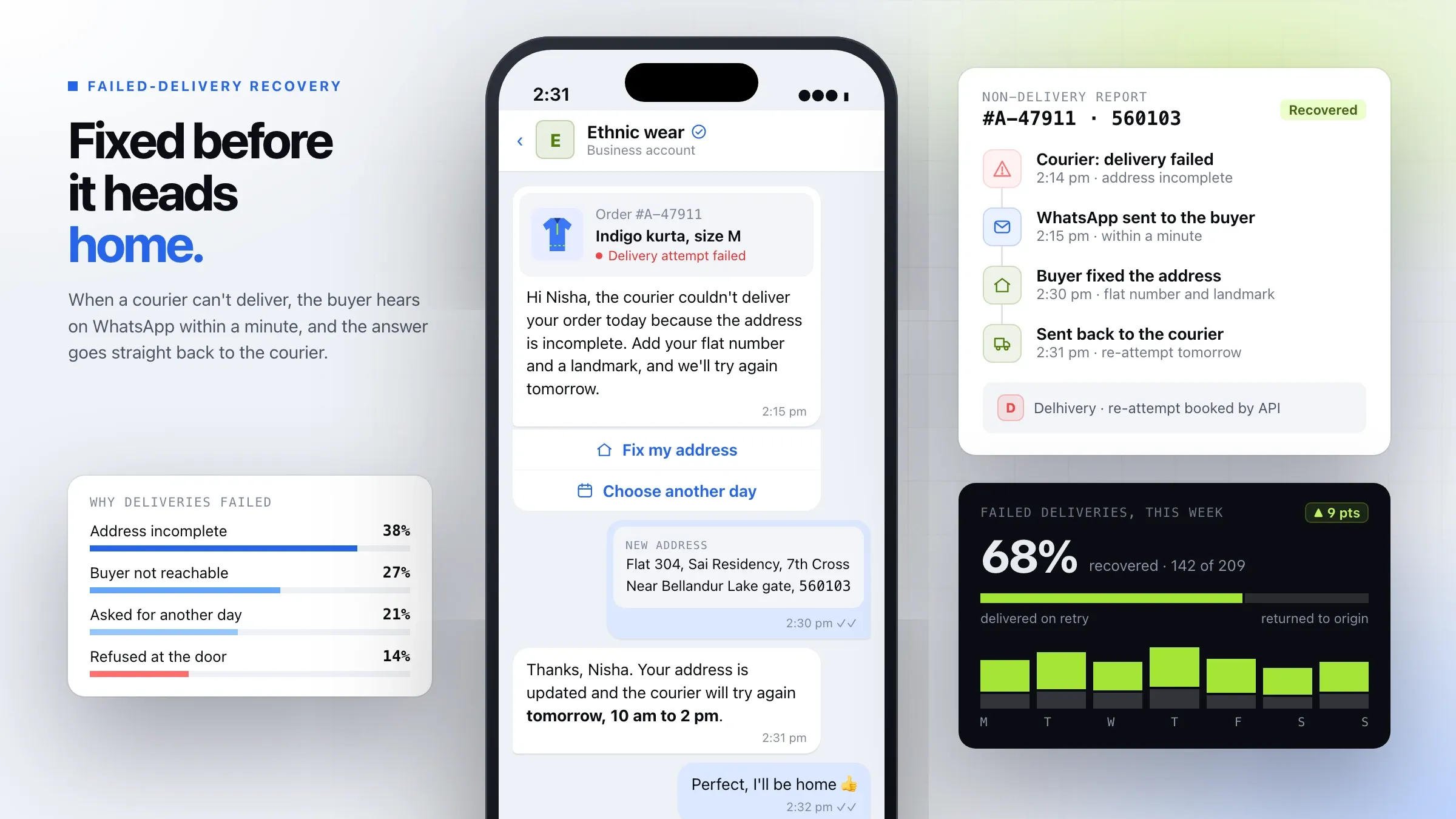 Failed deliveries, recovered on WhatsApp For a commerce startup we back in Bengaluru, buyers are messaged on WhatsApp the moment a delivery fails, to fix the address or choose a new time. Meet the startup
 -
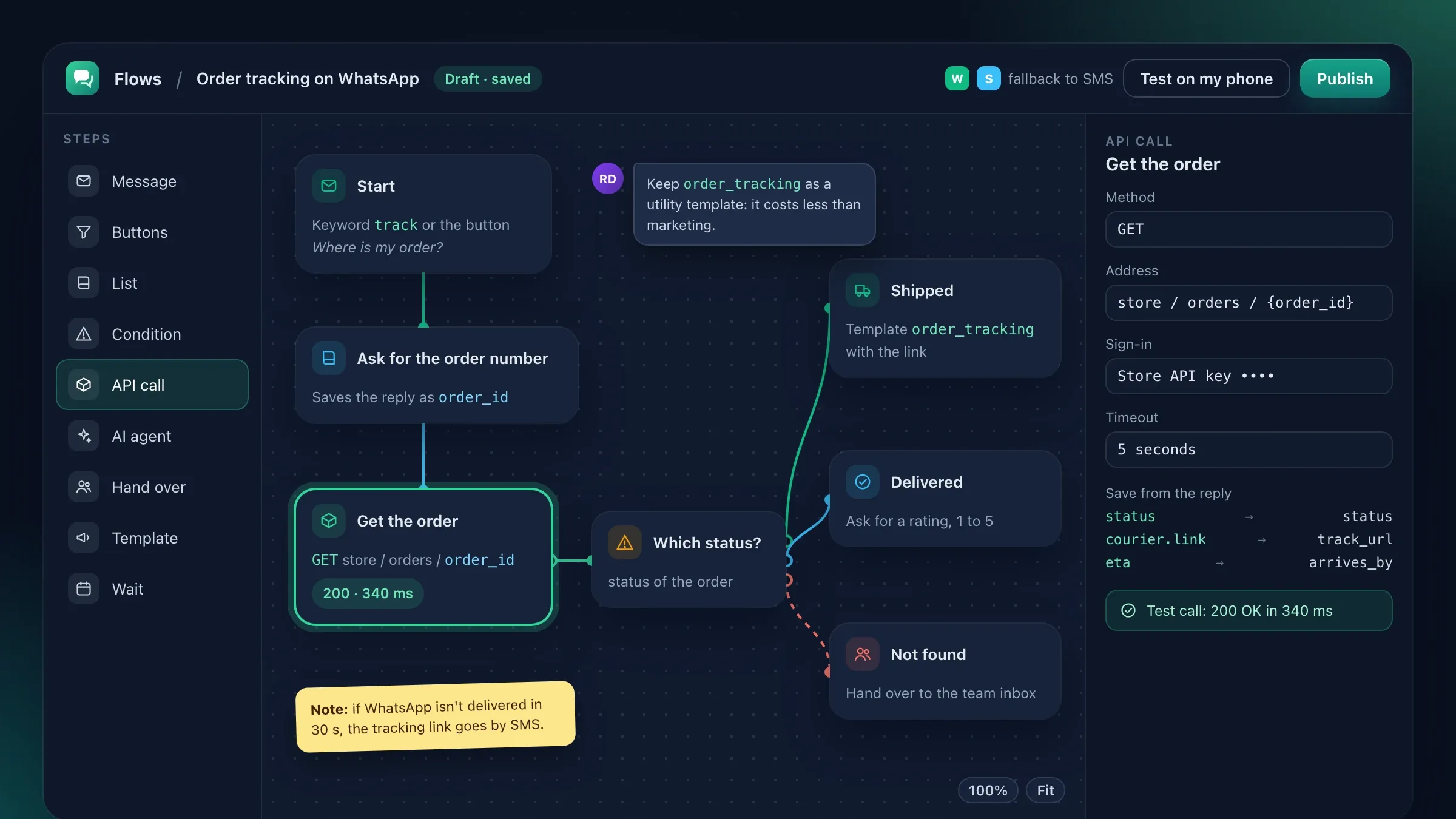 Chat flows without code For the messaging platform we invest in, we built the flow builder its customers use to create WhatsApp flows for orders, bookings and support. View the investment
 -
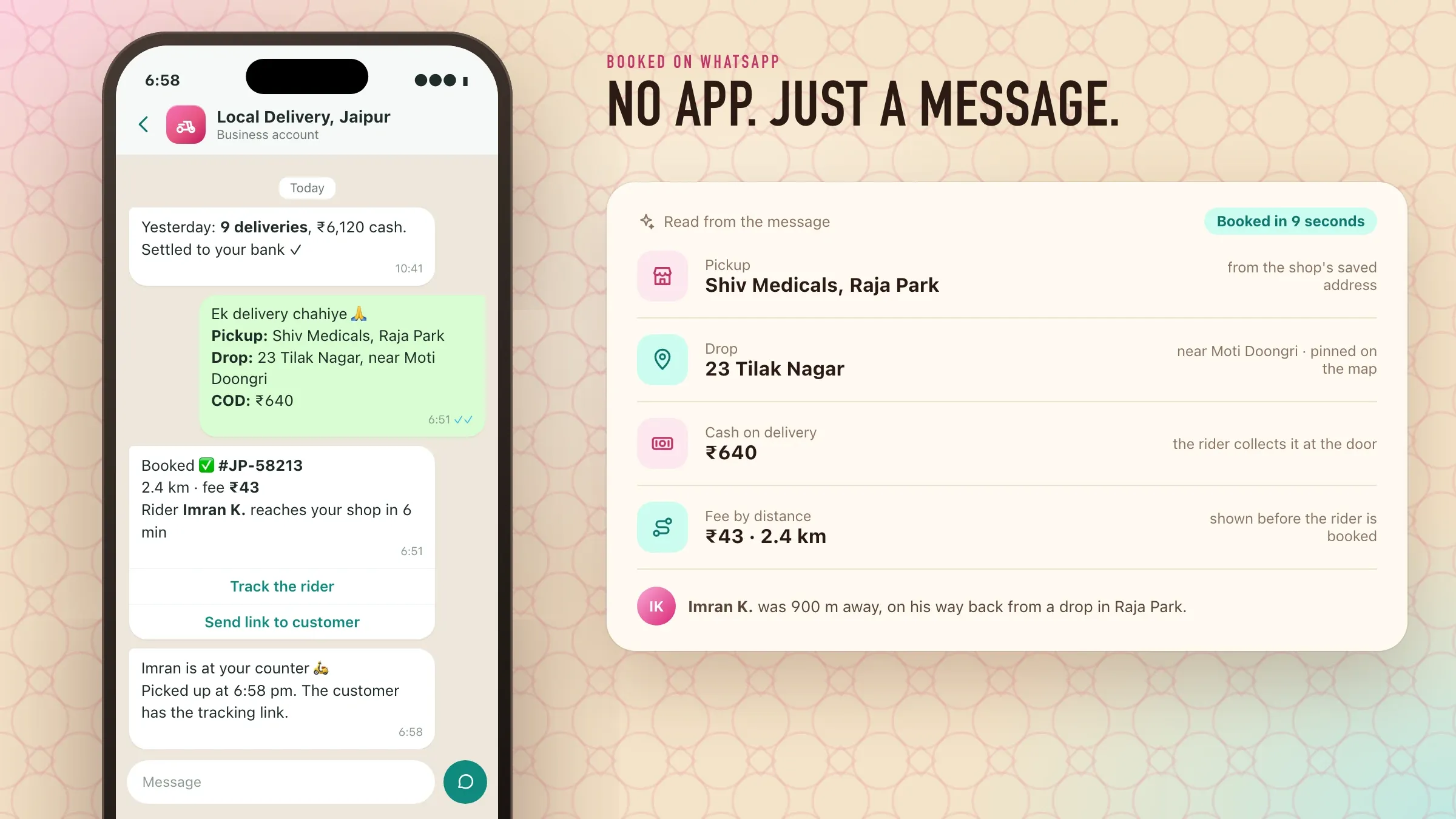 Deliveries booked on WhatsApp For a delivery startup we back in Jaipur, shops send pickup and drop details on WhatsApp and a rider is assigned without opening any app. Meet the startup
 -
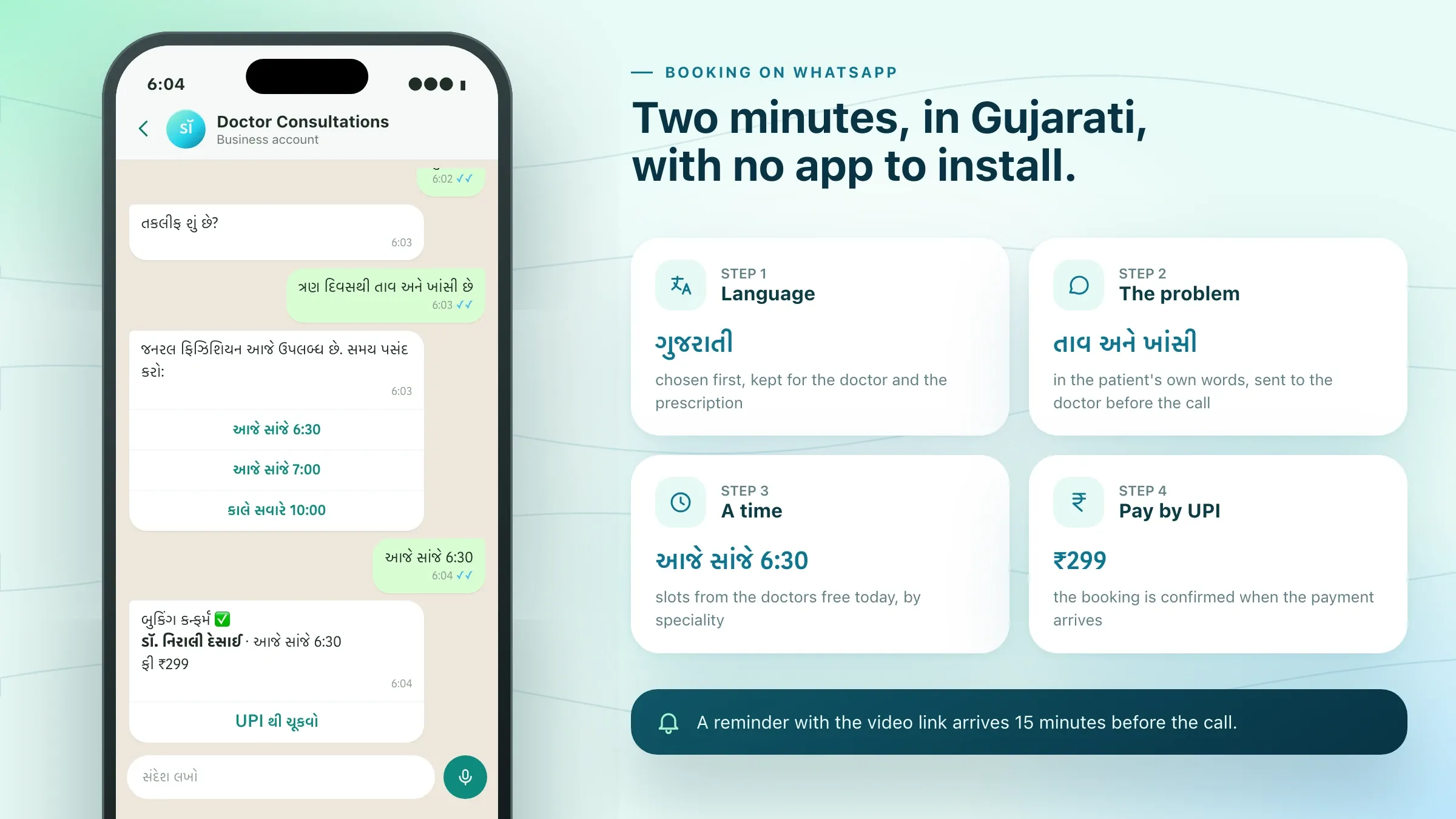 Doctor visits booked in Gujarati For a HealthTech startup we back in Ahmedabad, patients book video consultations by sending a message on WhatsApp, in Gujarati. Meet the startup
What the WhatsApp Business API is
The WhatsApp Business API connects WhatsApp to your own software. Instead of a phone on the counter, your business number is linked to your store, CRM or booking system, so messages go out automatically, a whole team can answer, and every chat is tied to the right customer and order.
It is part of Meta’s WhatsApp Business Platform. Businesses use it through Meta’s cloud service or through a provider, and Meta charges per template message. What the API does not give you is a screen to work in: the inbox, the flows, the catalogue and the links to your systems are what we build on top of it.
For a small shop with one person answering chats, the free WhatsApp Business app may be enough. The API makes sense once several people share the work, messages need to go out by themselves, or orders and payments have to reach your software without retyping.
Where WhatsApp pays off first
The quickest gains come from messages you already send another way. For many customers, in India especially, WhatsApp is the app they open first, so an order confirmation, a payment reminder or a delivery update there is more likely to be seen than the same message by email.
Next come the conversations that cost money when they go wrong: cash-on-delivery orders confirmed before they ship, appointments confirmed and rescheduled before they become no-shows, and leads from “click to WhatsApp” ads answered while the customer is still interested.
Selling from a catalogue and full support in a shared inbox usually follow, once customers are used to hearing from you on WhatsApp and your team has seen how it works.
Getting your account approved
Before the first message goes out, Meta needs to know who you are. Your business is verified in Meta’s Business Manager with documents that show its legal name and address, such as a GST certificate or a certificate of registration, and a website that matches.
You also choose the phone number and the display name customers will see. The name has to relate clearly to your business, and the number must be able to receive a verification code. If the number is already in use on the WhatsApp Business app, we check the options for moving it at the start, so nothing surprises you on the day.
We guide you through each step and prepare everything that doesn’t need your own login. The verification itself, and any documents Meta asks for, stay with you as the business owner. Meta’s review times vary, so we start this early, while the templates and integration are being built.
Templates, categories and the 24-hour window
WhatsApp treats messages you start differently from messages that answer a customer. When a customer writes to you, a 24-hour customer service window opens, and your team or AI assistant can reply freely within it. Any message you start outside that window must use a template Meta has approved.
Templates fall into three categories: marketing, such as offers, launches and win-back messages; utility, such as order updates, reminders and account alerts; and authentication, which means one-time passwords. Since July 2025 they are charged per message, at a different rate for each category, so the category a message belongs to matters for cost as well as for approval.
We write templates with the right variables, such as the customer’s name, order number and delivery date, in your brand’s tone and in each language you need. A template rejected for its wording is rewritten and resubmitted before launch, not discovered on launch day.
Selling inside the chat
WhatsApp can be a shop window, not just a notice board. Your product catalogue, with photos, prices and stock kept in step with your store, can be browsed inside the chat, and customers add products to a cart and send the order with one tap.
From there, the order is created in your store or ERP, and a UPI or card payment link is sent, or cash on delivery is confirmed. Abandoned carts get a reminder, and a customer who asked about an item that was out of stock hears when it comes back, if they agreed to.
WhatsApp flows add short forms inside the chat: choosing a size, booking a slot, entering a delivery address or answering a few questions, without sending anyone to a website and back.
Order updates and cash on delivery
For online stores in India, WhatsApp is where delivery problems get fixed. Every order can be confirmed on WhatsApp with the invoice and a tracking link, and updates follow at each step: packed, shipped, out for delivery and delivered.
Cash-on-delivery orders can be confirmed before they ship. The buyer confirms with one tap or switches to paying online in the same chat, and orders that are never confirmed can be held. When a courier reports a failed attempt, the buyer is asked straight away to correct the address or choose a new time, before the parcel heads back to you.
Each of these messages is an approved utility template triggered by your own systems, so nobody on your team sends them by hand.
One number, a whole team and an AI assistant
The API lets your whole team work from one WhatsApp number. Chats arrive in a shared inbox where each conversation can be assigned, tagged and passed between people, with the customer’s past orders and messages beside it.
An AI assistant can sit in front of the inbox. It answers routine questions from your own information, collects details such as order numbers or photos, and passes the chat to a person when it should. Your team can read everything it said.
Routing rules decide who gets what: sales enquiries to sales, returns to support, Gujarati chats to someone who speaks Gujarati, and your largest customers to their own account manager.
Opt-in, quality and staying within the rules
WhatsApp protects its users from spam, and your number is judged by how customers react to your messages. If many people block or report a business, its quality rating drops and its daily messaging limit can be cut.
We build opt-in into your customer journeys: a tick box at checkout, a QR code at the counter, or a message from the customer first. Each agreement is recorded, marketing goes only to people who asked for it, and anyone who opts out is removed at once.
Campaigns go to the right group of customers rather than to everyone, and we check delivery, read and block rates after each one. Used this way, WhatsApp stays a channel customers welcome rather than mute.
Connecting WhatsApp to your systems
WhatsApp is only as useful as what it is connected to. We link it to your online store, CRM, ERP, booking system or billing software, so events in those systems send messages, and replies and orders from WhatsApp land back in them.
Typical connections are Shopify or your own store for catalogues, orders and delivery status; a CRM for leads and follow-ups; Tally or an ERP for invoices; a payment gateway such as Razorpay for UPI links and payment confirmations; and your courier aggregator for tracking.
The integration runs on servers we set up for you, with your data kept in the region you need and access to the inbox limited by role.
Measuring and improving after launch
Every template and campaign reports how many messages were sent, delivered and read, how many got a reply and which buttons were tapped. Linked to your orders, those numbers show which messages lead to sales, which confirmations prevent returns and which reminders get invoices paid.
Before launch we note the figures you have today, such as reply times, cash-on-delivery refusals or missed appointments, so the monthly report can show what changed after the move to WhatsApp.
Meta changes the platform often, with new message types, new pricing and new rules for templates. We keep your set-up current, watch your number’s quality, rewrite templates that underperform and add flows, languages and campaigns as your business grows.
How we work with you
From the first call to running it
- Start
Choose the conversations
We list what customers ask and what you send today, and pick the first messages and flows to move to WhatsApp.
- Build
Set up and connect
We set up the account and number, write the templates, connect your systems and build the inbox and flows.
- Pilot
Test with real customers
A small group of customers and your team use it first, and we fix whatever confuses them.
- Launch
Switch it on for everyone
Order updates, the inbox and the first flows go live, with opt-in collected at checkout and at the counter.
- Every month
Review and grow
We read the numbers with you, improve templates, add flows and campaigns, and keep up with Meta's changes.
Safe and in your control
Opt-in on record
Every customer's agreement to receive messages is recorded, with where and when they gave it.
Opt-outs honoured at once
A customer who asks to stop is removed from marketing straight away, across every campaign.
Your number, your account
The WhatsApp Business Account is in your company's name, and it stays yours if you ever change providers.
Access by role
Each person in the inbox sees the chats and customer details their role needs, and no more.
Payment details stay out of chats
Card and bank details are entered on the payment provider's own page, never typed into a conversation.
Quality watched
We watch your number's quality rating and messaging limits, and adjust templates before a problem grows.
Time and cost
The cost has two parts: building the set-up once, and running it every month. Meta charges per template message, by category, and those charges follow your volume. After the first call we send a written plan and a quote for the build, with an estimate of the running costs.
What it connects to
Sending updates from one system is the quickest start. Catalogues, payments and orders flowing both ways take more.
Flows and AI
Simple buttons cost less than step-by-step flows, or an AI assistant that answers questions from your information.
The inbox
A shared inbox for a few people is simpler than one with teams, routing rules and reports.
Message volume and mix
Meta charges marketing, utility and authentication templates at different rates, and replies within a customer's 24-hour window are charged differently.
Languages
Each language version of a template or flow is written, tested and approved on its own.
Built with
Chosen for each project, never by habit
Questions and answers
12 answered
What is the WhatsApp Business API?
The WhatsApp Business API, part of Meta's WhatsApp Business Platform, lets a business send and receive WhatsApp messages from its own software. It supports many people on one number, approved message templates, catalogues, payments, flows and AI assistants, connected to systems such as an online store or a CRM.
What is the difference between the WhatsApp Business app and the API?
The Business app runs on a phone or two and suits a small shop answering chats by hand. The API connects WhatsApp to your software instead, so a whole team can share one number, messages go out automatically, and every chat is linked to the customer's orders.
How much does the WhatsApp Business API cost?
There are two parts. Since July 2025, Meta charges per template message, at different rates for marketing, utility and authentication messages, and replies within a customer's 24-hour window are charged differently. Then there is the cost to build the integration, which depends on the systems, flows and inbox you need. We quote the build after the first call.
What are WhatsApp message templates?
Templates are messages a business starts, such as an order confirmation, a reminder or an offer, written in advance and approved by Meta. Each belongs to a category: marketing, utility or authentication. Within a customer's 24-hour window, your team can reply freely without one.
Do customers have to opt in to WhatsApp messages?
Yes. Customers must agree to hear from your business, for example with a tick box at checkout or by messaging you first. We record each opt-in and make opting out easy, which also protects your number's quality rating.
Can customers order and pay inside WhatsApp?
Yes. Customers can browse a catalogue, add products to a cart and send an order in the chat, then pay through a UPI or card payment link, or confirm cash on delivery. The order reaches your store or ERP automatically.
Can an AI assistant answer on our WhatsApp number?
Yes. An AI assistant can answer questions about orders, products and policies from your own information, at any hour, and pass the chat to a person in the shared inbox when it should. Customers are told they are talking to an assistant.
Can we keep our existing WhatsApp number?
Usually, yes. A number already used on the WhatsApp Business app can be connected to the API. We check your number's options at the start and plan the switch, so customers keep reaching you on the number they know.
Can WhatsApp messages be in Hindi or Gujarati?
Yes. Templates, flows and AI replies can be written in Hindi, Gujarati, English and other languages. Each language version of a template is approved separately, and each customer gets the one that matches their preference.
How long does a WhatsApp Business API integration take?
Sending order updates from one system is a matter of weeks, including business verification and template approval. Catalogues, payments, flows, a shared inbox and an AI assistant take longer. The plan after the first call sets out the timeline.
Do you set up the WhatsApp Business API for businesses outside India?
Yes. FIRELIFE Ventures works with small and mid-size businesses worldwide from Rajkot, India, on India time. The WhatsApp Business Platform works the same way in every country where WhatsApp is available, and templates can be written in your customers' languages.
What happens after launch?
We look after it with you: we watch delivery, reads and your number's quality rating, update templates and flows, add campaigns and keep the integration current as Meta changes the platform.
Tell us what you want to build
Write a few lines about the idea and who it is for. We reply with our questions, a first plan and how we would start.
Write to us