Build something new gym membership app
Fill every class, keep every member
We build gym membership apps and the software behind them: memberships that renew on their own, class booking with fair waitlists, QR check-in at the door, trainer plans in every member's pocket, and one view of every studio, so classes fill and members stay.
- We start with a morning at your front desk
- Renewals with notice, never surprise charges
- One studio or a whole chain
Sound familiar?
What we hear before we start
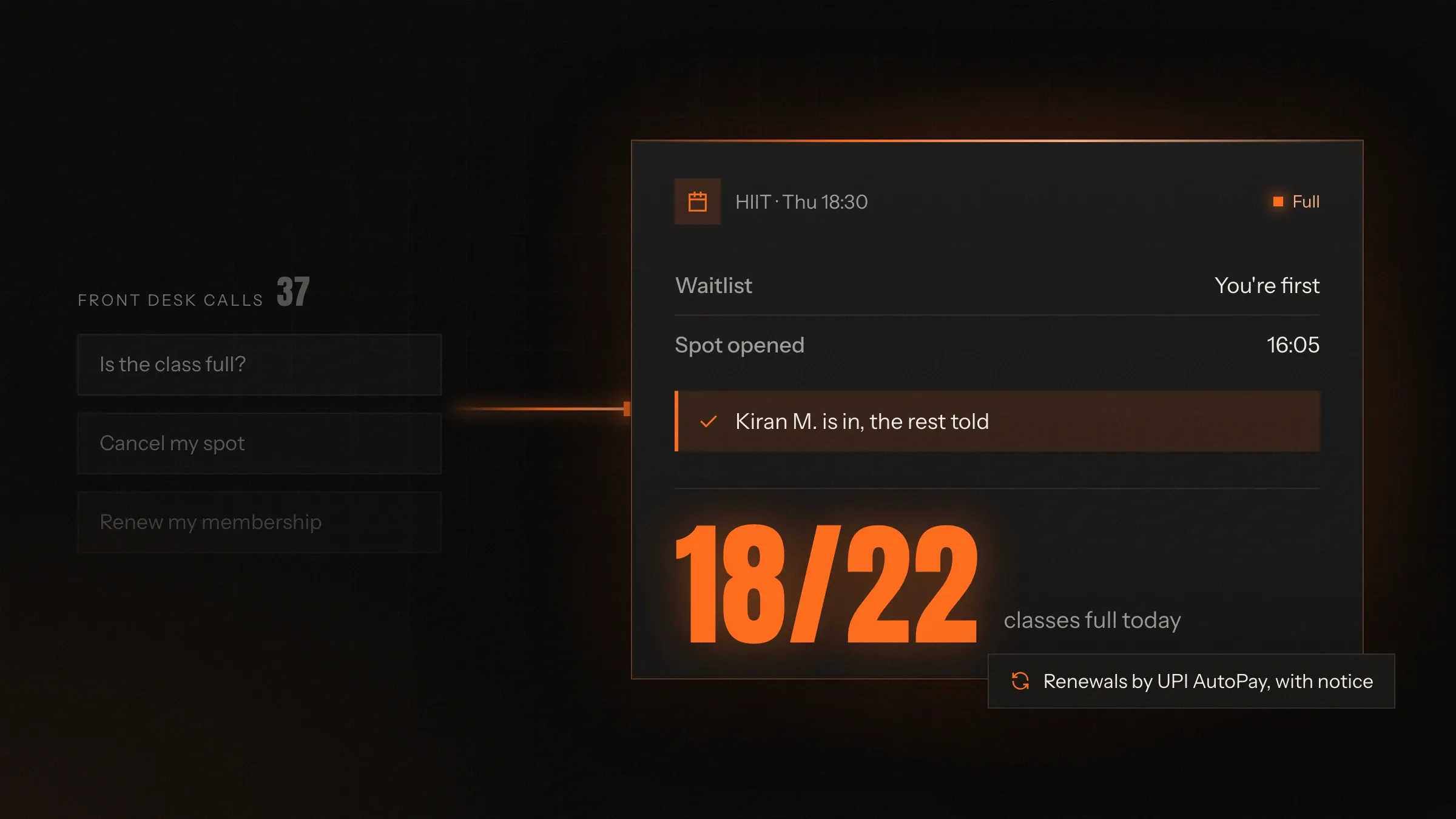
- Renewals are the front desk's biggest job, and every missed call is a member who lapses.
- Classes are booked in a WhatsApp group, so the fastest typist gets the spot.
- Popular classes overflow while the people who booked don't turn up.
- You don't really know who visits, and who quietly stopped coming.
- Trainers keep plans and progress in notebooks that leave with them.
- Comparing studios means asking each one to send its spreadsheet.
What changes
-
Today: Monthly fees are chased by phone and paid at the desk.
After: Memberships renew on UPI AutoPay or a card mandate, with a notice before every charge.
-
Today: Class spots go to whoever replies first in a group chat.
After: Members book in the app, join a waitlist when it's full, and get the spot when someone cancels.
-
Today: No-shows leave spots empty that someone else wanted.
After: Late-cancellation and no-show rules keep popular classes fair.
-
Today: Attendance is a guess, and screenshots of membership cards get shared.
After: Members check in with a QR code that refreshes every few seconds, and every visit is on record.
-
Today: Members drift away without anyone noticing.
After: The team sees whose visits have dropped and reaches out before they leave.
What it does for you
-
Memberships that renew themselves
Monthly plans on UPI AutoPay or card mandates, quarterly and annual plans, class packs and personal training packs, with GST invoices in the app.
For exampleA member approves AutoPay once, gets a notice before each monthly charge, and never has to queue at the desk again.
-
Class booking with waitlists
Every class has a set number of spots. When it's full, members join the waitlist and move up automatically.
For exampleSomeone cancels the 6:30 pm HIIT class at 4 pm, and the next member on the waitlist is booked and notified.
-
QR check-in at the door
A code in the app that refreshes every few seconds, checked at the entrance against the membership and any booked class.
For exampleA member scans in at 6:22 pm; the desk sees an active membership and her spot in the 6:30 class.
-
Freezes, upgrades and transfers
Members freeze while they travel, upgrade or downgrade with pro-rated charges, and move between studios if their plan allows.
For exampleA member travelling for three weeks freezes her plan, and the end date moves forward on its own.
-
Trainers and workout plans
Trainers assign plans, members log weights and reps, and personal training sessions are booked against packs.
For exampleA trainer adjusts a member's plan after a strength test, and it appears on his phone before his next session.
-
Leads and trial classes
Enquiries from the desk, the website and Instagram are recorded, booked into a trial and followed up afterwards.
For exampleA visitor who tried Saturday's yoga class gets a call on Monday with a joining offer.
-
Members at risk, flagged early
Members whose visits have dropped, whose AutoPay failed or whose plan is about to end, on one list for the team.
For exampleNine members who haven't visited in two weeks appear on the front desk's call list.
-
Every studio on one screen
Active members, joins and lapses, class fill, check-ins and collections, studio by studio.
For exampleThe owner sees one studio's evening classes are always full and adds a second batch.
How it works
-
They join
From the app, the website or the desk, choosing a plan and paying by UPI, card or AutoPay.
-
They book
Classes and personal training sessions in the app, with a waitlist when a class is full.
-
They check in
A refreshing QR code at the entrance confirms the membership and the booked class.
-
They train
Their trainer's plan is in the app, and weights, reps and progress are logged as they go.
-
They renew
AutoPay charges after a pre-debit notice, with a GST invoice in the app and a freeze when they travel.
-
You keep them
Drops in visits, failed payments and plans ending appear on the team's list, so nobody slips away unnoticed.
Where we've built it
3 from our portfolio
-
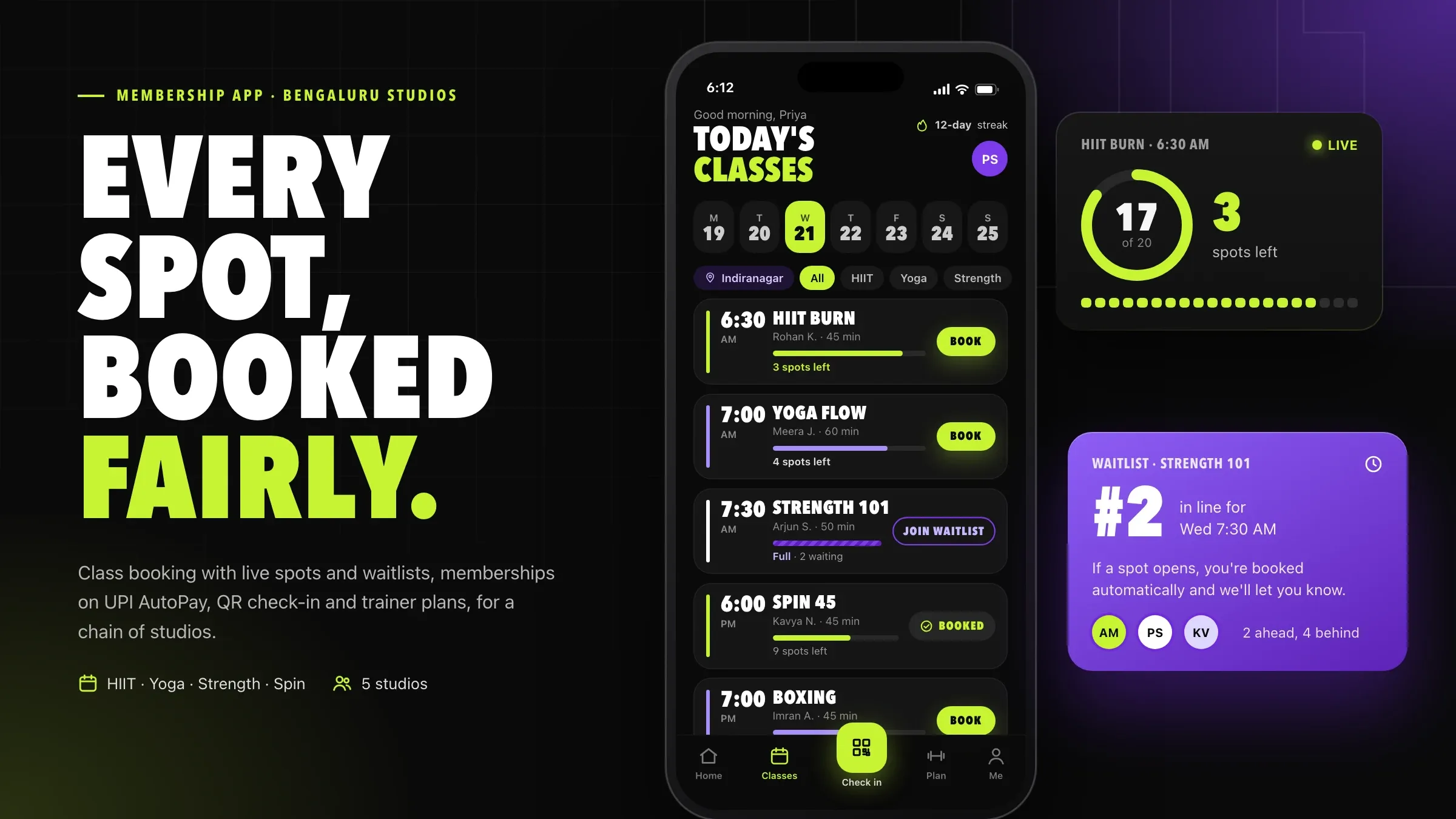 A membership app for a studio chain For a chain of fitness studios in Bengaluru, we built memberships on UPI AutoPay, class booking with waitlists, QR check-in, trainer workout plans and a front-desk console. Read the case study
 -
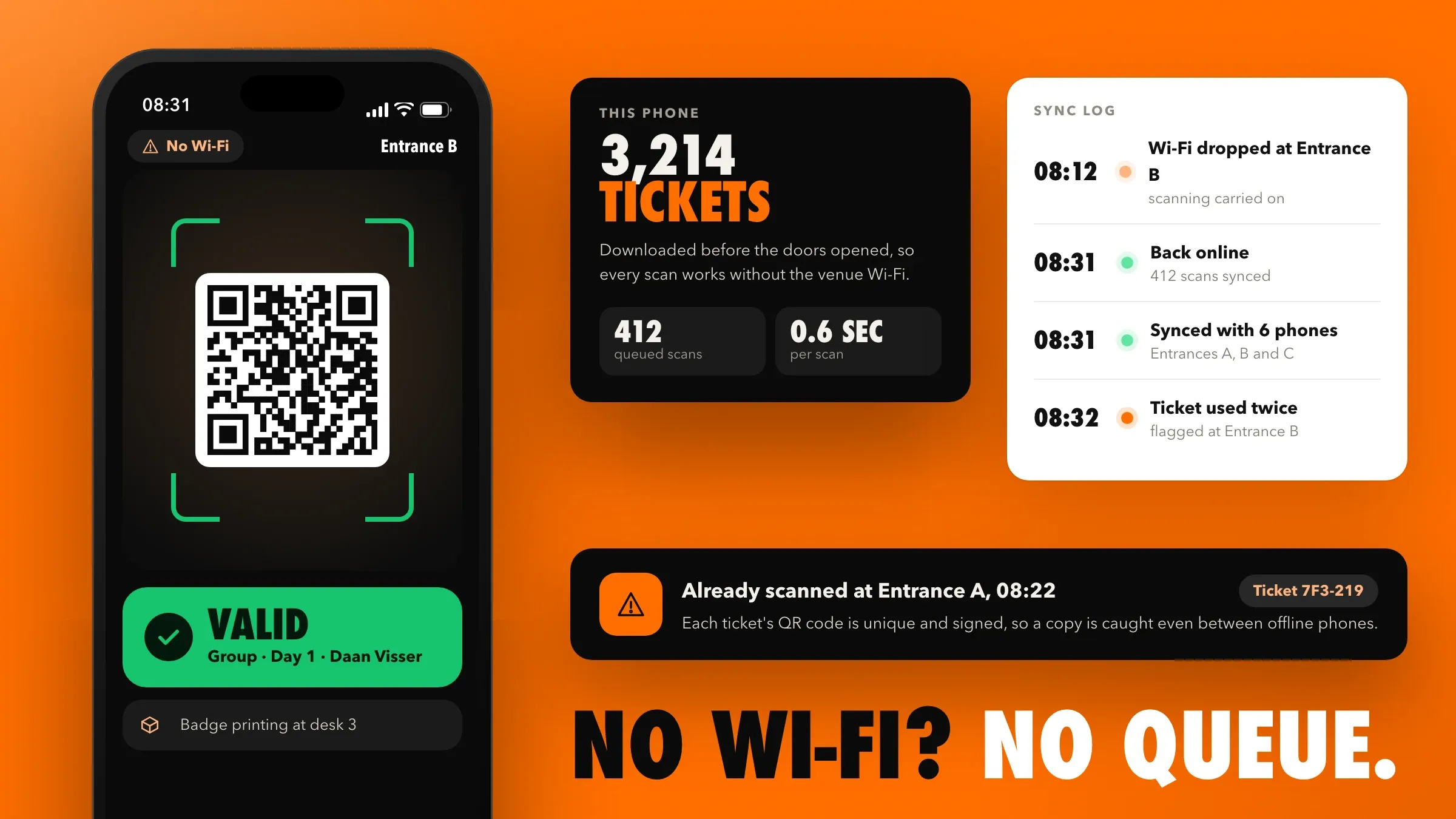 QR check-in that keeps going offline For a conference organiser in Utrecht, we built wallet tickets with signed QR codes and a check-in app that keeps scanning when the venue Wi-Fi drops. Read the case study
 -
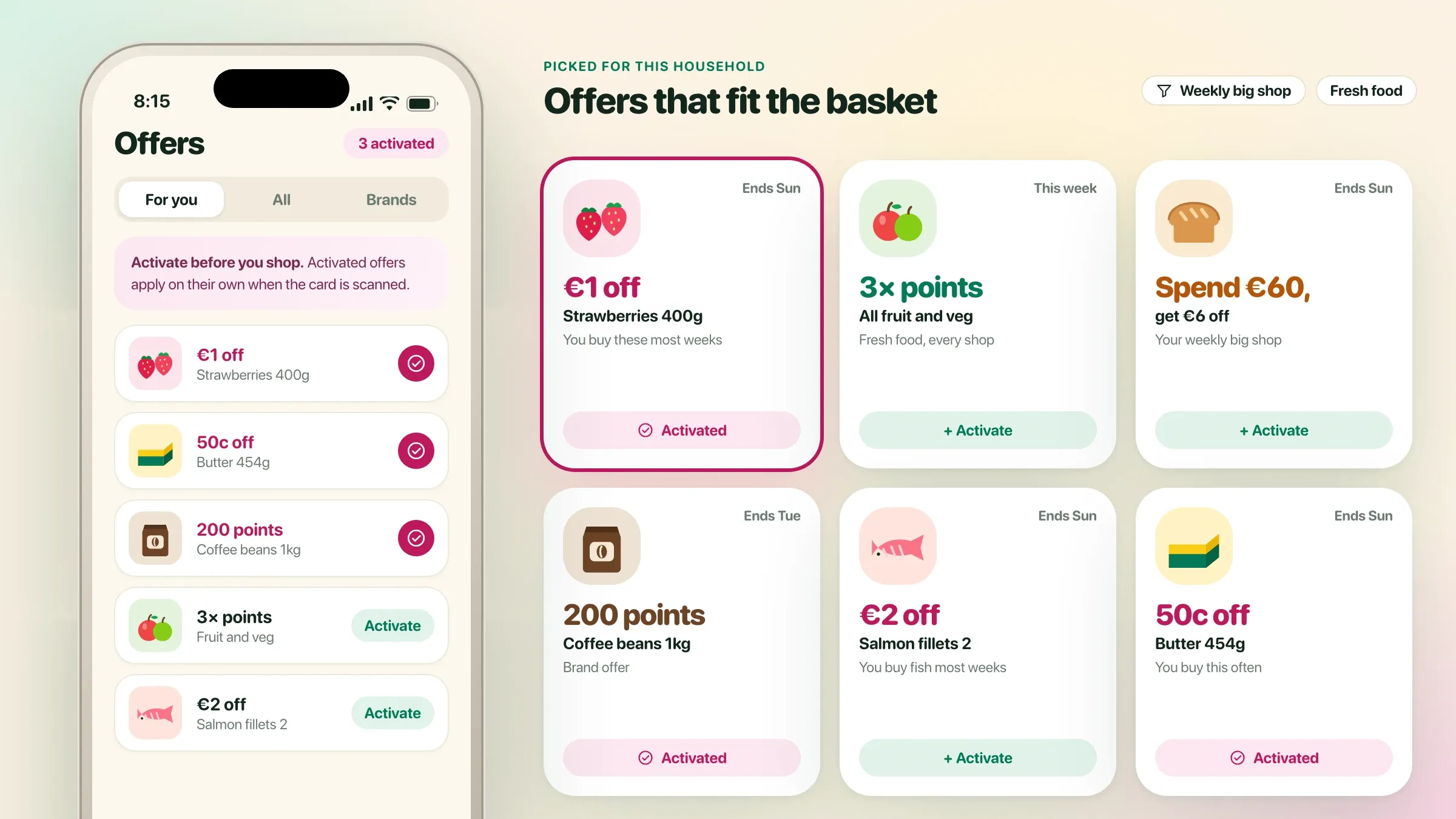 A loyalty app people keep using For a supermarket chain in Ireland, we built a loyalty app with a digital card scanned at the existing tills, household points and personalised offers. Read the case study
What a gym membership app does
A gym membership app runs the member’s side of the gym on their phone: joining, paying, renewing, booking classes, checking in and following their trainer’s plan. Behind it sits the software the gym runs on: members, plans, classes, payments, trainers and a console for the front desk.
Together they replace the register, the receipt book, the WhatsApp group for class bookings and the trainer’s notebook. Everyone works from the same record of who is a member, what they paid, which classes they booked and when they last came in.
The goal is in the name of this page. Classes should fill fairly, and members should stay. Everything we build is measured against those two things.
The same app suits gyms, fitness studios, yoga and dance studios, CrossFit boxes, swimming academies and sports clubs: anywhere people pay to come back regularly. The details differ, from swim levels to belt gradings, and we set the app up around yours.
Where it pays off first
Renewals are usually where a gym app earns its keep first. When monthly plans run on UPI AutoPay or a card mandate, renewals stop depending on a phone call, and the front desk stops spending its mornings chasing fees.
Class booking comes next. Moving bookings out of a WhatsApp group into the app, with spots, waitlists and no-show rules, makes popular classes fair and fills the ones that used to run half empty. Then comes knowing who actually visits: check-ins on record show which members are drifting away while there is still time to bring them back. For a chain, the owner’s view pays off quickly too: comparing studios no longer means waiting for spreadsheets.
Memberships and AutoPay
Members buy or renew in the app: monthly plans on AutoPay, quarterly and annual plans, class packs and personal training packs. Monthly plans run on UPI AutoPay or a card mandate. The member approves it once, receives a pre-debit notice before every charge, as RBI’s rules for recurring payments require, and can pause or cancel the mandate at any time.
When an AutoPay charge fails, the member is told straight away with a link to pay, and the desk sees it on their list. Freezes move the end date forward on their own, upgrades and downgrades are pro-rated, and every payment produces a GST invoice. Plans decide which studios a member can use, so all-access members move freely across a chain. Corporate plans, where a company pays for its staff, are billed to the company on one invoice a month.
Class booking, waitlists and no-shows
Every class, from yoga and spin to HIIT and strength, has a set number of spots. Members book from the app, and when a class is full they join the waitlist. When someone cancels, the next member is booked automatically and notified.
Each studio sets its own rules for late cancellations and no-shows. A member who cancels too late or doesn’t turn up can lose that class from their pack, which keeps the classes everyone wants open to the people who will come. Instructors see their class list before it starts, and cover is easy to arrange when an instructor is away.
The booking data also shows which time slots and formats fill and which don’t, so the timetable can follow demand instead of habit.
Check-in at the door
Members check in by showing a QR code from the app at the entrance. The code refreshes every few seconds, so a screenshot can’t be passed to a friend. Each check-in confirms the membership is active, records the visit and marks the booked class.
Where the gym has turnstiles, door controllers or biometric devices, a valid scan can open the door, once we have checked the hardware can connect. Where it can’t, check-in happens on a tablet at the desk. Either way, every studio gets an accurate attendance record, often for the first time. Guests and day passes work the same way: the desk issues a one-time code, and the visit is recorded like any other.
Trainers, plans and personal training
Trainers have their own view of the app. They assign workout plans, and members follow them in the app, logging weights and reps as they train. Trainers track progress, including strength, body measurements and progress photos the member chooses to share, and adjust plans as members improve.
Personal training sessions are booked against the member’s pack, and each trainer’s sessions are recorded for their payouts. With the member’s permission, steps and workouts can be read from Apple Health or Android’s Health Connect, so the trainer sees the whole week. Group class instructors get help too: their class list, who is new, and any injury a member has chosen to share.
Keeping members
Most members don’t leave in a day; their visits thin out over weeks. The app shows the team whose visits have dropped, whose AutoPay failed and whose plan ends soon, on one list, so the desk can call, a trainer can check in, or an offer can go out on WhatsApp before the member decides to stop.
New members start the same way. Enquiries from the desk, the website and Instagram are recorded the moment they arrive, booked into a trial class and followed up afterwards, so every visitor who tries a class hears back.
Members who keep coming can be rewarded: points for visits, a free class for a referral, a birthday offer. Small rewards, given consistently, keep a habit going.
What we need from you, and the decisions that shape it
We start with mornings and evenings at your front desk, conversations with members, trainers and managers, and a look at every plan, price, register and spreadsheet you use. The exceptions live there: the corporate plan with its own rules, the couple’s membership, the trainer who works at two studios.
A few decisions set the size of the build: one studio or a chain, which plans and payment types, whether the door has hardware to connect, how much trainers do in the app, which languages members need, and whether the apps carry your gym’s name. We write each decision down with its reason, so the plan and the quote match what you chose.
Members’ data and payments
A gym holds more personal data than it seems: phone numbers, payment mandates, injuries, health questionnaires, measurements and photos. Payments run through a licensed payment gateway, and the app keeps only a reference, never card numbers or UPI PINs. Health details and photos are seen only by the member and their trainer.
Each person sees their part: members their own plan, trainers their members, the desk today’s studio, owners every studio. Freezes, refunds and plan changes are logged with who made them, and member data is kept in the region you need. For gyms in India, we design for the Digital Personal Data Protection Act; elsewhere, for the GDPR or local rules, agreed with your adviser.
Launch, and running it every month
One studio pilots the system first. Existing members are moved across with their plans and balances, and the desk helps each member set up the app and AutoPay on their next visit. Other studios follow one by one.
After launch we review renewals, class fill, check-ins and lapses with you every month, fix what members and staff find, and add new class formats, offers and studios as the business grows.
The first weeks after launch need the most care. We watch AutoPay sign-ups, failed check-ins and booking questions closely, and adjust screens and messages quickly while members’ new habits are still forming.
How we work with you
From the first call to running it
- Start
Mornings and evenings at the desk
We spend the busy hours at your front desk, talk to members, trainers and managers, and review every plan, register and spreadsheet.
- Design
Screens members try first
The member app, class booking, check-in, the trainer view and the front-desk console are tried by real members and staff before we build them.
- Build
Build and connect
We build the apps and console, set up your plans and class rules, and connect payments, AutoPay, notifications and your door hardware if you have it.
- Pilot
One studio first
One studio runs on the new system while we fix what members and staff find, with the desk helping each member set up the app.
- Launch
Every studio, every member
Existing members move across studio by studio, with their plans, balances and AutoPay set up as they arrive.
- Every month
Run and improve
We look after the apps, review renewals, class fill and lapses with you, and add new class formats, offers and studios.
Safe and in your control
Notice before every charge
AutoPay members get a pre-debit notice before each charge and can pause or cancel the mandate at any time.
Card and UPI details never stored by us
Payments run through a licensed payment gateway; the app keeps only a reference, never card numbers or UPI PINs.
Health details kept private
Injuries, health questionnaires, measurements and progress photos are seen only by the member and their trainer, and photos only if the member chooses to share.
Each person sees their part
Members see their own plan, trainers see their members, the desk sees today's studio, and owners see every studio.
Every change on record
Freezes, refunds, plan changes and manual check-ins are logged with who made them and when.
Your members, yours to take
Member, payment and visit records can be exported at any time, so you are never locked in.
Time and cost
The cost of a gym app depends on how your gym runs, not on a package. Many start with memberships, AutoPay, class booking and check-in, then add trainer plans, leads and more studios. After the first call we send a written plan and a quote.
One studio or a chain
A single studio is the simplest. A chain needs plans that work across studios and one view for the owner.
Plans and payments
Monthly AutoPay, class packs, personal training packs, freezes and pro-rated upgrades each add rules and tests.
The door
QR check-in at the desk is quick. Turnstiles, door locks or existing biometric devices need hardware work.
Trainers and coaching
Workout plans, progress tracking, personal training bookings and trainer payouts add a second app view.
Apps under your name
Android and iPhone apps published under your gym's name cost more than a web app, and are worth it for members who visit every week.
Built with
Chosen for each project, never by habit
Questions and answers
12 answered
What is a gym membership app?
A gym membership app lets members join, pay, renew, book classes, check in and follow their workout plans on their phone. Behind it, the gym runs members, plans, classes, payments and trainers from one system, with a console for the front desk.
How does UPI AutoPay work for gym memberships?
The member approves a UPI AutoPay mandate once in their UPI app. Before each charge they get a pre-debit notice, as RBI's rules for recurring payments require, and the fee is collected automatically. They can pause or cancel the mandate at any time.
How much does it cost to build a gym membership app?
It depends on the number of studios, the plans and payment types, check-in hardware, trainer features and whether the apps carry your name. We send a written plan and a quote after the first call.
How long does it take to build a gym app?
It depends on the scope. Memberships, AutoPay, class booking and QR check-in for one studio is a matter of weeks; a chain with trainer plans, door hardware and its own apps takes longer. A pilot in one studio comes before the full switch.
How does class booking with a waitlist work?
Each class has a set number of spots. When it's full, members join the waitlist, and when someone cancels, the next member is booked automatically and notified. Late-cancellation and no-show rules, set by each studio, keep popular classes fair.
Can the app work with our turnstiles or biometric machine?
Often, yes. Many turnstiles, door controllers and biometric devices can be connected so a valid QR scan opens the door. We check your hardware before we promise it; where it can't connect, check-in happens at the desk or on a tablet.
Can members freeze or transfer their membership?
Yes. Members freeze for set periods, such as while travelling, and the end date moves forward on its own. Upgrades and downgrades are pro-rated, and plans decide which studios a member can use.
Does the app send GST invoices?
Yes. Every payment produces a GST invoice in the app and by email, and the accounts team sees collections by plan and studio.
Can the app connect to Apple Health or Google Fit?
It can, with the member's permission. Steps and workouts can be read from Apple Health or Android's Health Connect, which takes over from Google Fit, so trainers see the full week, not just the hour in the gym.
Can the app work in Hindi, Kannada or other languages?
Yes. The member app, notifications and messages can be in English, Hindi, Kannada, Gujarati and other languages, and members choose theirs.
Do you build gym apps for gyms outside India?
Yes. FIRELIFE Ventures works with small and mid-size businesses worldwide, from Rajkot, India, on India time. Outside India, memberships run on card subscriptions or local direct debits instead of UPI AutoPay, with invoices in the local tax format.
What happens after the gym app launches?
We look after it with you: updates and fixes, a monthly look at renewals, class fill and lapses, and new class formats, offers and studios as you grow.
Tell us what you want to build
Write a few lines about the idea and who it is for. We reply with our questions, a first plan and how we would start.
Write to us