Guide WhatsApp Business API pricing
WhatsApp Business API, explained: how it works and what decides the cost
With the WhatsApp Business API, Meta charges for each delivered message your business starts, at a rate set by the message's category and the country of the customer's number. Replies to customers who wrote first cost far less, so the cheapest WhatsApp set-up is one where customers start the conversation and your updates are written as utility messages.
By FIRELIFE Ventures · Updated 26 October 2026 · 8 min read
In short
- The API connects your WhatsApp number to your own software; Meta charges per delivered message, never for messages customers send you.
- Messages you start must be approved templates: marketing, utility or authentication, each at its own rate per country.
- When a customer writes first, a 24-hour window opens for replies: since 1 October 2026 the first 1,000 service replies a month per number are free.
- Your monthly bill follows how many messages of each category you send, and to which countries; the build is a separate, one-time cost.
- Start with utility messages customers want, such as order updates, and get opt-in before any marketing.
What is the WhatsApp Business API, and who charges for it?
The WhatsApp Business API connects your WhatsApp number to your own software, and Meta charges for the messages your business sends through it.
The free WhatsApp Business app runs on a phone. One or two people answer chats by hand, and whatever they type stays on that phone. The API is the other way in: your number is linked to your online store, CRM, booking system or ERP, so messages go out by themselves, a whole team can answer from a shared inbox, and every chat sits next to the right customer and order.
There are two kinds of cost, and it helps to keep them apart from the start:
- Meta’s message charges. Meta sets the rates and bills per delivered message. These are the same whichever company helps you set things up.
- The build and the running of it. Somebody connects WhatsApp to your systems, writes the templates and builds the inbox, flows or AI assistant. That is a one-time cost, plus care afterwards. Some providers also charge a monthly platform fee on top of Meta’s rates.
This guide is about the first kind: how Meta’s pricing works, and how to estimate what a month will cost you.
How does WhatsApp Business API pricing work?
Meta charges for each delivered message your business sends, at a rate set by the message’s category and the country of the customer’s phone number.
Since 1 July 2025, pricing has been per message. Before that, Meta charged per 24-hour “conversation”, which is why older articles still talk about conversation fees. Today, every message has exactly one category and is charged at most once, and only when it is delivered. Messages customers send to you are never charged.
Two things decide the price of one message:
- Its category. Marketing, utility, authentication or service (more on each below).
- The country code of the number it goes to. Meta publishes rates for 47 markets: 39 single countries and 8 regions, with an “Other” rate for the rest. A message to a number starting +91 is priced for India, one to +44 for the United Kingdom, whatever country your business is in.
So the same order update costs a different amount depending on where your customer lives, and a promotional message costs more than a plain update to the same person.
What is the 24-hour customer service window?
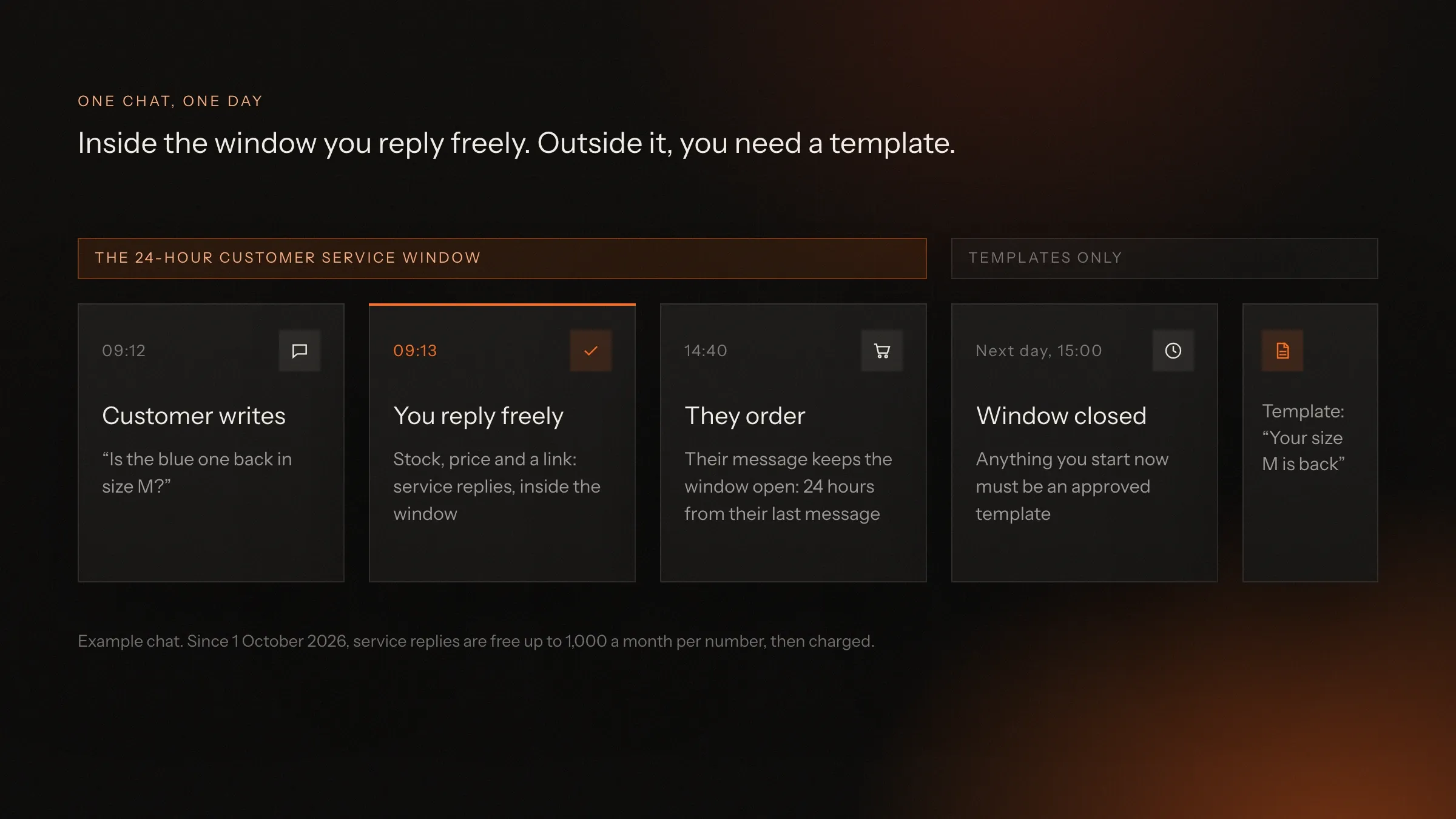
When a customer writes to you, a 24-hour window opens in which you can reply freely, without using an approved template.
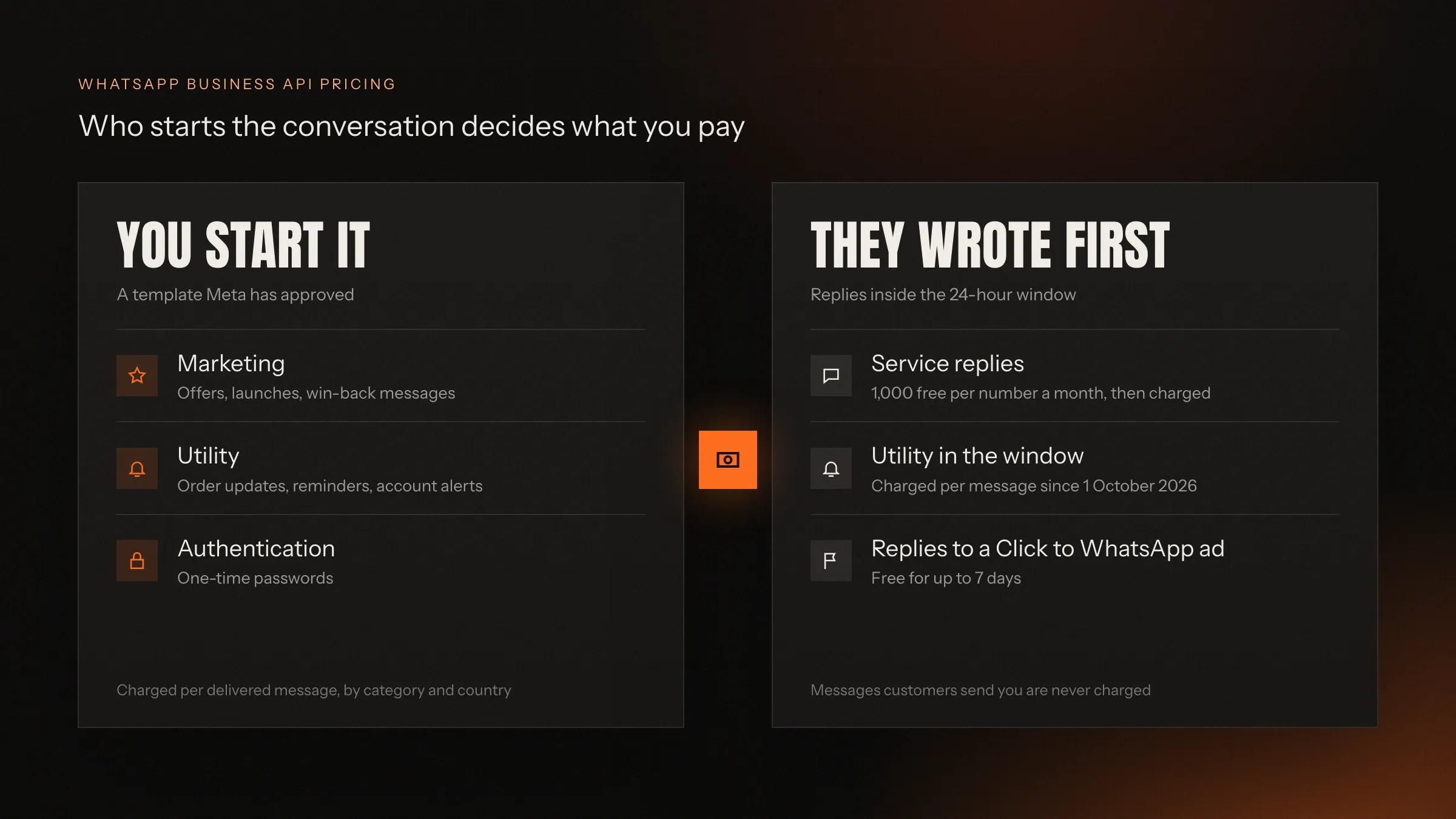
This is the most important idea in WhatsApp pricing. WhatsApp treats a conversation the customer started very differently from one you started:
- Inside the window, your team or AI assistant can answer in plain words: send a product link, a price, a photo, a delivery date. These are service messages. Every new message from the customer restarts the 24 hours.
- Outside the window, anything you start must be a template: a message written in advance and approved by Meta. A restock alert the next day, an order confirmation, a payment reminder: all templates.
There is one more open door. When a customer messages you from a Click to WhatsApp ad (an ad on Facebook or Instagram with a “Send message” button), a free entry point window opens that can last up to 7 days. While it is open, Meta doesn’t charge for your marketing, utility, authentication or service messages to that customer.
The practical lesson: wherever you can, let the customer start. A “Message us on WhatsApp” button on your website, a QR code at the counter, a number printed on the invoice: each one turns a paid message you would have started into a reply.
What are marketing, utility and authentication templates?
Templates are the messages you start, and Meta sorts each one into marketing, utility or authentication, each with its own rate.
Marketing templates promote something: an offer, a launch, a sale, a “we miss you” message. They usually have the highest rate, and they need the customer’s clear agreement to hear from you.
Utility templates are about something the customer already did or asked for: an order confirmation, a shipping update, an appointment reminder, a payment receipt, a change to their account. They are usually cheaper than marketing.
Authentication templates carry one-time passwords for logging in or confirming an action.
The category is about what the message says, not what you call it. An order confirmation that ends with “and here’s 20% off your next order” is a marketing message, charged as one. When you submit a template, Meta checks the category, and it can change it if the words don’t match. Keeping updates purely about the order is the simplest way to keep them at the utility rate, and it’s also what customers want from an update.
Which WhatsApp messages are free?
Messages customers send you are always free, and so are the first 1,000 service replies each month on every business number, and replies inside a Click to WhatsApp ad window.
Here is the full picture as of October 2026:
- Messages from customers to you: never charged.
- Service replies inside the 24-hour window: the first 1,000 delivered each month are free on every business phone number. Above that they are charged. The allowance resets every month and unused messages don’t carry over.
- Utility templates sent inside the window: free from July 2025, charged per message again since 1 October 2026.
- Anything inside a free entry point window (after a Click to WhatsApp ad): free for up to 7 days.
One change matters for every business on the API: from 1 October 2026, Meta delivers service replies beyond the free 1,000 only if there is a payment method in Meta’s Billing Hub. Without one, replies after the free allowance simply aren’t delivered. If customers suddenly say they never got your answer, that is the first thing to check.
How do I estimate my monthly WhatsApp bill?
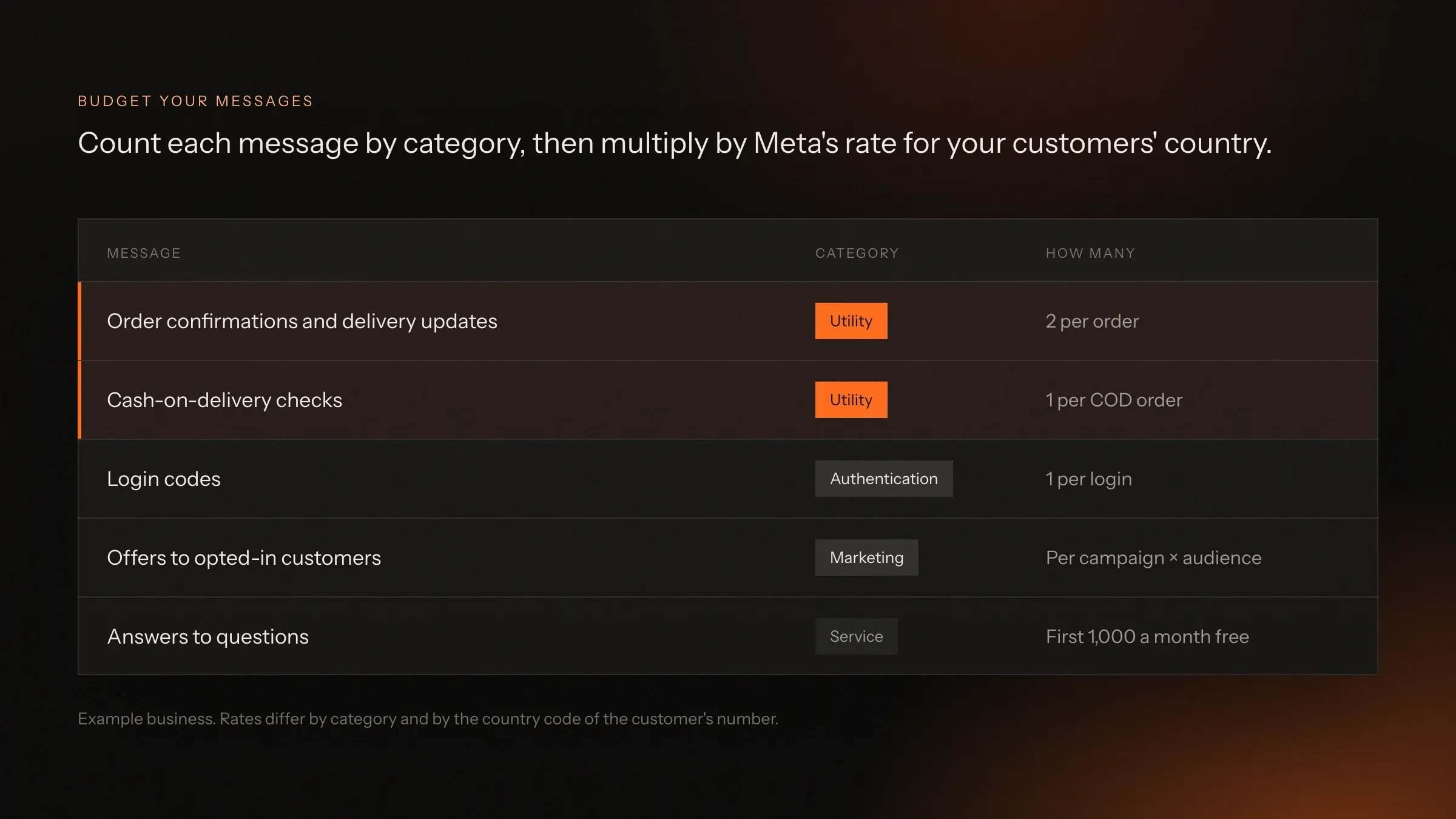
List every message you plan to send, put each in its category, count how many a month, and multiply by Meta’s rate for your customers’ country.
A worked way to do it, without guessing at prices:
- List the moments. Order confirmed, shipped, out for delivery, delivered. Cash-on-delivery check. Appointment reminder. Login code. Monthly offer. Answers to questions.
- Give each a category. Most moments in that list are utility. Login codes are authentication. The offer is marketing. Answers to questions inside the window are service.
- Count them. Orders a month × updates per order. Cash-on-delivery orders × one check. Logins a month. Campaigns × the number of opted-in customers each one reaches. Service replies beyond the free 1,000.
- Split by country. If most customers are in one country, one rate does most of the work. If you sell abroad, count each country separately.
- Multiply by Meta’s current rate card, linked under Sources, for each category and country.
Two refinements. Utility and authentication messages get volume tiers: past certain monthly volumes in a country, the rate per message drops, and the count starts again every month. And Meta bills Indian businesses in rupees since 1 January 2026; every messaging account of an eligible Indian business has to be moved to rupees by 31 December 2026, or its messages stop being delivered from 1 January 2027.
The number that usually surprises people is marketing. A single campaign to 20,000 opted-in customers is 20,000 marketing messages, more than many months of order updates. That isn’t a reason to avoid campaigns; it’s a reason to send them to people who asked for them and to measure what each one brings back.
How many messages can we send in a day?
A new business can start conversations with 250 different customers in any 24 hours, and the limit rises step by step as it proves it sends wanted messages.
This is Meta’s messaging limit. It counts unique customers you start conversations with, not replies inside the customer service window. It applies to your whole business portfolio, so all your numbers share it.
The steps are 250, then 2,000, then 10,000, 100,000 and unlimited. You reach 2,000 by verifying your business with Meta (or having the partner who set you up verify it), or by delivering 2,000 good-quality messages to different customers within 30 days. After that, Meta raises the limit by itself, one step at a time, when your messages keep a high quality rating and you have used at least half of your current limit in the last 7 days.
Quality is the part you control. It drops when customers block you or report your messages, which mostly happens when people get messages they never asked for. Opt-in on record, easy opt-out and messages people actually want keep your quality high and your limit growing.
How do we keep WhatsApp costs under control?
Let customers start conversations, keep updates to the point, send marketing only to people who opted in, and read your numbers every month.
- Invite the first message. Website buttons, QR codes and Click to WhatsApp ads turn messages you would pay for into replies.
- Answer inside the window. An AI assistant or a shared inbox that answers within minutes keeps the conversation inside the 24 hours, so you don’t need a template to follow up.
- Write utility templates as utility. Order, booking and payment updates, with no offer tucked in at the end.
- Choose which updates earn their place. A delivery update a customer would otherwise phone about pays for itself; a “thanks for visiting” message may not.
- Target campaigns. Send offers to the customers likely to care, not the whole list, and stop sending to people who never open them.
- Check the bill against results. Match messages sent to orders, bookings and fewer support calls each month, and drop what doesn’t pay back.
Where have we built this?
We have connected the WhatsApp Business API to stores, clinics and delivery services, and built the shared inbox and AI agents a messaging platform’s customers use.
For a skincare brand in Mumbai, every cash-on-delivery order is confirmed on WhatsApp before it ships, with the option to pay online in the same chat: one utility message that saves a wasted delivery. For the messaging platform we invest in, we built the shared team inbox and the flow and AI agent builders its customers run on WhatsApp. For a HealthTech startup we back in Ahmedabad, patients start the conversation themselves, booking video consultations on WhatsApp in Gujarati, so most of what follows are replies inside the window.
If you want to know what WhatsApp would cost and return for your business, the place to start is the list of moments in this guide. We can help you fill it in, and build the set-up once it adds up.
What decides your WhatsApp bill
There is no single price for the WhatsApp Business API: Meta publishes a rate card, and your bill follows what you send. These are the things that move it.
The category of each message
Marketing, utility and authentication templates each have their own rate. A message written as a plain update costs less than one that also sells.
Where your customers are
Rates follow the country code of the customer's number, so a business that writes to customers in several countries pays several rates.
Who starts the conversation
Replies inside the 24-hour window cost far less than messages you start, and replies to a Click to WhatsApp ad are free for up to 7 days.
How many you send
Utility and authentication messages get lower rates as your monthly volume in a country grows.
Your provider
Meta's charges are the same through any route; a provider or platform may add its own fee or monthly plan on top.
The build
Connecting WhatsApp to your store, CRM or ERP, the shared inbox, flows and an AI assistant are a one-time cost, separate from the messages.
Where we've built it
3 from our portfolio
-
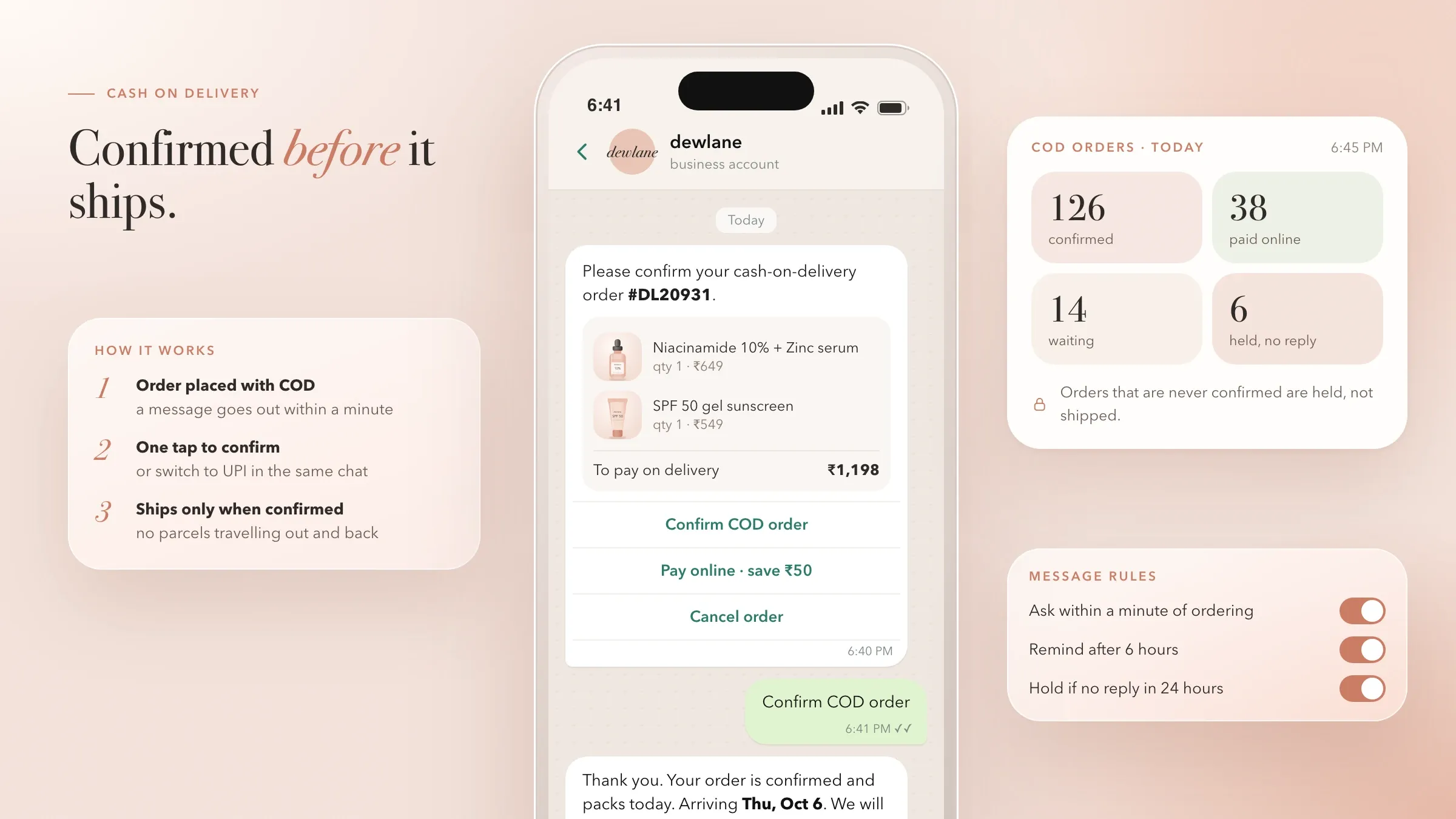 One utility message that saves a parcel For a skincare brand in Mumbai, every cash-on-delivery order is confirmed on WhatsApp before it ships, and buyers can switch to paying online in the same chat. Read the case study
-
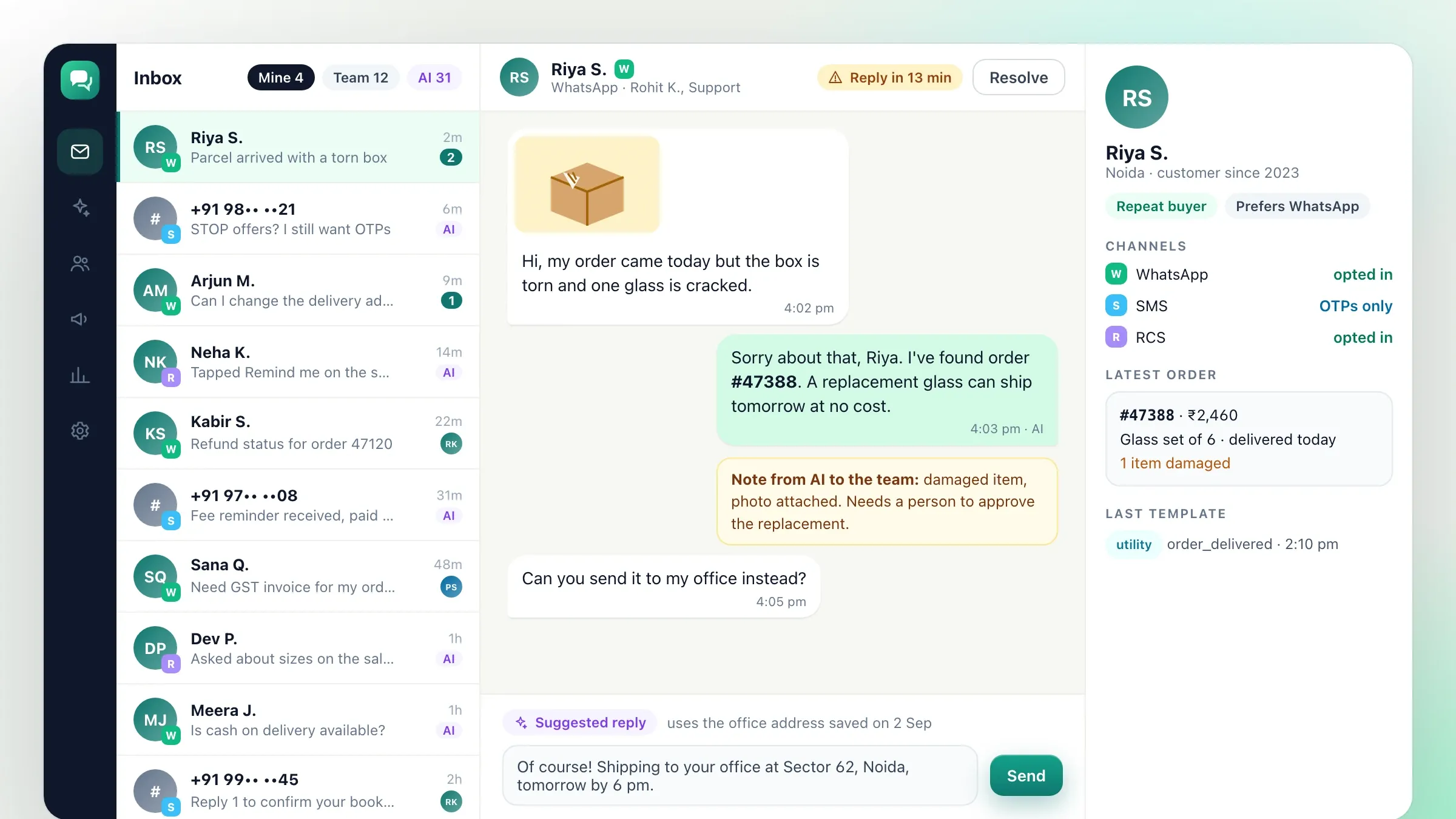 Every conversation in one inbox For the messaging platform we invest in, we built the shared team inbox its customers use to answer WhatsApp and SMS conversations from one place. View the investment
-
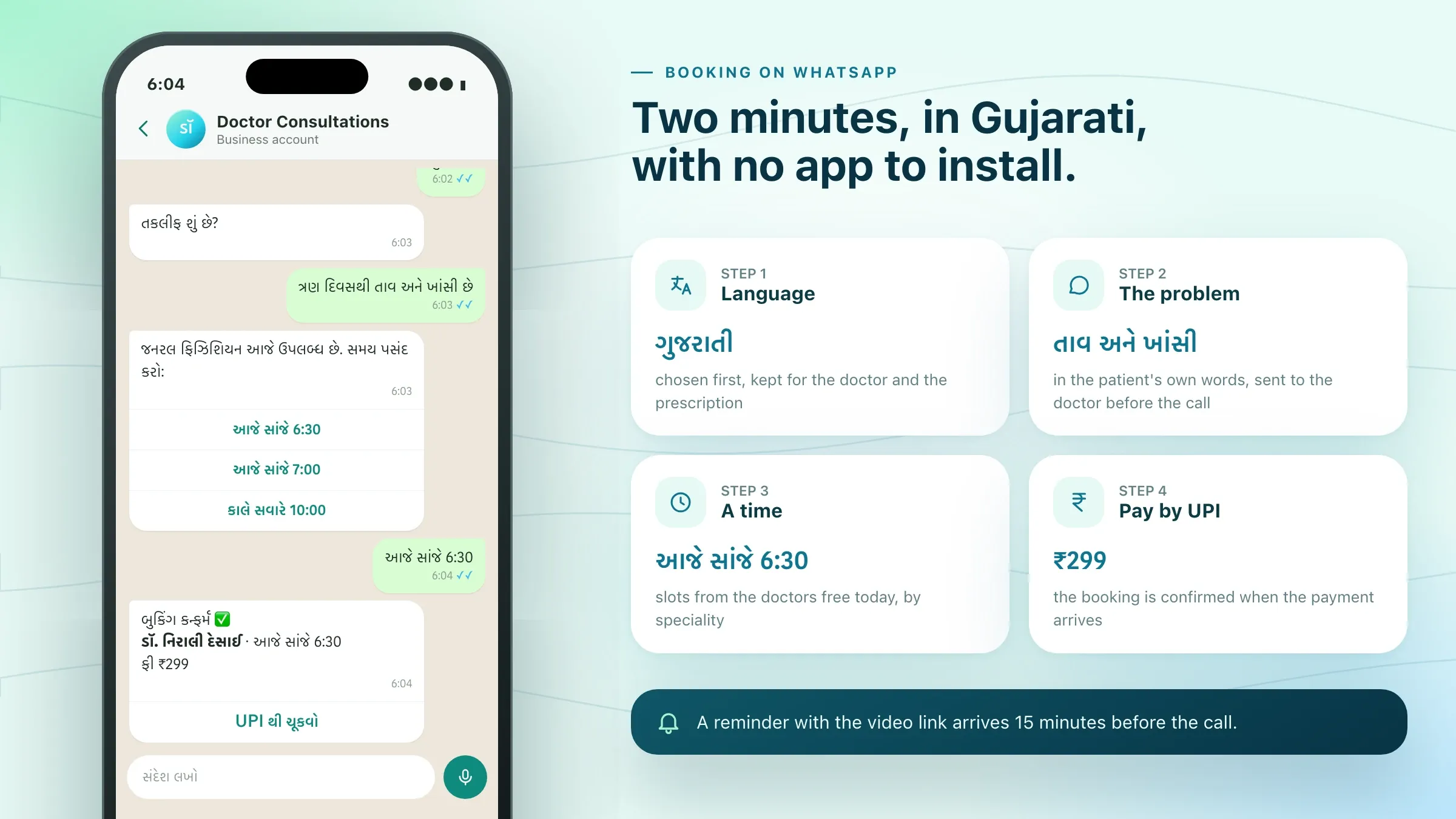 Customers who write first For a HealthTech startup we back in Ahmedabad, patients start the conversation by booking video consultations on WhatsApp, in Gujarati. Meet the startup
Questions and answers
7 answered
Is the WhatsApp Business API free?
No, but parts of it cost nothing. Messages customers send you are never charged, the first 1,000 service replies a month per number are free, and replies to a customer who came from a Click to WhatsApp ad are free for up to 7 days. Messages your business starts are charged per delivered message.
Does Meta still charge per conversation?
No. Meta replaced conversation-based pricing with per-message pricing on 1 July 2025. Each delivered message has one category and is charged at most once.
Which category should an order update be?
Utility: a message about something the customer already did, such as an order, a booking or a payment. If the same message also promotes a product or an offer, Meta treats it as marketing and charges the marketing rate.
Do we pay for messages customers send us?
No. Meta charges only for messages your business sends, and only once they are delivered.
Can we pay Meta in rupees?
Yes. Meta started billing in Indian rupees on 1 January 2026 for businesses whose billing country is India, and asks them to move every messaging account to rupees by 31 December 2026. The currency is chosen when an account is created and can't be changed later.
How many customers can we message a day?
A new business can start conversations with 250 different customers in 24 hours. Verifying your business, or sending 2,000 good-quality messages within 30 days, lifts that to 2,000, and it then grows on its own to 10,000, 100,000 and unlimited while your messages stay high quality.
Is the WhatsApp Business app cheaper than the API?
The app is free, but it runs on a phone or two and can't connect to your software. The API costs per message and needs a build, and in return a whole team can share one number, updates go out by themselves and every chat is tied to the customer's orders.
Sources
Facts we did not produce ourselves
Read next
Want one built for your business?
Tell us what takes your team's time today. We reply with our questions, a first plan and how we would start.
Write to usOr reach us directly
Building software since 2008 · Rajkot, India · Clients worldwide · We speak English, Hindi and Gujarati