Guide AI agents for small business
What an AI agent can do in a small business, and what it should never do alone
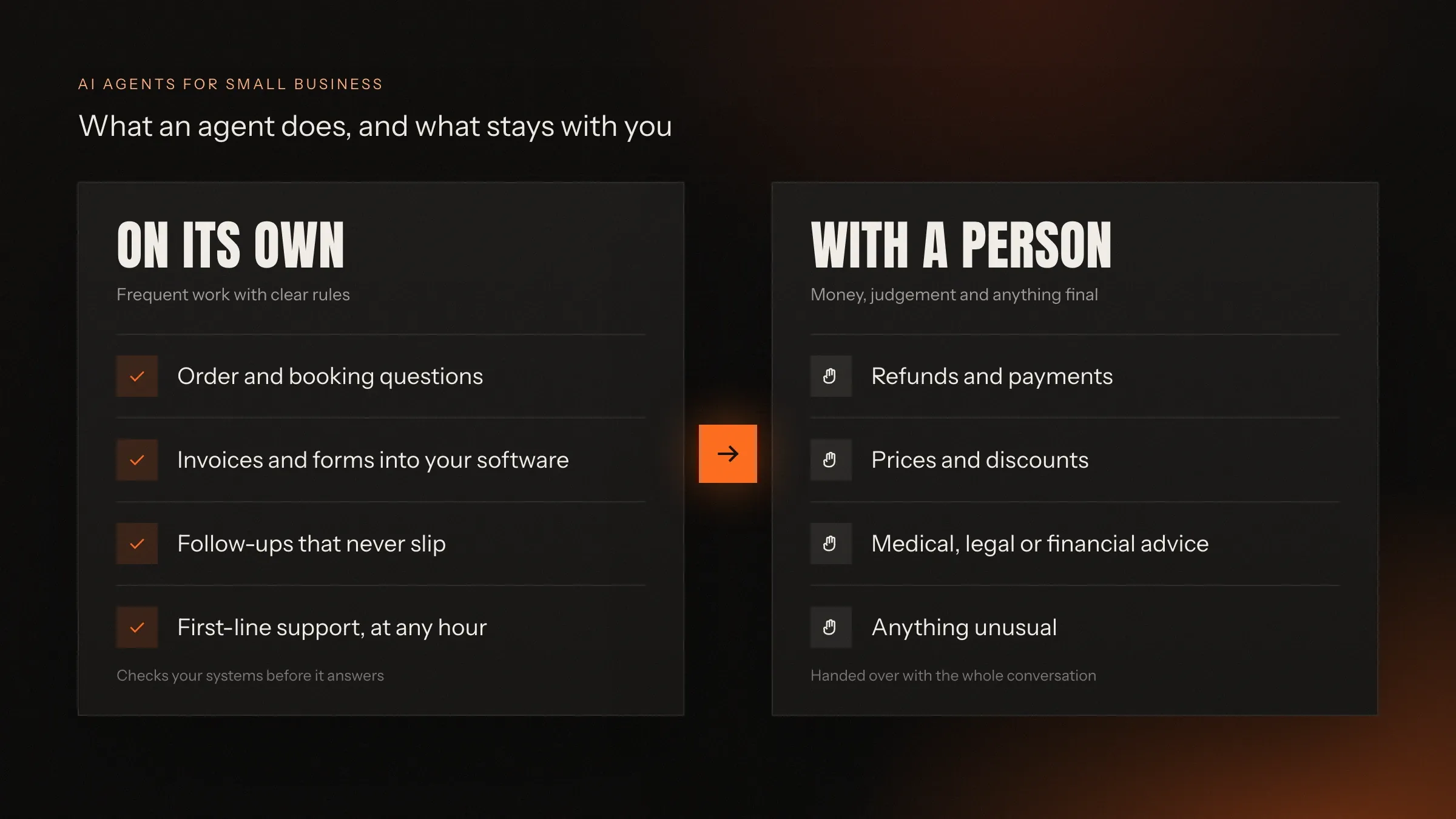
An AI agent can answer customers, read documents, update your software and chase follow-ups on its own, as long as a person stays in charge of money, judgement and anything unusual. The safest start is one frequent task with clear rules that you can easily check.
By FIRELIFE Ventures · Updated 22 October 2026 · 9 min read
In short
- An AI agent reads a request, checks your own systems, then answers, acts or hands the case to a person.
- Good first jobs: order and booking questions, entering invoices and forms, follow-ups and first-line support.
- Never alone: refunds and payments, prices and discounts, medical, legal or financial advice, and anything that can't be undone.
- Start with one task that comes up often, follows clear rules and is easy to check, with a person approving answers at first.
- It needs access to your tools, your rules in plain words and real past cases to be tested on.
What is an AI agent, in plain words?
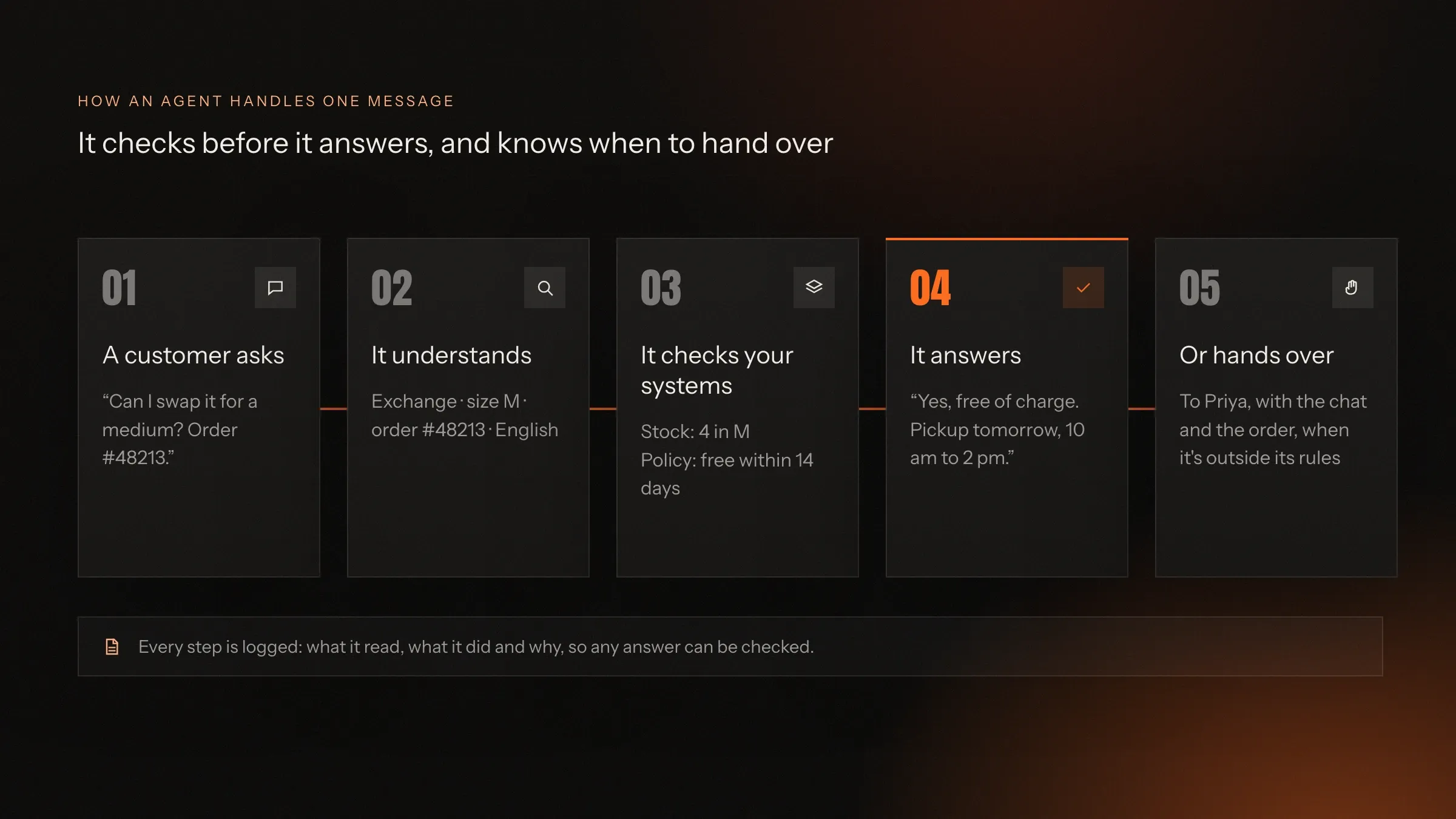
An AI agent is software that reads a request, looks up what it needs in your own systems, and then answers, takes an action or hands the case to a person.
Think of a capable new assistant on their first week. They don’t know your business by heart, but they know where to look: the order system, the booking calendar, the price list, the returns policy. When a customer asks something, they check before they answer. When something falls outside what they’re allowed to do, they pass it to someone who can decide, with the details attached.
An agent works the same way, with three differences. It answers in seconds, at any hour. It never gets bored of the hundredth question about delivery times. And it keeps a written record of everything it read, did and decided, so you can always see why it answered the way it did.
What makes it an agent rather than just an AI that writes text is that it can do things: check an order, book a slot, update a record, send a reminder. What keeps it safe is that it only does the things you allow, with the access you give it.
How is an agent different from a chatbot or an automation?
A chatbot follows a script, an automation follows fixed steps, and an agent understands the request and decides which allowed step comes next.
A chatbot answers from a script or a list of questions. Ask it something slightly different and it either misunderstands or sends you in circles. Most people have met one and didn’t enjoy it.
An automation (the kind you build with Zapier or inside your software) follows fixed steps: when an invoice arrives, copy these fields there. It’s reliable when every case looks the same, and it breaks the moment one doesn’t.
An agent sits between the two. It understands messy, real requests (“hi, I ordered the blue one last week, can I swap it for a medium?”), works out what’s being asked, picks the right step from the ones you’ve allowed and checks the facts before it acts. When it isn’t sure, it doesn’t guess: it hands over.
In practice, good systems mix all three. Fixed steps where cases are always the same, an agent where they aren’t, and a person where judgement is needed.
Which jobs can an agent take on in a small business?
The best jobs for an agent are the frequent ones that follow rules: answering routine questions, reading documents, updating records and following up.
Answering customers. Where is my order, can I change the delivery address, is the 4 pm slot free, do you have this in size L? An agent can answer these on your website, by email or through the WhatsApp Business API, from your real order and booking data, in the customer’s own language. This is what most people mean by AI customer support.
Reading documents. Supplier invoices, purchase orders, forms, ID papers: the agent reads them, fills in the fields in your accounting or ERP software, checks totals against the order and flags anything that doesn’t match. This is AI document processing, and it’s often the job with the clearest saving of hours.
Updating your systems. Booking or moving an appointment, creating an order, logging a lead in your CRM, raising a support ticket. The agent does these through the same tools your team uses, with its own login and only the permissions it needs.
Following up. The quote nobody replied to, the invoice that’s overdue, the customer who asked for a callback. An agent chases politely and on time, then passes the case to a person when it’s time to talk.
Drafting for a person to send. Quotes, replies to tricky emails, summaries of a long thread. The agent prepares, a person reads and sends with one tap.
Answering your own team. A new hire asks how returns work. Instead of asking around, they ask an agent that knows your policies, and gets the steps with a link to the source.
A small shop, a clinic, a distributor and an agency would each pick different jobs from this list, but the pattern is the same: frequent, rule-based work moves to the agent, and judgement stays with people.
What should an agent never do alone?
An agent should never decide alone on money, on judgement calls, on advice that needs a professional, or on anything that can’t be undone.
These are the red lines we draw with every client, and we recommend you draw them too:
- Refunds and payments. The agent can collect the details and prepare the refund. A person approves it.
- Prices and discounts. It can quote your published prices. It shouldn’t invent a deal, match a competitor or bend a rule because a customer pushed.
- Medical, legal or financial advice. It can book the appointment, share your opening hours or send a form. The advice comes from a qualified person.
- Anything that can’t be undone. Deleting records, cancelling contracts, sending something to all your customers at once.
- Anything unusual. An angry customer, a complaint about a staff member, a request that doesn’t fit any rule. The agent’s job here is to recognise the case and hand it over quickly, with everything the person needs.
This isn’t a limitation to apologise for. It’s what makes customers and staff trust the agent. A customer who gets a fast, correct answer about their order and a quick handover on their complaint is better served than by a person who takes hours for both.
What does an agent need from you?
An agent needs four things: access to the tools where your answers live, your rules in plain words, real past cases to learn and be tested on, and a person to hand over to.
Access to your tools. Your order system, booking calendar, accounting software, CRM, shared inbox: wherever the facts are. The agent gets its own account with the narrowest permissions that do the job, never a staff member’s login.
Your rules, in plain words. What it may answer, what it may change, what it must hand over and to whom. Written like instructions for a new colleague, and agreed with you before it goes live.
Real past cases. A few hundred recent messages, documents or requests of the kind you want it to handle. They show how your customers actually write, and they become the test the agent must pass before it talks to anyone.
A person to hand over to. Someone who picks up the cases the agent passes on, ideally in the same tool your team already uses (WhatsApp, email, your helpdesk), not a new screen they have to remember to check.
You don’t need perfect data or a technical team. Gaps show up quickly in testing, and the technical side is what the builder is for.
How do you pick the first task?
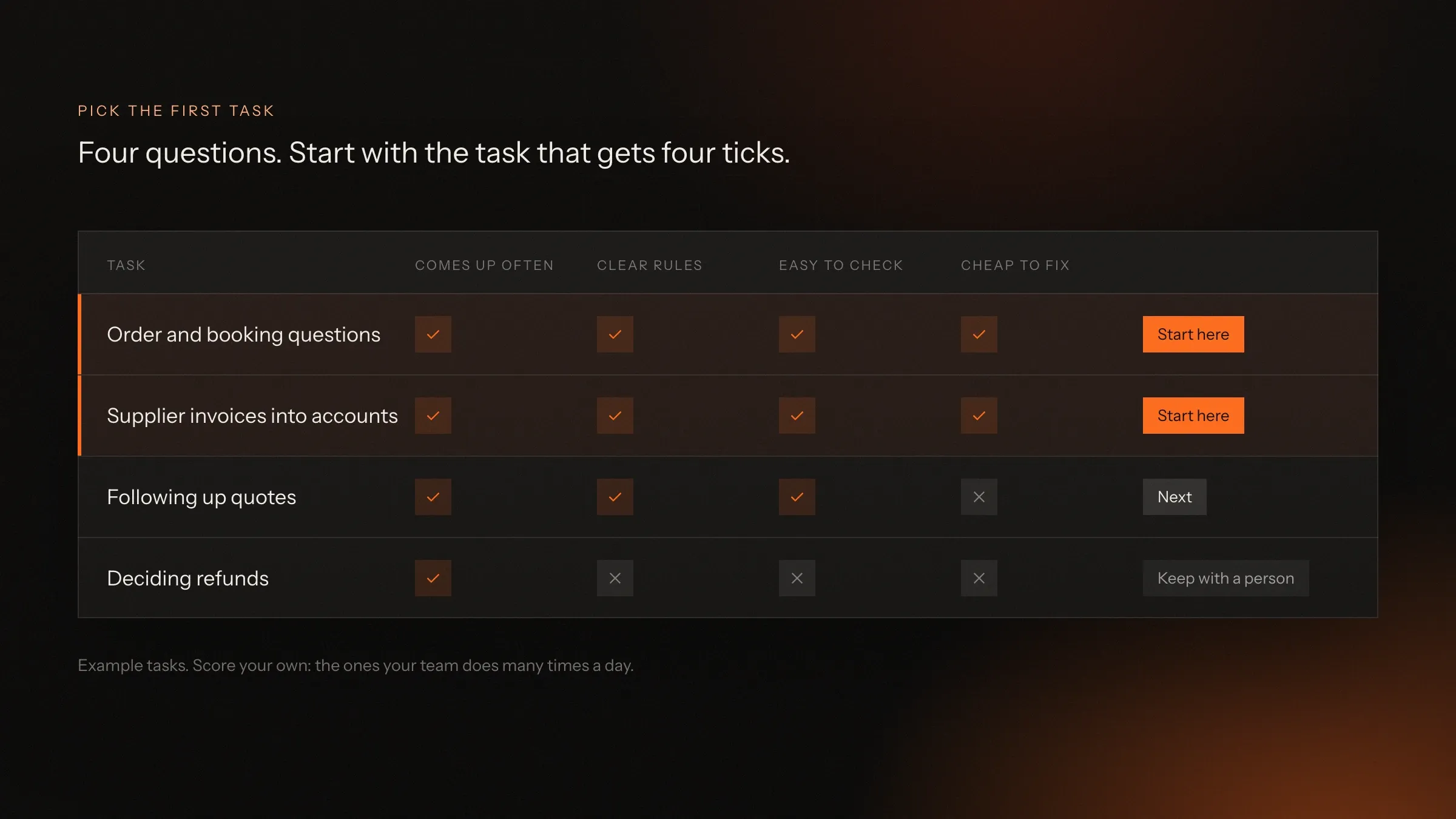
Pick the task that comes up most often, follows the clearest rules, is easiest to check and is cheapest to fix when something goes wrong.
Write down four or five jobs that take your team’s time every week. Then ask four questions about each one:
- Does it come up often? Many times a day is ideal. A job that happens twice a month isn’t worth automating first.
- Does it follow clear rules? If two of your staff would handle it the same way, an agent can learn it.
- Is it easy to check? You should be able to look at the agent’s answer and tell in seconds whether it’s right.
- Is a mistake cheap to fix? A wrong delivery estimate is an apology. A wrong refund is money.
The job with four ticks is your first task. For most small businesses it’s order or booking questions, entering supplier invoices, or following up on enquiries. Refund decisions usually score one tick at most, which is exactly why they stay with a person.
Start there, measure it, and add the next task only once the first one runs smoothly.
How do you keep it safe and under your control?
You keep an agent safe by limiting its access, writing its rules down, logging every step, testing it before launch and keeping a person in the loop until it has earned more freedom.
Least access. The agent can only see and change what its job needs. An agent that answers order questions doesn’t need to see salaries.
Rules you can read. Not hidden in code: written down, agreed with you, and changed only with your say.
Every step on record. For each case, what it read, what it did and why. If a customer says the agent told them something odd, you can check in a minute.
Tested on your own cases. Before launch, it runs on real past cases and its answers are compared with what your team did. It goes live only when you’re happy, and it’s tested again after every change.
A person in the loop. At first, a person approves its answers before they go out. As it proves itself, you let it handle the simple cases alone and keep approval for the rest.
Your data stays yours. Use AI providers’ business services, where your data isn’t used to train their models, and keep data in the region you need.
How do you know it’s working?
You know it’s working when you measure the same few things every week: how many cases it handled without a person, how fast customers got an answer, how many answers were wrong, and how many handovers your team received.
Agree these measures before launch and note where you start from: how long replies take today, how many invoices are typed by hand, how many follow-ups slip. Then compare every week.
Watch the mistakes closely in the first weeks. Every wrong answer has a cause: a missing rule, a gap in your data, a question it hasn’t seen. Fixing the cause, not just the answer, is what makes an agent get better over time.
And listen to your team. If the handovers arrive with everything they need, and the repetitive work has shrunk, the agent is doing its job, whatever the numbers say.
How do you start?
Start with one conversation about where your team’s time goes, choose one task, test the agent on real cases with a person approving, and switch it on only when it passes.
- List the repetitive work. What does your team do many times a day? Where do customers wait?
- Choose the first task with the four questions above.
- Collect the rules and past cases for that task.
- Build and test the agent on those cases, connected to your tools with the least access it needs.
- Run it beside your team with a person approving its answers, then let it handle the simple cases alone.
That is how our AI agent development work runs for small and mid-size businesses, from the first call to an agent that handles real work. If you’d like a second pair of eyes on which task to start with, write to us: we reply with our questions and a first plan.
What it costs, and what decides it
There is no fixed price for an AI agent: the cost follows the work you give it. These are the things that move it.
How many tasks it does
One clear task is the quickest and cheapest start. Every extra task adds rules, examples and testing.
Which tools it connects to
Software with a modern API connects quickly. Older or desktop-only software may need a small bridge first.
How much it handles
Running costs follow volume: the number of conversations, documents or tasks it handles each month.
Languages and channels
Each language and each channel (WhatsApp, website, email, phone) is set up and tested on its own.
How much a person checks
Having a person approve every answer at first costs less to build and earns trust. You widen what it does alone over time.
Where we've built it
3 from our portfolio
-
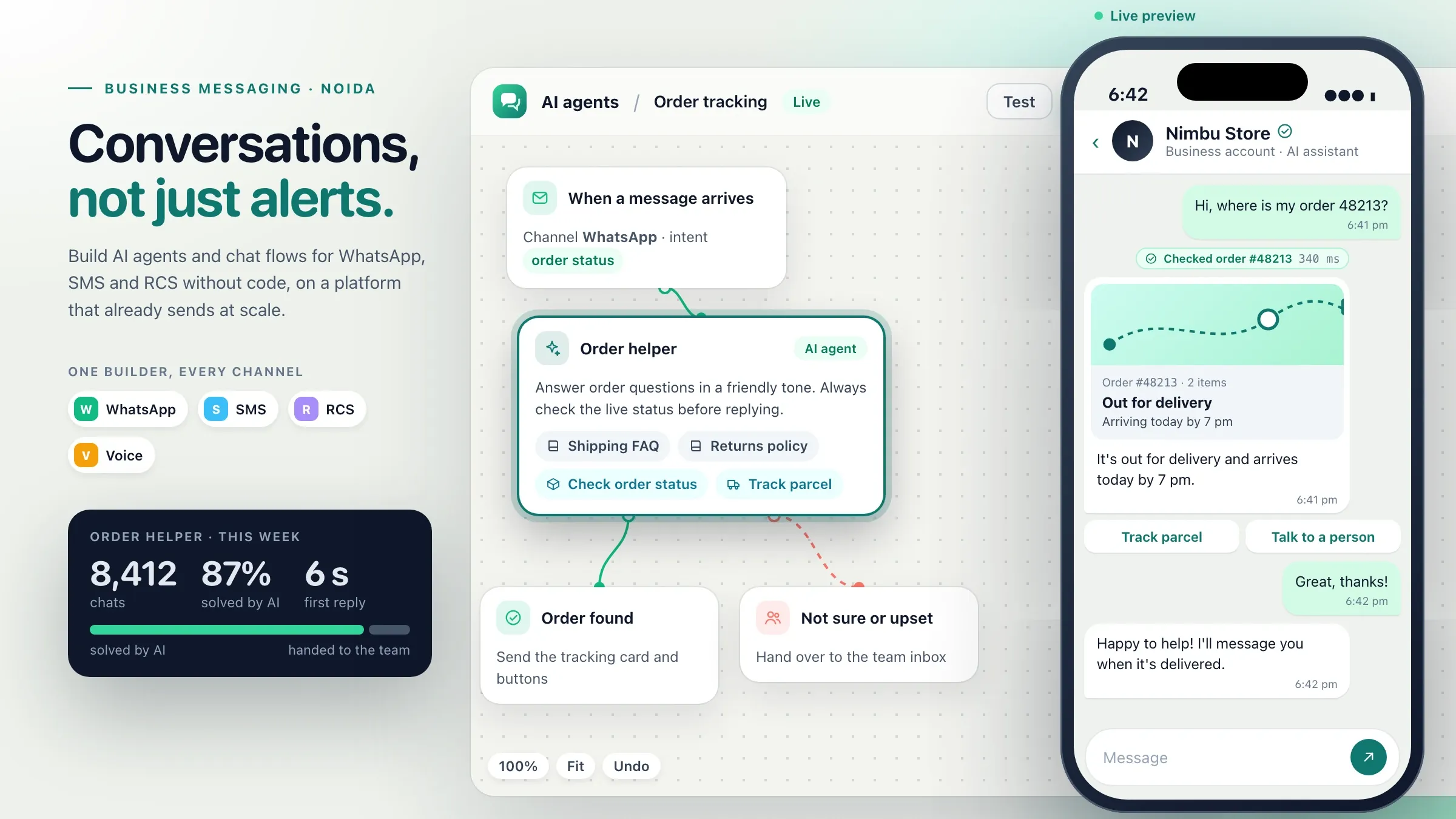 AI agents on WhatsApp For the messaging platform we invest in, we built the agent builder its customers use to answer order questions on WhatsApp and hand over to a person. View the investment
-
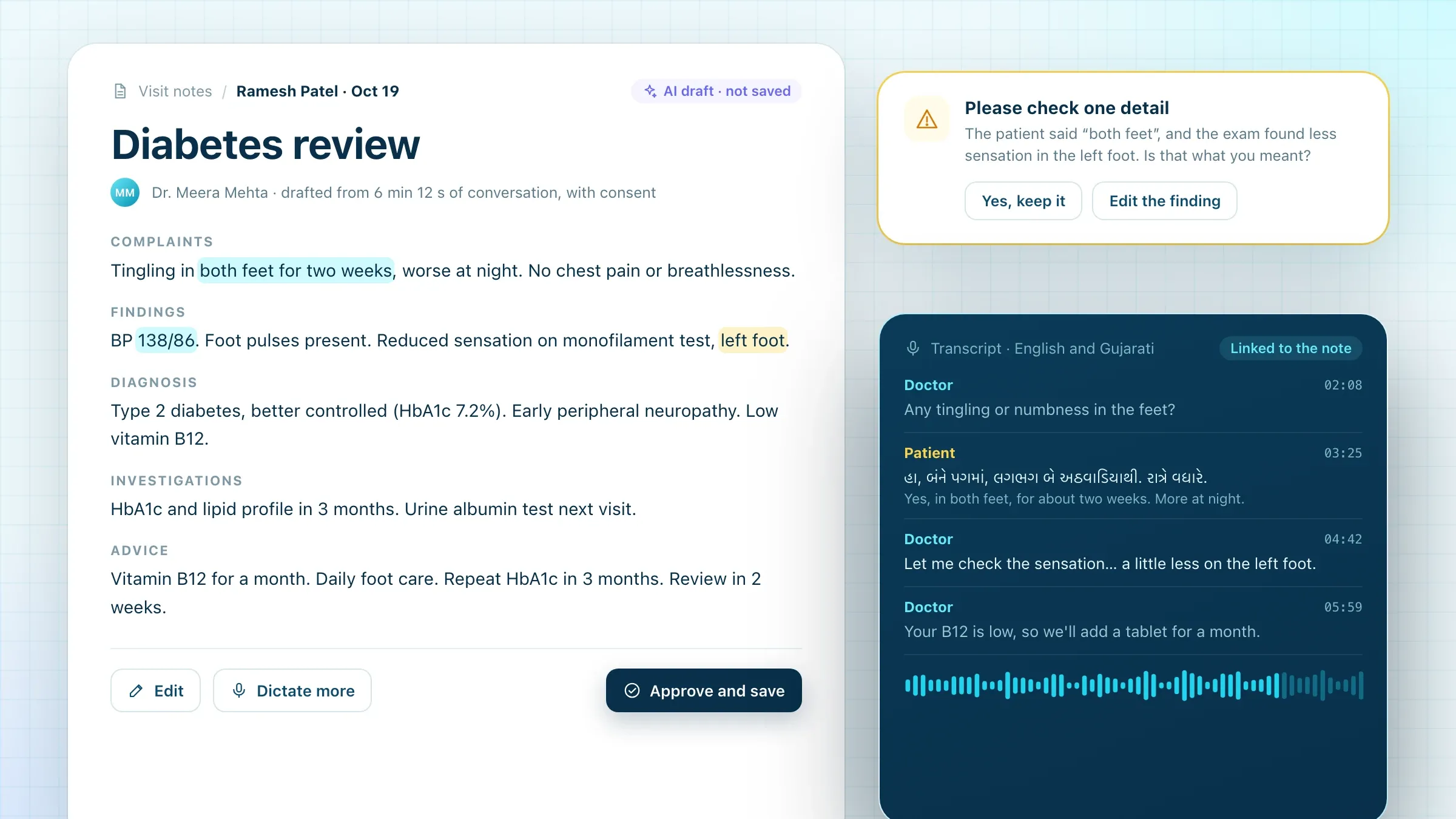 Visit notes the doctor approves In Pulse Clinic, our own clinic software, AI drafts the visit notes from the consultation, and the doctor checks and approves them. See the product
-
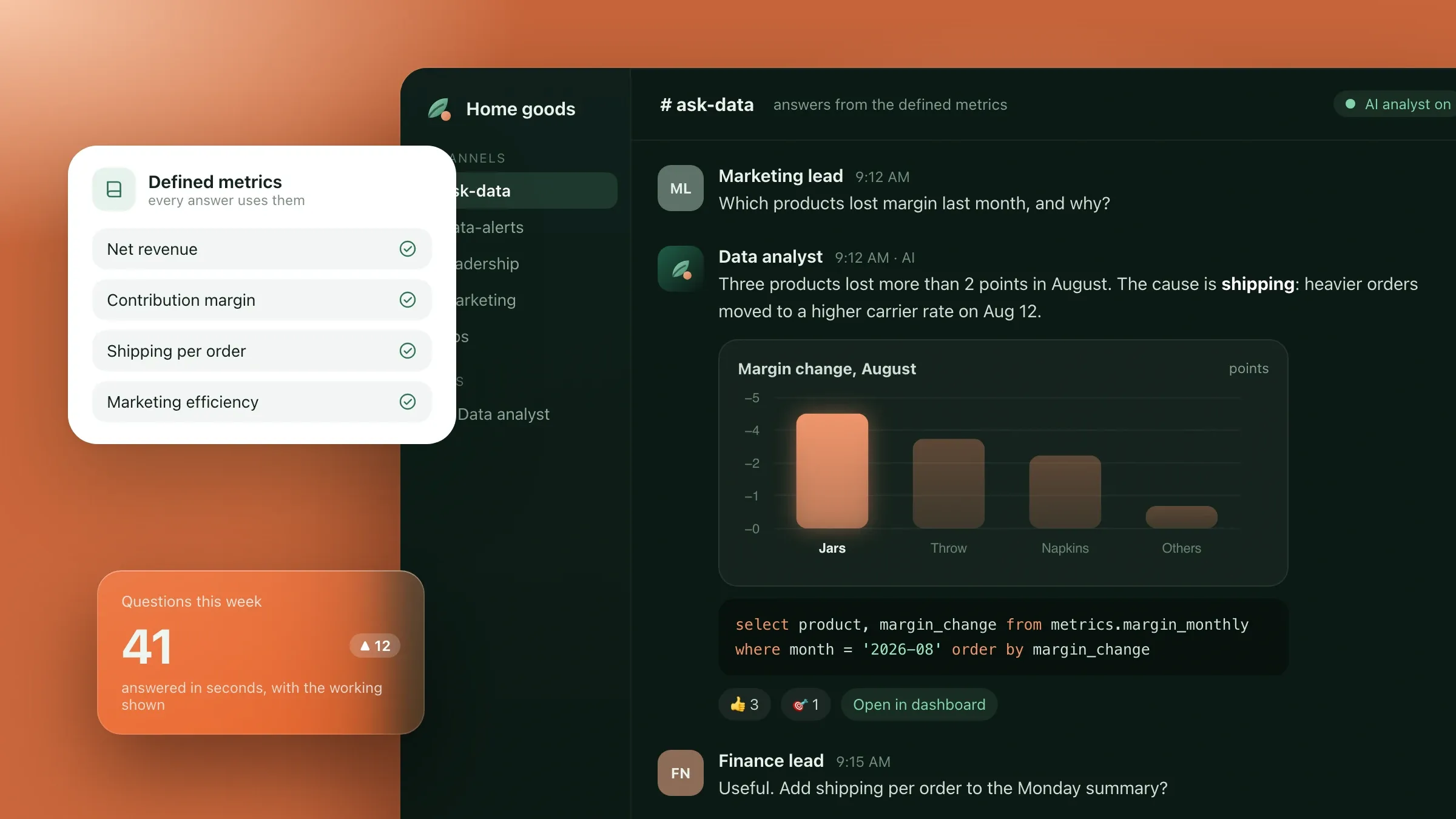 Answers with the working shown For a home goods brand in Denver, an agent answers questions about sales and stock in plain English and shows the query behind every figure. Read the case study
Questions and answers
7 answered
Can a small business afford an AI agent?
Yes, if it starts small. One clear task on tools you already use is the cheapest way in, and running costs follow how much the agent handles. You see it work before adding the next task.
Do we need clean data before we start?
No. The agent needs access to where the answers already live: your order system, bookings, price list or policies. Gaps and messy spots show up when it is tested on real past cases, and they are fixed then.
Should customers know they are talking to an AI agent?
Yes. We recommend saying so in the first message and letting customers ask for a person at any time. It builds trust, and some countries require it.
What happens when the agent doesn't know the answer?
It says so and hands the case to a person, with the conversation and what it already checked. An agent that guesses is a badly built agent.
Is an AI agent the same as ChatGPT?
No. ChatGPT is a general assistant you talk to. An agent is built around your business: it runs on a model like the ones behind ChatGPT or Claude, but answers from your own data, works inside your tools and follows your rules.
Do we need a developer to run it?
Not day to day. Your team reads the handovers and approves drafts. Changes to its rules and connections are technical work, done by whoever built it or by your own developer.
Which task should a small business hand to an agent first?
One that comes up many times a day, follows clear rules, is easy to check and is cheap to fix if it goes wrong. For most businesses that is order or booking questions, invoice entry or follow-ups.
Read next
Want one built for your business?
Tell us what takes your team's time today. We reply with our questions, a first plan and how we would start.
Write to usOr reach us directly
Building software since 2008 · Rajkot, India · Clients worldwide · We speak English, Hindi and Gujarati