Build something new LMS development
Teach online, at any size
We build learning management systems for coaching institutes, schools, training companies and businesses that train their own people: courses, live classes, tests, certificates and progress in one place, on the web and on phones, in the languages your learners use.
- We start from how you teach today
- Works on weak networks and offline
- English, Hindi, Gujarati and more
Sound familiar?
What we hear before we start
- Your courses live in a mix of YouTube links, Google Drive folders and WhatsApp groups.
- You can't tell who actually watched a lesson, let alone who understood it.
- Tests are on paper or in Google Forms, and marking takes the whole weekend.
- Recorded lessons get shared freely the week you publish them.
- Learners in smaller towns drop out because the video keeps buffering.
- You've outgrown the course platform you started on, but can't change how it works.
What changes
-
Today: Lessons, notes and tests are scattered across five tools.
After: Every course, lesson, test and certificate sits in one platform under your name.
-
Today: You know who enrolled, not who learned.
After: You see each learner's progress, scores and weak topics, and who needs a nudge.
-
Today: Tests are marked by hand, and results arrive days later.
After: Tests mark themselves, results arrive the same day, and teachers review only what needs judgement.
-
Today: Video buffers on a weak network, and the learner gives up.
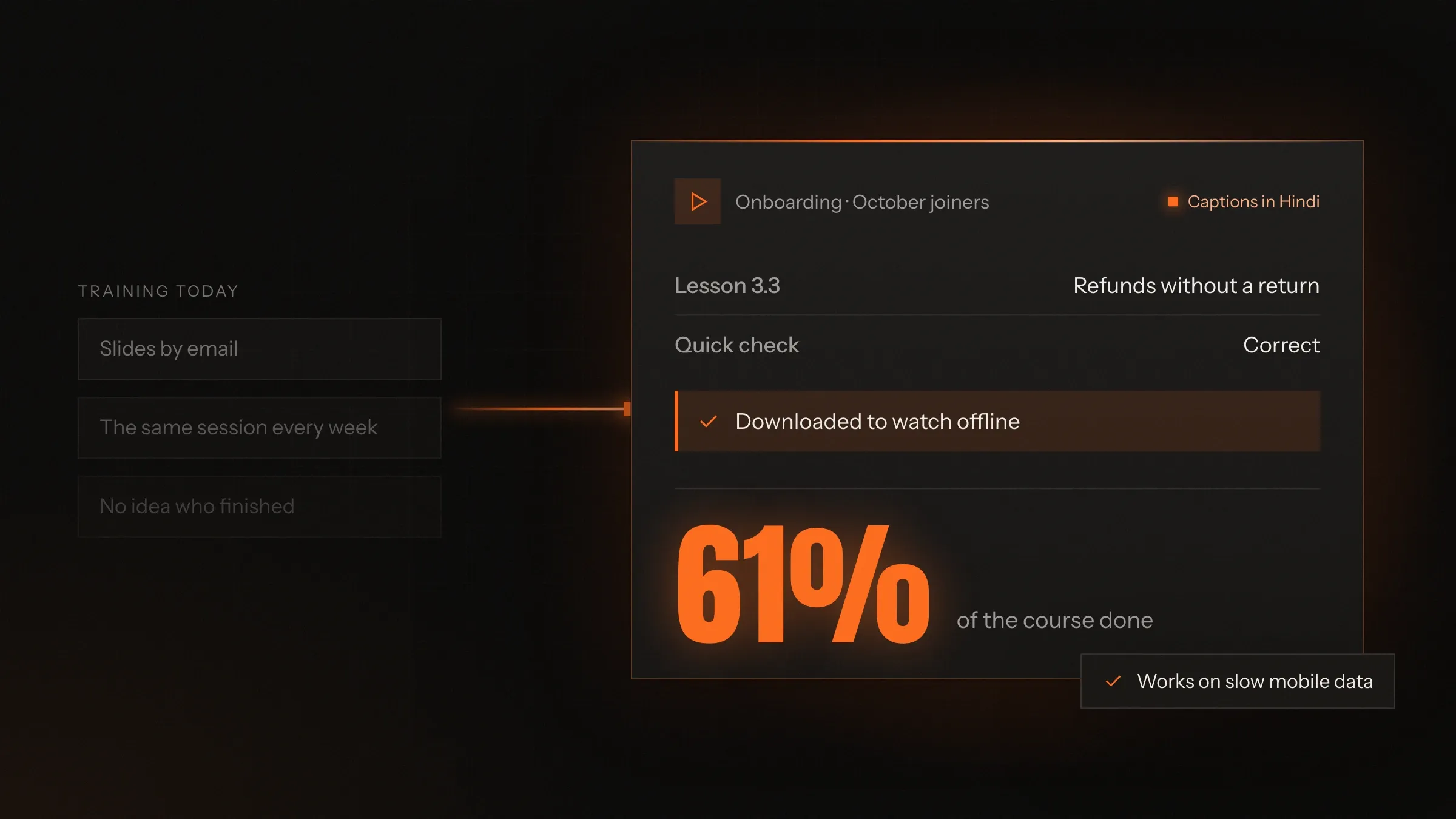
After: Lessons adjust to the network, drop to audio when needed, and download to watch offline.
-
Today: Every new batch means setting everything up again.
After: Courses are built once and reused for every batch, with dates and access set per batch.
What it does for you
-
Courses and lessons
Video, slides, PDFs, notes and quizzes arranged into modules, released on a schedule or all at once.
For exampleA new batch starts on Monday; week one unlocks, and week two opens the following Monday.
-
Live classes
Live classes inside the platform, with a board, chat and doubts, recorded into the course afterwards.
For exampleA Saturday doubt class is recorded and appears under the chapter it covered by Sunday morning.
-
Tests and question banks
Question banks tagged by topic, tests with timers and negative marking, and results with analysis by topic.
For exampleA mock test in the real exam format shows each student their rank and the three topics to work on.
-
Progress you can act on
Who started, who finished, who is stuck and where, for each learner, batch and branch.
For exampleA trainer sees six new hires haven't opened module two and sends them a reminder in one click.
-
Certificates and records
Certificates issued on completion, with a link anyone can check, and a record of every course a learner has taken.
For exampleA support agent finishes onboarding and downloads a certificate the HR team can verify.
-
AI that helps teachers
Questions drafted from your material, practice that adapts to weak topics, and answers to doubts, with a teacher reviewing what matters.
For exampleAI drafts twelve questions from a new lesson; the trainer keeps nine and edits two.
-
Offline and low-bandwidth
Lessons that download to the phone, an audio-first mode for weak networks, and progress that syncs when the connection returns.
For exampleA learner on a train downloads three lessons at the station and finishes them offline.
-
Selling courses
Course pages, coupons, instalments and subscriptions, paid by UPI, card or international cards, with GST invoices.
For exampleA learner in Dubai pays by card in dirhams, and a learner in Surat pays the first instalment by UPI.
How it works
-
You build the course
Upload lessons, set the order, add quizzes and tests, and choose when each part opens.
-
Learners join
By invite, by purchase, or from your HR or school system, into a batch with its own dates.
-
They learn, anywhere
On the web or the app, live or recorded, online or downloaded, in the language they choose.
-
They're tested
Quick checks after lessons and full tests at milestones, marked automatically where they can be.
-
You see what's working
Progress, scores and weak topics for each learner and batch, with nudges for anyone falling behind.
-
They finish
Certificates are issued, records are kept, and the next course or batch is suggested.
Where we've built it
2 from our portfolio
-
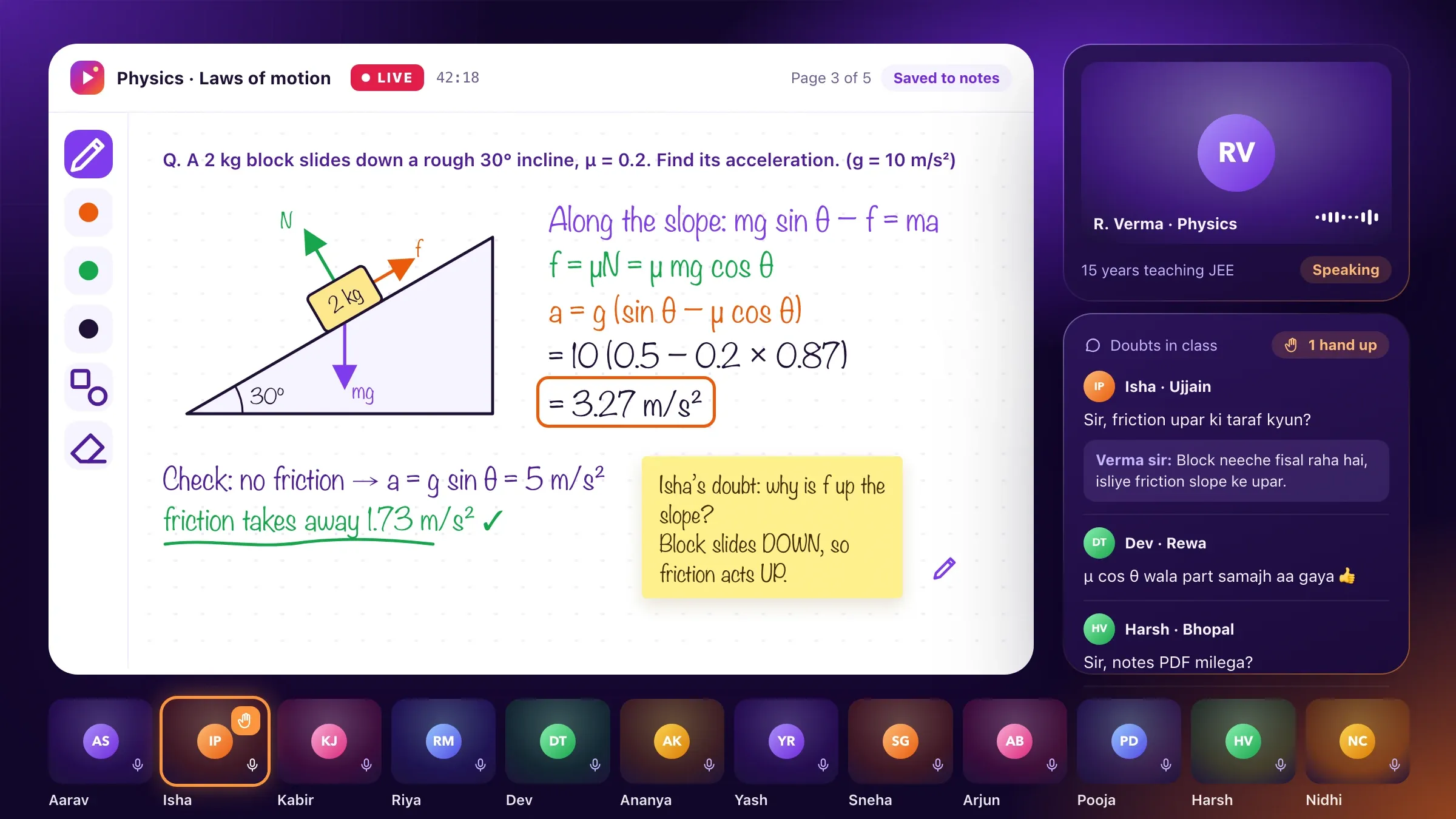 Live classes and AI practice For an EdTech startup we back in Indore, we built small-batch live classes in Hindi and English, a question bank tagged to the syllabus and AI practice that adapts to each student's weak topics. Meet the startup
 -
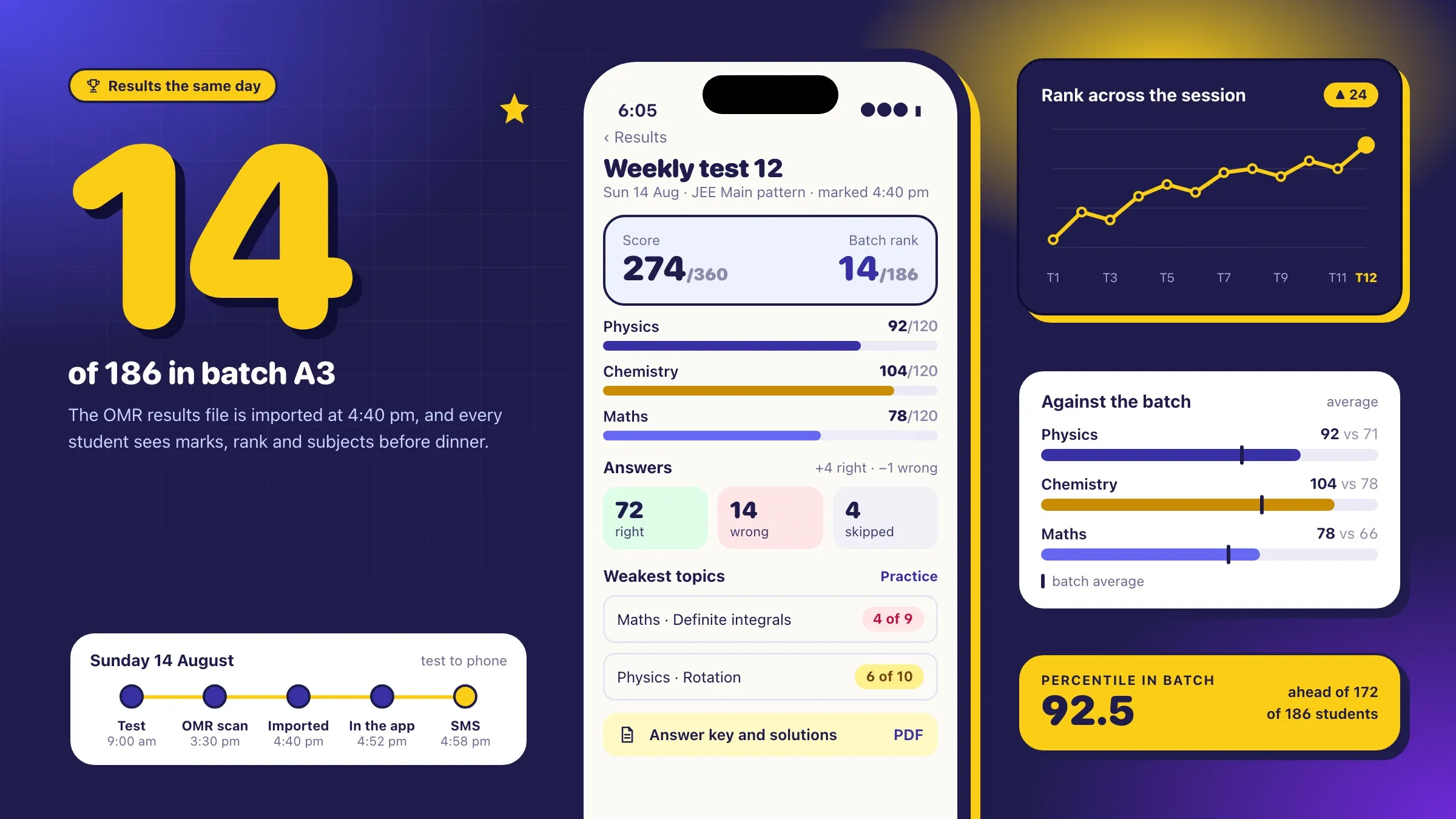 Mock tests and same-day results For a JEE and NEET coaching institute in Kota, we built online mock tests in the JEE Main format, same-day results with batch rank, and an app for students and parents. Read the case study
What an LMS does
A learning management system, or LMS, is the software that runs teaching online. It holds the courses, lets learners join, delivers lessons and tests, records who learned what, and issues certificates at the end. It replaces the mix of video links, shared folders, chat groups and spreadsheets most teaching starts with.
The same idea serves very different teachers. A coaching institute uses it for live classes, mock tests and batch rankings. A school uses it for homework, lessons and practice between classes. A business uses it to onboard new staff and keep everyone trained on policy and safety. A training company uses it to sell courses. “At any size” means the same platform works for one trainer with forty learners and for an institute with thousands across cities.
Build your own, or use a platform
Many teachers should start on an existing course platform, and we will tell you if that is you. Hosted platforms are quick to set up and good at the common case: recorded lessons, simple quizzes and payments.
A custom LMS makes sense when the common case isn’t yours: you need apps under your own name, tests in a real exam format, live classes and recordings in one place, learners on weak networks, your own way of selling courses, or connections to your school system, HR system or sign-in that a hosted platform can’t make. It also makes sense when you have outgrown a platform’s fees or rules, and want to own your content, learners and data.
Where an LMS pays off first
The first win is usually seeing who is learning. Most teachers know who enrolled and who paid, but not who watched, who understood and who quietly stopped. Progress and test scores by learner, batch and topic show where to step in while there is still time.
The second is time saved on tests. Tests that mark themselves, with results and analysis by topic the same day, give teachers back the hours they spent marking, and let students fix mistakes while the topic is fresh. The third is reach: lessons that work on a phone, on a weak network and offline bring in learners who could never sit in your classroom.
For a business training its own staff, the first win is often simpler: knowing every new joiner has finished onboarding and every team has read the new policy, with a record to show for it.
What we need from you
We need to see how you teach today. That means your courses as they are, your question banks and tests, how batches and dates work, how learners pay or are enrolled, and the tools you use now. We also like to sit in on a live class or a training session, because it shows us what the platform must not get in the way of.
We also need a person who owns the platform on your side, usually the academic head or the training manager, and a few teachers and learners willing to try the screens before we build them.
Your content doesn’t have to be perfect to start. Last year’s recorded classes, slides, and question banks in Word or Excel can be brought in, cleaned up and tagged as we go. We flag the lessons that need re-recording instead of holding the launch for them.
The decisions that shape your platform
A few choices set the size of the build. Live, recorded or both. Web only, or apps for Android and iPhone with downloads and offline playback. Simple quizzes, or exam-format tests with question banks, negative marking and rankings. Free for staff, or sold to the public with coupons, instalments and subscriptions.
Then come the details that matter to your learners: which languages, how strictly content must be protected, whether parents or managers see progress, and what a certificate must say. We write each decision down with its reason, so the plan and the quote match what you chose.
Who the platform belongs to matters too. A platform for your own learners is one build. A platform you offer to other institutes, each with its own branding, learners and billing, is a bigger one, closer to a SaaS product, and we plan it that way from the start.
Live classes and recorded lessons
Recorded lessons are the backbone of most courses: video, slides, notes and a short check after each lesson to make sure it landed. They can unlock on a schedule for a batch or all at once for self-paced learners.
Live classes add the teacher in the room. They run inside the platform, with a board, chat and a way to raise doubts, and they are recorded into the course afterwards so nobody misses a class for good. When a class moves, every learner in the batch is told and their calendar updates. For learners in smaller towns, a low-bandwidth mode keeps the teacher’s voice and board clear when video can’t keep up, and lessons can be downloaded to watch offline.
Tests, practice and AI
Tests are where an LMS proves its worth to students. Question banks are tagged by topic and difficulty, tests can follow a real exam’s format with timers and negative marking, and results show each learner their score, rank and weak topics the same day.
AI can make that practice personal. It drafts questions from your material for teachers to review, sets practice on exactly the topics each learner finds hard, explains mistakes step by step and answers doubts from the course content. A teacher stays in charge: AI-drafted questions are approved before they count, and doubts the AI isn’t sure about go to a person.
For tests that matter, the platform shuffles questions and options, sets time limits and records every attempt. Tests still taken on paper, such as OMR sheets in an exam hall, can be imported, so results from the hall and the app sit side by side.
Your content, your learners, protected
Courses are often a teacher’s life’s work, and they are shared the moment they leave the platform. We stream video through signed links that expire, keep downloads inside the app rather than the phone’s gallery, and can watermark each video with the learner’s details so a shared recording shows who shared it.
Learner data gets the same care. Each learner sees only their own progress, teachers see their batches, and parents’ consent is recorded for learners under 18, as India’s data protection law asks. Data is encrypted and kept in the region you need.
Connecting to your other systems
An LMS rarely stands alone. For businesses, it can sign staff in with their Google or Microsoft accounts, take new joiners from the HR system and send completions back. For schools, it can share classes and students with the school ERP. For training providers’ content, it can play SCORM and xAPI courses alongside your own.
For courses you sell, it connects to payment gateways for UPI, cards and international payments, issues GST invoices, and sends receipts and reminders on email and WhatsApp.
After launch: measuring and improving
Before launch we agree what success looks like: how many learners finish, how test scores move, where learners drop off and how quickly doubts are answered. The platform records these as it runs.
Every month we review them with you, fix where learners get stuck, and add what comes next: a new course format, another language, a mobile app, or practice that adapts to each learner. A platform that is looked after keeps learners coming back for the next course.
Big moments get extra care: the first day of a new batch, a mock test taken by everyone at once, results day. We plan for the load beforehand and watch the platform through it.
How we work with you
From the first call to running it
- Start
How you teach today
We look at your courses, your learners and your tools, sit in on a class or a training session, and agree what the platform must do first.
- Design
Tried by teachers and learners
The course page, lesson player, tests and progress views are tried by a few teachers and learners before we build them.
- Build
Build and bring your courses across
We build the platform, move your existing lessons and questions into it, and connect payments, sign-in and your other systems.
- Pilot
One course, one batch
A real batch takes one course on the platform while we watch where learners stall and fix it.
- Launch
Every course, every batch
The rest of your courses move across, with the apps published under your name.
- Every month
Run and improve
We look after the platform, review completion and scores with you, and add what teachers and learners ask for.
Safe and in your control
Your content, protected
Videos are streamed through signed links and watermarked with the learner's details, so shared recordings can be traced.
Learners see only their own
Each learner sees their own scores and progress; teachers see their batches; admins see everything.
Tests that can be trusted
Shuffled questions, time limits and attempt logs make online tests harder to game.
Children's data with consent
For learners under 18, a parent's consent is recorded, and data is kept only as long as it is needed.
AI with a teacher in charge
AI-drafted questions and answers to doubts are checked by a teacher before they count.
Your platform, yours to take
Courses, questions and learner records can be exported at any time, so you are never locked in.
Time and cost
The cost of an LMS depends on how you teach, not on a package. Many start with courses, tests and progress on the web, then add live classes, apps and AI. After the first call we send a written plan and a quote.
Who learns, and how many
A few hundred staff on one course is simpler than thousands of students across batches, branches and live classes.
Live, recorded or both
Recorded courses are the quickest start. Live classes add video, scheduling and recordings.
Apps and offline
A web platform costs less than Android and iPhone apps with downloads, offline playback and content protection.
Tests and AI
Simple quizzes are quick. Exam-format tests, question banks and adaptive AI practice take more.
Content to move and systems to connect
Each existing course, question bank, payment gateway, HR or school system and sign-in method is work to bring across.
Built with
Chosen for each project, never by habit
Questions and answers
12 answered
What is an LMS?
An LMS, or learning management system, is software for running courses online: it holds lessons and tests, enrols learners, tracks their progress and issues certificates. Schools, coaching institutes, training companies and businesses training their staff all use one.
Should we build our own LMS or use an existing platform?
Use an existing platform if it already does what you need; we'll tell you if it does. A custom LMS makes sense when you need your own apps and brand, exam-format tests, live classes in one place, weak-network learners, your own sales model or connections an off-the-shelf platform can't make.
How much does LMS development cost?
It depends on how many learners and courses you have, live or recorded teaching, apps and offline playback, tests and AI, and the content and systems to bring across. We send a written plan and a quote after the first call.
How long does it take to build an LMS?
It depends on the scope. Courses, tests and progress on the web is a matter of weeks; a platform with live classes, apps, offline downloads and AI practice takes longer. The written plan sets out each stage and a pilot with one batch.
Can the LMS run live classes?
Yes. Live classes run inside the platform with a board, chat and doubts, and are recorded into the course afterwards. A low-bandwidth mode keeps the teacher's voice and board clear on a weak network.
Can learners study offline?
Yes. Lessons can be downloaded in the app and watched without internet, and progress and quiz answers sync when the phone is back online. Downloads stay inside the app, not in the phone's gallery.
Can we stop our recorded lessons being shared?
We make it hard and traceable. Videos stream through signed links, downloads stay inside the app, and each video can be watermarked with the learner's details, so a shared recording shows who shared it.
Can courses be in Hindi, Gujarati or other languages?
Yes. The platform, courses, captions and tests can be in English, Hindi, Gujarati and other languages, and learners choose theirs. Captions can be generated from your recordings and checked by your team.
Can the LMS work with SCORM content and our HR system?
Yes. The platform can play SCORM and xAPI courses from training providers, sign staff in with Google or Microsoft accounts, and send completions to your HR system.
How does AI help in an LMS?
AI can draft questions from your material, set practice on each learner's weak topics, answer doubts from the course content and generate captions. A teacher reviews what matters before it counts.
Do you build LMS platforms for organisations outside India?
Yes. FIRELIFE Ventures works with small and mid-size organisations worldwide, from Rajkot, India, on India time. The platform can take international payments, run in several languages and keep data in the region you need.
What happens after the LMS goes live?
We look after it with you: updates, fixes and backups, a monthly review of completion and scores, help when a big batch starts, and new features as your teaching grows.
Tell us what you want to build
Write a few lines about the idea and who it is for. We reply with our questions, a first plan and how we would start.
Write to us