Build something new school ERP software
Run your school on one system
We build school ERP software that runs admissions, attendance, fees, exams and report cards, timetables, transport and parent updates in one system, with an app that every parent can read in their own language.
- We start with a day in your school office
- Your fee rules and report card formats, as they are
- English, Hindi, Gujarati and more
Sound familiar?
What we hear before we start
- The office spends the first week of every month chasing fees by phone.
- Teachers enter the same marks in a register, a spreadsheet and the report card.
- Parents hear about an absence or a due fee days too late.
- Admission season means piles of forms, photocopies and a queue at the counter.
- When a teacher is absent, someone runs around at 8 am finding a substitute.
- UDISE+ time means a week of collecting data the school already had somewhere.
What changes
-
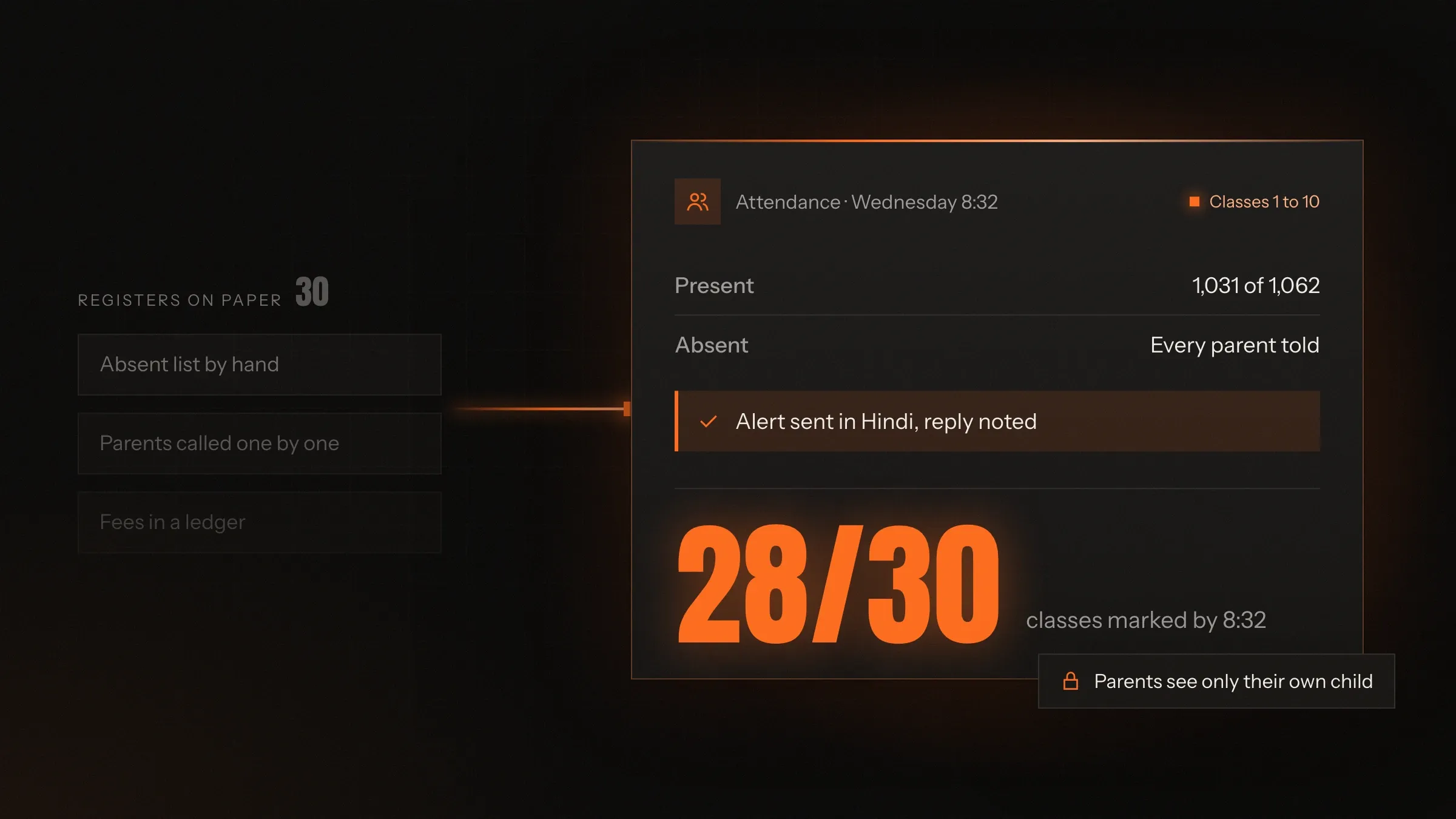
Today: Attendance lives in registers and reaches the office by lunch.
After: Teachers mark it on their phone, and parents of absent children hear the same morning.
-
Today: Fees are paid at the counter and written into receipt books.
After: Parents pay by UPI or card from a link or the app, and receipts go out by themselves.
-
Today: Report cards are typed up from registers at the end of every term.
After: Marks are entered once, and report cards print in your format, with remarks drafted for teachers.
-
Today: Notices go home on paper, and half of them never arrive.
After: Notices, homework and results reach every parent's phone, in their language.
-
Today: The principal waits for the month-end report to know how the school is doing.
After: Attendance, fees and admissions are on one screen, every day.
What it does for you
-
Admissions and student records
Online enquiries and admission forms with documents, seats by class including RTE seats, and one record per student from enquiry to transfer certificate.
For exampleA parent applies for Class 1 from her phone, uploads the birth certificate, and the office sees the seat filled.
-
Attendance in a minute
Teachers mark the whole class on their phone, and parents of absent children get a message the same morning.
For exampleBy 8:35, the office knows which classes are short and which parents have already replied.
-
Fees with online payment
Fee plans, concessions, late fees and reminders, paid by UPI or card, with receipts sent automatically and dues always current.
For exampleA sibling discount applies by itself, and the reminder goes out three days before the due date.
-
Exams and report cards
Marks entry, grading rules per board and class, and report cards in your format, including the holistic progress card.
For exampleA class teacher starts from AI-drafted remarks for 40 students and approves each one.
-
Timetables and substitutions
The timetable built once for the year, and free teachers suggested for every period an absent teacher would have taught.
For exampleA maths teacher calls in sick at 7:30; six periods are covered before assembly.
-
Transport parents can see
Routes, stops and students on each bus, with the bus live on a map and an alert as it nears the stop.
For exampleA parent leaves home when the alert says the bus is two stops away.
-
A parent app in their language
Notices, homework, attendance, results, fee dues and payments in one app, in English, Hindi, Gujarati or another language.
For exampleA grandmother reads the circular about the sports day in Gujarati.
-
Government reporting as you go
Student and staff records kept in the fields UDISE+ asks for, with each student's APAAR ID recorded.
For exampleThe annual return draws on data the office already keeps, instead of a week of collecting it.
How it works
-
Set up the school
Classes, sections, subjects, staff and students, imported from the spreadsheets you already have.
-
Set the rules
Fee plans, concessions, grading rules, report card formats and the timetable, set once for the year.
-
Run the day
Teachers mark attendance and marks; the office collects fees, issues certificates and sends notices from the same system.
-
Keep parents close
Parents see attendance, results and dues on their phone as they change, and pay without visiting the school.
-
Close the term
Report cards print in your format, promotions run class by class, and government returns draw on the year's records.
Where we've built it
3 from our portfolio
-
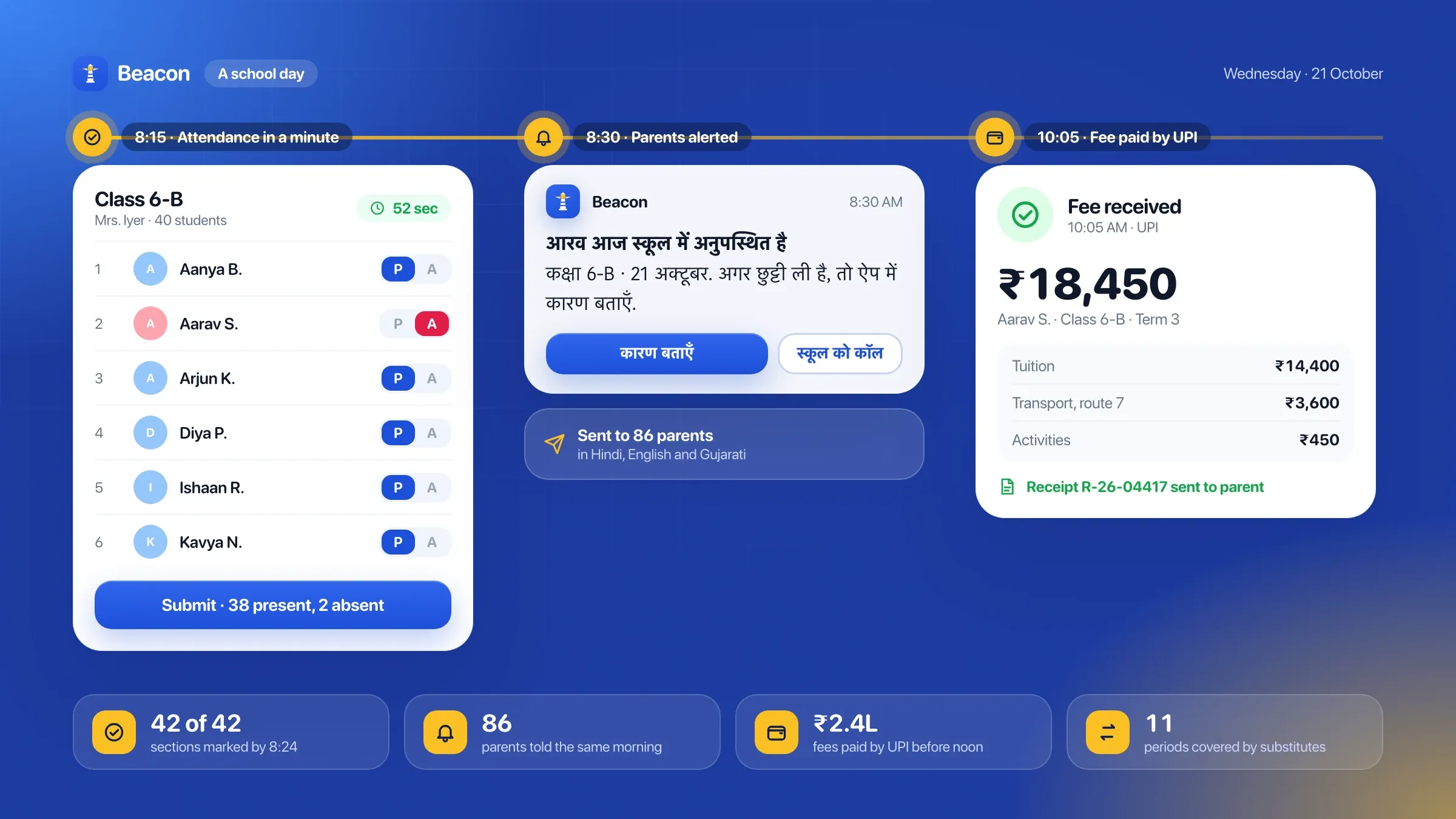 Beacon School ERP, our own school software Our school ERP software that runs admissions, attendance, fees, exams and parent updates in one school management system, with a parent app. It is in development. See the product
 -
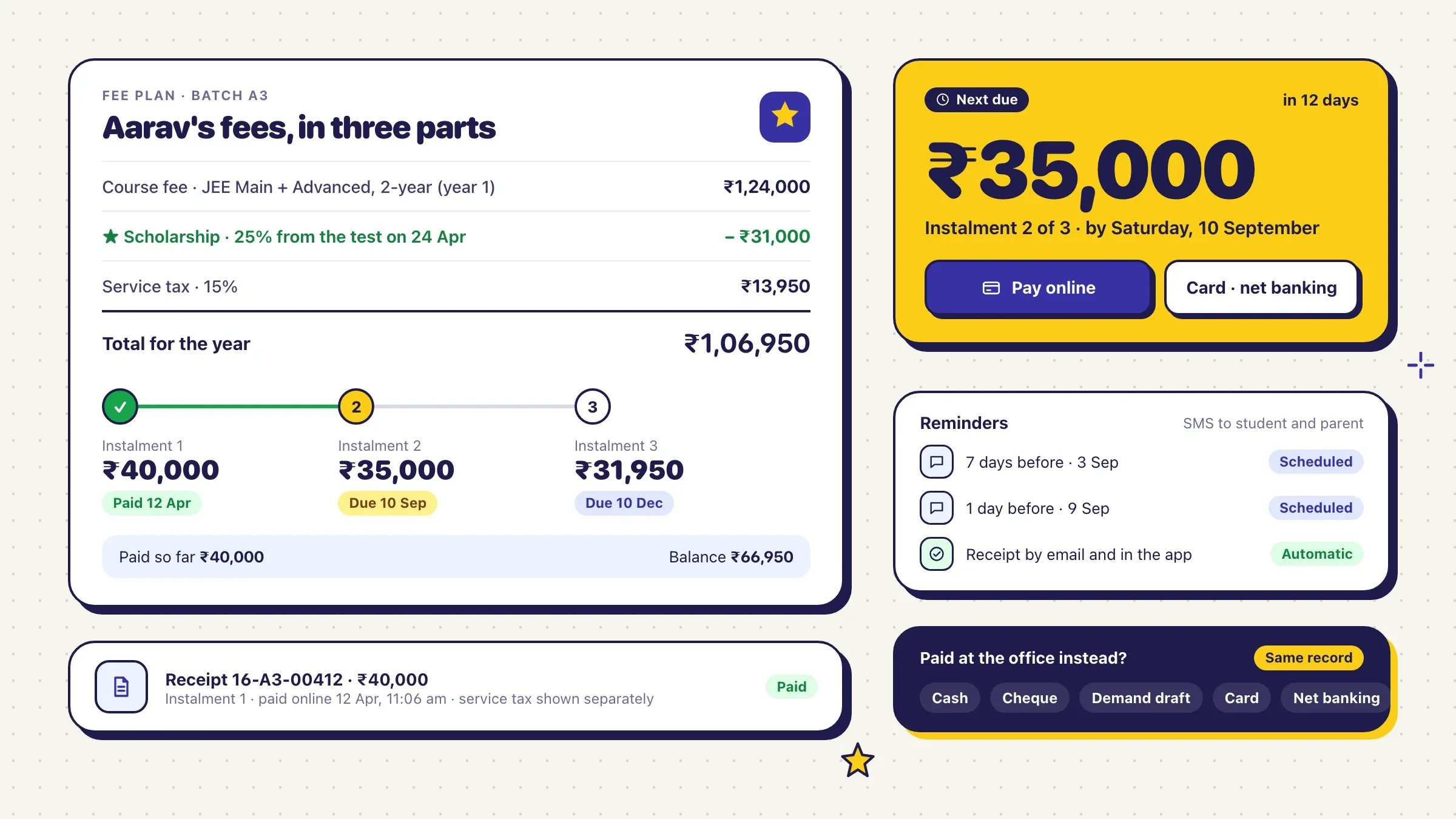 Admissions, fees and results online For a JEE and NEET coaching institute in Kota, we built online admissions, fee instalments with reminders, batch timetables, same-day test results and an app for students and parents. Read the case study
 -
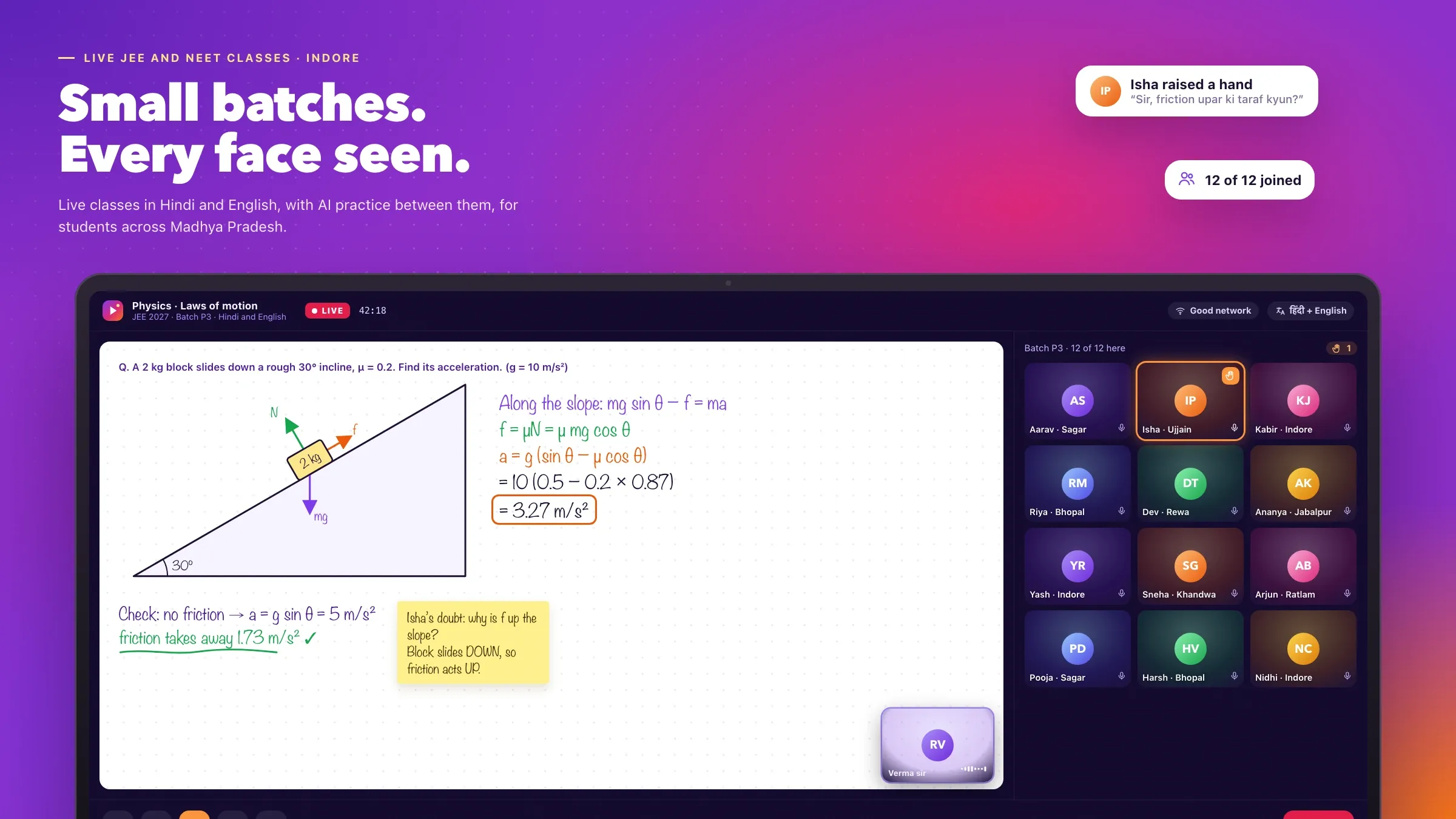 Live classes, tests and parent reports For an EdTech startup we back in Indore, we built small-batch live classes, tests in the real exam format and weekly progress reports for parents on WhatsApp. Meet the startup
What a school ERP does
A school ERP runs the administration of a school in one system: admissions, student records, attendance, fees, exams and report cards, timetables, transport and parent communication. ERP stands for enterprise resource planning, but in a school it simply means that the office, the teachers, the principal and the parents all work from the same records.
Without one, the same information lives in five places. A student’s details sit in the admission file, the class register, the fee register, the exam spreadsheet and the bus list, and every change has to be made five times. With a school ERP, a change is made once and everyone sees it.
The test of a good school ERP is the busiest mornings: the first week of a fee cycle, the day results come out, the first day of admissions. If it makes those mornings calmer, it is doing its job.
Ready-made, or built for your school
There are two ways to get school software from us: our own product, or a system built for you. Beacon School ERP is our school ERP software that runs admissions, attendance, fees, exams and parent updates in one school management system, with a parent app. It is in development, and schools that want early access can ask through the form on this page.
A ready-made product suits most day schools whose year follows a familiar pattern. A custom build fits better when your school doesn’t: a group of schools with a central office and its own rules, a boarding school with hostels, mess and outings, an international curriculum with its own assessments, a college with semesters and credits, or an existing accounting or HR system the school must keep.
We will tell you which one fits after the first conversation. If Beacon covers what you need, we will say so rather than build it again.
Where it pays off first
Fees are usually where a school ERP earns its keep first. Online payment by UPI, automatic receipts and reminders before each due date turn a month of phone calls into a report the accounts team reads in the morning.
Attendance comes next. When teachers mark it on their phones and parents of absent children hear within the hour, the office stops making calls and parents stop being surprised. Then come report cards: marks entered once, grading rules applied by the system and report cards printed in your format remove days of copying at the end of every term.
The principal feels it last, and most. Instead of waiting for month-end registers, attendance, fee collection and admissions are on one screen every morning, and a class that keeps falling behind on fees or attendance shows up in time to do something about it.
What we need from your school
We start with a day in your school office. We sit with the office staff, the accounts team, a few class teachers and the transport in-charge, because each of them knows the exceptions no list of features mentions.
We also collect what the school already uses: admission forms, fee structures and concession rules, report card formats, the timetable, the bus routes and every register or spreadsheet someone keeps on the side. Each one becomes a screen or a report, so nothing your team relies on is lost.
Finally, we need one person who owns the project, usually the principal or the administrator, and the session dates. Schools switch most smoothly at the start of a session or a term, so we plan backwards from that date.
The decisions that shape your system
A few early choices set the size of the work. One school or a group: a group needs a central view and rules that can differ by school. Which boards and classes: each has its own grading and report card. Which modules first: most schools start with attendance, fees and the parent app, and add exams, transport, library, hostel and payroll as they settle in.
Others are about parents. A parent app under the school’s name, or WhatsApp and web links that need no download? Which languages? Should parents see the bus live? We write each decision down with its reason, so the plan and the quote match what the school chose.
Admissions, fees and RTE seats
Admissions begin online: parents fill in the enquiry form, the school follows up, and the admission form collects documents, photos and previous school records. Seats are tracked by class, including the seats private schools reserve under the Right to Education Act, with their own documents and fee concessions.
Each class has its fee plan: tuition, transport, activities and one-time fees, paid monthly, quarterly or yearly. Concessions for siblings, staff children and scholarships apply automatically, and late fees follow the school’s rules. Parents pay by UPI or card, receipts go out on their own, and the accounts team sees collections and dues by class without a single register.
Exams, report cards and the holistic progress card
Teachers enter marks by subject and assessment, once. Grading rules follow the school’s board and class, and report cards print in the school’s own format: CBSE, ICSE or state board, and the holistic progress card introduced under the National Education Policy, with co-scholastic areas and teacher observations.
AI can draft a remark for each student from their marks, attendance and the teacher’s notes, so teachers start from a draft instead of a blank page. Every remark is checked and approved by the teacher before it reaches a report card, and published marks are locked against quiet changes.
Parents, in their own language
Parents follow their child on one app or on WhatsApp: notices, homework, attendance, results, fee dues and payments, the timetable and the school bus on a map. Parents with more than one child at the school see all of them in one place. Replies come back the same way: a parent answers an absence alert, and the class teacher sees the reason before the first period ends.
Every parent should be able to read what the school sends. We build the parent side in English, Hindi, Gujarati and other languages, so a circular about the sports day reaches a grandmother in the language she reads, and an absence alert reaches a father who doesn’t read English.
Children’s data and government reporting
Children’s data needs the most care of all. Student data is encrypted and, for Indian schools, stored in India. Each staff member sees only what their role needs, parents see only their own children, and every change to a student’s record is logged. India’s data protection law asks for a parent’s consent before a child’s data is processed, so consent is recorded with each record.
Schools also file UDISE+ returns every year, and students are being given APAAR IDs. We keep student and staff records in the fields these ask for as part of everyday work, so annual reporting draws on data the school already has.
Switching over, and running it every year
Students, staff, fee balances and past results are imported from your old software or spreadsheets. A few classes and the accounts team try the system first, teachers are trained in short sessions on their own phones, and parents are invited class by class.
The timetable and bus routes are set up in the same weeks, so the first day on the new system covers the whole school day: attendance before assembly, substitutes suggested for absent teachers, fees through the day and bus alerts in the afternoon.
After launch we look after the system with you: help at admission and exam time, a new session set up each year, and new modules when the school is ready. Each year the school runs on better data than the last.
How we work with you
From the first call to running it
- Start
A day in your school office
We sit with the office, the accounts team, a few class teachers and the transport in-charge, collect every register and format, and agree what goes first.
- Build
Your rules, set up
We build or set up the system with your fee plans, concessions, grading rules and report card formats, and import your students and staff.
- Pilot
A few classes first
A few classes and the accounts team use it while we fix what they find, and teachers are trained in short sessions on their own phones.
- Launch
The whole school, at a new term
Every class switches together, ideally at the start of a session or a term, with parents invited to the app class by class.
- Every month
Run and improve
We look after the system, help at admission and exam time, and add what the school asks for next.
Safe and in your control
Children's data, handled with care
Student data is encrypted and stored in India for Indian schools, and parents' consent is recorded for their children's data.
Each person sees their part
Teachers see their classes, the accounts team sees fees, parents see only their own children, and the principal sees the whole school.
Every change on record
Who changed a mark, a fee or a student's details, and when, is kept on a log the principal can check.
Marks locked when published
Once a report card is published, its marks can only be changed with approval, and the change is recorded.
Teachers approve every remark
AI drafts report card remarks, but nothing reaches a report card until the teacher has read and approved it.
Your data, yours to take
Every record can be exported at any time, so the school is never locked in.
Time and cost
The cost of school software depends on how your school runs, not on a package. Many schools start with attendance, fees and the parent app, then add exams, transport and the rest. After the first call we send a written plan and a quote.
One school or a group
A single school is the simplest. A group needs a central office view, shared rules and differences school by school.
Modules you need first
Attendance, fees and the parent app are a quick start. Exams, transport, hostel, library and payroll each add work.
Boards and formats
Each board, report card format and fee structure is set up and tested with your own data.
Apps and languages
Parent and teacher apps under your school's name cost more than WhatsApp and web links; each language is tested with real parents.
What it connects to
Payment gateways, WhatsApp and SMS, GPS on buses, biometric devices and accounting software such as Tally are each a connection.
Built with
Chosen for each project, never by habit
Questions and answers
13 answered
What is school ERP software?
School ERP software runs a school's administration in one system: admissions, student records, attendance, fees, exams and report cards, timetables, transport and parent communication. It replaces registers, spreadsheets, receipt books and separate apps, so the office, teachers, principal and parents work from the same records.
Should we use Beacon School ERP or have software built for our school?
It depends on how your school works. Beacon School ERP, our own school management software, suits most schools; it is in development and schools can ask for early access. A custom build fits better for school groups with their own ways of working, boarding schools, international curricula or a system the school must connect to.
How much does school ERP software cost?
It depends on one school or a group, the modules you need first, your boards and formats, whether parents get an app under your name, and what it connects to. We send a written plan and a quote after the first call.
How long does it take to set up a school ERP?
It depends on the modules and how much is custom. Attendance, fees and a parent app for one school is a matter of weeks; a group with exams, transport and its own apps takes longer. Most schools switch at the start of a session or a term.
Can parents pay school fees online by UPI?
Yes. Parents pay by UPI or card from the parent app or a payment link on WhatsApp. Receipts go out automatically, reminders go out before each due date, and the accounts team sees every payment as it arrives.
Does it support CBSE, ICSE and state board report cards?
Yes. Grading rules and report card formats are set per board and class, including the holistic progress card introduced under the National Education Policy, with co-scholastic areas and teacher observations.
Does it help with UDISE+ and APAAR IDs?
Yes. Student and staff records are kept in the fields UDISE+ returns ask for, and each student's APAAR ID can be recorded, so annual reporting draws on data the school already keeps.
Can the parent app work in Hindi and Gujarati?
Yes. Parents choose English, Hindi, Gujarati or another language, and notices, alerts and reminders reach them in it. Staff screens stay in the language your team prefers.
How is children's data protected?
Student data is encrypted, stored in India for Indian schools, and visible only to the staff and parents who need it. Parents' consent is recorded, as India's data protection law requires for children's data, and every change is logged.
Can we move our data from the old software mid-year?
Yes. Students, staff, fee balances and past results can be imported from your old software or spreadsheets. Switching mid-year works, though the start of a term is easier for teachers and parents.
Does it work for a group of schools?
Yes. Each school runs its own day, while the group office sees admissions, attendance and fee collection across every school, with shared rules where the group wants them.
Do you build school software for schools outside India?
Yes. FIRELIFE Ventures works with small and mid-size organisations worldwide, from Rajkot, India, on India time. For a school elsewhere we start with its curriculum, its report formats and the data rules that apply there, such as the GDPR in the UK and Europe.
What happens after the school ERP goes live?
We look after it with you: fixes, updates and backups, help through admission season and exams, a new session set up each year, and new modules when the school is ready.
Tell us what you want to build
Write a few lines about the idea and who it is for. We reply with our questions, a first plan and how we would start.
Write to us