Build something new real estate portal development
Sell homes from the map
We build real estate portals that let buyers search homes on a map by locality, budget and possession date, give every project its own microsite with live unit availability, and send every enquiry straight to the right salesperson.
- We start with your sales team
- Your team edits listings and prices itself
- Built to be found in local search
Sound familiar?
What we hear before we start
- Price lists and availability go out of date the week they are printed.
- Enquiries from ads, listing sites and site visits end up in personal notebooks.
- Buyers want to know where the project is before anything else, and a brochure can't show them.
- You pay listing sites for leads that also go to three other sellers.
- Every launch starts with new brochures and a website built from scratch.
What changes
-
Today: Buyers call to ask what is available and at what price.
After: Buyers search by locality, budget and possession date, on a list or a map.
-
Today: Availability lives on a sheet in the sales office.
After: Each unit shows as available, on hold, booked or sold, the moment it changes.
-
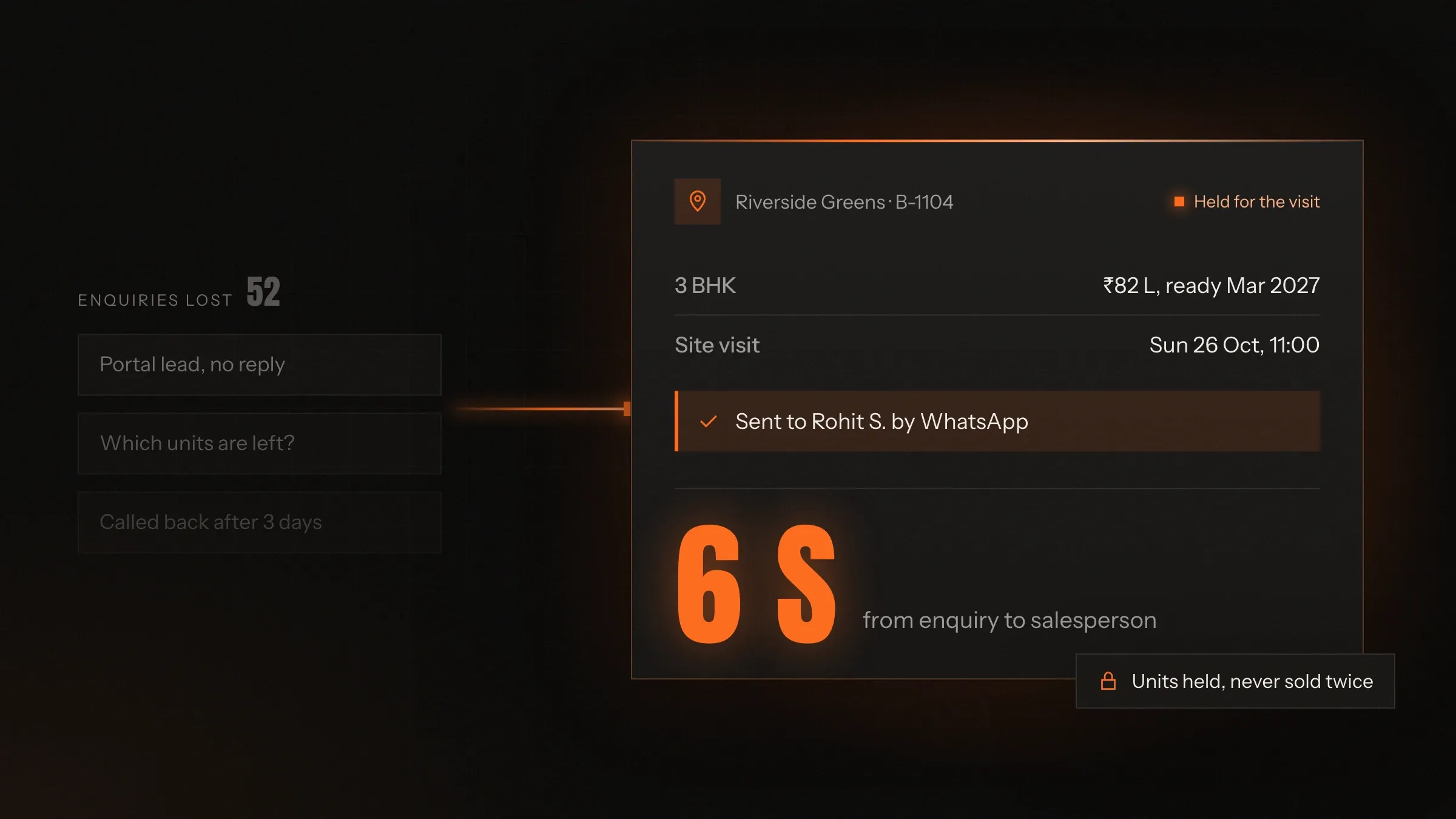
Today: Leads wait until someone is free to call back.
After: Every enquiry reaches a salesperson within seconds, with its source attached.
-
Today: Each launch needs a new brochure and a new website.
After: A project microsite is created from the admin panel, ready for the first day of bookings.
-
Today: Nobody knows which ads bring buyers who book.
After: Every source is followed from enquiry to site visit to booking.
What it does for you
-
Search the way buyers search
Locality, budget, BHK, property type and possession date, with ready-to-move and under-construction homes kept apart.
For exampleA family filters 3 BHK homes under ₹90 lakh, ready to move, and sees them on the map near their children's school.
-
Show where it is
Every home on a map, with the distances that decide visits: work, schools, hospitals and the main road.
For exampleA project page shows the drive to the business district, the nearest hospital and the ring road.
-
A microsite for every project
Amenities, floor plans, the price list, payment plans, construction updates and site visit booking, under one address.
For exampleA new tower launches with its own pages, price list and visit booking on the first day of bookings.
-
Show live unit availability
Each tower, floor and unit marked available, on hold, booked or sold, the same on the website and in the sales office.
For exampleA unit booked at the site office stops being offered on the website a moment later.
-
Send every enquiry to the right person
Forms, calls, WhatsApp, listing sites and walk-ins captured as leads, assigned and alerted at once, with duplicates merged.
For exampleAn enquiry from a listing site is matched to the buyer's earlier call and goes to the same salesperson.
-
Book site visits online
Buyers pick a date and time, the site team sees the day's visits, and reminders go out before each one.
For exampleA buyer books a Sunday visit, and the site manager sees it on the schedule with the units the buyer shortlisted.
-
Know what brings bookings
Every lead keeps its source, so reports show which ads and sites bring buyers who visit and book.
For exampleThe monthly report shows which newspaper ad brought the visits that became bookings.
How it works
-
A buyer searches
On Google or on your portal, by locality, budget, size and possession date.
-
They see it on the map
With photos, floor plans, prices and the distances that matter to them.
-
They enquire or book a visit
Through a form, a call, WhatsApp or a site visit slot.
-
The right salesperson hears
The lead is assigned and alerted within seconds, with the property and the source attached.
-
Follow-up until booking
Each lead has a next call date, a visit and a booking on the price list of the day.
-
The unit updates everywhere
A booked unit changes status on the website and in the sales office at once.
Where we've built it
2 from our portfolio
-
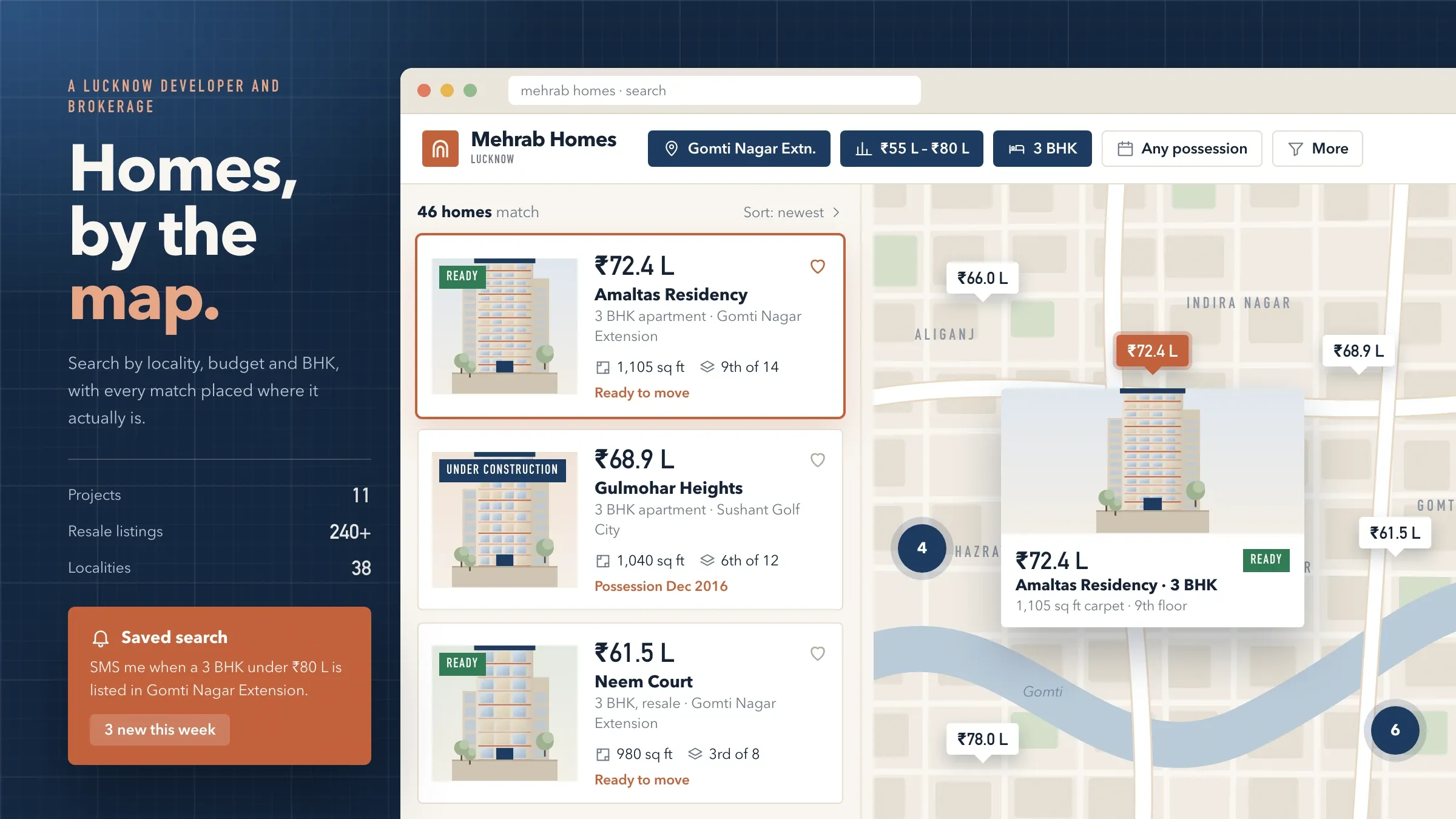 Property search with maps For a developer and brokerage in Lucknow, we built property search with maps, a microsite for every project, unit-by-unit availability and every enquiry sent straight to a salesperson. Read the case study
 -
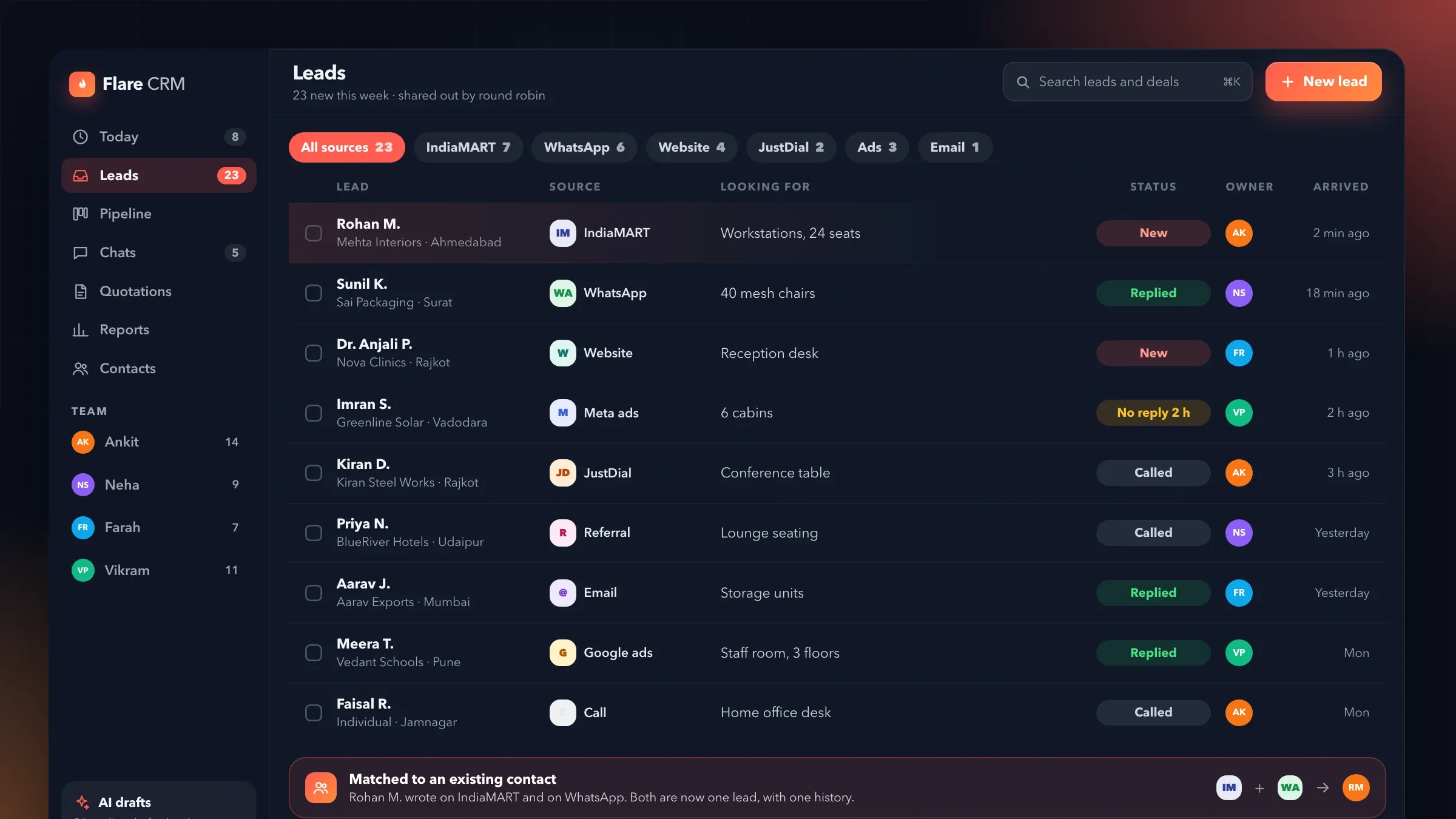 Every enquiry in one list Flare CRM, the sales software we are building for small teams such as real estate teams, gathers enquiries from the website, WhatsApp and lead ads into one list and shares them out automatically. See the product
What a real estate portal does
A real estate portal puts your properties where buyers look for them and turns their interest into leads your team can follow. Buyers search by locality, budget and size, see each home on a map with photos and floor plans, and enquire or book a visit. Your sales team receives each enquiry at once, with the property and the source attached.
Behind the pages sits the part buyers never see: the inventory of every project and unit, the price lists, the leads and the follow-ups. A portal that keeps those current is a sales tool. One that doesn’t is a brochure that goes out of date.
That is why we build the search, the inventory and the lead handling together, around how your sales office already works.
Developer, broker or marketplace: decide first
The first decision is who lists on the portal, because it shapes everything else. A developer’s portal shows its own projects, with a microsite for each, unit-level availability and leads for its own sales team. A brokerage’s portal adds resale and rental listings from many owners, with listings that need checking and agents who share leads.
A marketplace goes further: many brokers and owners list for themselves, often on a subscription or with paid featured listings, and the portal must check listings, stop duplicates and share enquiries fairly. Some developers also want a portal for channel partners, the brokers who sell their projects, with live availability and their own leads. Each choice changes the admin side too: who can add listings, who checks them, how leads are shared and how the portal earns its keep.
For a developer and brokerage in Lucknow, we built one portal for both sides: new projects with their own microsites and resale listings, searched together.
Search the way buyers search
Buyers start with three questions: what can I afford, where is it, and when can I move in. In Lucknow, the sales team and recent buyers told us the same thing, so search leads with budget, locality and possession date, and keeps ready-to-move and under-construction homes clearly apart.
Size and type follow: 1, 2, 3 or 4 BHK, plots, shops and offices. Results show as a list or on a map, buyers can shortlist and compare homes side by side, and every property page carries its photos, floor plan, carpet area, amenities and location. Most buyers search on their phones, so every screen is designed for a phone first.
Buyers who are not ready today can save a search and receive a WhatsApp or email alert when a matching home is listed or a price changes. That brings them back to you without paying for another ad.
The map does the selling
Location decides more site visits than any photograph. Buyers want to see the distance to work, schools, hospitals and the main road before they call, so every project and property sits on a map with those distances alongside.
On the search map, nearby properties are grouped so the map stays readable, and buyers move or zoom it to change the search. Locality pages bring together the projects, prices and amenities of one area, which helps buyers who know where they want to live but not yet which building.
A microsite for every project
Each project gets its own microsite inside the portal, so a launch never starts with a blank page. It carries the location map, amenities and specifications, floor plans for each unit type, the price list and payment plan, construction updates month by month, and site visit booking with a choice of date and time.
The brochure download can ask for a name and number first, so interest becomes a lead. Each project’s RERA registration number appears on its microsite and on the pages your ads point to. Your team creates a new microsite from the admin panel, and in Lucknow the next project’s microsite went live on the first day of bookings.
Live inventory and price lists
Availability belongs in one place. Each project’s inventory is tracked unit by unit: tower, floor and unit, marked available, on hold, booked or sold. When the sales office changes a status, the website changes with it, so a sold unit is never offered again.
Holds can expire on their own if a booking does not follow. Price list changes are saved as new versions, and every booking records the price list it was made on, which settles questions months later. Channel partners can see the same live availability, so they stop selling units that are already gone.
Resale and rental listings need a different kind of care. Each one carries its owner or agent, whether it has been checked, and the date it was last confirmed, so listings that go stale are hidden instead of wasting buyers’ calls.
Every enquiry becomes a lead
A lead is worth most in the first minutes after an enquiry. The portal captures every enquiry with its source: forms on the portal and each microsite, dedicated phone numbers and landing pages for each ad, listing site enquiries read from their emails, WhatsApp messages, and walk-ins entered by the site team.
New leads are assigned to salespeople by your rules and alerted by SMS, WhatsApp or email within seconds. Duplicate enquiries join the buyer’s existing lead instead of starting a new one. Each salesperson has a follow-up list with the next call date for every lead, and managers see which sources bring buyers who actually visit and book.
Leads can also flow into the CRM you already use. For the Ohio distributor, every quote request goes into HubSpot with the product attached; for small sales teams, Flare CRM, the sales software we are building, gathers leads from every channel into one list.
Being found on Google
Most buyers begin with a search like “3 BHK in Gomti Nagar” rather than a company name, so the portal is built to answer those searches. Every locality, project and property has its own page with a clear address, title and description, listed in a sitemap and described with structured data.
Pages load fast on phones, because a slow page loses the buyer before the photos appear. If you already have a site that ranks, we move it carefully: every old address is mapped to its new page with a permanent redirect, as we did for the Ohio distributor, so its search presence carries over.
Clear answers to the questions buyers ask, such as the difference between carpet and built-up area or what a RERA number tells them, can live on the portal too. They help buyers decide and give search engines and AI assistants something worth quoting.
What we need from you, and how we measure it
We need your projects, your sales process and an owner on your side. That means price lists, floor plans, photos and the unit sheet for each project, the sources your leads come from today, and how leads are shared out. The owner is usually the head of sales, someone who can decide how leads are handled. Good photos and accurate floor plans matter more than any feature; if they are missing, we say so early so they are ready for launch.
Before we build, we agree the measures: enquiries by source, time to the first call, site visits booked, bookings by source and the cost of each booking. Those measures appear in a monthly report, so you can see which ads and sites earn their money.
Launch and the years after
A portal launches best alongside a project. In Lucknow, existing projects and resale listings were loaded and checked against the sales office’s records, and the portal went live with the next project’s microsite on its first day of bookings.
After launch we keep the portal current with you. Over the years in Lucknow, new projects and listings were added, and when RERA came into force in 2017, each project’s registration number was added to its microsite and advertising pages. Markets change, and the portal changes with them.
How we work with you
From the first call to running it
- Start
Sit with your sales team
We spend time with sales, site managers and recent buyers, read every brochure, price list and sheet, and write down what buyers ask most.
- Build
Search, projects and leads
Search and map, project microsites, unit inventory and lead capture are built and connected to the tools your sales team already uses.
- Pilot
Load and check every listing
Every live project, unit and listing is loaded and checked against the sales office's records before anyone outside sees it.
- Launch
Launch with a project
The portal goes live, ideally alongside your next project, with its microsite ready on the first day of bookings.
- Every month
Run and grow
We add projects, localities and features, watch search and lead reports with you, and keep the portal fast and current.
Safe and in your control
Buyers' details kept close
Each enquiry is visible to its salesperson and managers only, and is never shared with other sellers.
Consent on record
Each buyer's agreement to calls and messages is recorded with the enquiry, and they can opt out at any time.
RERA details where they belong
Each project's RERA registration number appears on its microsite and on the pages your ads send people to.
One version of the price
Price list changes are saved as new versions, and every booking records the price list it was made on.
Every change on record
Who changed a price, a unit's status or a listing is logged with the time.
Your listings and leads stay yours
Projects, listings and every lead belong to you, can be exported at any time and are hosted where you choose.
Time and cost
The cost depends on who lists on the portal and how much of your sales process it runs, not on a package. A developer's own portal with a few projects is the quickest start; a marketplace for many brokers and owners takes longer. After the first call we send a written plan and a quote for the first stage.
Who lists
Your own projects, your brokerage's listings, or many brokers and owners each need different tools, checks and pricing.
Search and map
Filters and a map are standard. Drawing areas, commute times and neighbourhood data add more work.
Inventory depth
Unit-level availability, holds, price list versions and payment plans each add rules and screens.
Lead sources and CRM
Each listing site, ad platform, phone line and CRM connection is built and tested on its own.
Content and running costs
Moving an old site, writing locality pages, maps, messages and image storage grow with the size of the portal.
Built with
Chosen for each project, never by habit
Questions and answers
14 answered
What is a real estate portal?
A real estate portal is a website where buyers search properties by location, price, size and type, see photos, floor plans and a map, and contact the seller. For a developer or brokerage, it also captures every enquiry as a lead for the sales team.
What features should a real estate portal have?
Search with filters for locality, budget, size and possession date, map search, property pages with photos and floor plans, live availability, enquiry forms that reach sales at once, site visit booking, and an admin panel so your team updates listings and prices without a developer.
Should a developer build its own portal or rely on listing sites?
Both have a place. Listing sites bring reach, but their leads often go to several sellers. Your own portal shows only your projects, sends every enquiry to your team alone, and builds search visibility that stays with you. Many developers use both and track which brings bookings.
How does map search work on a property portal?
Every property is stored with its location, so results can be shown on a map as well as a list. Buyers move or zoom the map to change the search, nearby properties are grouped so the map stays readable, and each project shows the distances that matter to buyers.
What is a project microsite?
A project microsite is a set of pages for one housing or commercial project, with its location map, amenities, floor plans, price list, payment plans, construction updates and enquiry form, so each launch can be marketed on its own.
How do enquiries reach our sales team?
Every enquiry is saved as a lead with the property and its source, assigned to a salesperson by your rules and alerted by SMS, WhatsApp or email within seconds. Duplicate enquiries from the same buyer join their existing lead.
Can the portal connect to our CRM?
Yes. Leads can flow into the CRM you already use, such as HubSpot, or into Flare CRM, the sales software we are building for small teams. If you have no CRM, the portal can include a simple lead list with follow-up dates.
How does the portal show live unit availability?
Each tower, floor and unit is tracked as available, on hold, booked or sold. When the sales office changes a unit's status, the website shows it straight away, so a sold unit is never offered again.
Does the portal show RERA registration details?
Yes. Each project's RERA registration number appears on its microsite and on the pages your ads send people to. We added RERA numbers to the Lucknow portal's projects when the law came into force in 2017.
How will buyers find the portal on Google?
Every locality, project and property gets its own page with a clear address, title and description, listed in a sitemap and described with structured data. Pages load fast on phones, and an old site is moved with every address redirected so its rankings carry over.
How much does a real estate portal cost?
It depends on who lists on it, how search and the map work, how deep the unit inventory goes, which lead sources and CRM it connects to, and how much content moves across. After the first call we send a written plan and a quote for the first stage.
How long does it take to build a real estate portal?
A developer's portal with a few projects is the quickest start; a marketplace for many brokers and owners takes longer. We often plan the launch alongside your next project, so its microsite is ready on the first day of bookings.
Do you build property portals outside India?
Yes. FIRELIFE Ventures works with small and mid-size businesses worldwide, from Rajkot, India, on India time, and builds in the units, currencies and listing rules of the market you sell in.
What happens after the portal goes live?
We run it with you: we add projects, listings and localities, keep prices and availability flowing, watch search and lead reports, and add features as your sales team asks for them.
Tell us what you want to build
Write a few lines about the idea and who it is for. We reply with our questions, a first plan and how we would start.
Write to us