Build something new web app development
Run your business from one web app
We build web apps that run a business from one place: bookings, customers, orders, payments and your team in one secure system that opens in any browser, on a computer or a phone, with nothing to install.
- Opens in any browser, nothing to install
- A portal for customers, a console for your team
- Looked after by us once it's live
Sound familiar?
What we hear before we start
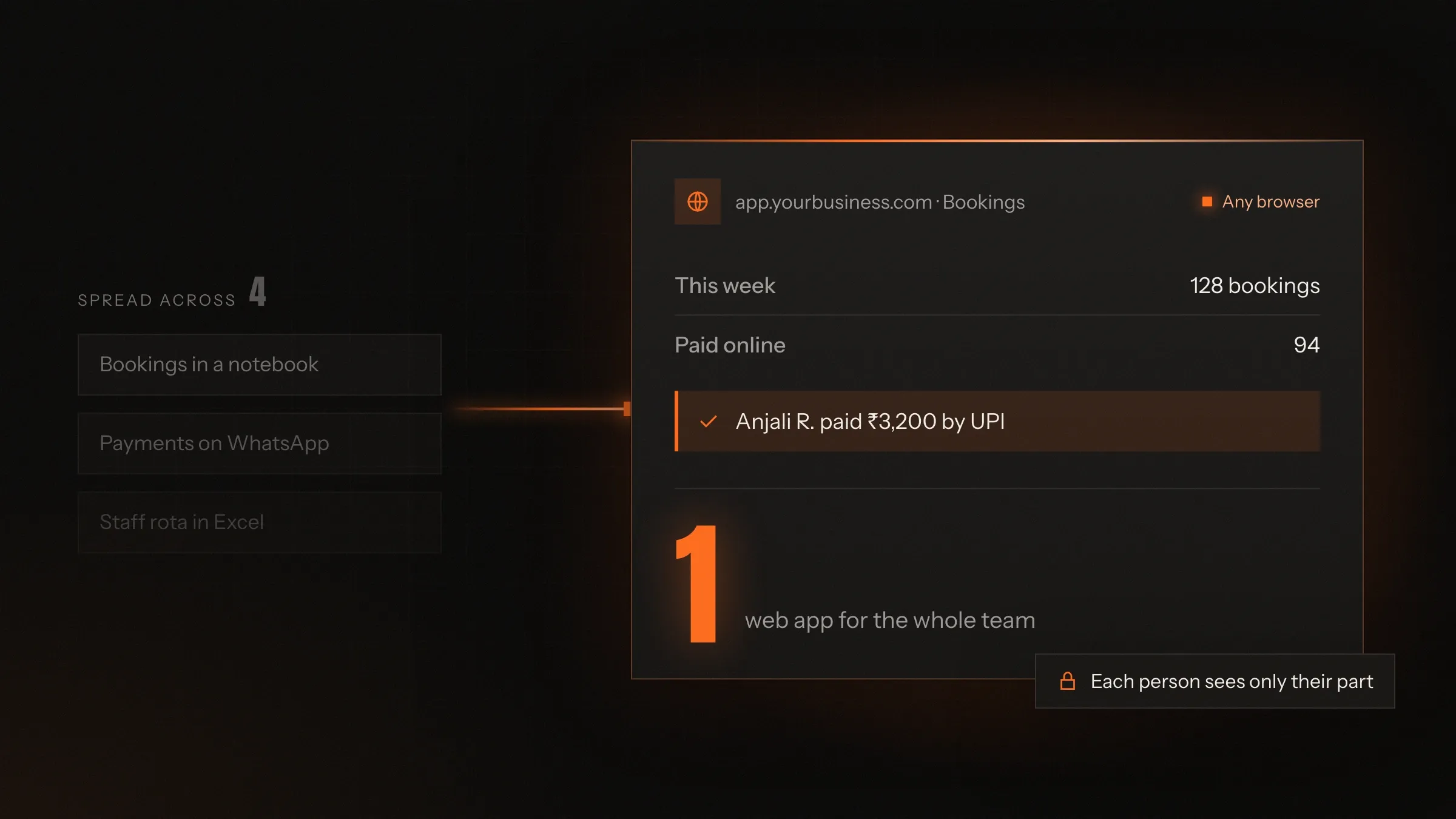
- Customers, bookings and invoices live in five tools that don't talk to each other.
- Your team works from shared spreadsheets, and someone always has the old version.
- Customers email and call for things they could look up themselves.
- The software you rent charges per user and still doesn't do the one thing you need.
- Seeing the whole business at a glance means asking every team for a report.
What changes
-
Today: Every tool has its own login and its own version of the truth.
After: One web app holds customers, bookings, payments and work, in one place.
-
Today: Customers call to check, change or pay.
After: They do it themselves in a portal, at any hour, from any phone.
-
Today: Staff email spreadsheets back and forth.
After: Everyone works in the same live system, each with their own access.
-
Today: Reports are pieced together by hand at month end.
After: Dashboards show today's figures, and reports export in a click.
-
Today: Working from another branch or from home means workarounds.
After: It opens in any browser, anywhere, behind secure sign-in.
What it does for you
-
A portal for your customers
Customers book, pay, download invoices and follow progress without calling you.
For exampleA parent in another state checks fees, results and notices from a phone.
-
A console for your team
Bookings, orders, customers and tasks in one place, with each role seeing what it needs.
For exampleThe admissions team watches seats fill in every batch as applications arrive.
-
Payments and invoices
Online payment by UPI, card or bank transfer, with proper GST or VAT invoices and reminders before anything falls due.
For exampleA company buys ten conference tickets, enters its VAT number and gets an invoice its finance team accepts.
-
Search and filters
Find anything quickly, by place, date, price, status or any field your business uses.
For exampleA buyer filters homes by locality, budget and BHK and sees the matches on a map.
-
Dashboards and reports
Live figures for the owner and each team, from the same records the work happens in.
For exampleLeadership opens one screen each morning with sales, margin and ad spend by channel.
-
Portals for partners
Separate access for agents, partners or suppliers, with their own rates and their own view.
For exampleA travel agent checks seats left on a departure, books at agreed rates and sees the commission.
-
Connected to your other tools
Accounting, email, WhatsApp, calendars, maps and payment providers, linked so nothing is typed twice.
For exampleEnquiries forwarded by property portals are read from email and turned into leads.
How it works
-
Open it anywhere
Staff, customers and partners sign in from any browser, on a computer, tablet or phone.
-
See what's yours
Each person gets the screens and records their role allows, and nothing else.
-
Do the work
Book, quote, invoice, assign or approve, all in one place.
-
Everyone sees it at once
Changes appear live for whoever needs them, without refreshing or emailing.
-
Customers are kept informed
Confirmations, reminders and receipts go out by email, SMS or WhatsApp.
-
The numbers stay current
Dashboards and reports update from the same records as the work.
Where we've built it
4 from our portfolio
-
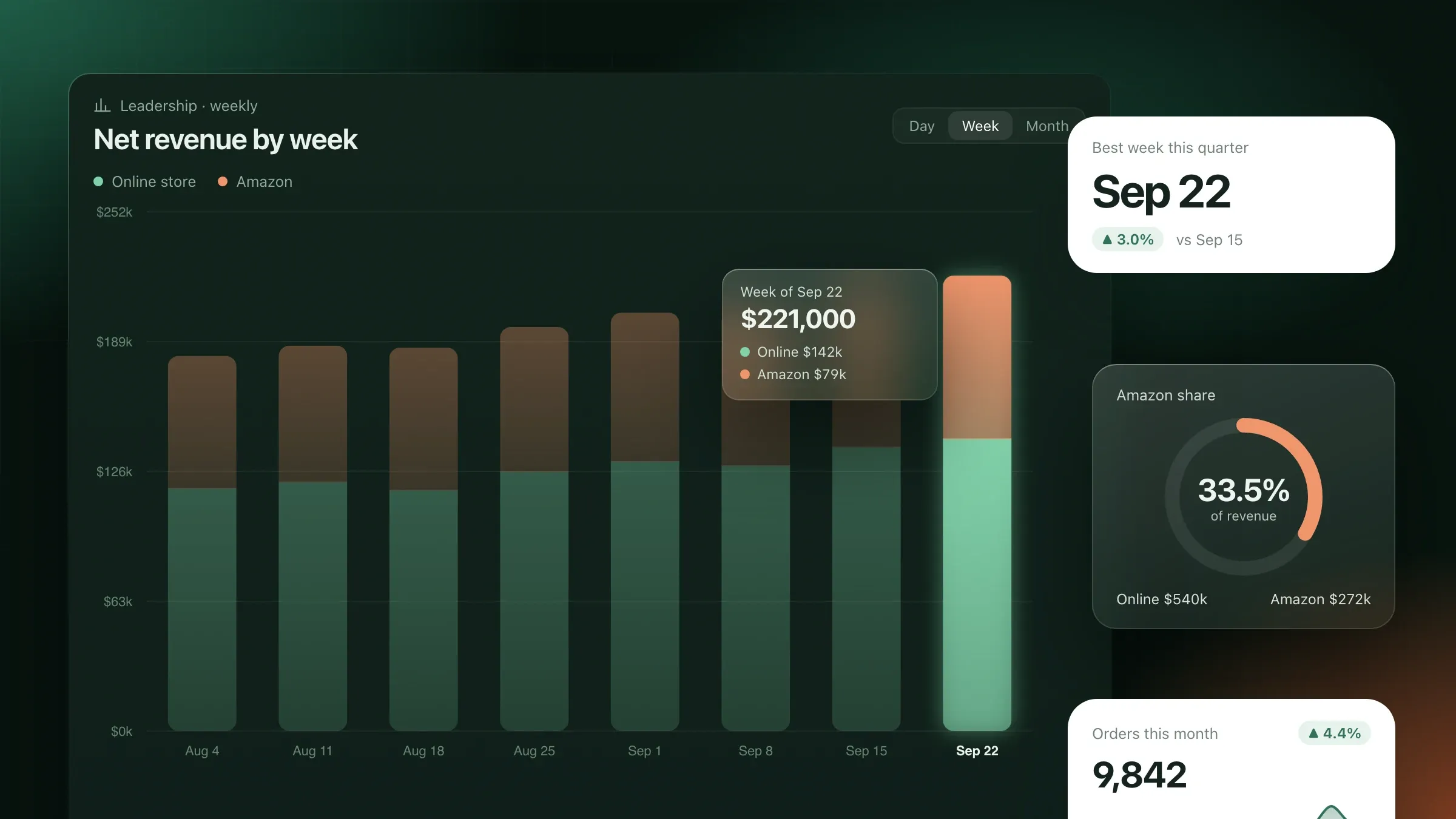 Every team's numbers in one place For a home goods brand in Denver, dashboards for leadership, marketing, operations and finance, all built on one agreed definition for every number. Read the case study
 -
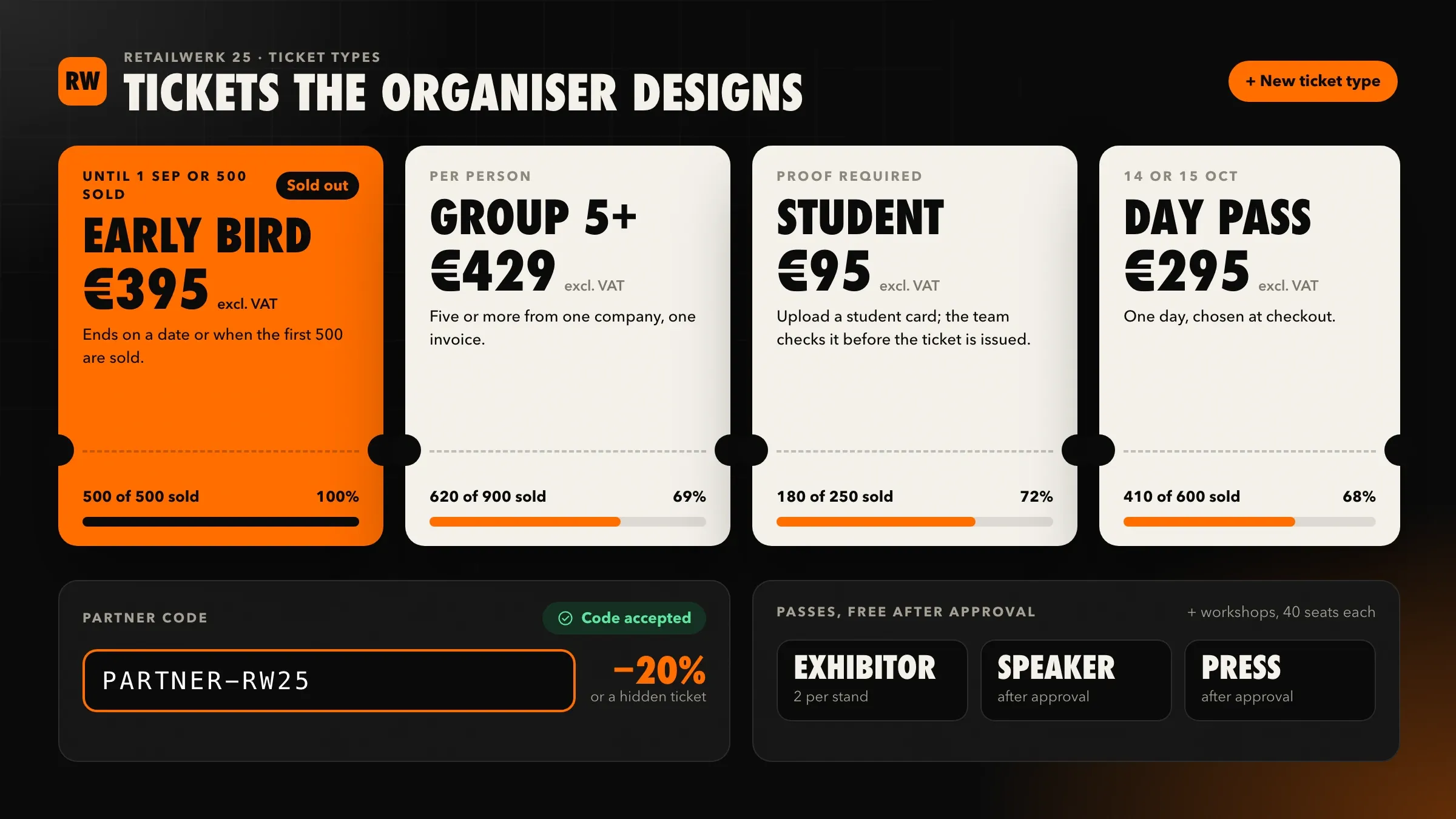 Tickets and invoices the organiser controls For a conference organiser in Utrecht, a ticket shop and organiser dashboard with ticket types it designs, VAT invoices for companies and wallet tickets. Read the case study
 -
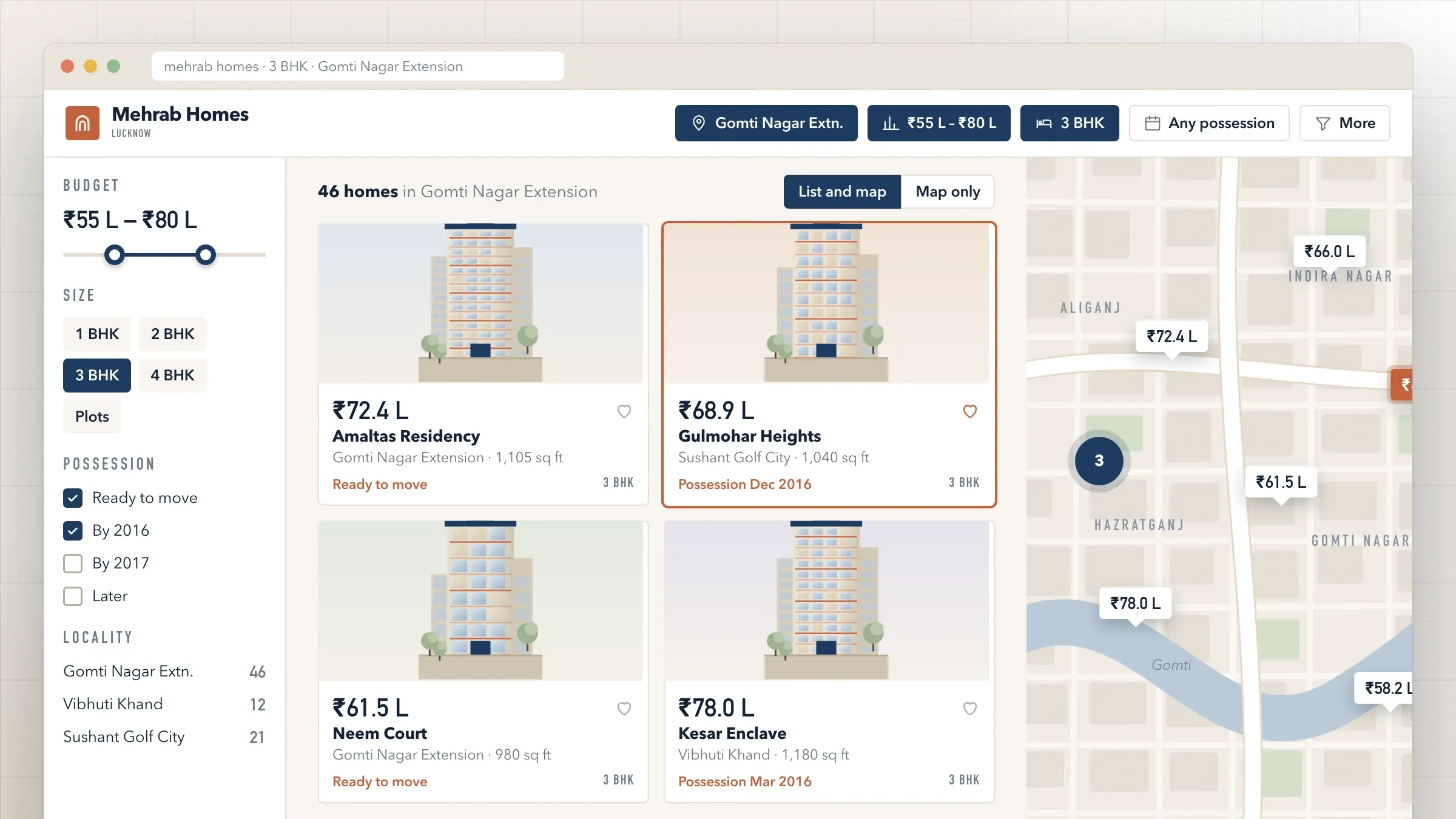 Property search that feeds the sales team For a developer and brokerage in Lucknow, a portal with map search, a microsite for every project and every enquiry sent straight to a salesperson. Read the case study
 -
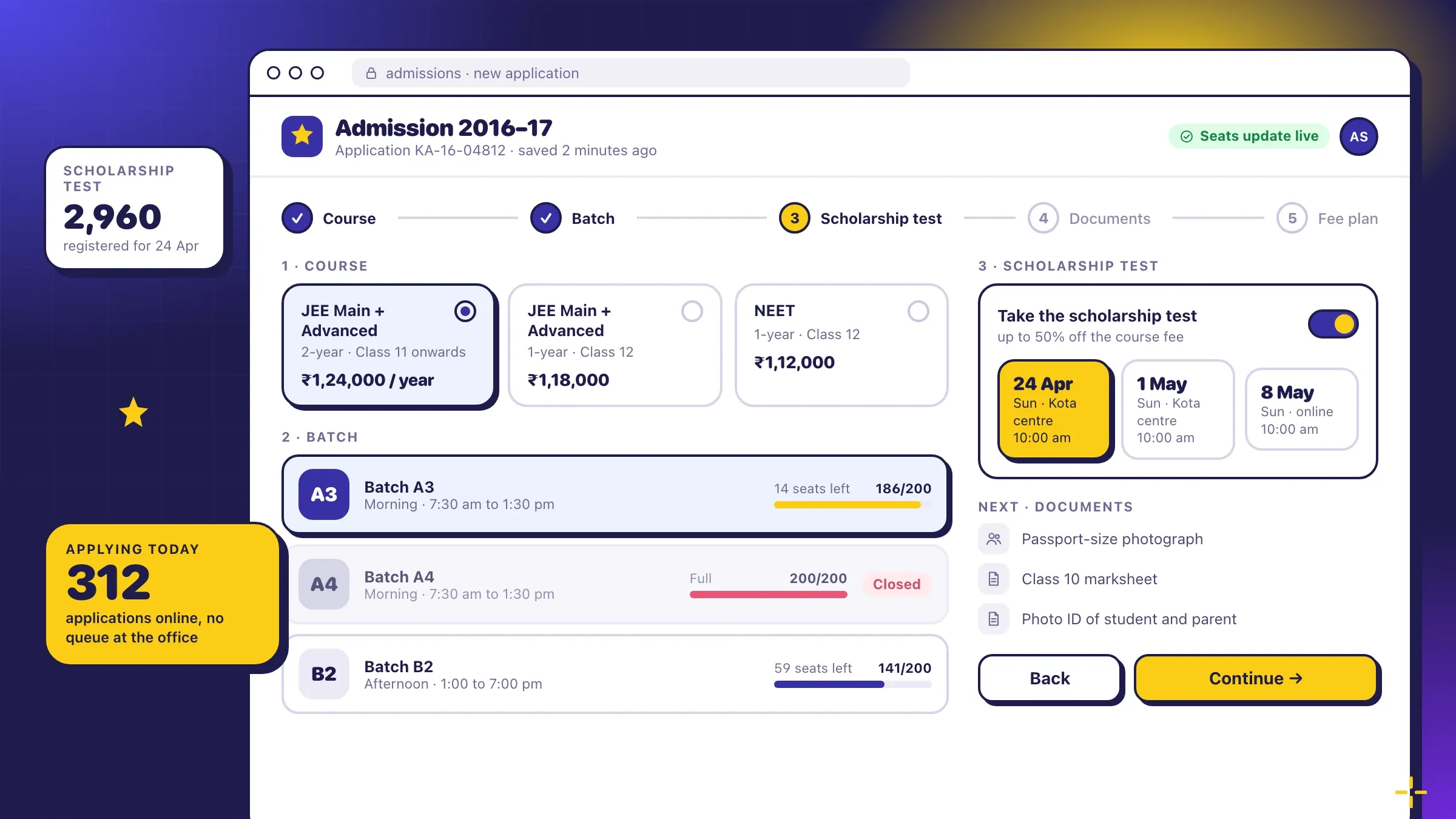 Admission season, online For a JEE and NEET coaching institute in Kota, a portal for online admissions, fee instalments with reminders, batch timetables and same-day test results. Read the case study
What a web app is, and why businesses choose one
A web app is software your business uses through a web browser. There is nothing to install: staff, customers and partners open an address, sign in and see their own screens, on a computer, a tablet or a phone. Everyone works on the same live data, so there is one version of every booking, order and invoice.
Businesses choose a web app when the way they work has outgrown spreadsheets and email, and when the software they could rent doesn’t fit. It suits work that happens at desks and counters, teams spread across branches or homes, and customers who need to do something now and then without downloading an app.
A website and a web app often sit side by side. The website explains what you do and brings people in; the web app is where they book, pay, apply or manage their account, and where your team runs the business behind it.
One place instead of five tools
Most businesses that come to us run on several tools that each do one job: a booking tool, a spreadsheet of customers, an invoicing program, a shared inbox and a WhatsApp group. Each has its own login, and none of them agree.
A web app brings the essential parts together. A booking knows its customer, its payment and the person doing the work. An invoice knows which booking it belongs to. A report reads from the same records, so its numbers match what the team sees.
That doesn’t mean replacing everything. Tools that do their job well, such as your accounting software or email, stay and are connected. The web app takes over the work that falls between them, which is usually where time and money leak.
A portal for customers, a console for your team
Most business web apps have two faces. Your team works in a console: bookings, orders, customers, tasks, approvals and reports, each role seeing what it needs. Customers use a portal: they book, pay, download invoices, upload documents and follow progress without calling you.
The two share the same data, so when a customer pays, your team sees it straight away, and when your team moves an appointment, the customer is told. A coaching institute in Kota runs admissions, fees and results this way: students apply and pay online, the admissions team sees seats fill batch by batch, and parents in other states see results on their phones the day they are marked.
Some businesses need a third face: a portal for partners. Travel agents booking seats at agreed rates, suppliers confirming orders or franchisees running their own branch all get their own view of the same system.
What we need from you
We need the people who will use the app, the rules your business runs on, and someone who can decide.
We start by watching the work: how a booking is taken, how an invoice is raised, what happens when a customer cancels. The people who do it every day know the shortcuts and exceptions, and the app should handle them.
The rules include prices, discounts, taxes, approval limits, cancellation terms and the documents you send. Copies of your real invoices, forms and spreadsheets help more than descriptions.
And we need one person on your side who can say yes or no to a screen or a release, and answer questions within a day. They don’t need to be technical; they need to know the business.
Designing screens people use all day
A web app is used for hours at a time, so small details matter. Tables that can be sorted and filtered, keyboard shortcuts for frequent tasks, and search that finds a customer from part of a name or a phone number save time every day.
We design the key screens first and you try them in your own browser before anything is built. The people who will use them most, such as the front desk, the accounts team or the sales team, try them too, and we change what slows them down.
Every screen works on a phone as well as a computer. A manager can approve a refund from a phone, and a customer can pay a balance on the bus, while your team does the heavy work on larger screens.
Payments, invoices and the rules around them
Taking money online is often the reason a business needs a web app. In India that means UPI, cards, net banking and wallets through a gateway such as Razorpay, with GST invoices that carry the right details. Abroad it means cards, bank transfers and local methods such as iDEAL through providers such as Stripe, with VAT invoices that a company’s finance team will accept.
The rules matter as much as the payment button: deposits and balances, instalments, refunds, reverse-charge VAT for businesses elsewhere in the EU, and reminders before something falls due. A tour operator in London takes deposits in four currencies and collects the balance before departure; a conference organiser in Utrecht invoices companies elsewhere in the EU under the reverse-charge rules, and issues tickets paid by bank transfer when the money arrives.
Card and UPI details never touch your servers. They go straight to the payment provider, which keeps your web app out of the riskiest part of handling money.
Connecting to the tools you keep
A web app becomes far more useful when it talks to the rest of your business. Common connections include accounting software such as Tally, payment providers, email, SMS and WhatsApp for confirmations and reminders, calendars for appointments, and maps for addresses and areas.
Connections also work in the other direction. Enquiries forwarded by property portals can be read from email and turned into leads automatically, as they are for a real estate developer in Lucknow. Data from other systems can feed dashboards, as it does for a home goods brand in Denver whose store, Amazon, ads and accounting data now sit in one place.
Where a tool has no modern connection, we build a small bridge, so nothing has to be typed twice.
Speed, security and hosting
A web app should feel quick even on a slow connection. We keep pages light, load data as it is needed and test on ordinary phones and networks, not just fast office computers.
Security is built in from the start: secure sign-in with two-step verification, permissions by role, encryption, a log of every change and regular updates for the frameworks underneath. Customers’ personal data is handled under the rules that apply to you, such as India’s data protection law or the GDPR, with consent, export and deletion where they are required.
We host web apps on AWS, Google Cloud or Vercel, in the region you need, with automatic backups and monitoring that alerts us when something goes wrong.
Moving in and switching over
A new web app should arrive without a day when nothing works. We move your existing customers, bookings and records across, check the totals with your team, and let one team or branch use the app for real work while the old tools are still available.
Training happens on your own data, at your own desks, so people recognise what they see. When the first team is comfortable, the rest move over in turn, and the old tools are switched off only when nobody needs them.
Looking after it after launch
A web app is a living part of your business. Customers ask for new things, rules change, and your team finds better ways to work once the basics are in place.
We host and watch the app, keep its frameworks and security up to date, fix what comes up, and add features in planned releases, chosen with you from what your teams and customers ask for. The real estate portal in our portfolio, for example, gained each project’s RERA registration number on its microsite and advertising pages when RERA came into force.
How we work with you
From the first call to running it
- Start
Map the work and the people
We learn who will use the app, what they do every day, and which tools it must replace or connect to.
- Design
Click through it first
You try the key screens in your own browser, and we adjust them with the people who will use them.
- Build
Working releases
We release the app in usable parts, starting with the one your team needs most, so you can test as we go.
- Pilot
One team, real work
A team or a branch uses it for real while the old tools stay within reach.
- Launch
Everyone moves over
Your data is moved across, each team is trained, and the old tools are retired.
- Every month
Run and improve
We host it, look after it, fix what comes up and add what your teams and customers ask for.
Safe and in your control
Secure sign-in
Passwords stored safely, two-step sign-in, and sign-in with Google or Microsoft accounts where you want it.
Roles and permissions
Each member of staff, customer and partner sees only what they should, and you decide who sees what.
Encrypted and backed up
Data is encrypted on the way and where it is stored, and backed up automatically.
Every change on record
Who changed what, and when, is logged, so a mistake can be traced and put right.
Kept up to date
Frameworks and libraries are updated for security fixes as part of looking after the app.
Privacy rules built in
Consent, data export and deletion are part of the app where the law asks for them, such as the GDPR or India's data protection law.
Time and cost
The cost of a web app depends on what it has to do and who uses it, not on the number of pages. Most start with the part your team needs most and grow from there. After the first call we send a written plan and a quote for the first release.
How many kinds of user
A console for your team is one build. A customer portal and a partner portal each add their own screens and permissions.
How much it replaces
Replacing one spreadsheet is a quick start. Replacing several tools at once means more to design, move and test.
Payments and documents
Taking payments and issuing GST or VAT invoices add rules that must be exactly right.
What it connects to
Accounting software, email, WhatsApp, maps and your existing systems each add a connection to build and test.
Data to move across
Clean records move quickly. Years of scattered files need tidying first.
Hosting and running
Servers, email and SMS costs grow with use, and the plan sets them out.
Built with
Chosen for each project, never by habit
Questions and answers
12 answered
What is a web app?
A web app is software that runs in a web browser instead of being installed on each computer, like online banking or email in the browser. People sign in from any device and everyone works on the same live data. It lets people do things, such as book, pay, manage records and see reports, rather than only read pages.
What is the difference between a website and a web app?
A website mainly informs: pages people read. A web app lets people act: sign in, book, pay, manage their records and see their own data. Many businesses need both, and they can sit at the same address.
How much does web app development cost?
It depends on how many kinds of user it serves, how much it replaces, whether it takes payments and issues invoices, and what it connects to. A console for one team costs far less than a console, a customer portal and a partner portal together. After the first call we send a written plan and a quote.
How long does it take to build a web app?
It depends on the scope. A focused web app for one team can be a matter of weeks; one with customer and partner portals, payments and several connections takes longer. The written plan sets out the timeline release by release.
Do we need a web app or a mobile app?
Start with a web app if most of the work happens at a desk or customers use it now and then; it works on phones too, with nothing to install. Add a mobile app when people use it many times a day on the move, or need the camera, location or offline use. Both can share one back end.
Will it work on phones and tablets?
Yes. Every screen is designed to work on a phone, a tablet and a computer, and tested on each. Customers can book or pay from a phone, while your team works on larger screens.
Can it replace the spreadsheets and tools we use now?
Usually, yes. We list what each tool does today, bring the essential parts into the web app and move your data across. Tools that do their job well, such as accounting software, are connected rather than replaced.
Where will the web app be hosted?
On cloud hosting such as AWS, Google Cloud or Vercel, in the region you need, including India, Europe or the United States. We set it up and look after it, or hand it over to your own team if you prefer.
Can it work in Hindi, Gujarati or other languages?
Yes. Screens, emails and messages can be in English, Hindi, Gujarati or other languages, and each person can choose theirs.
Is a web app secure?
It is when it is built with care: secure sign-in, permissions by role, encryption, a log of every change and regular updates. We build these in from the start and keep them up to date after launch.
Do you build web apps for businesses outside India?
Yes. FIRELIFE Ventures works with small and mid-size businesses worldwide, from Rajkot, India, on India time. Our portfolio includes web apps for clients in the United States, the Netherlands, the United Kingdom and India.
What happens after the web app launches?
We host it, watch it and keep it up to date, fix anything that comes up and add what your teams and customers ask for, in planned releases.
Tell us what you want to build
Write a few lines about the idea and who it is for. We reply with our questions, a first plan and how we would start.
Write to us