Make it work better UI/UX design
Make your product easy to use
We redesign apps, websites and business software so people find what they need and finish what they started. We watch your real users first, then design clear screens and test them with those users before anything is built.
- We watch your users before we draw
- Screens tested before they are built
- Designed and checked for accessibility
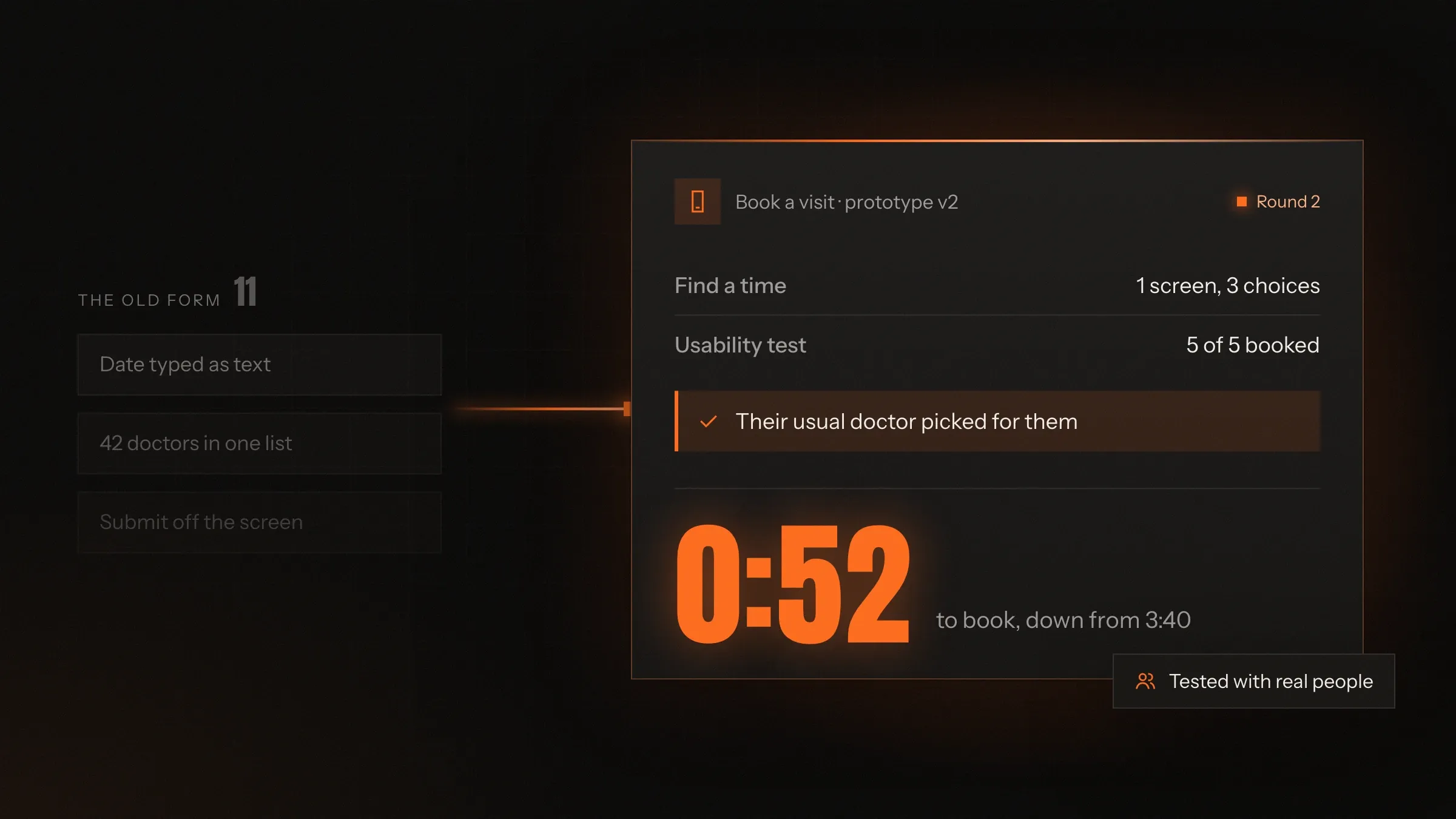
Sound familiar?
What we hear before we start
- Customers start signing up or checking out, then leave halfway and you can't tell why.
- Your support team explains the same screen on the phone every day.
- Staff keep their own notes and spreadsheets because the software is quicker to work around than to use.
- Every new feature adds another button, and the app feels more crowded each release.
- Older customers, or people less sure with phones, ask a family member to do it for them.
- Your developers design screens as they go, so no two pages look or behave the same.
What changes
-
Today: Design decisions come from whoever speaks loudest in the meeting.
After: Decisions come from watching real users try the real task.
-
Today: People abandon the form at the same step and nobody knows which field causes it.
After: The step is found, redesigned and tested again before it goes live.
-
Today: Error messages say "Something went wrong" and send people to support.
After: Every message says what happened and what to do next, in plain words.
-
Today: Each screen is designed from scratch, so the product looks stitched together.
After: A shared design system keeps every screen consistent and quicker to build.
-
Today: The app only works well for people who see well and use a mouse.
After: Screens work with screen readers, keyboards, larger text and older phones.
What it does for you
-
Find where people get stuck
Sessions with your users, your analytics and your support questions, put together into a short list of what to fix first.
For exampleRecordings show shoppers leaving checkout at the delivery date field, so that step moves to the top of the list.
-
Redesign the flows that matter
Sign-up, booking, checkout, search and the busiest staff screens, rethought step by step around what people came to do.
For exampleA booking that took four screens becomes one screen with the next free slots already shown.
-
Write the words on the screen
Buttons, labels, help text and error messages written the way your customers talk, not the way the database is named.
For example"Payment failed: code 402" becomes "Your card was declined. Try another card or pay by UPI."
-
Test before anything is built
Paper sketches and clickable prototypes tried by your own users, so mistakes are fixed while they are still cheap.
For exampleCustomers try a clickable checkout. Most miss the coupon field, so it moves before any code is written.
-
Make it work for everyone
Colour contrast, text size, keyboard use and screen readers designed in from the start and checked against WCAG 2.1 AA.
For exampleA customer who uses a screen reader books an appointment without asking for help.
-
Design in your users' language
Screens laid out for English, Hindi and Gujarati, with room for longer words and the number and date formats people expect.
For exampleA shopkeeper switches the app to Gujarati and every button still fits on one line.
-
Give developers a design system
Colours, type, spacing and ready-made components in Figma and in code, with every state drawn: empty, loading, error and done.
For exampleYour developer builds a new settings page from existing parts, without waiting for a designer.
How it works
-
We watch
We sit with the people who use your product and watch them do real tasks.
-
We map
We draw each journey step by step and mark where people hesitate, go back or give up.
-
We sketch
We try several simple answers on paper before choosing one to design in detail.
-
We test
Your users try a clickable prototype while we watch, without help from us.
-
We refine
We fix what tripped them up and test again until the task feels easy.
-
We hand over
Developers get every screen, state and component, ready to build or built by us.
-
We measure
After launch we compare the same measures as before, so you can see what changed.
Where we've built it
5 from our portfolio
-
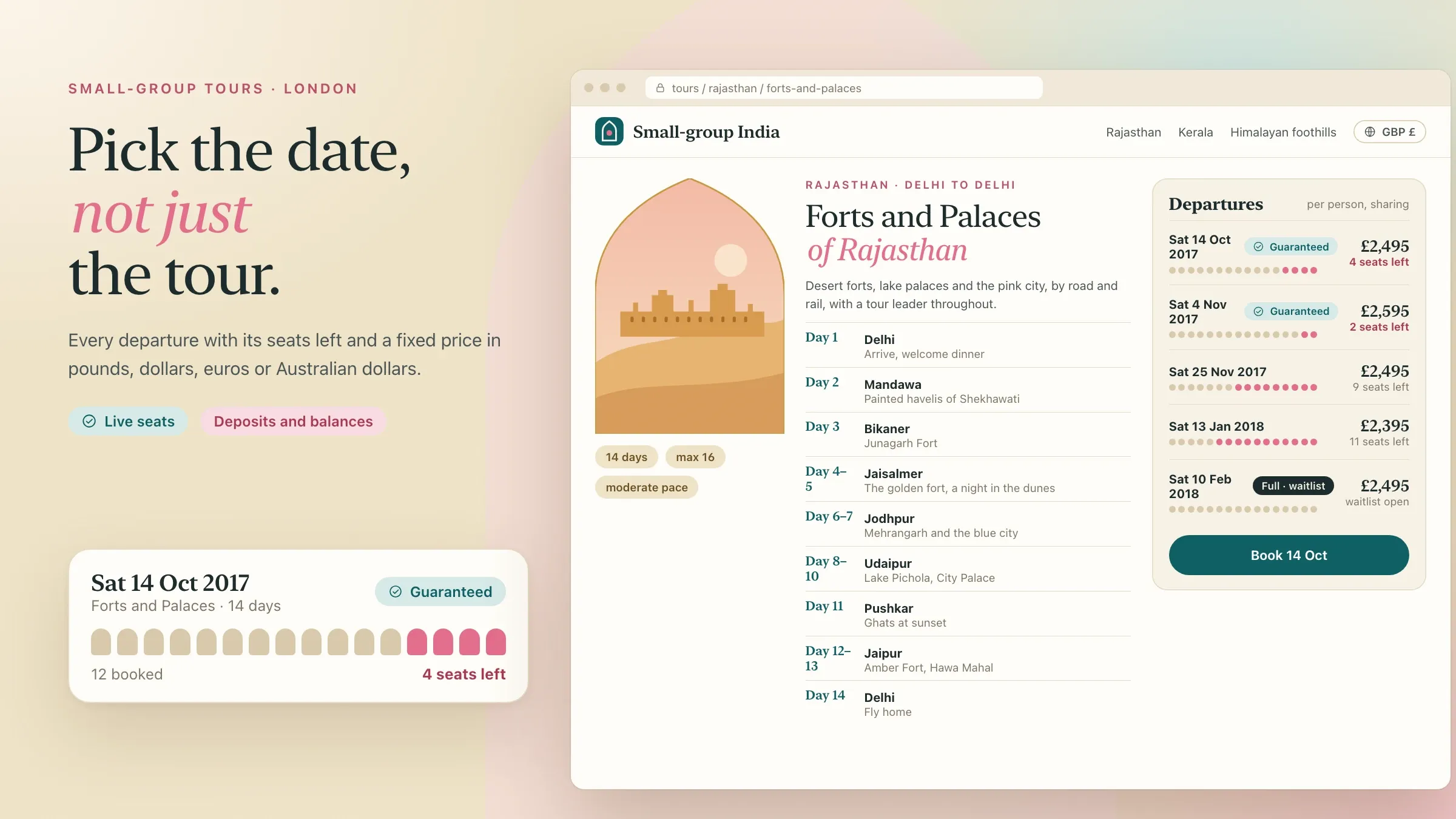 Tours compared by date For a tour operator in London, we spoke with past travellers and partner agents first, then designed the tour pages and booking around how people compare departures. Read the case study
 -
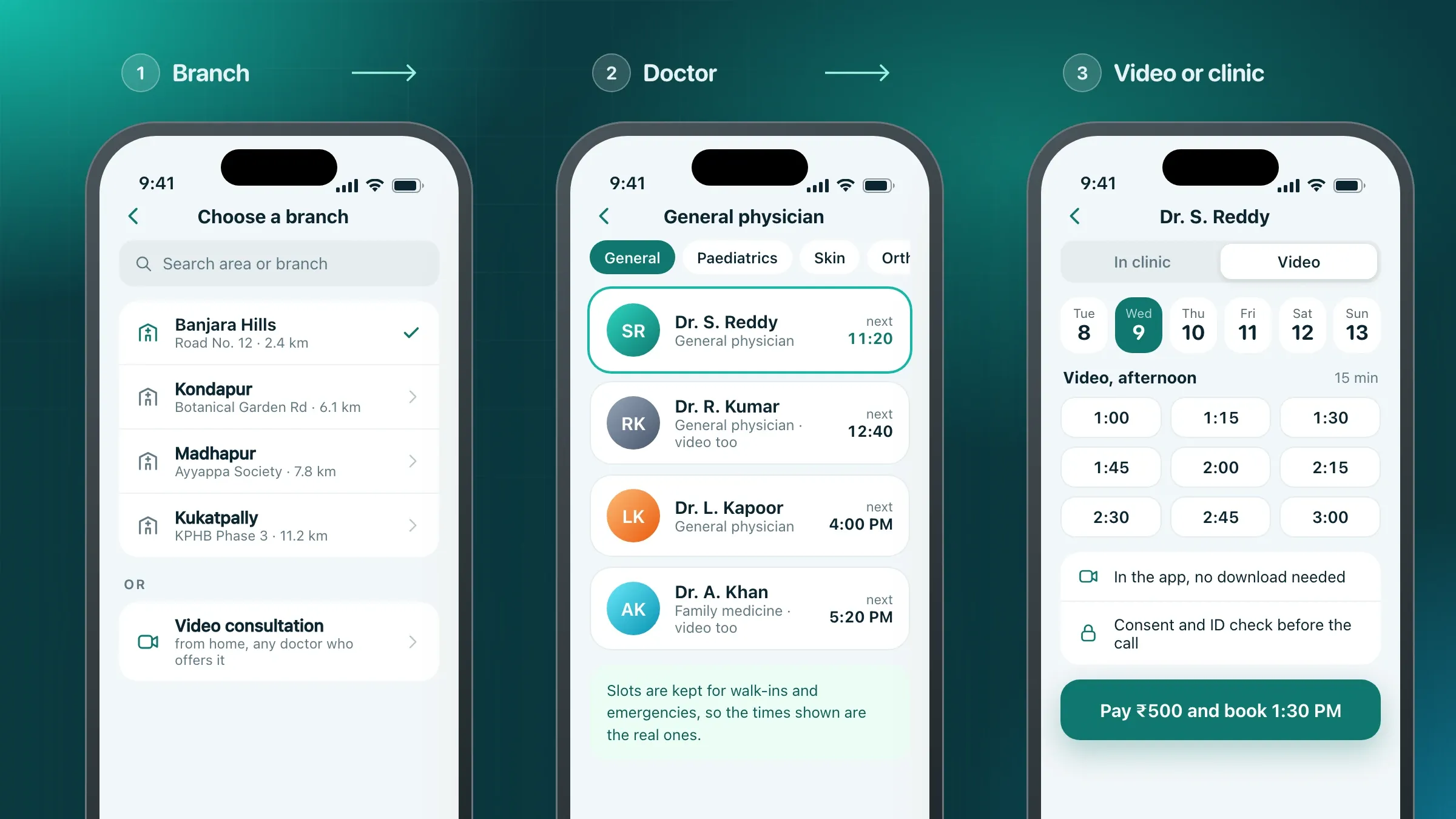 Booking tested with patients For a clinic group in Hyderabad, we designed the patient booking flow, the doctor's calendar and the reception console, and tested them with patients on paper and on screen. Read the case study
 -
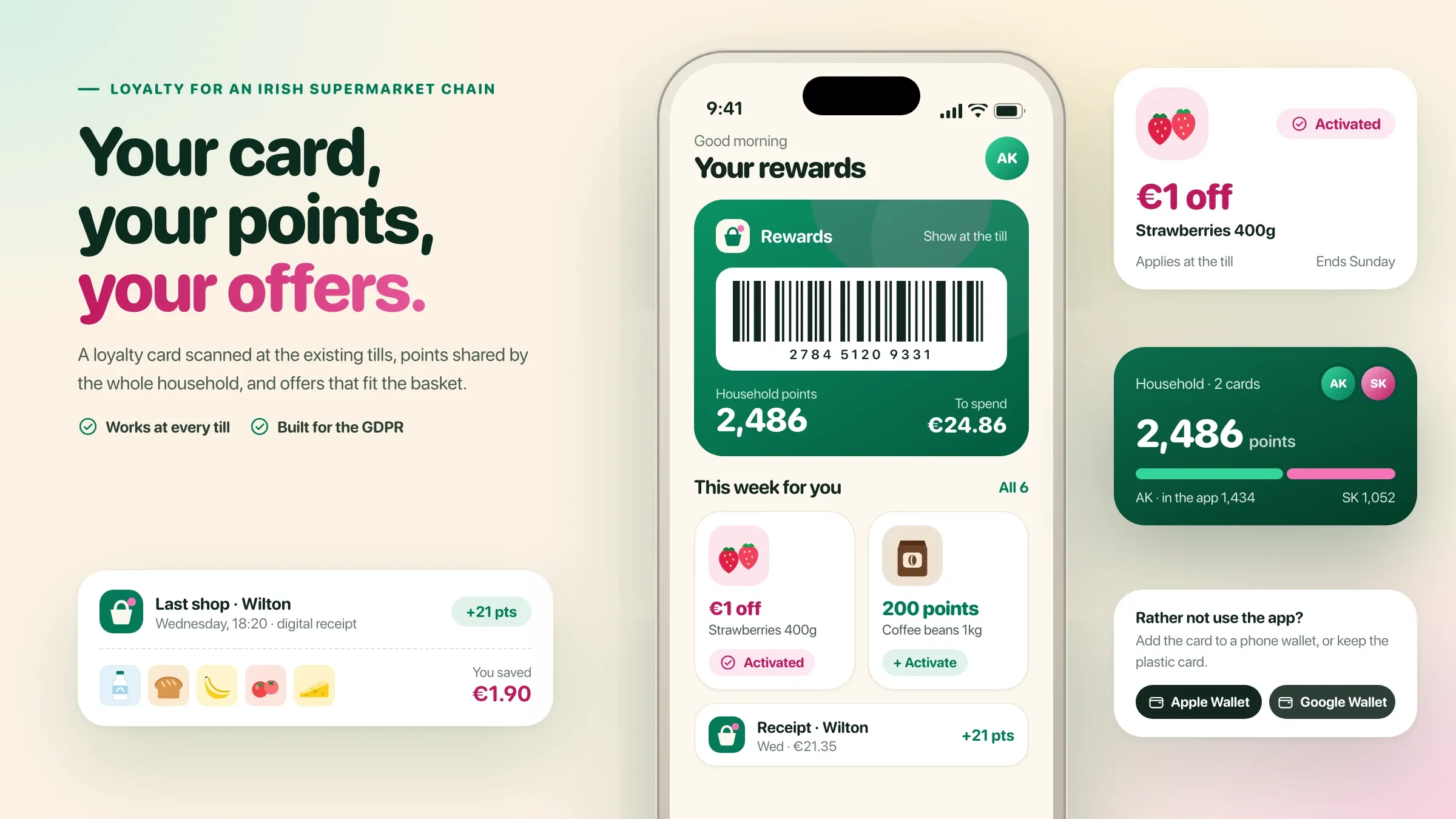 A loyalty card for every shopper For a supermarket chain in Cork, we spent time at the tills and with regular shoppers of all ages, then designed the loyalty card, offers, receipts and privacy choices. Read the case study
 -
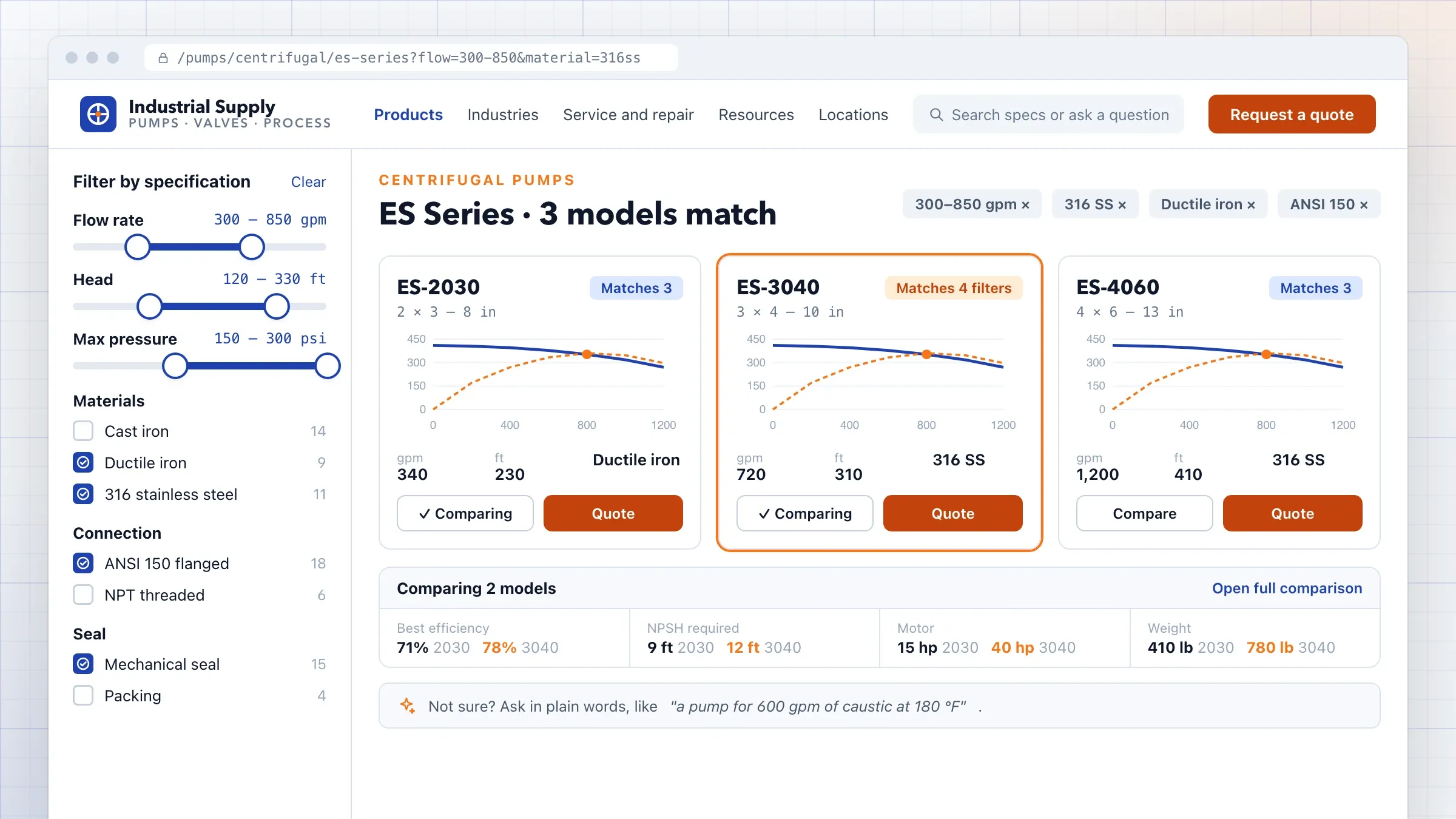 Accessible pages, built from blocks For an industrial equipment distributor in Ohio, we designed a design system and page blocks tested against WCAG 2.1 AA, with products filtered by specification. Read the case study
 -
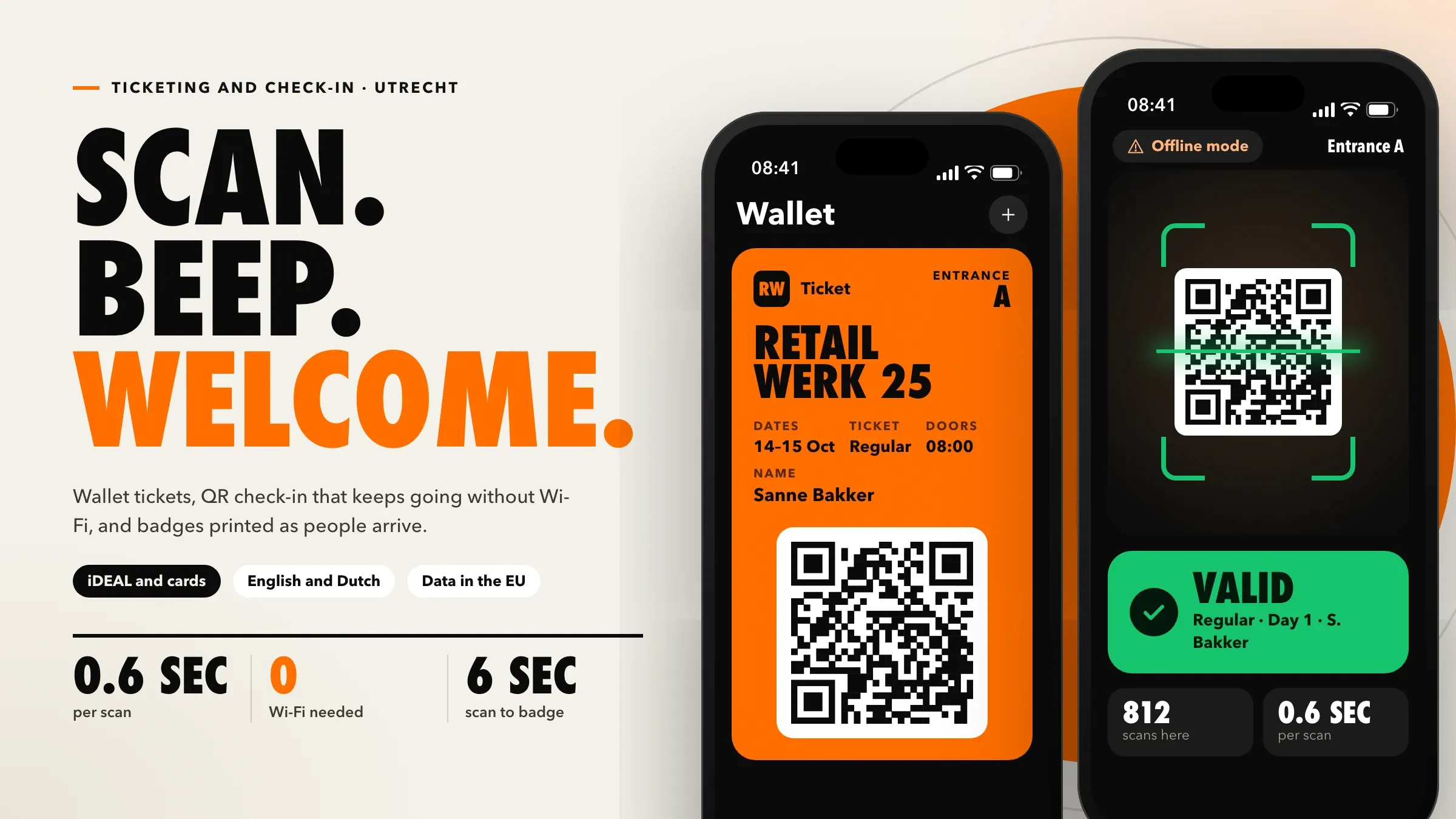 Designed for the busiest hour For a conference organiser in Utrecht, we designed the ticket shop, wallet tickets, the check-in app and badges for the busy first morning of an event. Read the case study
What UI/UX design actually covers
UI/UX design decides how your product works and how it looks, and it starts from what people came to do. UX, the user experience, is the order of the steps, what each screen asks for, what happens when something goes wrong and the words that guide people through. UI, the user interface, is the layout, type, colour, buttons and icons on each screen.
The two can’t be separated for long. A polished screen in a confusing flow still loses customers, and a sensible flow on a cluttered screen still sends people to your support line. That is why we design both together, and why we judge a design by whether people can finish their task, not by whether it looks modern in a presentation.
For an existing product, the work is usually less about a new look and more about removing friction: the field nobody understands, the button in the wrong place, the step that could be skipped, the error message that blames the user.
Signs your product needs a redesign
The clearest sign is that people need help with something that should be simple. Your support team explains the same screen every day. Customers start a checkout or a sign-up and stop halfway. Staff keep paper notes or spreadsheets beside the software because the software is slower than working around it.
Other signs are quieter. Sales demos need a guided tour. New staff take weeks to learn a screen they use all day. Every release adds another button, and nobody remembers why the old ones are there. Older customers, or people less sure with phones, ask their children to book for them.
None of these need a full rebuild to fix. Most products have a few journeys that carry most of the value and most of the pain, and those are where we start.
Research before we draw anything
We watch real people use your product before we design a single screen. Opinions in a meeting are not a reliable guide; watching a customer hesitate over a field is.
Research is usually a mix of four things. We sit with customers and staff while they do real tasks, at their own desks or on their own phones. We read your support questions and complaints, which tell us where people get stuck in their own words. We look at your analytics to see where people leave. And we talk to the people who sell and support the product, because they hear what customers never write down.
In our portfolio this has meant mornings at clinic front desks before designing a booking app, time at supermarket tills before designing a loyalty card, and calls with past travellers before designing a tour booking site. The findings fit on one page: a short list of problems, in order of how much they cost you.
Flows first, screens second
We design the journey step by step before we design how each screen looks. A flow shows what the person wants, what they need to see, what they must decide and where they can go wrong, from the first tap to the confirmation.
We design for the busiest moment, not the quiet one. A check-in screen has to work in the rush of the first hour; a till screen has to work on a busy Saturday; a booking app has to work for someone standing in a queue with one hand free. That usually means fewer choices on each screen, sensible defaults and the next step always obvious.
We also write the words. Labels, help text, empty screens and error messages are part of the design, written the way your customers talk. A good error message says what happened and what to do next, so the customer fixes it without calling you.
Testing designs before they are built
We test every important journey with your own users before your developers write code. Changing a prototype takes minutes; changing a released app takes a release.
Early ideas are tested as paper sketches or simple wireframes. Detailed designs become clickable prototypes that look and behave like the real product. We give each person a real task, such as booking a slot for next Tuesday or finding an invoice from March, and watch without helping. Where they hesitate, go back or guess, the design is changed and tested again.
A handful of people of each kind usually reveals the main problems. The point is not statistics; it is to see the problems your team can no longer see because it knows the product too well.
Accessible to everyone who uses it
An accessible product works for people with poor eyesight, colour blindness, shaky hands or a screen reader, and it is easier for everyone else too. We design and check against WCAG 2.1 AA, the widely used accessibility standard.
In practice that means text that is large enough and contrasts with its background, buttons big enough to tap, forms that work with a keyboard, images with descriptions and screens that make sense to a screen reader. It also means designing for the phones and networks your customers actually have: a mid-range Android phone on a patchy connection is a better test than the latest iPhone on office Wi-Fi.
We check accessibility on the built screens before launch, not only in the design files, because many problems appear only in code.
Designing in Hindi, Gujarati and other languages
A screen designed only in English often breaks in other languages. Hindi and Gujarati words can be longer, scripts need more line height, and a button that fits “Pay” may not fit its translation.
We design layouts that leave room for every language from the start and check each one with people who read it. We use the formats people expect: rupees with lakhs and crores where that is natural, dates written the local way and names that don’t assume a first and last name. Where customers write in Hindi or Gujarati using English letters, search and forms are designed to accept that too.
The same care applies to products used abroad: prices in each traveller’s own currency, as on the tour booking site we designed for a London operator, or an assistant that answers in Dutch as well as English, as on the event platform we built in Utrecht.
A design system your developers can build
A design system is the shared set of colours, type, spacing and components that every screen is built from. It keeps the product consistent and makes each new screen quicker to design and build.
We set it up in Figma for designers and, where we build the product, in code as well, often documented in Storybook. Every component comes with its states: empty, loading, error, disabled and done, so developers don’t have to guess what happens when there is no data or the network fails.
For a website, the same idea becomes a library of page blocks the marketing team combines into new pages without a developer, as we did for an industrial equipment distributor in Ohio.
Redesigning without upsetting existing users
People who use your product every day have learned it, even its odd corners. A redesign should make their work easier, not make them learn everything again.
We keep familiar paths where they work, change what causes trouble and roll big changes out in stages: a pilot group, one branch or one store first, then everyone. Staff see the new screens before customers do, so they can answer questions on the first day. For a website, existing addresses, titles and structured data are kept or redirected so that search rankings carry across.
How we know the redesign worked
Before we design, we agree what we will measure: how many people finish the task, how long it takes, where they leave and how many ask support for help with it.
We record those measures for the old design, then compare them after launch, along with new sessions with real users. If a journey still causes trouble, we fix it and measure again. Over time the same measures guide what to redesign next, so design becomes a steady habit rather than a big project every few years.
How we work with you
From the first call to running it
- Start
Look at what you have
We go through your product, your analytics and your support questions with you, and agree which tasks matter most.
- Research
Watch your users
We watch customers and staff use the product today and write down where they hesitate, work around it or give up.
- Design
Flows, then screens
We redesign the journeys that matter most, write the words on each screen and build a clickable prototype.
- Test
Try it with real people
Your users try the prototype on real tasks. We fix what tripped them up and test again before anything is built.
- Build
Hand over or build it
Your developers get every screen, state and component, or our team builds it and you review it on a test site.
- Every month
Measure and improve
We compare the measures we agreed at the start, watch new sessions and take the next part of the product.
Safe and in your control
Your live product stays untouched
We design on copies and prototypes. Nothing changes for your customers until you approve the new screens.
Your users' privacy in research
People agree before a session is recorded, recordings are kept only for the project and personal details are blurred in anything we share.
You own every file
Design files, the design system, prototypes and research notes are yours, in your own workspace, during and after the project.
Changes your users can follow
Big changes roll out in stages, familiar paths stay where people expect them, and staff see the new screens before customers do.
Search rankings protected
When a website is redesigned, existing addresses, titles and structured data are kept or redirected so Google rankings carry across.
Accessibility checked, not assumed
Contrast, keyboard use and screen readers are checked on the real screens before launch, not only in the design files.
Time and cost
The cost depends on how much of the product we redesign and how much research it needs, not on a package. Most businesses start with the one or two journeys that lose the most customers or staff time. After the first call we send a written plan and a quote.
How many journeys and screens
One checkout or booking flow is a contained piece of work. A whole app or staff console takes longer.
How much research
Watching a few users of one kind is quick. Several kinds of users, in several places, take more sessions.
Platforms
Web, Android and iPhone each need their own layouts and checks, even when they share a design system.
Languages
Each language needs its words, its layouts and its own round of checks with people who read it.
Design only, or design and build
We can hand over to your developers, or build the new screens ourselves and take them live.
Built with
Chosen for each project, never by habit
Questions and answers
13 answered
What is UI/UX design?
UI/UX design is the work of making software easy and pleasant to use. UX (user experience) decides how a task flows from start to finish; UI (user interface) decides how each screen looks: layout, type, colour and buttons. Good design does both, starting from what people came to do.
What is the difference between UI and UX?
UX is how it works and UI is how it looks. UX covers the steps, the order of information and the words; UI covers the visual design of each screen. A beautiful screen in a confusing flow still loses customers, so we design both together.
How much does UI/UX design cost?
It depends on how many journeys and screens we redesign, how much research is needed, how many platforms and languages there are, and whether we also build it. We send a written plan and a quote after the first call.
How long does a UI/UX redesign take?
One journey, such as a checkout or a booking flow, is a matter of weeks including research and testing. A full app or a large staff console takes longer and is usually done in stages, most important journey first.
Can you redesign software we already have?
Yes. We start with what people struggle with in your product today and redesign those journeys first, so you see the benefit without waiting for a full rebuild. The new screens can be built into your existing software.
Do you test designs with real users?
Yes. We watch your users try clickable prototypes, and sometimes paper sketches, on real tasks before anything is built. What trips them up is fixed and tested again.
Do you make designs accessible?
Yes. We design and check against WCAG 2.1 AA, the widely used accessibility standard: colour contrast, text size, keyboard use and screen readers. This matters for customers with disabilities and for older users, and it reduces legal risk in markets such as the United States and Europe.
Can you design apps in Hindi and Gujarati?
Yes. We design screens in English, Hindi, Gujarati and other languages, with layouts that leave room for longer words and the number, date and currency formats people expect, and we check each language with people who read it.
Will a website redesign hurt our Google rankings?
It shouldn't, if it is planned. We keep or redirect existing addresses, carry titles, descriptions and structured data across and keep the content that ranks. Clearer, faster pages are also easier to use, which is what search engines look for.
Can our own developers build your designs?
Yes. We hand over every screen, state and component in Figma, with a design system your developers can build from. If you prefer, our team builds the screens and you review them on a test site.
What do we get at the end of a UI/UX project?
The research findings, the redesigned journeys as clickable prototypes, every screen and state ready to build, and a design system with colours, type, spacing and components. All files are yours.
Do you work with businesses outside India?
Yes. FIRELIFE Ventures works with small and mid-size businesses worldwide from Rajkot, India, on India time. Our portfolio includes design work for clients in the United Kingdom, Ireland, the Netherlands, the United States and India.
What happens after the new design goes live?
We compare the measures we agreed at the start, such as how many people finish the task and how many ask for help, watch new sessions and fix what still causes trouble. Then we move on to the next journey when you are ready.
Tell us what should work better
Write a few lines about what slows you down today. We reply with our questions, a first plan and how we would start.
Write to us