Make it work better website migration
Rebuild your website, keep your Google rankings
We move websites to a new design, platform or domain without throwing away what they have earned in search: every old address is mapped to its new page, everything search engines rely on is carried across, and we watch Search Console until the new site has settled.
- Every old address gets a new home
- You approve the redirect map before launch
- We watch and fix after launch day
Sound familiar?
What we hear before we start
- Your website looks dated, but it brings in most of your enquiries from Google.
- You've heard stories of businesses that vanished from Google after a redesign.
- Nobody is sure which pages actually bring in the visitors.
- The new site is nearly ready, and nobody has listed the old addresses.
- Your developer says the redirects are handled, but can't show you a list.
- The last time something changed, the tracking broke and nobody noticed for weeks.
What changes
-
Today: Old pages disappear, and visitors from Google land on an error.
After: Every old address redirects to the page that replaces it.
-
Today: Titles, descriptions and structured data are rewritten from scratch.
After: What already works in search is carried across, and changed only where it helps.
-
Today: Links inside the site still point to addresses that no longer exist.
After: Internal links are updated to the new addresses before launch.
-
Today: Tracking stops on launch day, and the reports go quiet.
After: Analytics and conversions are tested on the new site before the switch.
-
Today: Problems show up months later as a slow drop in enquiries.
After: Search Console and the redirects are checked closely after launch, and problems are fixed as they appear.
What it does for you
-
Audit what search sees
Every page, the searches it appears for, the clicks it brings and the links pointing to it from other sites.
For exampleThe audit shows that a few dozen pages bring most of the search clicks, and each gets a planned new home.
-
Map every old address
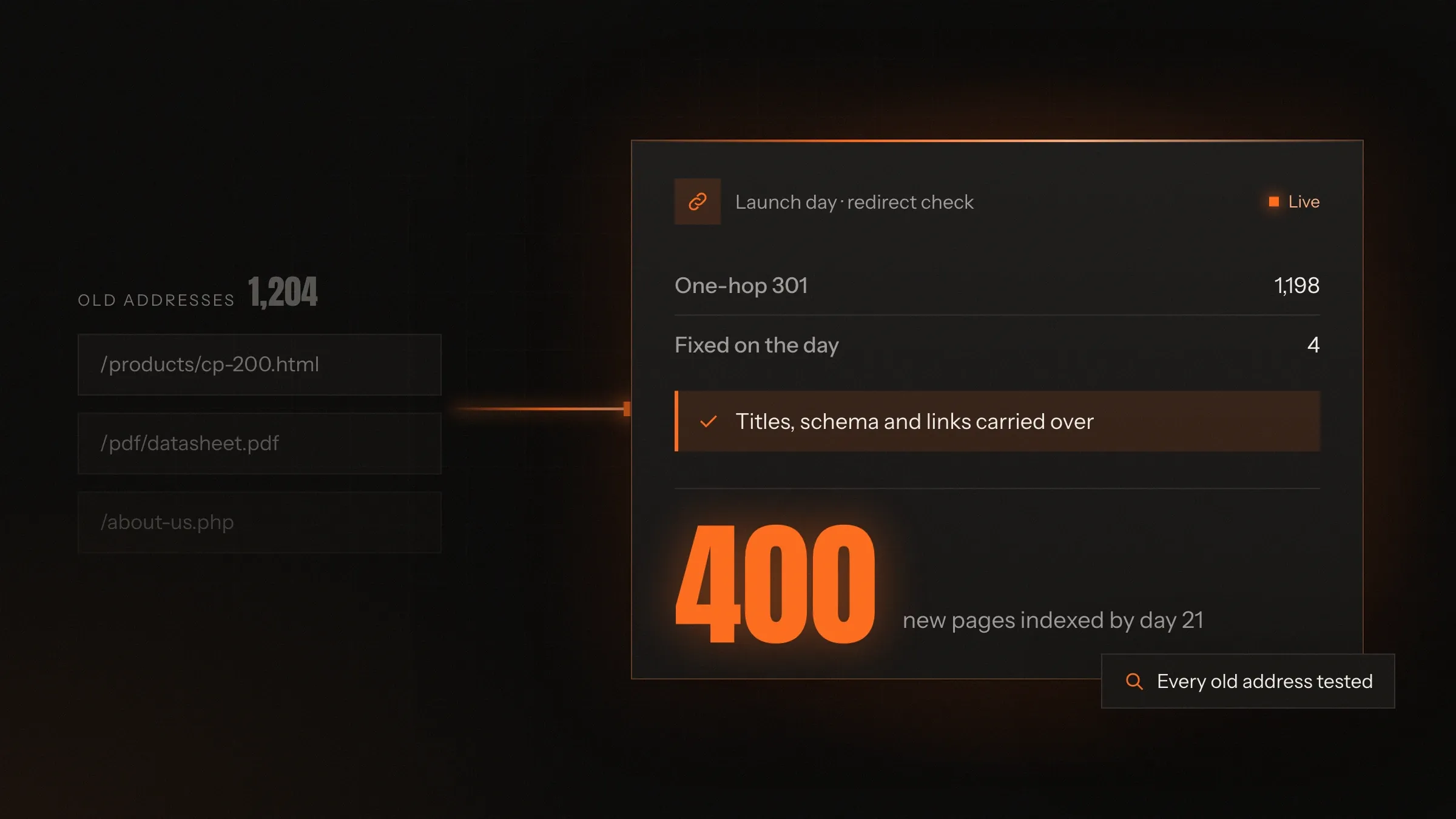
A redirect map from each old URL to its closest new page, including PDFs and images that get traffic, reviewed with you before launch.
For example/products/pumps/cp-200.html goes to /pumps/cp-series/cp-200, not to the home page.
-
Carry the SEO across
Titles, descriptions, headings, structured data, canonical tags, hreflang and image alt text moved or rebuilt on the new pages.
For exampleA product page keeps its title and its Product structured data on its new address.
-
Fix the links inside the site
Menus, footers and links inside content updated to the new addresses, so visitors and crawlers don't hop through redirects.
For exampleHundreds of links in old blog posts are rewritten to point straight at the new guides.
-
Keep tracking working
Google Analytics 4 events, conversions, Google Ads and Meta tags, Tag Manager and cookie consent tested before launch.
For exampleA quote request on the staging site shows up as a conversion before anything goes live.
-
Move platforms and domains
WordPress to a headless CMS, an online store to Shopify, a new domain or a merger of two sites, each with its own checklist.
For exampleA business moving from a .in to a .com address uses Search Console's change of address tool on the day.
-
Check everything on launch day
Redirects tested in bulk, the new sitemap submitted, robots rules and indexing tags checked, key pages inspected.
For exampleA leftover noindex tag from staging is caught and removed before Google sees it.
-
Watch and fix after launch
Search Console, crawl errors, the index and key pages watched closely in the weeks after launch, with fixes as problems appear.
For exampleAn old address with links from a trade directory turns up as a 404 and is redirected the same day.
How it works
-
Crawl the old site
Every URL, including old ones that still have links or visits.
-
Rank what matters
Pages sorted by search clicks, rankings, links from other sites and enquiries.
-
Map and approve
Each old URL matched to its new page. You review the map before anything changes.
-
Build and test on staging
Redirects, metadata, structured data and tracking tested where search engines can't see them.
-
Switch
The new site goes live, redirects switch on and sitemaps are submitted.
-
Watch and fix
Search Console, analytics and redirect checks until the new pages have replaced the old ones.
Where we've built it
3 from our portfolio
-
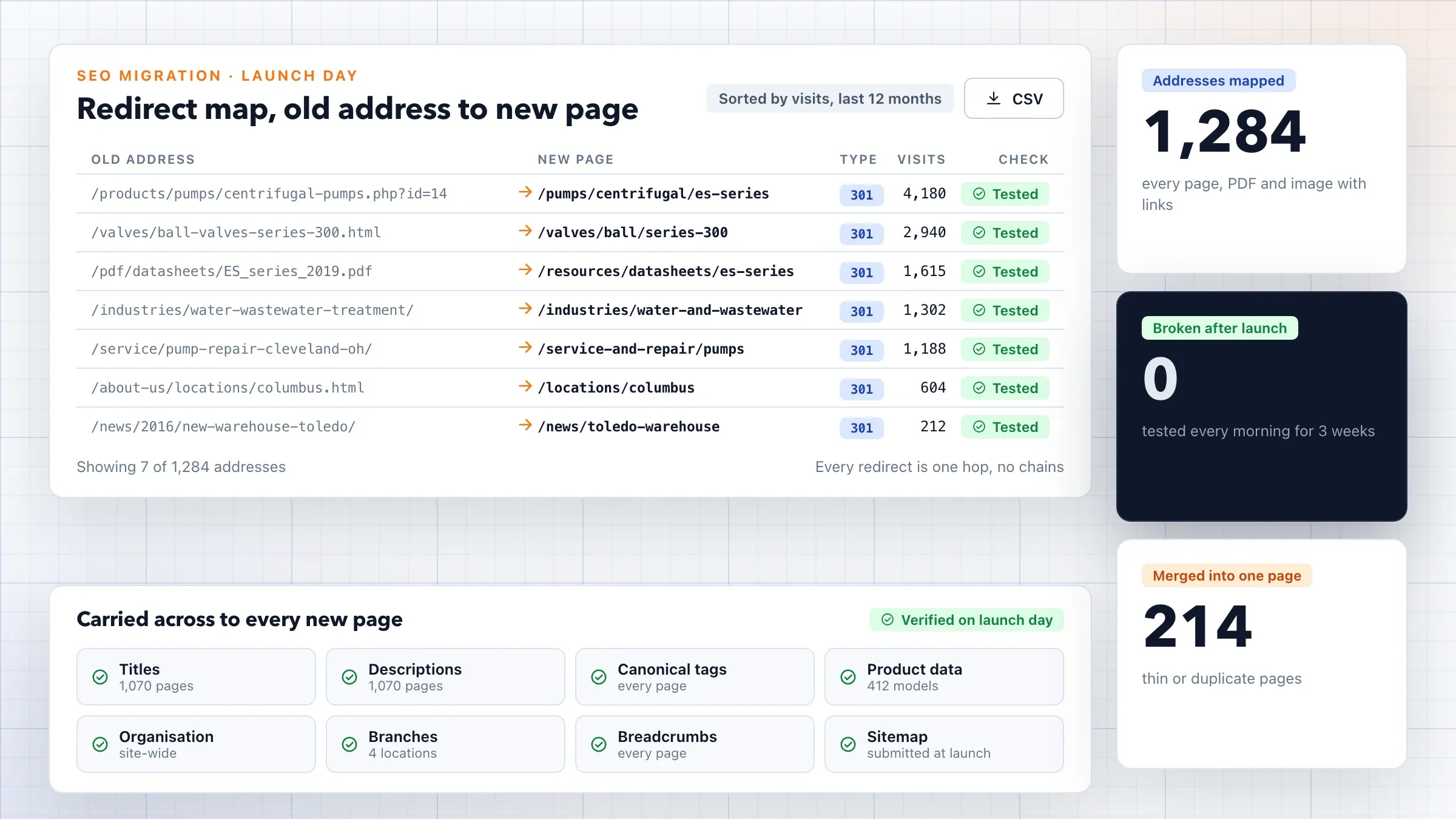 A careful SEO migration for an industrial distributor For an industrial equipment distributor in Ohio, every old address was mapped to its new page with a permanent redirect, titles and structured data were carried across, and Search Console was watched daily after launch. Read the case study
 -
 Redirects for every product and collection For a skincare brand in Mumbai moving to a headless storefront, every old product, collection and page address was redirected, with titles, descriptions and structured data carried across. Read the case study
 -
 Analytics moved before the deadline For the London agency we partner with, every client website moved to Google Analytics 4 before Universal Analytics stopped collecting data, with events and conversions set up so reporting carried on. View the investment
What a website migration is
A website migration is any change big enough to change how search engines see your site. A redesign that changes page addresses is one. So is moving from WordPress to another platform, changing your domain, merging two websites, adding language versions or moving to HTTPS.
Each of these changes something search engines have learned about your site over years: where each page lives, what it is about and which other sites link to it. A migration is the work of moving all of that to the new site, so the trust your old pages earned isn’t left behind at addresses that no longer exist.
Many redesigns treat this as a small job at the end. We treat it as its own project, planned from the first week, because it decides whether the new site starts with your search traffic or without it.
Why sites lose rankings when they move
Rankings are rarely lost to the new design itself. They are lost to a handful of avoidable mistakes.
- Pages vanish. Old addresses return errors, so search engines drop them and the links pointing to them go nowhere.
- Redirects go to the wrong place. Everything is sent to the home page, which search engines treat as missing pages.
- Content that ranked is cut or merged until it no longer answers the search it ranked for.
- Signals are dropped: titles, descriptions, structured data, internal links and hreflang tags left behind.
- Staging settings go live, such as a noindex tag or a robots rule that blocks the whole site.
- Tracking breaks, so nobody notices any of the above until the enquiries slow down.
A careful migration is a checklist against each of these, worked through before, on and after launch day.
The audit: what your site has earned
Before anything is designed, we find out what the current site is worth in search. We crawl every page, pull clicks and search terms from Search Console, visits and conversions from analytics, and the links pointing in from other sites.
That shows which pages matter. On most sites, a fairly small share of pages brings most of the search visits and enquiries, while others have links from other sites that are worth keeping. We also record where you stand today for the searches that matter to you, so there is a clear benchmark to compare against after launch.
The audit often finds problems worth fixing in the move: duplicate pages, broken links, missing titles and old addresses that already return errors. On large sites we also read the server logs, which show the addresses search engines actually visit, including old ones no crawl would find from the menus.
The redirect map
The redirect map is the heart of the migration. It lists every old address and the new page that replaces it, matched by meaning, not just by name. A product page goes to the same product’s new page, a guide to its updated version, a category to its new category.
Where a page has no true replacement, we send it to the closest useful page or let it return a proper “gone” response; we never send everything to the home page. PDFs, images that get search traffic and old addresses with links from other sites are mapped too.
Large sites are mapped with pattern rules and then checked line by line where the traffic is. You review and approve the map before launch, and it stays with you as a record of what moved where.
What else moves with the pages
Redirects tell search engines where a page went; the new page still has to be as good as the old one. For each page we carry across or rebuild the title, the description, the main heading, the structured data, canonical tags, hreflang for language versions and alt text for images.
Links inside the site are updated to the new addresses, so menus, footers and links in old articles point straight at the new pages instead of hopping through redirects. The XML sitemap lists only the new addresses, and robots rules are checked so nothing important is blocked.
Content can be improved during the move, but carefully. Rewriting a page that ranks well changes what search engines see, so we change what needs changing and leave the rest.
Tracking, consent and ads
A migration has to keep your measurements working, or you can’t see whether it went well. Google Analytics 4, Tag Manager, conversion events, Google Ads and Meta tags, and cookie consent are rebuilt on the new site and tested on staging before launch.
Analytics history stays in the same property, so before and after can be compared. If the domain changes, the new domain is added to Search Console and verified before launch, so its data starts on the first day. Ad campaigns pointing at old landing pages are updated to the new addresses, so paid clicks don’t pass through redirects or land on errors.
Testing on staging
The new site is built on a staging copy behind a password, so search engines can’t index it and it never competes with the live site. There, we test the whole redirect map against the new pages: every old address should reach its final page with a single permanent redirect.
We crawl the staging site as a search engine would, check titles, structured data and internal links, and compare the result with the old site’s crawl. Anything missing or broken is fixed before the switch, not discovered afterwards.
Launch day
Launch is a checklist, not a moment of hope. DNS changes are prepared ahead so the switch reaches everyone quickly, and the launch is timed for a quiet hour on a working day, when your team and ours are both around. The new site goes live, redirects switch on, and we test them again in bulk on the live site. Staging settings such as noindex tags and password protection are confirmed gone.
The new XML sitemap is submitted in Google Search Console and Bing Webmaster Tools, and key pages are inspected so search engines pick them up quickly. If the domain changes, Search Console’s change of address tool is used and the old domain keeps redirecting for as long as possible, and at least a year, as Google advises. We also ask the sites that link to you most to update their links where we can.
After launch: watching and fixing
The weeks after launch are when problems show, so we watch closely. Search Console shows old addresses leaving Google’s index as the new ones are picked up, along with any crawl errors, pages not found or pages excluded by mistake.
Each problem is fixed as it appears: a missed redirect added, a broken template corrected, a page that dropped out inspected. Rankings and clicks for the pages that matter are compared with the benchmark from the audit. Some movement is normal while Google recrawls; a page that keeps falling gets attention.
When the new addresses have replaced the old ones and the numbers have settled, we send a short report of what moved, what was fixed and how search traffic and enquiries compare with before.
What we need from you
We need access, early. That means Search Console and analytics, your DNS and hosting, the current site’s admin, and your ad accounts if campaigns point at the site. Access can be given to our team’s accounts and removed once the work is done.
We also need someone who knows the business to review the redirect map, especially where pages are being merged or dropped, and to tell us about seasons and campaigns so the switch happens at a quiet time. If another team is building the new site, we work alongside them, so the migration is part of their plan rather than a job squeezed in at the end.
How we work with you
From the first call to running it
- Start
Audit and benchmark
We crawl the old site, pull Search Console and analytics data, list the links pointing in, and record where you stand in search today.
- Map
Map and agree
Every old address gets a new home in a redirect map, and you review and approve it.
- Build
Test on staging
Redirects, metadata, structured data, internal links and tracking are tested on a staging site hidden from search.
- Launch
Switch with a checklist
Redirects go live, sitemaps are submitted and every key page is checked on the day.
- After launch
Watch and fix
Search Console, the index, redirects and enquiries are watched closely, and any problem is fixed as it appears, until the new site has settled.
Safe and in your control
Nothing switched off until it's mapped
The old site stays live until the redirect map is complete, approved and tested.
Staging hidden from search
The new site is built behind a password, so it can't be indexed or compete with the live one.
A way back
The old site and its settings are kept, so the switch can be reversed if something serious goes wrong.
Permanent redirects, one hop
Each old address goes straight to its final page with a permanent redirect: no chains, no loops and no mass redirects to the home page.
History kept
Analytics history, Search Console properties and ad conversion tracking stay connected through the move.
Your accounts, your access
Search Console, analytics, DNS and hosting stay in your name, and we work with access you can remove at any time.
Time and cost
The cost depends on the size of the old site and how much changes, not on a fixed fee. A small site moving to a new design on the same domain is simpler than thousands of pages moving to a new platform and a new domain at once. After the first call we send a written plan and a quote.
Number of addresses
A few dozen pages are mapped one by one quickly. Thousands need pattern rules and careful checking.
What changes
Design, platform, URL structure, domain or language: each change adds checks, and several at once add risk.
Content
Carrying content across as it is is quicker than restructuring or rewriting it at the same time.
Tracking
Analytics, advertising tags, Tag Manager and consent to rebuild and test on the new site.
Languages and countries
Each language or country version adds its own redirects and hreflang.
The watch after launch
A small site settles quickly. A large one needs a longer watch and more follow-up fixes.
Built with
Chosen for each project, never by habit
Questions and answers
14 answered
What is a website migration?
A website migration is any big change that affects how search engines see your website: a redesign with new page addresses, a new platform, a new domain or a move to HTTPS. Done carelessly, search engines lose track of the pages that had earned their place.
Will we lose our Google rankings when we redesign?
A redesign doesn't have to cost you your rankings. They are usually lost when pages disappear, addresses change without redirects or content that ranked is cut. A planned migration avoids those, though positions can move for a while as Google recrawls the new site.
Can you promise we won't lose any traffic?
No, and be wary of anyone who does. Google decides rankings, and any big change brings some movement. What we commit to is the work: every page mapped, every redirect tested, everything search relies on carried across, and close watching after launch with fixes as problems appear.
What is a 301 redirect?
A 301 redirect tells browsers and search engines that a page has moved permanently to a new address. Visitors and links to the old address land on the new page, and search engines pass the old page's standing on to it.
What is a redirect map?
A redirect map lists every old address on your website and the new page each one should go to. We build it from a crawl of the old site plus Search Console, analytics and backlink data, and you approve it before launch.
Should we change our domain at the same time as the redesign?
Only if you need to. Each change carries its own risk, and several at once make problems harder to trace. If the domain must change, we use Search Console's change of address tool and keep the old domain redirecting for as long as possible, and at least a year, as Google advises.
How long do rankings take to settle after a migration?
It varies with the size of the site and how often Google crawls it. Small sites are often recrawled quickly; large sites take longer. We watch Search Console until the new addresses have replaced the old ones in Google's index.
Do you move WordPress sites to Shopify, Next.js or a headless CMS?
Yes. We move sites between platforms, such as WordPress to a headless CMS on Next.js or an online store to Shopify, and carry the content, addresses, metadata and structured data across.
Will our analytics and ads tracking keep working?
Yes, because we test it before the switch. Google Analytics 4 events, conversions, Google Ads and Meta tags, Tag Manager and cookie consent are set up and checked on the new site before launch, so your reports carry on.
How much does a website migration cost?
It depends on how many addresses the old site has, what changes (design, platform, domain or language), how much content moves and how long the watch after launch needs to be. After the first call we send a written plan and a quote.
How long does a website migration take?
It depends on the number of pages and what changes. A small site moving to a new design is a matter of weeks, including the watch after launch; a large site changing platform and domain takes longer. We plan the switch away from your busiest season.
Can you migrate a website in Hindi, Gujarati or other languages?
Yes. Each language version is mapped and redirected on its own, and hreflang tags tell search engines which version to show to whom, so visitors keep landing in their own language.
Do you work with businesses outside India?
Yes. FIRELIFE Ventures works with businesses worldwide from Rajkot, India. We carried out a careful SEO migration for an industrial equipment distributor in Ohio, with every old address redirected and Search Console watched after launch.
What happens after launch?
We watch Search Console, analytics and the redirects closely, fix any page that drops out or any redirect that fails, and send you a short report comparing search traffic and enquiries with the benchmark taken before the move.
Tell us what should work better
Write a few lines about what slows you down today. We reply with our questions, a first plan and how we would start.
Write to us