Build something new field service app
Send your field team the right job
We build field service apps that send each job to the right technician, put the address, history and checklist on their phone, and close the job on site with photos, the customer's sign-off and an invoice.
- We start by riding along with your team
- An app that keeps working without signal
- English, Hindi, Gujarati and more

Sound familiar?
What we hear before we start
- Jobs are handed out on WhatsApp every morning, and half the day goes on rearranging them.
- A technician reaches the customer without the right part, and the visit has to be booked again.
- Customers wait at home all day and ring the office to ask when someone will come.
- Service reports are on paper, and the invoice waits until they reach the office.
- AMC visits fall due and nobody notices until the customer complains.
What changes
-
Today: Jobs go out by WhatsApp and phone calls each morning.
After: Each job goes to a technician with the right skills, in the right area, who is free at that time.
-
Today: Technicians call the office for the address, the history and the fault.
After: The job on their phone has the address, the customer's history, the reported fault and the checklist.
-
Today: Customers wait without knowing who is coming or when.
After: Customers get the technician's name and a message when they set off.
-
Today: Paper service reports reach the office days later.
After: Photos, the checklist and the customer's sign-off close the job on site.
-
Today: AMC visits and renewals live in someone's diary.
After: Scheduled visits are created on time, and renewals are flagged before they lapse.
What it does for you
-
Match the right technician
Jobs are matched on skills, area, availability and workload, then offered or assigned in order of fit.
For exampleAn AC that won't cool goes to a technician who services that make and is finishing a job nearby.
-
Plan each day's route
Each technician's visits are ordered to cut travel time while keeping the time windows customers agreed.
For exampleFive visits in the same part of the city are ordered so the last one still lands in its evening slot.
-
Put the job on their phone
Address and directions, the customer's history, the reported fault, manuals and the checklist for that kind of job.
For exampleBefore servicing a water purifier, the technician sees the last visit's notes and which filter was fitted then.
-
Close the job on site
The checklist, before-and-after photos, parts used and the customer's signature or OTP, saved even without signal.
For exampleAfter a repair, the customer enters the OTP and receives the service report on WhatsApp.
-
Bill and collect on the spot
An invoice from the job record, with payment by UPI, card or cash recorded against it.
For exampleThe customer scans a UPI QR on the technician's phone, and the paid invoice reaches accounts at once.
-
Keep AMC and scheduled visits on time
Maintenance contracts, preventive visits and warranty periods, with each visit created before it falls due.
For exampleA hospital's quarterly equipment service is created ahead of time and confirmed with the customer on WhatsApp.
-
Know where every part is
Stock in each van and branch, parts used on each job, and requests raised from the app.
For exampleA technician fits the last compressor in the van, and a replacement is reserved at the branch for the next morning.
How it works
-
A job is raised
By the customer on WhatsApp, a call, your website, or automatically from an AMC schedule.
-
It is matched
Skills, area, availability and parts are checked, and the job goes to the best fit.
-
The technician accepts
The job appears in the app with everything needed, and the customer is told who is coming.
-
On the way and on site
The customer is messaged when the technician sets off, and arrival is recorded at the address.
-
The work is recorded
Checklist, photos, parts and notes are saved on the phone and sent as soon as there is signal.
-
Closed and billed
The customer signs or gives an OTP, the report and invoice go out, and payment is recorded.
Where we've built it
3 from our portfolio
-
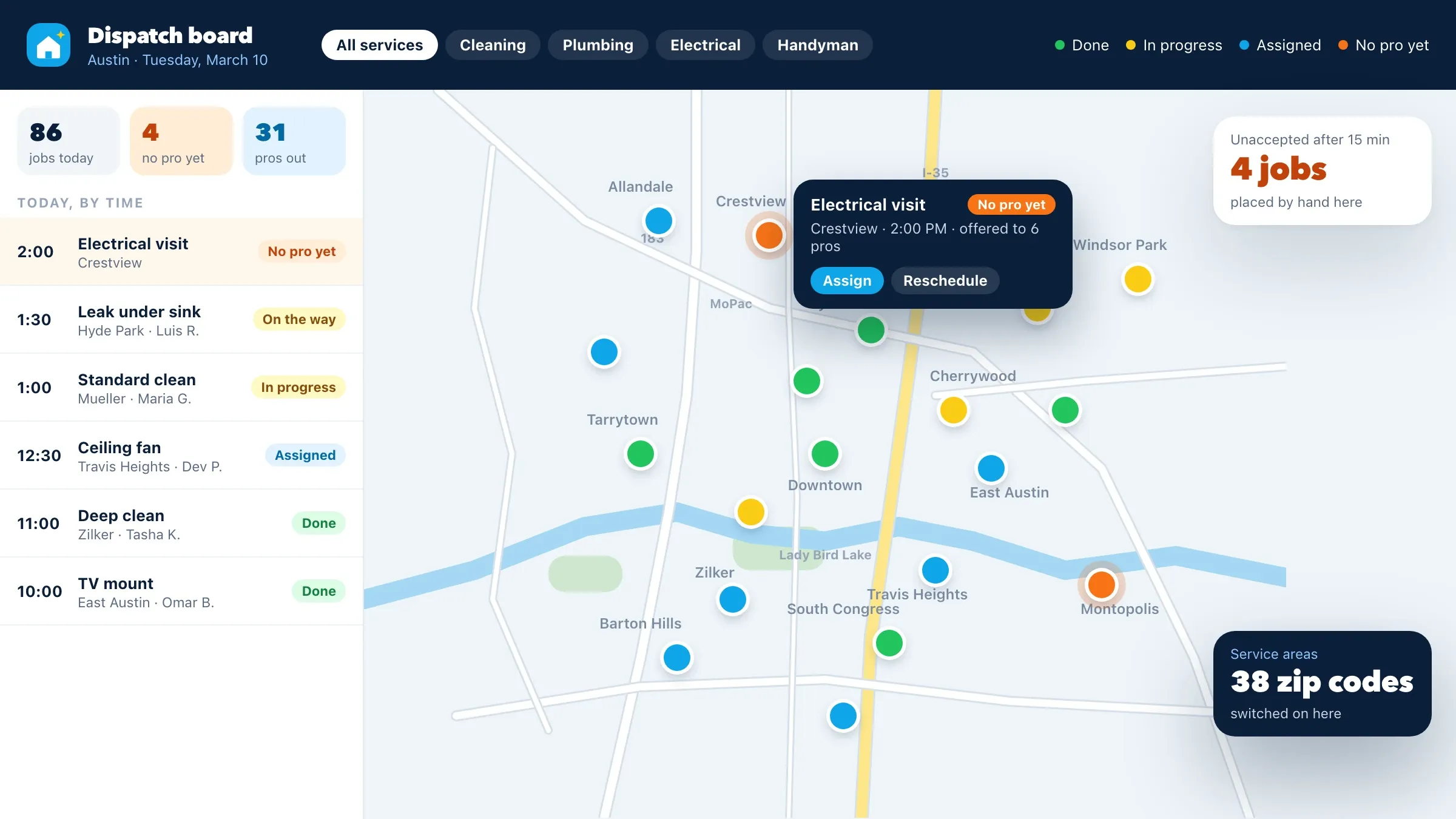 Jobs to checked pros, run from one board For a home services company in Austin, jobs go to available pros who cover that zip code and service, pros work from their own app, and the team runs the day from a dispatch board with every job on a map. Read the case study
 -
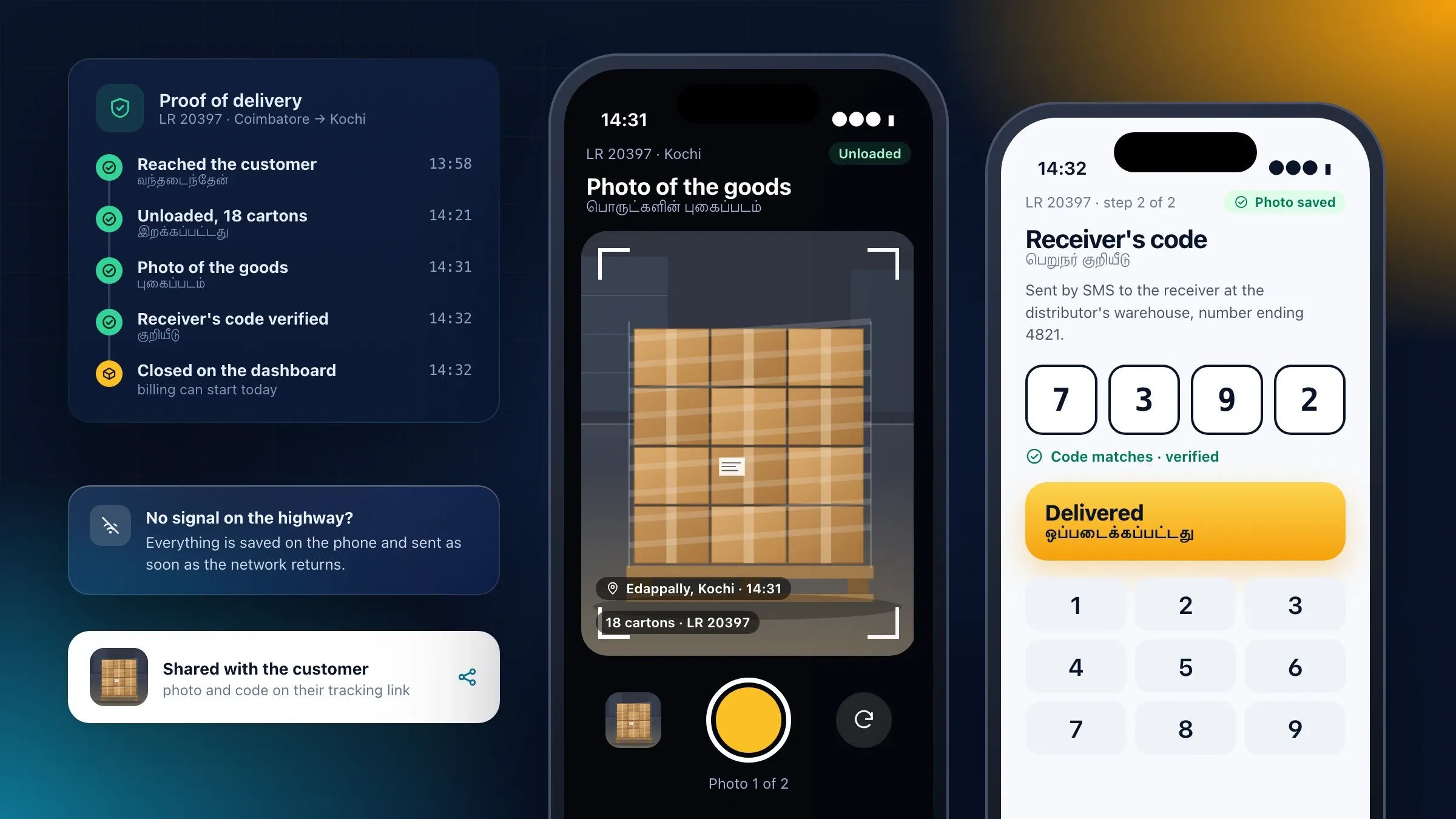 An app that works where the signal doesn't For a transport company in Coimbatore, drivers close each delivery with a photo and a signature or one-time code, in Tamil or English, and the app sends it when the network returns. Read the case study
 -
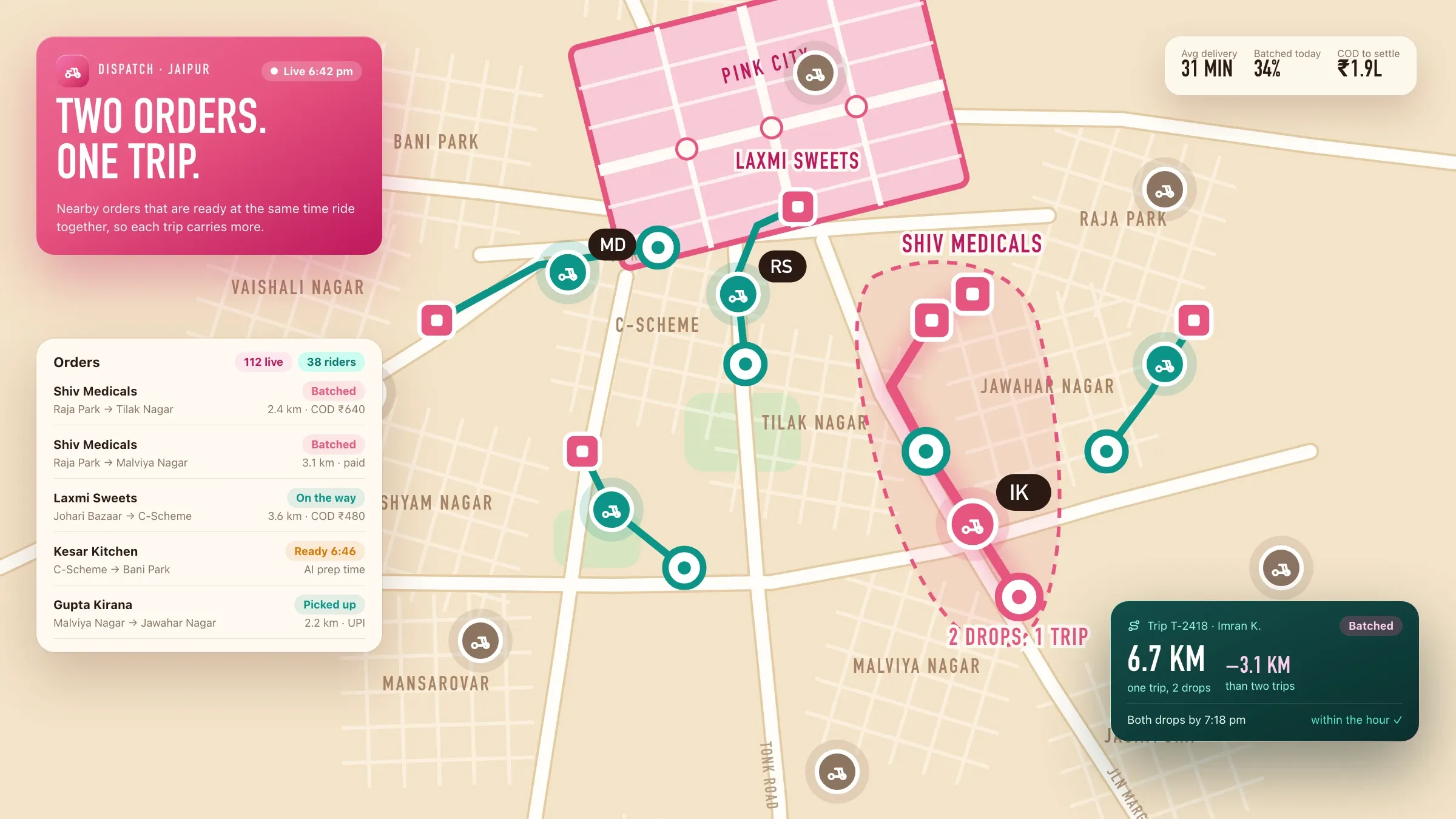 Deciding who takes which job For a delivery startup we back in Jaipur, we built the dispatch engine that decides which rider takes which order, and the rider app built for low-cost Android phones. Meet the startup
What a field service app does
A field service app runs the work your team does at customers’ homes and sites. It takes the booking, sends the job to the right technician, gives them what they need on their phone, and closes the job with proof, a report and an invoice.
It usually has three sides. The office works from a dispatch board that shows every job and every technician for the day. Technicians work from an app with their jobs, directions, checklists and a way to record the work. Customers book, hear who is coming and receive the report, on WhatsApp, by text or on your website.
The value is in the rules between those sides: who gets which job, what must be recorded before a job can close, when a contract visit is due, and what happens when a technician is running late.
Where it pays off first
It pays off first for businesses whose technicians make several visits a day: AC and appliance service, solar installation and maintenance, lifts, pest control, security systems, water purifiers, medical equipment, facility management and home services.
The signs are the same everywhere. Jobs are handed out on WhatsApp each morning and rearranged all day. Technicians call the office for addresses and history. Repeat visits happen because the right part or the right skill wasn’t on the first one. Service reports come back on paper, so invoices go out late. Contract visits are tracked in a diary, and the customer notices a missed one before you do.
For a home services company in Austin, every booking used to depend on a phone call and a string of text messages, and each job was offered to pros one text at a time. We built a pro app, a dispatch board and job matching, and the team now runs the day from one board instead of a stream of messages.
The right technician for each job
Matching starts with a few plain questions: who has the skills for this job, who covers this area, and who is free at that time. Workload, the parts in each van and the customer’s history can count too, such as sending the technician who fitted the equipment last year.
Jobs can be assigned by the office or offered to technicians, who accept them in the app. In Austin, each booking is offered to pros who cover that zip code and service and are free at that time, best-rated first; the first to accept takes the job, and if nobody accepts in time it appears on the dispatch board for the team to place by hand.
Route planning comes next. Once each technician’s jobs are known, their visits are ordered to cut travel time while keeping the time windows customers were promised, and the board shows when a late job puts the rest of the day at risk.
The technician’s app
The app should make the visit easier, not add paperwork. Each job shows the address and directions, the customer’s history, the reported fault, any manuals or drawings, and the checklist for that kind of job.
Technicians record what they did as they work: checklist items, before-and-after photos, readings, parts used and notes. Plant rooms, basements and rooftops often have no signal, so everything is saved on the phone and sent when the network returns. The Coimbatore driver app we built works the same way on highways, saving each proof of delivery until there is a network.
The app is written in the languages your technicians read, such as Hindi, Gujarati, Tamil or English, with large buttons and as few screens as the job allows. We test it with technicians on real visits rather than in an office.
Closing the job on site
A job is closed at the customer’s door, not back at the office. The technician completes the checklist, adds the photos and parts, and the customer signs on the phone or gives a one-time code. The service report goes to the customer on WhatsApp or by email straight away.
Before-and-after photos protect both sides. In the Austin pro app, they settle disputes about what was agreed and what was done, and every job’s photos, messages and history sit together on the dispatch board.
Billing follows from the same record. The invoice is built from the job, with GST where it applies, and payment by UPI, card or cash is recorded against it, so accounts sees a paid invoice the moment the job closes. Where customers pay by saved card, they can be charged when the job is marked complete, as Austin homeowners are.
AMC, warranties and scheduled visits
Many service businesses earn most of their steady income from annual maintenance contracts. Each contract records the customer, the equipment, the visits it covers and its renewal date.
Preventive visits are created before they fall due and confirmed with the customer, so they are planned like any other job instead of remembered. Warranty periods are recorded per piece of equipment, so the technician knows on site whether a repair is chargeable. Renewals are flagged early, with the visit history attached, which makes the renewal conversation easier.
Parts and van stock
A first visit fails most often for want of a part. The app keeps stock for each van and each branch, records the parts used on every job, and lets technicians request parts from the field.
When a job is matched, the parts it is likely to need can count too, so it goes to a technician who carries them. Parts used flow into the invoice and into stock at the same time, and a weekly view shows which parts run out and which sit unused in vans.
Keeping customers informed
Most calls to a service office are a customer asking when someone will come. The answer should reach them first.
Customers book on WhatsApp, your website or by phone, into one queue. They receive the technician’s name, the time window and a message when the technician sets off. Calls between customers and technicians can go through masked numbers, as in the Austin apps, so neither side sees the other’s real number. After the visit, a short rating tells you how the job went while it is still fresh.
Connecting your systems, and how we measure success
Field service works best when it shares records with the rest of the business. Customers and equipment can come from your CRM, invoices and payments can flow to accounting software such as Tally or to your ERP, and parts can follow your inventory. If you also need attendance and payroll for the same team, Hearth HRMS, the HR and payroll software we are building, has field and site teams check in on their phone at an allowed location.
We need three things from you: your job types and checklists as they are today, recent jobs with their outcomes, and an owner on your side, usually the service manager. Before we build, we agree the measures that matter: response time against what you promise, jobs per technician per day, repeat visits, time from job to invoice and calls asking where the technician is. We watch them through the pilot.
Launching and running it
A field service app is best launched one branch or team at a time. Technicians are trained in person, on their own phones, and the office runs the old way alongside for a short while until the board is trusted.
In Austin, pros were onboarded onto the app before customers could book, so there were checked pros ready in every zip code on launch day. After launch, we run the system with you: we tune the matching rules and checklists, add job types and reports, and keep the apps working as phones, maps and payment providers change.
How we work with you
From the first call to running it
- Start
Ride along with your technicians
We spend days with technicians on their visits and with the people who plan their work, and agree what the first version must do.
- Build
Build the job loop
Booking, matching, the technician app and closing the job come first, connected to the tools you already use for customers and billing.
- Pilot
One branch, real jobs
One branch or team runs on the new app while we tune the matching, the checklists and the screens with the technicians using them.
- Launch
Every branch, every technician
The other branches switch in turn, technicians are trained in person, and customers start booking and hearing from the new system.
- Every month
Run and improve
We review response times and repeat visits with you, tune the rules, and add job types, checklists and reports as you grow.
Safe and in your control
Location only while working
The app shares a technician's location only during working hours or an active job, and they can see when it is on.
Customers' details on a need-to-know basis
Technicians see only their own jobs, and calls can go through masked numbers so neither side sees the other's real number.
Checked before the first job
Licences, insurance and certifications are recorded before a technician receives jobs, and their expiry dates are watched.
Proof on every visit
Photos, the checklist and the customer's sign-off are kept with the job, which protects both sides if there is a dispute.
Nothing lost without signal
Basements, plant rooms and rooftops often have no network, so the app saves the work and sends it when the signal returns.
Your data stays yours
Job, customer and equipment history belong to you, can be exported at any time and are hosted in the region you choose.
Time and cost
The cost depends on the kinds of jobs you run and how clever the scheduling has to be, not on a package. Many businesses start with booking, a dispatch board and the technician app, then add route planning, AMC contracts and parts once the team is using it. After the first call we send a written plan and a quote for the first stage.
Kinds of jobs
Each job type has its own checklist, report and rules. A few well-defined types are the quickest start.
How scheduling decides
Assigning by hand is simplest. Automatic matching and route planning need more rules and more testing.
Contracts and parts
AMC contracts, warranties and van stock each add records, reminders and reports.
Which systems it connects to
Accounting software, an ERP, a CRM or a payment gateway each add an integration to build and test.
Languages and running costs
Each language is tested with technicians, and maps, messages and hosting grow with the number of jobs.
Built with
Chosen for each project, never by habit
Questions and answers
14 answered
What is a field service app?
A field service app runs work done at customers' sites: it takes the booking, sends the job to the right technician, gives them the details and checklist on their phone, and closes the job with photos, the customer's sign-off and an invoice. The office sees every job and technician on one board.
Which businesses need field service software?
Any business that sends people to customers' homes or sites: AC and appliance service, solar installation, lifts, pest control, security systems, water purifiers, medical equipment, facility management and home services such as cleaning, plumbing and electrical work.
Should we buy a ready-made field service tool or build our own?
A ready-made tool suits standard work. Building your own makes sense when your jobs, contracts or pricing don't fit one, when technicians need an app in their language that works offline, or when it must connect closely to your own systems. We help you decide on the first call.
How does the app decide which technician gets a job?
It checks who has the right skills, covers that area and is free at that time, then offers or assigns the job in order of fit. If nobody accepts in time, the job appears on the dispatch board for your team to place by hand.
Does the technician app work without a network?
Yes. Plant rooms, basements and rooftops often have no signal, so the app saves checklists, photos and sign-offs on the phone and sends them as soon as the network returns.
Can customers book a service visit on WhatsApp?
Yes. Customers can book, choose a time and get updates on WhatsApp, and the job is created without anyone retyping it. They can also book on your website or by phone, into the same queue.
Can it manage AMC contracts and preventive maintenance?
Yes. Each contract records the equipment, the visits it covers and its renewal date. Scheduled visits are created before they fall due, and renewals are flagged early so they can be offered to the customer.
Can technicians give invoices and collect payment on site?
Yes. The invoice is built from the job record, with GST where it applies, and payment by UPI, card or cash is recorded against it, so accounts sees a paid invoice the moment the job closes.
Can it connect to our accounting software or ERP?
Yes. Invoices, payments and parts can flow into accounting software such as Tally or into your ERP, and customers and equipment can come from your CRM, so nothing is typed twice.
Can the app work in Hindi, Gujarati or other languages?
Yes. The technician app can run in English, Hindi, Gujarati and other languages, and each language is tested with technicians before launch.
How much does a field service app cost?
It depends on the kinds of jobs, how scheduling decides, whether you need AMC contracts and parts, the systems it connects to and the languages it supports. After the first call we send a written plan and a quote for the first stage.
How long does it take to build a field service app?
Booking, a dispatch board and a technician app for a few job types is the quickest start; route planning, contracts, parts and integrations take longer. We launch in stages, so your team uses the first part while the rest is built.
Do you build field service apps for businesses outside India?
Yes. FIRELIFE Ventures works with small and mid-size businesses worldwide, from Rajkot, India, on India time. Our portfolio includes a home services marketplace for a company in Austin, Texas, with a pro app and a dispatch board.
What happens after the app goes live?
We run it with you: we review response times and repeat visits, tune the matching rules and checklists, fix what technicians report, and add job types, reports and features as you grow.
Tell us what you want to build
Write a few lines about the idea and who it is for. We reply with our questions, a first plan and how we would start.
Write to us